
What is BigQuery? BigQuery is Google Cloud fully managed, serverless data warehouse for storing and analysing large volumes of data with SQL. You load or stream data into tables, run queries, and Google Cloud handles servers, scaling, storage and maintenance, so teams focus on analysis rather than infrastructure. Storage and compute are separate, which lets each scale independently, and you can pay per query or reserve capacity for predictable cost. This guide explains how BigQuery works, its main building blocks, how data is loaded and queried, how pricing and performance work, how it is secured, where it fits compared with other platforms, a typical adoption path and the mistakes that cause high bills or slow queries. Features and pricing change, so confirm in current Google Cloud documentation.
Short answer: BigQuery is a serverless, SQL-based cloud data warehouse that separates storage from compute, scales automatically and charges by data processed or reserved capacity. It suits large-scale analytics, reporting and machine learning on warehouse data.
How BigQuery works
BigQuery stores data in a columnar format and runs queries across many machines in parallel. Because it is serverless, there are no clusters to size or patch: you submit SQL and the service allocates resources. Datasets organise tables inside a project, and access is controlled with identity and access management. See data warehouses and cloud computing.
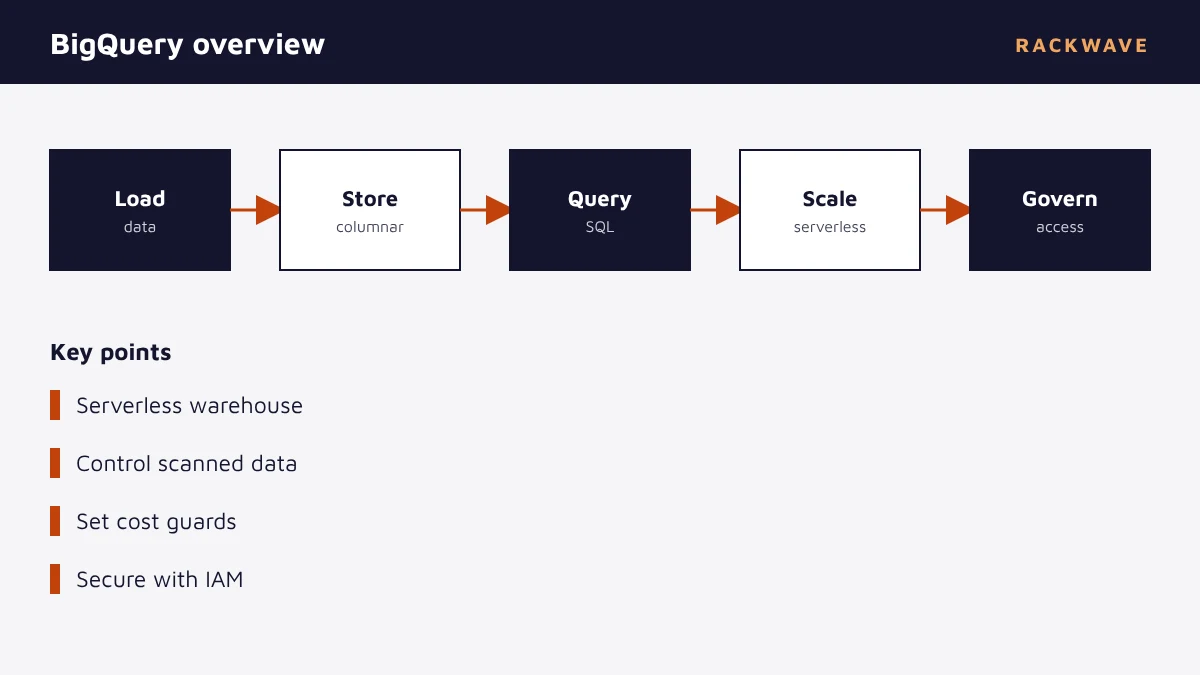
Core building blocks
| Concept | Meaning |
|---|---|
| Project | Top-level container for resources, billing and access |
| Dataset | A collection of tables and views, with location and access settings |
| Table | Structured data, native or external, with a schema |
| View and materialized view | Saved queries, the latter precomputed and refreshed |
| Partition and cluster | Ways to organise a table so queries scan less data |
| Job | A unit of work such as a query, load or export |
| Reservation and slot | Reserved compute capacity measured in slots |
Understanding these makes cost and performance easier to control.
Loading and querying data
| Route | Best for | Notes |
|---|---|---|
| Batch load from files | Large periodic loads | Load jobs from cloud storage are efficient |
| Streaming | Low-latency event data | See streaming inserts |
| Transfer services | Scheduled imports from supported sources | Managed connectors |
| External tables | Query data in place | Useful for lakes, with different performance |
| Federated queries | Query other databases | Convenient for small lookups |
| Scheduled queries | Recurring transformations | See scheduled queries |
Standard SQL is used for analysis, with support for arrays, structs and nested data.

How pricing works
- On-demand pricing charges for the bytes a query processes, so scanning fewer columns and partitions costs less.
- Capacity pricing reserves slots for predictable cost, as described in slots and reservations.
- Storage is charged by volume, with a lower rate for data not modified for a period.
- Streaming, some transfers and certain features have separate charges.
- Free tiers and quotas exist, but check current terms.
- Use dry runs and cost controls to see the cost before running a query. See cost control.
Performance and design
Performance depends on data layout and query design. Partition large tables by date or another key, cluster by frequently filtered columns and select only the columns you need. Avoid repeatedly scanning huge tables with select star, and use materialized views or summary tables for common aggregations. See partitioning and clustering and materialized views.
Security and governance
- Control access with roles at project, dataset, table and column level.
- Use policy tags for column-level protection of sensitive fields.
- Apply row-level security where users should see only part of a table.
- Encryption at rest and in transit is on by default.
- Audit logs record queries and access.
- Choose dataset locations to meet residency requirements. See access control.
Where BigQuery fits
| Option | Strength | Consider when |
|---|---|---|
| BigQuery | Serverless operation and tight Google Cloud integration | You use Google Cloud and want minimal operations |
| Snowflake | Multi-cloud and strong data sharing | You need multi-cloud or sharing features. See BigQuery vs Snowflake |
| Databricks | Lakehouse with strong engineering and machine learning | You have heavy engineering and ML workloads |
| Traditional warehouse | Existing investment and control | You have specific on-premises needs |
See Snowflake and Databricks for comparison.
Data modelling in BigQuery
BigQuery supports both traditional star schemas and denormalised, nested designs. Because storage is columnar and joins are efficient, many teams keep fact and dimension tables as in a classic warehouse. Others use nested and repeated fields to store related data in one table, which reduces joins for event-style data, such as an order with its line items.
Choose based on query patterns and tool support. Star schemas are easy for BI tools and analysts to understand, while nested designs can be faster and cheaper for specific access paths. Document the model and keep naming consistent, so users can find data and trust it. See data modeling.
- Use star schemas for BI-friendly reporting.
- Use nested fields for event-style data.
- Keep naming and documentation consistent.
- Review the model as queries evolve.
Monitoring and operating a BigQuery platform
Operate BigQuery like any production platform. Track query cost and run time by user, team and workload using job metadata, alert on failed loads and slow jobs, and review the most expensive queries each month. Use labels on jobs and datasets to attribute cost to teams, and set quotas so that a mistake cannot create an unlimited bill.
Document ownership for every dataset and keep a catalog of trusted tables. Regular reviews of access, storage growth and unused tables keep the platform tidy and secure as it grows.
- Track cost by team using labels.
- Alert on failed and slow jobs.
- Review top queries monthly.
- Remove unused tables and review access.
Common mistakes
- Running select star on very large tables.
- No partitioning or clustering, so every query scans everything.
- No cost controls or quotas, leading to surprise bills.
- Granting broad project-level access.
- Streaming data that could be batch loaded.
- Treating BigQuery as a transactional database.
A worked example
A retailer loaded sales and web events into BigQuery, partitioned fact tables by date and clustered by store and product. Dashboards used materialized views, scheduled queries built daily summaries and analysts had column-level access to customer data only where needed.
Queries became faster and cheaper, costs were predictable through budgets and quotas and the data team spent time on analysis rather than servers. The example is illustrative.
Best practices and support
- Design partitioning and clustering before loading large tables.
- Set budgets, quotas and alerts.
- Grant least-privilege access.
- Review top queries by cost monthly.
Our data warehousing service and data analytics service design and optimise BigQuery platforms.
Related guides
Read data engineering, data lakes, dbt and ETL for related topics.
Adoption checklist
| Item | Done when |
|---|---|
| Project | Structure and billing set |
| Datasets | Locations and access defined |
| Layout | Partitioning and clustering planned |
| Cost | Budgets, quotas and alerts on |
| Security | Roles and policy tags applied |
| Transform | Scheduled queries or dbt in place |
A typical adoption path
- Plan the project and datasets. Choose regions, naming and ownership.
- Load a first source. Start with one valuable dataset.
- Design tables. Partition, cluster and set schemas.
- Build transformations. Use scheduled queries or dbt.
- Connect reporting tools. Provide governed access.
- Optimise and govern. Review cost, performance and access regularly.
Using BigQuery for machine learning and advanced analytics
BigQuery can train and run some models with SQL, call external models and integrate with Google Cloud AI services, which keeps data in place. Use it for forecasting, classification and recommendations where SQL-based workflows are enough, and consider specialised platforms for heavy training. See BigQuery ML.
Key takeaways
- BigQuery is a serverless data warehouse.
- Storage and compute are separate.
- Pricing is per data processed or reserved capacity.
- Partitioning and clustering cut cost.
- Secure with IAM and policy tags.
Quick glossary
| Term | Meaning |
|---|---|
| Dataset | Collection of tables and views |
| Slot | Unit of compute capacity |
| Partition | Table division for pruning |
| Cluster | Sorting columns to reduce scans |
| Policy tag | Column-level access label |
Read next: BigQuery vs Snowflake: Which Cloud Data Platform? · BigQuery Streaming Inserts: Real-Time Ingestion Guide · BigQuery Access Control: IAM, Policy Tags and Row Security
Frequently asked questions
What is BigQuery?
A fully managed, serverless data warehouse from Google Cloud for analysing large datasets with SQL.
Is BigQuery serverless?
Yes. There are no servers to manage, and Google Cloud allocates resources for each query.
How is BigQuery priced?
By data processed per query or by reserved capacity for compute, plus storage and some other features.
What SQL does BigQuery use?
GoogleSQL, also called standard SQL, with support for arrays and nested structures.
How do I reduce BigQuery costs?
Partition and cluster tables, select only needed columns, set quotas and monitor expensive queries.
Can BigQuery handle streaming data?
Yes, through streaming ingestion, though batch loads are cheaper when low latency is not needed.
How is data secured in BigQuery?
With IAM roles, column and row-level controls, encryption and audit logs.
When should I choose another platform?
When you need multi-cloud portability, specific sharing features or heavy lakehouse workloads.