
How do you control BigQuery costs? BigQuery cost control is the set of design choices, limits and monitoring habits that keep spending predictable while analysts keep working freely. Under on-demand pricing, cost follows the bytes each query reads, so a careless query on a huge table can be expensive, and under capacity pricing cost follows the slots you reserve. Most surprise bills come from a few patterns: scanning too much data, repeated identical work, uncontrolled streaming and forgotten tables. This guide explains how costs arise, how to estimate before running, how to reduce scanned data with design and query habits, how to use quotas, budgets and alerts, how to choose between pricing models, how to attribute cost to teams and the mistakes that cause overspend. Pricing changes, so confirm in current Google Cloud documentation.
Short answer: Estimate with dry runs, partition and cluster large tables, select only needed columns, cache and materialise repeated work, set quotas and budgets, attribute cost with labels and review the most expensive queries every month.
Where BigQuery costs come from
| Cost area | Driver | Typical lever |
|---|---|---|
| Query compute on demand | Bytes processed per query | Partitioning, clustering, column selection |
| Query compute with capacity | Slots reserved and used | Right-sizing reservations. See slots and reservations |
| Active storage | Data volume that changes | Delete unused tables, set expiry |
| Long-term storage | Data not modified for a period | Lower rate applies automatically |
| Streaming and ingestion | Rows streamed and certain loads | Batch where latency allows. See streaming inserts |
| Other features | Machine learning, transfers, external services | Review each feature charges |
Know your largest area first, then optimise there. See what is BigQuery.
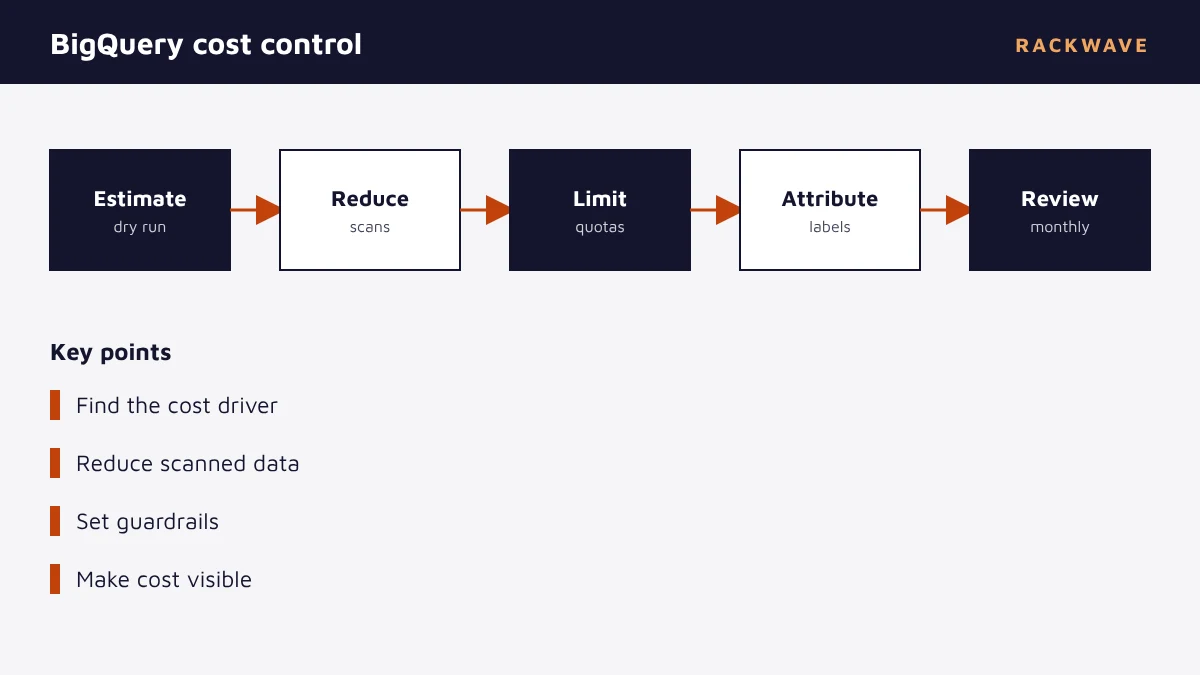
Estimating cost before running
- Use a dry run to see bytes a query would process without running it.
- Check the estimate shown by the console or client before executing large queries.
- Remember that clustering savings are only known after the query runs.
- Use preview features instead of select star to look at table contents.
- Test logic on a small partition or sample before running on all data.
- Teach analysts to read bytes processed as a cost signal.
Reducing the data scanned
- Partition and cluster. Align layout with common filters. See partitioning and clustering.
- Select only needed columns. Columnar storage charges for columns read, so avoid select star.
- Filter early. Apply partition filters and selective conditions first.
- Materialise repeated work. Use summary tables or materialized views.
- Use caching. Identical queries on unchanged data can return cached results.
- Avoid repeated full scans. Join smaller pre-aggregated tables rather than raw data.

Controls and guardrails
| Control | What it does |
|---|---|
| Maximum bytes billed | Fails a query that would exceed a set number of bytes |
| Custom quotas | Limits daily bytes processed per project or user |
| Budgets and alerts | Notify owners when spending approaches thresholds |
| Required partition filter | Blocks unfiltered scans of large tables |
| Reservations and assignments | Cap compute for a team or workload |
| Access limits | Restrict who can run large queries or create tables |
Combine several controls. No single one covers every risk.
Choosing a pricing model
On-demand pricing is simple and suits variable or small workloads, but cost can vary widely. Capacity pricing gives predictable compute for steady or heavy workloads and lets you separate production and ad hoc use into different reservations. Many organisations mix both. Review usage regularly and switch when the numbers favour a different model.
- On-demand for variable or small workloads.
- Capacity for steady, heavy usage.
- Separate reservations for production and exploration.
- Re-evaluate every quarter.
Attributing and reporting cost
Costs improve when teams can see their own. Label jobs, datasets and tables by team, product and environment, export billing and job metadata to BigQuery and build a dashboard showing cost by label, top queries and trends. Share it with teams and agree targets, so optimisation becomes part of everyday work instead of a once-a-year clean-up.
- Label by team, product and environment.
- Export billing and job data.
- Build a cost dashboard.
- Review top queries monthly.
Cost governance for self-service analytics
Self-service analytics is valuable, but it multiplies risk. Give analysts a curated, well-partitioned layer to query rather than raw tables, provide sandbox projects with tight quotas for exploration and require review before new scheduled jobs reach production. Make the guardrails visible, so users know the limits and understand how to request more when they have a good reason.
Publish a short query-writing guide with examples of efficient patterns and a checklist for dashboards, such as using summary tables and caching. A few minutes of training often saves far more than any single technical control.
- Provide a curated query layer.
- Use sandbox projects with quotas.
- Review new scheduled jobs.
- Publish a short efficiency guide.
Reviewing and retiring unused assets
Orphaned scheduled queries, forgotten tables and unused dashboards quietly cost money every day. Use job history to find queries that run but are never read, and table access logs to find data nobody uses. Notify owners, set a deprecation date and remove assets that nobody claims. Repeat this clean-up each quarter so the platform stays lean.
Common mistakes
- Using select star on large tables.
- No quotas or budgets.
- Leaving scheduled queries running that nobody uses.
- Streaming data when batch would do.
- Keeping every table forever without expiry.
- Optimising queries without first knowing where cost arises.
A worked example
A company reviewed its bill and found that three dashboards ran uncached queries over a raw events table every few minutes. They created a daily summary table, pointed dashboards at it, partitioned the raw table and set a maximum bytes billed limit for analysts.
Compute cost fell sharply, dashboards became faster and a budget alert now warns the team early. The example is illustrative.
Best practices and support
- Make cost visible to the teams that cause it.
- Set limits before problems occur.
- Review top queries and unused objects monthly.
- Document the pricing model decision.
Our data warehousing service and data analytics service help teams reduce and control BigQuery cost.
Related guides
Read scheduled queries, BigQuery vs Snowflake, cloud computing and data warehouses for related topics.
Cost control checklist
| Item | Done when |
|---|---|
| Visibility | Cost dashboard by label |
| Layout | Large tables partitioned and clustered |
| Guardrails | Quotas and maximum bytes billed set |
| Budgets | Alerts configured |
| Model | Pricing option reviewed |
| Cleanup | Unused tables and jobs removed |
Storage cost management
Storage is smaller than compute for many teams but grows quietly. Set expiry on temporary and staging tables, review large datasets for obsolete copies and decide whether to keep history at full detail. Data not modified for a period moves to a lower rate automatically, but deleting what you no longer need is still the cheapest option.
- Expiry for staging and temporary tables.
- Review the largest tables quarterly.
- Remove duplicate copies.
- Archive only what regulations require.
Building a cost-aware culture
Tools help, but habits decide. Include bytes processed in code reviews of transformation SQL, share a short guide with analysts on writing efficient queries and recognise teams that reduce cost without hurting delivery. Treat cost incidents like any other incident: find the cause, fix it and add a guardrail so it cannot recur.
Handling cost spikes
When spending jumps, start with job metadata to find the users, queries and tables responsible, then stop or fix them. Check scheduled queries, new dashboards and recent changes in loading. After resolving the cause, add a limit or alert for that pattern.
Key takeaways
- Know your main cost driver.
- Estimate with dry runs.
- Reduce bytes scanned.
- Set quotas and budgets.
- Attribute cost to teams.
Quick glossary
| Term | Meaning |
|---|---|
| Dry run | Estimate without running |
| Maximum bytes billed | Query size limit |
| Quota | Usage limit |
| Slot | Compute capacity unit |
| Label | Tag for cost attribution |
Read next: BigQuery vs Snowflake: Which Cloud Data Platform? · BigQuery Streaming Inserts: Real-Time Ingestion Guide · BigQuery Access Control: IAM, Policy Tags and Row Security
Frequently asked questions
What drives BigQuery cost?
Query compute, based on bytes processed or reserved slots, plus storage, streaming and some feature charges.
How do I estimate a query cost?
Run a dry run or check the bytes processed estimate before executing the query.
How do I reduce bytes scanned?
Partition and cluster tables, select only needed columns and filter early.
What is maximum bytes billed?
A setting that makes a query fail if it would process more bytes than the limit.
Should I use on-demand or capacity pricing?
On-demand suits variable workloads, and capacity suits steady, heavy workloads needing predictable cost.
How can I see cost by team?
Label jobs and datasets, export billing and job data and build a cost dashboard.
Does caching reduce cost?
Yes, identical queries on unchanged data can return cached results at no query charge.
How do I stop surprise bills?
Set quotas, budgets, alerts and required partition filters, and review expensive queries regularly.