
How does BigQuery access control work? BigQuery access control is the combination of Google Cloud identity and access management roles, dataset and table permissions, column-level and row-level security, data masking and audit logging that decides who can see and change data. A sound design follows least privilege, uses groups instead of individuals, protects sensitive columns with policy tags and records access for audit. This guide explains the layers of control, how roles and inheritance work, how to design datasets and permissions, how to use column and row-level security and masking, how to manage service accounts and shared data, how to audit access and the mistakes that expose sensitive data or block legitimate work. Features and role names change, so confirm in current Google Cloud documentation.
Short answer: Grant roles to groups at the narrowest scope that works, separate data by dataset, protect sensitive columns with policy tags, apply row-level security where users should see only part of a table, use service accounts for workloads and review access and audit logs regularly.
The layers of control
| Layer | What it controls | Typical use |
|---|---|---|
| Project IAM | Who can run jobs and manage resources in a project | Analysts can run queries, admins manage resources |
| Dataset access | Who can read or write tables in a dataset | Separate raw, curated and sensitive data |
| Table and view access | Who can access specific tables or views | Share only prepared views |
| Column-level security | Who can read sensitive columns using policy tags | Protect personal data fields |
| Row-level security | Which rows a user can see | Regional or customer-specific access |
| Data masking | What users see instead of raw values | Show partial or hashed values |
| Audit logs | Who did what and when | Investigations and compliance |
Use several layers together. See what is BigQuery and cloud security.
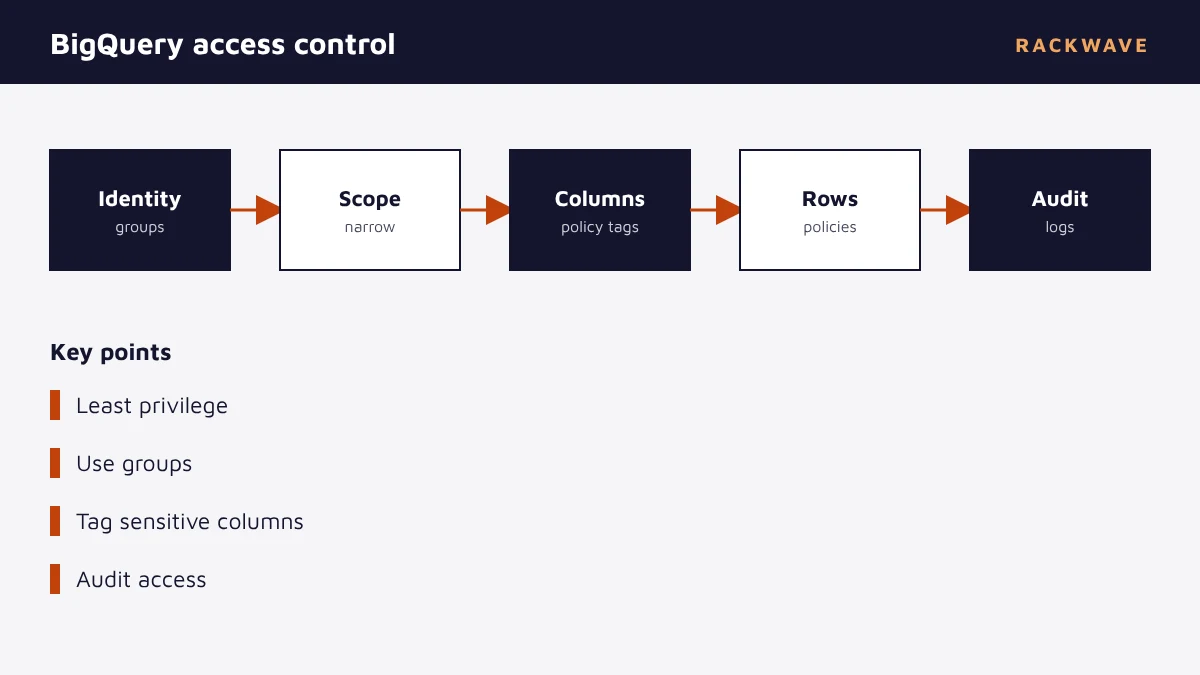
Roles and inheritance
Permissions are granted through roles and inherited down the hierarchy from organisation to folder, project, dataset and table. A role at a higher level applies to everything beneath it, so broad grants at project level can unintentionally open all datasets. Running a query needs permission to create jobs in a project and to read the data, which can be in different projects.
- Prefer predefined roles over broad basic roles.
- Grant at the narrowest level that works.
- Use groups so membership is managed in one place.
- Separate who can read data from who can administer it.

Designing datasets for access
- Classify data. Label data as public, internal, confidential or restricted.
- Separate by sensitivity. Place raw, curated and sensitive data in different datasets.
- Define roles. Map groups to read, write and admin permissions per dataset.
- Share through views. Expose prepared, filtered views instead of raw tables.
- Apply fine-grained controls. Use policy tags and row access policies where needed.
- Review regularly. Audit access and remove what is no longer needed.
Column-level and row-level security
| Control | How it works | Example |
|---|---|---|
| Policy tags | Tag columns with a taxonomy, grant access by tag | Only HR can read salary and national id |
| Dynamic data masking | Return masked values to users without full access | Show last four digits only |
| Row access policies | Filter rows by user or group | Regional managers see their region |
| Authorised views | View exposes filtered data without granting base table access | Share a safe subset with partners |
These controls support privacy and regulatory needs. See data governance and GDPR.
Service accounts and workloads
- Use dedicated service accounts for pipelines, dashboards and applications.
- Give each only the roles and datasets it needs.
- Avoid downloading long-lived keys and prefer short-lived credentials and workload identity.
- Separate production and development identities.
- Rotate and review credentials regularly.
- Log and alert on unusual service account activity.
Auditing and monitoring access
Audit logs record queries, data reads, permission changes and administrative actions. Export them to BigQuery for analysis, build reports of who accessed sensitive tables and set alerts for unusual patterns, such as large exports or access outside normal hours. Combine this with periodic access reviews where data owners confirm that each group still needs its access.
- Export audit logs to BigQuery.
- Report on access to sensitive data.
- Alert on unusual activity.
- Run quarterly access reviews.
Handling temporary and emergency access
Sometimes people need elevated access for a limited time, for example to investigate an incident. Provide a controlled route: a request with an approver, time-limited grants that expire automatically and logging of every action taken. Review these grants afterwards and remove anything that remains, so emergencies do not leave permanent exposure.
Document the procedure and test it, so responders can act quickly without bypassing controls. Include the data owner or security team in approvals for sensitive datasets.
- Use approval for elevated access.
- Make grants expire automatically.
- Log all actions taken.
- Review and remove after the event.
Separation of environments
Keep development, testing and production in separate projects with separate identities. Analysts should not use production service accounts, and test data should not contain real personal data unless protected equally. Promote code and schemas through a pipeline, and restrict direct changes to production datasets to automated deployments and a small set of administrators.
Common mistakes
- Granting broad roles at project or organisation level.
- Giving individuals access instead of groups.
- Leaving sensitive columns unprotected in shared datasets.
- Sharing base tables when a filtered view would do.
- Using long-lived service account keys.
- Never reviewing or removing old access.
A worked example
A healthcare analytics team classified data, placed raw data in a restricted dataset and exposed curated views to analysts through groups. Personal fields carried policy tags with masking for most users, and row access policies limited regional teams to their own data.
Analysts worked freely on safe data, sensitive fields were visible only to a small approved group and audit reports satisfied reviewers. The example is illustrative.
Best practices and support
- Start from least privilege and add access on request.
- Use groups and policy tags.
- Automate access reviews.
- Document data owners and approvers.
Our data governance service and data warehousing service design secure BigQuery access models.
Related guides
Read cost control, streaming inserts, zero trust and data loss prevention for related topics.
Access control checklist
| Item | Done when |
|---|---|
| Classification | Data labelled by sensitivity |
| Groups | Roles granted to groups |
| Scope | Narrowest level used |
| Fine-grained | Policy tags and row policies applied |
| Workloads | Dedicated service accounts |
| Audit | Logs exported and reviewed |
Sharing data safely
Sharing with other teams or partners is a common source of risk. Prefer authorised views and curated datasets over direct table access, limit the time of access where possible and record who approved each share. For external sharing, consider platform sharing features that avoid copying data, and review what recipients can see before granting access.
- Share through views.
- Time-limit external access.
- Record approvals.
- Review shares regularly.
Compliance and data residency
Choose dataset locations that meet legal requirements, document where personal data lives and prepare for access, correction and deletion requests. Keep evidence of controls, such as access reviews and audit logs, so you can show compliance when asked.
Onboarding and offboarding
Link access to your identity provider so that joining or leaving a team updates group membership automatically. Provide a simple request process for new access with data owner approval, and remove access promptly when people change roles or leave. This prevents the slow build-up of unnecessary permissions.
Key takeaways
- Use layered access controls.
- Grant roles to groups at narrow scope.
- Protect sensitive columns with policy tags.
- Use dedicated service accounts.
- Audit and review access.
Quick glossary
| Term | Meaning |
|---|---|
| IAM role | Set of permissions granted to an identity |
| Policy tag | Column-level access label |
| Row access policy | Filter on visible rows |
| Authorised view | View with access to base tables |
| Audit log | Record of access and changes |
Read next: BigQuery vs Snowflake: Which Cloud Data Platform? · BigQuery Streaming Inserts: Real-Time Ingestion Guide · BigQuery ML: Build Machine Learning Models With SQL
Frequently asked questions
How is access controlled in BigQuery?
With IAM roles, dataset and table permissions, column and row-level security, masking and audit logs.
Should I grant access to individuals?
Prefer groups, so membership is managed centrally and access reviews are simpler.
What are policy tags?
Labels on columns that control who can read sensitive fields through a taxonomy.
What is row-level security?
Policies that filter which rows a user or group can see in a table.
How do authorised views help?
They let users query a filtered view without direct access to the underlying tables.
How should workloads authenticate?
Use dedicated service accounts with minimal roles and short-lived credentials.
How do I audit access?
Export audit logs, report on access to sensitive tables and review them regularly.
What is the biggest mistake?
Granting broad roles at project level, which exposes every dataset beneath it.