
What is BigQuery ML? BigQuery ML lets you create, train, evaluate and use machine learning models directly inside BigQuery using SQL, without moving data out of the warehouse or writing separate training code. Analysts who know SQL can build models such as linear and logistic regression, boosted trees, clustering, forecasting and recommendation, and can also call external and remote models for tasks like text analysis. This guide explains what BigQuery ML offers, the typical workflow from data preparation to prediction, supported model types, evaluation and monitoring, how it compares with dedicated machine learning platforms, cost and governance considerations and the mistakes that produce unreliable models. Features and models change often, so confirm in current Google Cloud documentation.
Short answer: Use BigQuery ML when your data already lives in BigQuery and you need practical models, such as churn, forecasting or segmentation, built and served with SQL. Prepare clean features, evaluate honestly, monitor drift and move to a dedicated platform when you need custom training or complex deployment.
Why machine learning inside the warehouse
Moving data between systems for training is slow, adds copies and creates security risk. Training where the data lives avoids this, shortens the path from idea to prediction and lets analysts contribute directly. Predictions are written back as tables, ready for reporting and activation. See what is BigQuery and data science.
Common model types
| Task | Model family | Example use |
|---|---|---|
| Predict a number | Linear regression, boosted trees | Customer lifetime value |
| Predict a category | Logistic regression, boosted trees | Churn or fraud flag |
| Group similar records | Clustering | Customer segments |
| Forecast over time | Time-series models | Demand forecasting |
| Recommend items | Matrix factorisation | Product recommendations |
| Reduce dimensions or detect anomalies | PCA and anomaly detection | Outlier detection |
| Use external or generative models | Remote models | Text classification and summarisation |
Model availability changes, so check the current list.
The workflow
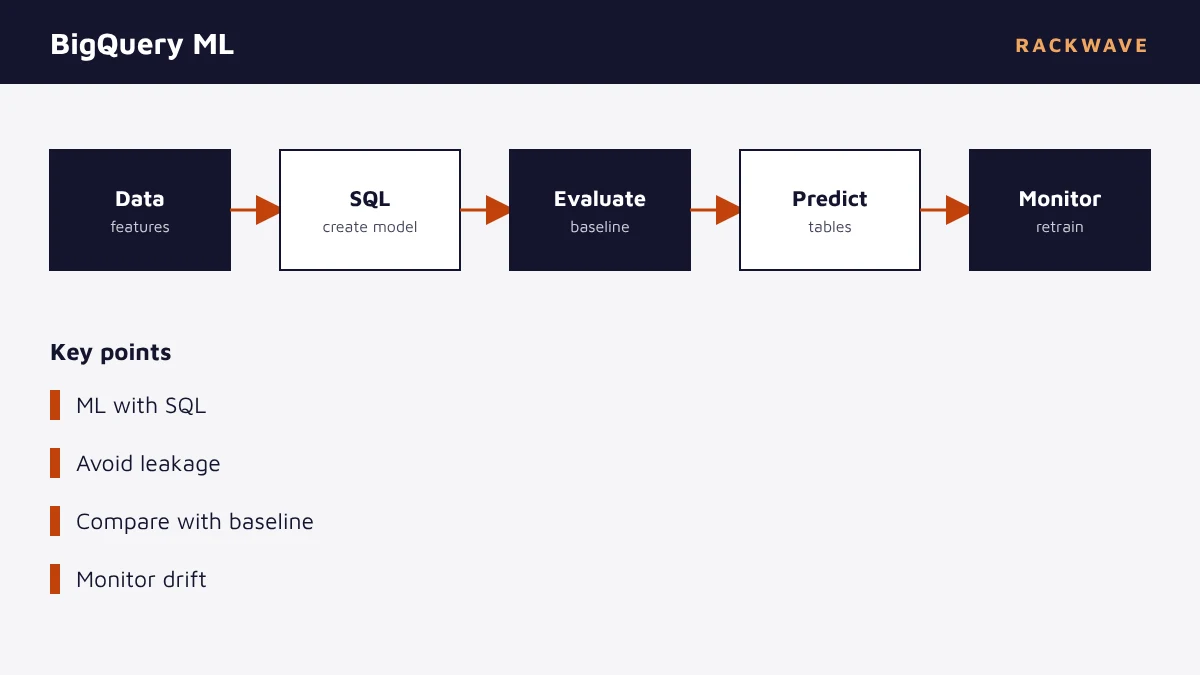
- Define the question. State the target, the prediction moment and how results will be used.
- Prepare features. Build a clean training table with no future information leaking in.
- Create the model. Use a create model statement with options for type and settings.
- Evaluate. Review metrics on held-out data and compare with a simple baseline.
- Predict. Run prediction queries and write results to tables.
- Monitor and retrain. Track performance and refresh models as data changes.

Preparing good training data
- Define a clear label, such as churned within thirty days.
- Build features only from information available at prediction time.
- Split data by time, not randomly, for forecasting and behaviour models.
- Handle missing values and outliers deliberately.
- Check class balance and consider sampling for rare events.
- Document feature definitions so they can be reproduced. See data quality.
Evaluating and explaining models
A model is useful only if it beats a simple baseline and holds up on unseen data. Review accuracy, precision, recall and error metrics suited to the task, and compare against a heuristic such as last period value. Use explanation features to see which inputs drive predictions, and check that results make business sense. Be cautious with models that perform suspiciously well, which often signals data leakage.
- Compare with a simple baseline.
- Evaluate on a time-based holdout.
- Review feature importance.
- Look for leakage when results seem too good.
BigQuery ML compared with other platforms
| Aspect | BigQuery ML | Dedicated ML platform |
|---|---|---|
| Skills needed | SQL | Python, frameworks, infrastructure |
| Data movement | None, in the warehouse | Often exports or connectors |
| Model flexibility | Supported model types and options | Custom architectures and training |
| Deployment | Predictions in SQL and exports | Custom endpoints and pipelines |
| Best for | Business analytics models and fast iteration | Complex or specialised models |
| Governance | Warehouse access controls | Platform-specific controls |
Many teams start in BigQuery ML and move heavy cases to a dedicated platform. See Databricks for a lakehouse alternative.
Cost, governance and operations
- Training and prediction use BigQuery compute, so apply cost controls. See cost control.
- Limit who can create models and read training data.
- Protect sensitive features with column-level controls and review fairness risks.
- Version models and record training data and settings.
- Schedule retraining and predictions with scheduled queries.
- Monitor prediction quality and data drift.
A practical starting project
Pick a use case with clear data, a measurable outcome and a willing business owner, such as churn, lead scoring or demand forecasting. Build the simplest model first, compare it with a rule of thumb and share results with the owner before investing further. A small, successful project builds trust and shows where data quality needs work.
Agree up front how success will be measured, who will act on predictions and how often the model should be refreshed. Without this, even an accurate model can sit unused.
- Choose a measurable use case.
- Start with the simplest model.
- Agree success measures early.
- Name who acts on predictions.
Hyperparameters, features and iteration
Model options such as tree depth, regularisation and learning rate affect accuracy and cost. Start with defaults, then change one setting at a time and compare on the same holdout data. Feature engineering, such as ratios, counts over windows and time since last event, often matters more than tuning. Record each experiment, its settings and its metrics, so progress is reproducible and results can be explained later.
Common mistakes
- Training on data that contains future information.
- Skipping the baseline comparison.
- Using random splits for time-dependent data.
- No plan for retraining.
- Deploying a model nobody can explain to the business.
- Ignoring privacy and fairness implications of features.
A worked example
A subscription business trained a boosted tree model in BigQuery ML to predict thirty-day churn from usage and billing features, using a time-based split. Predictions were written daily to a table used by the retention team.
Outreach focused on the highest-risk customers, churn fell in the targeted group and the model was retrained monthly with scheduled queries. The example is illustrative.
Best practices and support
- Start with a clear business question and baseline.
- Keep features documented and reproducible.
- Monitor performance after launch.
- Involve governance and privacy teams early.
Our AI and machine learning service and data analytics service build practical models on BigQuery.
Related guides
Read slots and reservations, data engineering, customer data platforms and data analytics for related topics.
BigQuery ML checklist
| Item | Done when |
|---|---|
| Question | Target and use defined |
| Data | Features free of leakage |
| Evaluation | Baseline beaten on holdout |
| Governance | Access and privacy reviewed |
| Operations | Retraining and monitoring scheduled |
| Cost | Controls and budgets in place |
Using BigQuery ML outputs
Predictions are most valuable when they reach decisions. Write scores to tables that dashboards and activation tools read, add thresholds agreed with business owners and record which model version produced each score. Measure the effect of actions, such as retention offers, with control groups, so improvements are proven rather than assumed.
- Write scores with model version and date.
- Agree thresholds with owners.
- Use control groups to measure impact.
- Feed results to reporting and activation tools.
Risks and responsible use
Models can encode bias or use features that should not influence decisions. Review inputs for sensitive attributes and proxies, document intended use and limits, and provide a human route to challenge important decisions. Re-check regularly, since data and behaviour change over time.
Skills and ways of working
BigQuery ML lowers the barrier, but good modelling still needs care. Pair analysts with data scientists for review, keep code in Git and share a template for model projects that includes data checks, evaluation and monitoring. This keeps quality high as more people build models.
Key takeaways
- Train and predict inside BigQuery with SQL.
- Prepare features without leakage.
- Evaluate against a baseline.
- Schedule retraining and monitor.
- Move to a platform for custom needs.
Quick glossary
| Term | Meaning |
|---|---|
| BigQuery ML | Machine learning with SQL in BigQuery |
| Feature | Model input column |
| Label | Value the model predicts |
| Data leakage | Future information in training |
| Baseline | Simple comparison method |
Read next: BigQuery vs Snowflake: Which Cloud Data Platform? · BigQuery Streaming Inserts: Real-Time Ingestion Guide · BigQuery Access Control: IAM, Policy Tags and Row Security
Frequently asked questions
What is BigQuery ML?
A feature that lets you create, train and use machine learning models in BigQuery using SQL.
What models can I build?
Regression, classification, clustering, forecasting, recommendation and others, plus remote models, depending on current support.
Do I need Python?
Not for supported model types. SQL is enough, though complex cases may need other tools.
How do I evaluate a model?
Use held-out data, suitable metrics and a comparison with a simple baseline.
What is data leakage?
Using information in training that would not be available at prediction time, which inflates results.
How do I keep models fresh?
Schedule retraining and predictions, and monitor performance and data drift.
Is it free?
No. Training and prediction use BigQuery compute and storage, so cost controls apply.
When should I use another platform?
When you need custom architectures, heavy training or complex real-time deployment.