
What is cloud computing? Cloud computing is the delivery of computing services, such as servers, storage, databases, networking, software and analytics, over the internet on a pay-as-you-go basis, so organisations can use technology without buying and running their own data centres. This guide explains how cloud computing works, the service models (IaaS, PaaS and SaaS), the deployment models (public, private and hybrid), the benefits and risks, and how to plan a move to the cloud.
Short answer: Cloud computing means renting computing resources from a provider instead of owning them. You use what you need, when you need it, and pay for what you use.
What is cloud computing?
Cloud computing replaces the old model, in which each company bought servers, housed them in a server room and hired people to maintain them. With cloud computing, a provider operates very large shared data centres and offers capacity as a service. You can start a server in minutes, store terabytes of data without buying disks, and shut resources down when you no longer need them.
The leading public cloud providers are Amazon Web Services, Microsoft Azure and Google Cloud. Our comparison of AWS vs Azure looks at how the two largest differ.
How cloud computing works
- The provider builds pooled infrastructure. Large data centres hold servers, storage and networks shared by many customers.
- Virtualisation divides it. Software splits physical machines into virtual servers and isolated environments.
- Customers request resources. Through a console, command line or API, they create servers, databases or storage in minutes.
- Usage is metered. The provider measures consumption and bills by the hour, second or unit.
- Resources scale up and down. Capacity grows with demand and shrinks afterwards, often automatically.
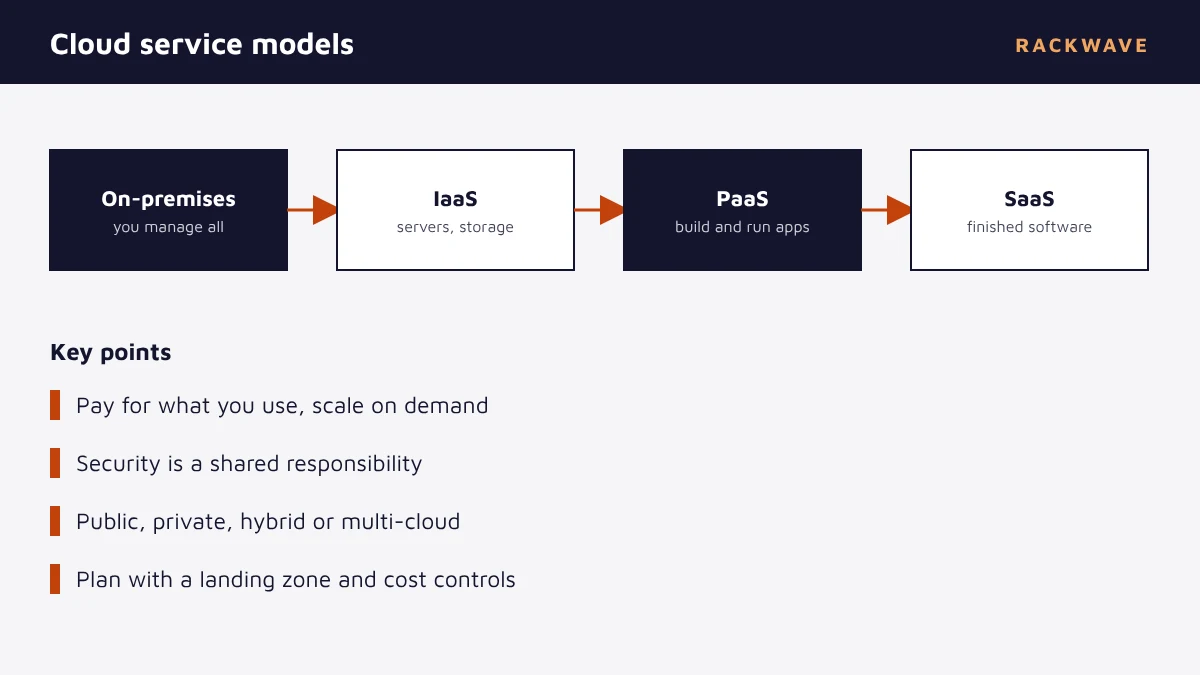
Cloud service models: IaaS, PaaS and SaaS
| Model | What the provider supplies | What you manage | Example |
|---|---|---|---|
| IaaS | Servers, storage, networking | OS, middleware, applications, data | Virtual machines, block storage |
| PaaS | Runtime and development platform | Applications and data | Managed databases, app hosting |
| SaaS | Complete application | Users and configuration | CRM, email, collaboration tools |
| FaaS / serverless | Code execution on demand | Functions and logic | AWS Lambda, Azure Functions |
The SaaS guide goes deeper into the top layer of this stack.
Cloud deployment models
| Model | Description | Typical use |
|---|---|---|
| Public cloud | Shared infrastructure operated by a provider | Most workloads; fast and cost-effective |
| Private cloud | Dedicated infrastructure for one organisation | Strict control or regulatory needs |
| Hybrid cloud | A mix of public and private with connectivity between them | Gradual migration and mixed requirements |
| Multi-cloud | Using more than one public provider | Avoiding dependence on one vendor and choosing best services |
Benefits of cloud computing
- Cost flexibility: operating expense replaces large capital purchases, and you stop paying for idle hardware.
- Elastic scalability: handle a seasonal peak without owning peak capacity all year.
- Speed: teams create environments for testing and projects in minutes.
- Reliability: providers offer redundancy across zones and regions, and disaster recovery options. See what is a disaster recovery plan.
- Access to modern services: managed databases, analytics and AI tools without building them.
- Security investment: major providers spend heavily on physical and platform security.
Risks and challenges
- Cost overruns: easy provisioning leads to forgotten resources and surprise bills without governance.
- Security misconfiguration: the provider secures the platform, but customers must configure access, storage and networks correctly.
- Skills gaps: cloud architecture and operations differ from traditional IT.
- Vendor lock-in: deep use of proprietary services makes switching expensive.
- Compliance and data residency: some data must stay in specific countries or under specific controls.
- Latency and connectivity: some workloads need low latency that distance can affect.
The cloud does not remove responsibility. It changes who is responsible for what, and the customer's share is bigger than most people expect.
The shared responsibility model
Every major provider describes security as shared. The provider is responsible for the physical facilities, hardware and the core platform. The customer is responsible for identity and access, data, configuration and the security of the applications they run. A storage bucket left public by mistake is the customer's failure, not the provider's. Training and automated policy checks reduce this risk.
Common cloud use cases
- Hosting websites and applications that need to scale with traffic.
- Backup, archive and disaster recovery.
- Data lakes, warehouses and analytics. See what is a data lake.
- Development and test environments created on demand.
- Running containers and microservices. See Kubernetes.
- Training and serving machine learning models.
Cloud migration strategies: the six Rs
| Strategy | What it means | When it fits |
|---|---|---|
| Rehost | Move as is to cloud servers | Quick exit from a data centre; little change needed |
| Replatform | Move with small optimisations, such as a managed database | Gains without a rewrite |
| Refactor | Redesign for cloud-native services | Systems that need scale or agility |
| Repurchase | Replace with a SaaS product | Commodity functions such as email or CRM |
| Retire | Switch off what is no longer needed | Unused or duplicate applications |
| Retain | Leave in place for now | Regulation, latency or low value of moving |
Most programmes use several of these. A sensible portfolio retires a surprising number of systems, replaces commodity ones with SaaS and puts effort into refactoring only the few applications where it pays back.
Controlling cloud costs
Cloud cost management is its own discipline, often called FinOps. Tag every resource with an owner and purpose, set budgets and alerts per team, shut down non-production environments outside working hours and review idle or oversized resources monthly. Commitment discounts, such as reserved capacity or savings plans, can reduce the price of steady workloads, but only commit once usage is understood. Make cost visible to the engineers who create it, because people spend more sensibly when they can see the bill.
Cloud computing and compliance
Regulated industries can and do use the cloud, but they must prove control. Choose regions that meet data residency rules, enable encryption with keys you manage where required, keep audit logs for the retention period the regulation sets and document the shared responsibility split in your risk register. Ask providers for their compliance reports, and map their controls to your own. Compliance is much easier when it is built into the landing zone than when it is retrofitted.
How to plan a move to the cloud
- Assess the estate. Inventory applications, dependencies, data and compliance needs.
- Choose a strategy per workload. Rehost, replatform, refactor, replace or retire. Not every system deserves the same treatment.
- Design the landing zone. Set up accounts, networking, identity, security baselines and cost controls before moving anything.
- Pilot with a low-risk workload. Learn the process on something that matters but cannot cause a crisis.
- Migrate in waves. Move groups of related systems, test each wave and keep a rollback plan.
- Operate and optimise. Monitor cost and performance, right-size resources and automate with infrastructure as code.
Practical tip: Set budgets, tagging and alerts on day one. Cost governance added after the first surprise invoice is harder than cost governance built into the landing zone.
Cloud and DevOps
Cloud and DevOps reinforce each other. Because infrastructure is created by API, it can be defined in code, tested and deployed by a pipeline. This makes environments repeatable and shortens delivery. Our cloud migration service and DevOps service cover assessment, landing zones, migration and ongoing operations.
Key takeaways
- Cloud computing delivers IT resources over the internet, billed by use.
- Service models are IaaS, PaaS and SaaS, with serverless as a further option.
- Deployment can be public, private, hybrid or multi-cloud.
- Security is a shared responsibility; configuration errors are the usual cause of incidents.
- Plan with an assessment, a landing zone, a pilot, waves and cost governance.
Quick glossary
| Term | Meaning |
|---|---|
| Elasticity | Ability to scale resources up and down automatically |
| Region | A geographic area where a provider has data centres |
| Availability zone | An isolated data centre location within a region |
| Landing zone | A secure, pre-configured cloud environment for workloads |
| Serverless | Running code without managing servers |
Read next: Lead Nurturing: Strategy, Tactics and Examples · Data Quality: Dimensions, Causes and How to Improve It · What Is a Data Pipeline? Components, Types and Examples
Frequently asked questions
What is cloud computing in simple terms?
It is using computing resources such as servers, storage and software over the internet from a provider, and paying for what you use, instead of buying and running your own hardware.
What are the three types of cloud computing services?
The three main service models are IaaS (infrastructure), PaaS (platform) and SaaS (software). Serverless is a related model that runs code without server management.
What is the difference between public, private and hybrid cloud?
Public cloud is shared infrastructure run by a provider. Private cloud is dedicated to one organisation. Hybrid combines both with connectivity between them.
What are examples of cloud computing?
Examples include storing files in cloud storage, running a website on a virtual server, using a managed database, using email and CRM as software services and training machine learning models on rented compute.
What are the benefits of cloud computing?
Flexible cost, elastic scalability, fast provisioning, built-in resilience, access to modern services and reduced need to maintain hardware.
Is cloud computing secure?
Major providers invest heavily in security, but customers must configure access, data protection and networks correctly. Most cloud incidents come from misconfiguration rather than provider failure.
What is the difference between cloud computing and virtualisation?
Virtualisation divides physical hardware into virtual machines. Cloud computing builds on it, adding self-service, metering, pooling and elastic scaling delivered as a service.
How do I start moving to the cloud?
Inventory your applications, choose a strategy for each, build a secure landing zone with cost controls, pilot one low-risk workload and migrate in waves.