
How does Twilio Programmable SMS work? Twilio Programmable SMS lets applications send and receive text messages through a REST API. You create a message resource with a recipient, a sender and a body, Twilio routes it to the carrier network and reports status changes back to your application through callbacks. This guide explains how to send and receive messages, how segments and encoding affect cost, the message status lifecycle, how to handle replies and opt-outs, common error causes, security practices and design patterns for reliable notifications. Behaviour differs by country and carrier, and products change, so confirm details in current Twilio documentation and local regulation.
Short answer: Send by creating a message with a sender and body, track delivery with status callbacks, handle inbound replies through a webhook, respect opt-outs and registration rules, and design for retries without duplicate sends.
How sending works
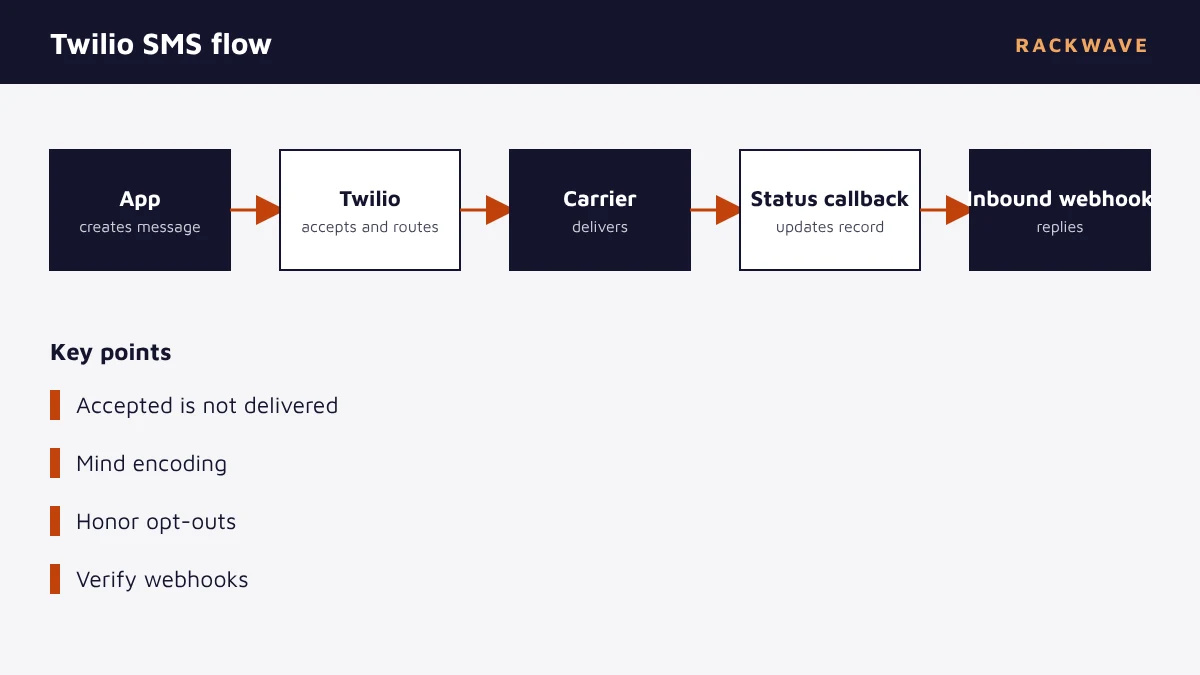
Your application makes an authenticated HTTPS request to create a message. Twilio validates it, selects a route, hands the message to a carrier and returns a message identifier immediately. Delivery happens afterward, and the final result arrives later by status callback, so a successful API response means accepted, not delivered. This is a typical asynchronous pattern, similar to those described in what is a webhook. For the platform overview see what is Twilio.
Sender options
| Sender type | Where it fits | Notes |
|---|---|---|
| Local long code | Two-way conversations, reminders | Needs registration in some countries, such as 10DLC in the US. See A2P 10DLC |
| Toll-free number | Notifications and support in some regions | May require verification |
| Short code | High volume, high throughput programmes | Longer provisioning, higher cost |
| Alphanumeric sender ID | One-way branded messages in some countries | Often cannot receive replies, rules vary |
| Messaging service | A pool of senders with shared settings | Recommended for scale. See messaging services |
Rules differ widely by country, so always check the destination requirements before launch.
Segments, encoding and cost
- A message with standard GSM characters fits 160 characters in a single segment, while longer messages split into concatenated segments with slightly fewer characters each.
- A single non-GSM character, such as some smart quotes or emoji, switches the message to UCS-2 encoding with a much shorter segment limit.
- You pay per segment, so a long message with emoji can cost several times a short plain one.
- Preview templates in real text, and normalise characters where appropriate.
- MMS is supported on certain routes and is priced differently.
Message status lifecycle
| Status | Meaning |
|---|---|
| queued | Accepted and waiting to be sent |
| sent | Handed to the carrier |
| delivered | Carrier confirms delivery to the handset where supported |
| undelivered | Could not be delivered |
| failed | Could not be sent, for example an invalid number or blocked route |
| received | An inbound message arrived |
Not every carrier returns delivery receipts, so a message can remain sent without a final confirmation. Store the identifier and the latest status with your own record.
Receiving messages and handling opt-out
- Configure the inbound webhook. Point the number or messaging service at your HTTPS endpoint.
- Verify the request. Check the signature to confirm it came from Twilio. See Twilio webhooks.
- Parse the message. Read the sender, body and media, and match the sender to a customer.
- Handle keywords. Treat STOP, HELP and similar keywords as required by rules, and update consent records.
- Reply or route. Respond with instructions or hand the conversation to an agent.
- Log it. Store the message and your response for audit and support.
Reliability patterns
- Use idempotency in your own system so a retry after a timeout does not send the same reminder twice.
- Queue outbound sends and apply rate limits so bursts stay within sender throughput.
- Use status callbacks to update records, and retry or fall back to another channel on failure when appropriate.
- Store the message identifier to answer support questions quickly.
- Separate transactional and promotional traffic using different senders or services.
Common delivery problems
| Symptom | Likely cause | What to check |
|---|---|---|
| Message blocked or filtered | Content or sender flagged by carrier filtering, or missing registration | Registration status, content and sender reputation |
| Undelivered to some countries | Country rules or unsupported sender type | Destination requirements and sender ID rules |
| Many failures to old numbers | Disconnected or landline numbers | Number validation and list hygiene |
| Replies never arrive | Webhook misconfigured or failing | Inbound URL, logs and signature checks |
| Unexpected cost | Long or non-GSM messages, high volume | Segment counts and usage reports |
Twilio logs include error codes for most failures. Map frequent codes to a runbook so support teams know the next step.
Compliance, consent and content
Send only with a lawful basis and clear consent, record when and how it was captured, honour opt-outs quickly and respect quiet hours and local rules. Include identification of the sender and avoid prohibited content categories on regulated routes. Keep personal data in messages to the minimum required. See GDPR, SMS marketing and WhatsApp versus SMS for when another channel may be better.
Testing before launch
- Send to real handsets on the main carriers in each target country and compare delivery times.
- Test long messages, emoji and accented characters to confirm segment counts.
- Send a STOP and a HELP reply and confirm the consent record updates.
- Simulate a webhook failure and confirm that your retry behaviour is safe.
- Run a small pilot and review delivery, reply and opt-out rates before scaling.
Keep a test number list and a short checklist so every new template or country follows the same steps. Most production surprises, such as an unexpected character encoding or a blocked route, show up in a careful pilot.
Metrics to track
| Metric | Why it matters | Watch for |
|---|---|---|
| Delivery rate by country and carrier | Shows route quality | Drops after content or sender changes |
| Filtered or blocked rate | Signals compliance or reputation problems | Spikes after campaigns |
| Reply and conversion rate | Shows usefulness of messages | Falling engagement |
| Opt-out rate | Shows list and content health | Sudden increases |
| Cost per delivered message | Shows efficiency | Segment growth from long messages |
Common mistakes
- Treating API success as delivery.
- Ignoring character encoding and paying for avoidable segments.
- Not handling STOP, so opt-outs are missed.
- Using one sender for both alerts and promotions.
- Skipping webhook verification.
A worked example
A delivery company sends parcel updates by SMS. The app queues messages, sends them through a messaging service and stores the message id. Status callbacks update the parcel timeline. Replies such as a gate code or reschedule request go to a webhook that creates a task for the dispatcher. After noticing that messages with a special arrow symbol cost double, the team replaced the symbol with plain text.
Delivery rates were tracked by country and carrier, and a weekly report showed filtered messages, which the team used to adjust templates. The example is illustrative.
Best practices and support
- Keep message copy short, clear and plain text where possible.
- Include a way to opt out and a way to get help.
- Test with real devices and carriers in each target country.
- Track delivery rate, reply rate, opt-out rate and cost per message.
Our API development service builds reliable messaging integrations, and our CRM and lifecycle service designs consent and journey logic around them.
Key takeaways
- Create a message, then track status through callbacks.
- API success means accepted, not delivered.
- Encoding and length decide segments and cost.
- Handle replies and opt-outs through a verified webhook.
- Design for retries without duplicates.
Quick glossary
| Term | Meaning |
|---|---|
| Segment | A billable unit of a text message |
| Status callback | Event sent when message status changes |
| GSM-7 | Standard SMS character encoding |
| UCS-2 | Encoding for non-GSM characters with shorter limit |
| Messaging service | A pool of senders with shared settings |
Read next: What Is API Management? Lifecycle, Features, Tools · What Is a Message Queue? Patterns and Best Practices · What Is RabbitMQ? Exchanges, Queues and Use Cases
Frequently asked questions
How do I send an SMS with Twilio?
Make an authenticated API request that creates a message with a recipient, a sender and a body.
Does an API success mean delivered?
No. It means Twilio accepted the message. Delivery status arrives later through status callbacks.
How long can an SMS be?
A GSM message fits 160 characters per segment, and a message with non-GSM characters fits far fewer, with longer messages split into segments.
How do I receive replies?
Configure an inbound webhook on your number or messaging service and process the request in your application.
How should I handle STOP?
Treat it as an opt-out, update your consent records and avoid further marketing messages, following local rules.
Why was my message filtered?
Common causes are missing registration, content flagged by carriers or sender reputation. Check registration and error codes.
Should I use a messaging service?
It is recommended for scale because it manages sender pools and shared settings.
How can I reduce SMS cost?
Shorten messages, avoid unnecessary non-GSM characters, clean lists and choose appropriate senders and routes.