
What is RabbitMQ? RabbitMQ is an open source message broker that receives messages from producer applications, routes them through exchanges to queues and delivers them to consumers. It implements the Advanced Message Queuing Protocol, AMQP, and supports other protocols such as MQTT and STOMP. RabbitMQ is widely used to decouple services, distribute background jobs, build event driven systems and integrate applications reliably. It offers flexible routing, acknowledgements, persistence, clustering and management tools. This guide explains how RabbitMQ works, its core concepts such as exchanges, queues and bindings, the main exchange types, high availability options including quorum queues, common use cases and the operational practices that keep a broker healthy.
Short answer: RabbitMQ is a mature message broker. Producers publish to exchanges, which route messages to queues by rules called bindings, and consumers process them with acknowledgements, giving flexible, reliable asynchronous communication.
What is RabbitMQ?
The RabbitMQ article on Wikipedia describes it as open source message broker software. It is a classic implementation of a message queue, often compared with Apache Kafka, and a common building block of event driven architecture and microservices.
Core RabbitMQ concepts
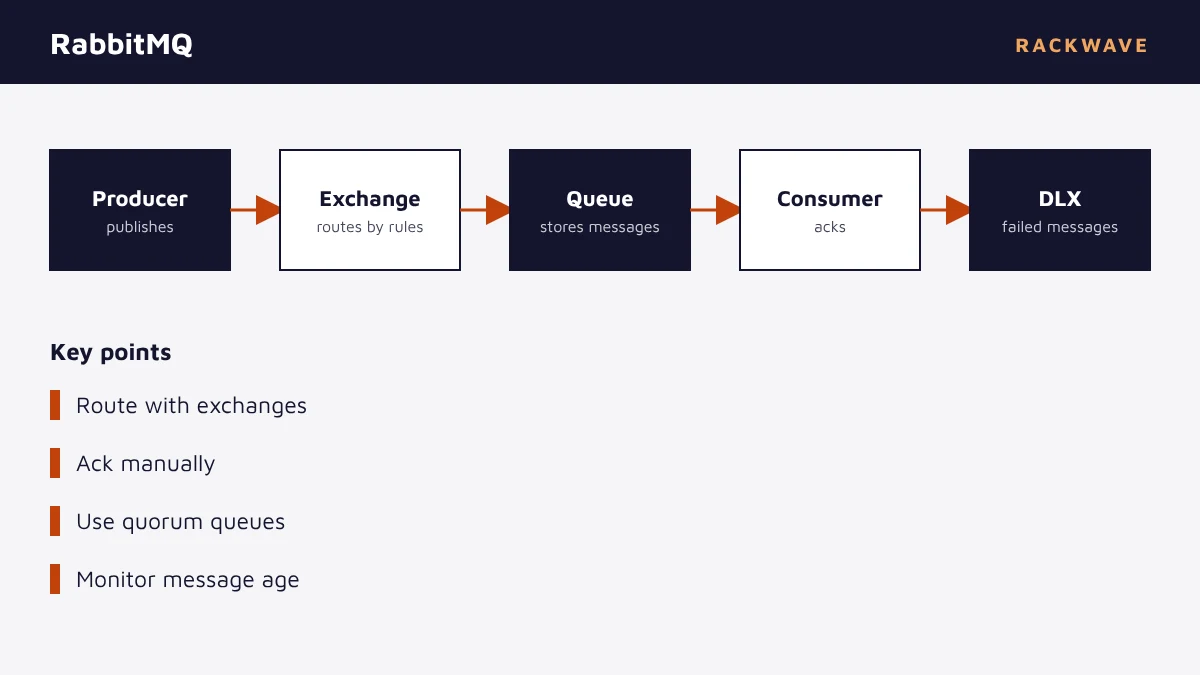
| Concept | Meaning |
|---|---|
| Producer | Application that publishes messages |
| Exchange | Receives messages and routes them to queues using rules |
| Queue | Buffer that stores messages until consumers handle them |
| Binding | Rule linking an exchange to a queue, often with a routing key |
| Consumer | Application that receives and acknowledges messages |
| Virtual host | Logical separation of resources and permissions inside a broker |
| Channel | Lightweight connection inside a TCP connection used for operations |
Exchange types
| Type | Routing behaviour | Typical use |
|---|---|---|
| Direct | Exact match on routing key | Targeted task queues |
| Fanout | Copies to all bound queues | Broadcast notifications |
| Topic | Pattern match on routing key such as orders.eu.* | Selective subscriptions |
| Headers | Match on message headers | Complex attribute routing |
| Default exchange | Routes to the queue named by the key | Simple work queues |
How RabbitMQ delivers messages reliably
- Acknowledgements: a message is removed only after the consumer confirms processing.
- Persistence: durable queues and persistent messages survive broker restarts.
- Publisher confirms: the broker confirms it has taken responsibility for a message.
- Dead letter exchanges: failed or expired messages are routed elsewhere for inspection.
- Prefetch: limits unacknowledged messages per consumer for fair dispatch.
- Time to live and length limits: control message age and queue size.
Queue types and high availability
| Queue type | Description | When to use |
|---|---|---|
| Classic queue | Single node queue with optional mirroring in older versions | Simple or transient workloads |
| Quorum queue | Replicated queue based on the Raft consensus algorithm | Data safety and high availability |
| Stream | Append only log with replay | High throughput and multiple readers |
| Lazy or disk focused queues | Keep messages mostly on disk | Very long queues |
Clusters join several nodes so that queues and metadata survive failures. Quorum queues are the recommended choice for important data because they replicate messages across a majority of nodes and elect a new leader automatically.
Common use cases
| Use case | How RabbitMQ helps |
|---|---|
| Background jobs | Work queues spread tasks, such as email or report generation, across workers |
| Microservice communication | Asynchronous messages decouple services |
| Workflow orchestration | Messages move steps between stages with retries |
| Notifications and fanout | One event reaches many consumers |
| IoT and mobile | MQTT support connects devices |
| Integration | Bridges legacy and modern systems through messaging. See what is system integration |
RabbitMQ versus Kafka and cloud queues
| Item | RabbitMQ | Kafka | Cloud queue service |
|---|---|---|---|
| Model | Smart broker, flexible routing | Distributed log, replay | Managed, simple queues |
| Strength | Routing, per message acknowledgement | Throughput, retention | Low operations |
| Best for | Task distribution and integration | Streaming and analytics | Simple decoupling in one cloud |
| Ordering | Per queue | Per partition | Varies |
Operating RabbitMQ well
- Size and place the cluster. Use an odd number of nodes across failure zones for quorum queues.
- Secure access. Enable TLS, create per application users and limit permissions per virtual host.
- Set policies. Apply TTL, length limits, dead letter rules and queue types through policies.
- Tune consumers. Use prefetch, manual acknowledgements and idempotent handlers.
- Monitor. Track queue depth, message age, unacked counts, memory, disk and connection churn.
- Plan upgrades and backups. Export definitions, rehearse failover and upgrade in rolling fashion.
Common mistakes
- Using auto acknowledgement, which loses messages when a consumer fails.
- Letting queues grow without limits until memory or disk alarms trigger.
- Opening a new connection per message instead of reusing connections and channels.
- Using non durable queues for important data.
- No dead letter handling, so poison messages loop forever.
- Sharing one virtual host and user across unrelated systems.
Our system integration service designs RabbitMQ based messaging for reliable integrations, and our DevOps service operates clusters with monitoring and automation.
A worked example: a reliable order pipeline
An e-commerce platform publishes order events to a topic exchange with routing keys such as order.created.eu. Separate durable queues are bound for payments reconciliation, warehouse allocation, invoicing and customer notifications, each with its own consumers and a dead letter exchange. Quorum queues replicate across three nodes in different zones.
During a promotion, invoicing slows and its queue grows, but checkout is unaffected. Alerts on message age trigger extra consumers. A malformed message that always fails after three attempts is routed to the dead letter queue, where an engineer fixes the producer bug and replays the messages safely. No orders are lost during a rolling upgrade of the cluster.
Security and multi tenancy
Treat the broker as shared infrastructure with clear boundaries. Use virtual hosts to separate environments and applications, give each application its own credentials with the minimum permissions on exchanges and queues and enforce TLS for clients and between nodes. Rotate credentials, disable default accounts and restrict the management interface to trusted networks. Audit configuration changes, and avoid placing secrets or unnecessary personal data inside message bodies.
Performance and capacity planning
Throughput depends on message size, persistence, acknowledgements and the number of queues and consumers. Persistent messages with confirms are slower than transient ones, so measure realistic workloads rather than relying on benchmarks. Keep queues short in steady state, because very long queues use memory and slow recovery. Scale by adding consumers and splitting traffic across queues, and test failover and recovery times with production sized data before launch.
Patterns you will use with RabbitMQ
| Pattern | Setup | Benefit |
|---|---|---|
| Work queue | One queue, many competing consumers | Parallel job processing |
| Publish subscribe | Fanout exchange with a queue per subscriber | Each service gets every event |
| Routing | Direct or topic exchange with bindings | Consumers receive only what they need |
| Retry with delay | Dead letter exchange plus TTL queue | Backoff without custom scheduler code |
| RPC style | Reply queue and correlation identifier | Asynchronous request and response |
Start with the simplest pattern that meets the requirement and add routing or retry layers only when needed. Document every exchange, queue and binding as part of the system design, so new engineers can see how messages flow and which team owns each part.
Migrating to and from RabbitMQ
Teams move to RabbitMQ from database polling, from in process job libraries or from older enterprise brokers, and sometimes move on to streaming platforms as volumes and replay needs grow. Introduce it incrementally behind an abstraction, run old and new paths in parallel for a period and compare results before cutting over. Keep message contracts independent of the broker, so the transport can change without rewriting business logic.
Key takeaways
- RabbitMQ routes messages from producers through exchanges to queues for consumers to process.
- Direct, fanout, topic and headers exchanges provide flexible routing.
- Acknowledgements, persistence, confirms and dead letter exchanges deliver reliability.
- Quorum queues and clusters provide high availability.
- Operate with security, policies, monitoring and idempotent consumers.
Quick glossary
| Term | Meaning |
|---|---|
| Exchange | The component that routes published messages |
| Binding | A rule connecting an exchange to a queue |
| Quorum queue | A replicated queue using Raft |
| Prefetch | Limit on unacknowledged messages per consumer |
| Virtual host | A logical partition inside a broker |
Read next: What Is API Management? Lifecycle, Features, Tools · What Is a Message Queue? Patterns and Best Practices · What Is Single Sign-On (SSO)? How It Works
Frequently asked questions
What is RabbitMQ used for?
It is used to decouple applications, distribute background jobs, route events to many consumers and integrate systems through reliable asynchronous messaging.
What protocols does RabbitMQ support?
AMQP 0-9-1 is the core protocol, with support for AMQP 1.0, MQTT, STOMP and HTTP based options through plugins.
What is an exchange in RabbitMQ?
An exchange receives messages from producers and routes them to queues according to its type and the bindings configured.
What is the difference between RabbitMQ and Kafka?
RabbitMQ is a flexible broker with per message routing and acknowledgement. Kafka is a distributed log optimised for high throughput streaming and replay.
What are quorum queues?
They are replicated queues that use the Raft algorithm to keep messages safe across nodes and elect a new leader automatically after failure.
How do I avoid losing messages in RabbitMQ?
Use durable queues, persistent messages, publisher confirms and manual consumer acknowledgements, and replicate with quorum queues.
Is RabbitMQ free?
The core broker is open source. Commercial support and enterprise distributions are available from vendors.
How do I monitor RabbitMQ?
Use the management interface, Prometheus metrics and alerts on queue depth, message age, unacknowledged counts, memory and disk.