
What is system integration? System integration is the process of connecting separate software systems, applications and data sources so they work together as one coordinated whole. It lets orders, customers, inventory and financial data move between tools automatically instead of being copied by hand. This guide explains the main approaches, the technologies behind them, the benefits and risks and how to plan a project.
Short answer: System integration links independent systems, such as CRM, ERP, e-commerce and analytics, so they exchange data and trigger each other's processes. Common approaches are point-to-point connections, hub-and-spoke, middleware such as an ESB or iPaaS, and API- and event-led designs.
What is system integration?
Organisations accumulate systems over time, each bought to solve a specific problem. System integration makes them behave like one environment. When a customer places an order, integration can update stock, raise an invoice, notify the warehouse and create a record for support, all without anyone re-typing data.
The practice sits within the wider field of enterprise application integration. It covers connecting applications, but also data, devices and partners.
Why system integration matters
- Fewer errors: data is entered once and flows automatically.
- Faster processes: hand-offs that took days happen in seconds.
- Better visibility: leaders see consistent, near real-time information.
- Better customer experience: every team sees the same customer history.
- Easier change: well-designed integration lets you replace one system without rebuilding everything.
Integration approaches compared
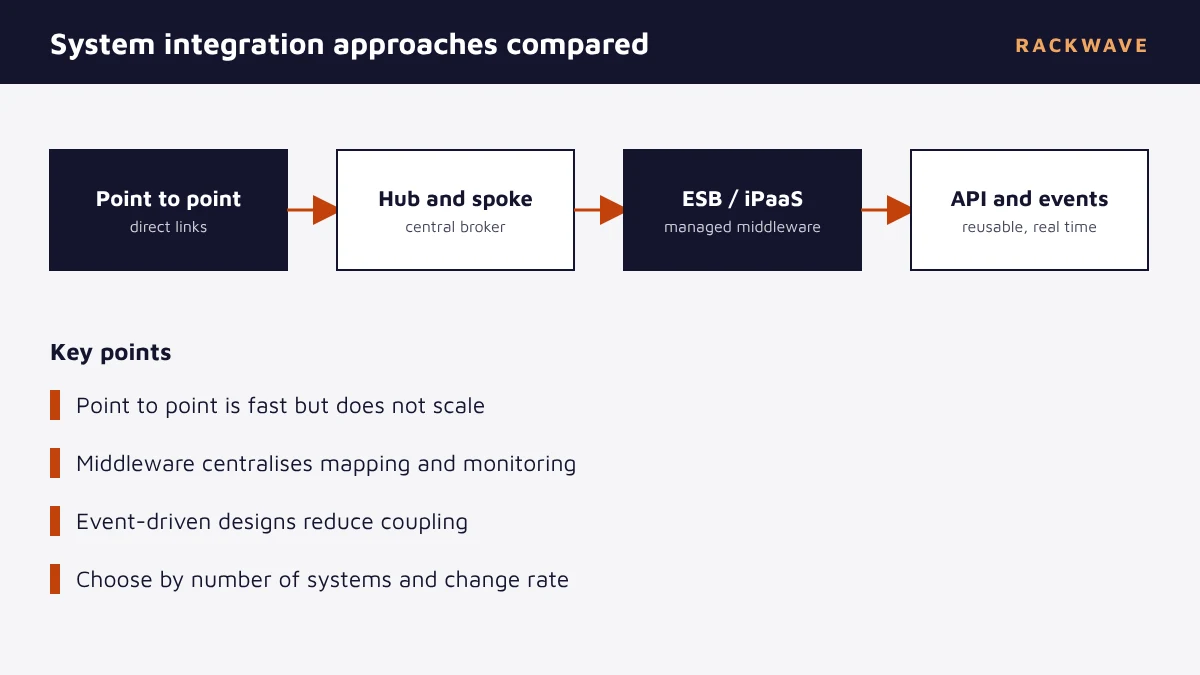
| Approach | How it works | Strengths | Weaknesses |
|---|---|---|---|
| Point to point | Each system connects directly to each other | Quick for two or three systems | Connections multiply; hard to maintain |
| Hub and spoke | Systems connect to a central broker | One place for mapping and routing | The hub can become a bottleneck |
| ESB / iPaaS | Middleware handles routing, transformation and monitoring | Rich tooling and connectors | Needs governance and skills |
| API and event-driven | Systems expose APIs and publish events others consume | Reusable, loosely coupled, scalable | Requires good design and discipline |
The number of direct links in a point-to-point design grows quickly. Ten systems that all need to talk to each other could need 45 separate connections, which is why middleware and APIs become attractive as an estate grows.
Key technologies
- APIs: standard interfaces for systems to request and send data, usually over REST. See what is an API gateway.
- Webhooks and events: one system notifies others when something happens. See what is a webhook.
- ETL and ELT: extract, transform and load data between databases and warehouses. See ETL pipelines.
- Middleware and iPaaS: platforms such as MuleSoft that provide connectors, transformation and monitoring.
- Message queues: buffers that let systems exchange messages reliably even when one is offline.
The system integration process
- Assess the landscape. Inventory systems, owners, interfaces and data flows, including undocumented spreadsheets and scripts.
- Define requirements. Specify which processes must be automated, how fast data must move and the volumes involved.
- Choose an architecture. Select the approach and tools based on the number of systems, change rate and team skills.
- Design data mapping and ownership. Agree which system owns each data element and how fields translate.
- Build and test. Develop interfaces, then test functionality, volume, failure handling and security.
- Deploy and monitor. Release in stages with monitoring, alerting and clear support ownership.
Every integration is a promise that two systems will keep agreeing as both of them change.
Risks and how to manage them
| Risk | Mitigation |
|---|---|
| Poor data quality spreads between systems | Validate and cleanse data at the boundary; assign data owners |
| Fragile point-to-point links | Use middleware or APIs and document every interface |
| Security gaps | Use least-privilege credentials, encryption and audit logs |
| Vendor lock-in | Prefer open standards and keep business rules portable |
| No monitoring | Build dashboards and alerts into the project scope |
Build, buy or outsource?
Small, stable integrations can be built in-house with native connectors or light scripts. Larger programmes benefit from an integration platform and experienced architects who have solved similar problems. Many organisations use a mix: a platform for the core, with partner support for design, delivery and run. Whichever you choose, treat integration as a product with an owner, a roadmap and a support model, not a one-off project.
If your project centres on Salesforce, read Salesforce integration. For the CRM background, see what is CRM. Our system integration and API development services cover design through to support.
Real-world integration examples
Order to cash: an online order triggers stock allocation in the ERP, a payment capture, an invoice, a shipping label and a status update to the customer. Each step lives in a different system, and integration passes the order along without manual hand-offs.
Lead to revenue: a web form creates a lead in the CRM, marketing automation scores it, sales is notified, and a signed contract creates an account in billing. See what is CRM for the CRM side of this flow.
Customer 360: data from sales, service, product usage and billing is brought together to give a complete customer view, often through a customer data platform such as Data Cloud.
Data integration vs application integration
Application integration connects live processes, so an action in one system triggers an action in another. Data integration moves and combines data for reporting and analytics, often in batches into a warehouse. Most organisations need both. Application integration keeps operations running, while data integration feeds analysis and machine learning.
Integration governance
As integrations multiply, governance keeps them healthy. Keep an up-to-date catalogue of interfaces with owners, data contracts and service levels. Version your APIs, set naming and security standards, and review changes before release. Without this, an integration estate drifts into the same tangle that middleware was meant to prevent.
- Assign an owner to every interface.
- Document data contracts, including formats, keys and frequency.
- Set standards for authentication, logging and error handling.
- Review capacity before adding new consumers.
- Retire interfaces that no longer serve a purpose.
Choosing the right integration architecture
Start with facts about your estate. Count the systems and the interfaces between them, and note how often each changes. Check how fast data must move: seconds for a payment status, hours for a nightly report. Assess the skills you have, because a sophisticated platform without the people to run it creates its own risk.
For two or three stable systems, a direct, well-documented connection may be the cheapest right answer. As the number of systems and consumers grows, shared middleware and reusable APIs reduce duplicate work. For fast-changing, high-volume domains, event-driven designs let systems react without tight coupling, at the price of more careful design around ordering, duplicates and failures.
Whichever route you take, avoid hard-coding assumptions about other systems into business logic. Put transformation and routing in a layer you can change, and agree contracts, so either side can evolve without surprising the other.
Key takeaways
- System integration connects separate systems so they work as one.
- Approaches range from point-to-point to API- and event-driven designs.
- Middleware centralises mapping, routing and monitoring.
- Data quality and ownership decide whether integration succeeds.
- Govern interfaces with owners, contracts and standards.
Quick glossary
| Term | Meaning |
|---|---|
| API | A defined interface for systems to exchange data |
| ESB | Middleware that routes and transforms messages |
| iPaaS | Cloud-based integration platform as a service |
| Webhook | A notification sent when an event occurs |
Read next: Lead Nurturing: Strategy, Tactics and Examples · Data Quality: Dimensions, Causes and How to Improve It · What Is a Data Pipeline? Components, Types and Examples
Frequently asked questions
What is system integration in simple terms?
It is connecting separate software systems so they share data and work together automatically, instead of people copying information from one to another.
What are the types of system integration?
Common approaches are point-to-point integration, hub-and-spoke, enterprise service bus or iPaaS middleware, and API- and event-driven integration.
What is the difference between API and system integration?
An API is a technical interface a system exposes. System integration is the broader practice of connecting systems, which often uses APIs along with events, middleware and data pipelines.
What is an ESB?
An enterprise service bus is middleware that routes, transforms and mediates messages between systems. Modern platforms often combine this role with API management.
What is iPaaS?
Integration platform as a service is a cloud platform that provides connectors, workflow tools and monitoring for building integrations without managing the underlying infrastructure.
How long does a system integration project take?
Simple connections can take days or weeks. Larger programmes involving several systems, data mapping and testing take months. Scope, data quality and approvals are the main drivers.
What are the risks of system integration?
Key risks are poor data quality, fragile connections, security gaps, vendor lock-in and a lack of monitoring. Careful design, ownership and testing reduce them.
How do I choose an integration approach?
Consider the number of systems, how often they change, required speed, available skills and budget. Direct links suit very small estates, while middleware or API-led designs suit larger ones.