
What is a message queue? A message queue is a form of asynchronous communication in which a producer application sends messages to a queue, and one or more consumer applications retrieve and process them later, independently and at their own pace. The queue holds messages until they are handled, which decouples systems, smooths traffic spikes, improves reliability and lets work be distributed across many workers. Message queues are a foundation of event driven architectures, microservices and integration platforms. This guide explains how message queues work, the main patterns such as point to point and publish subscribe, delivery guarantees, popular technologies, when to use them and the design practices that avoid lost, duplicated or stuck messages.
Short answer: A message queue lets one system hand work to another without waiting. Messages are stored until a consumer processes them, which decouples services, absorbs spikes and makes systems more resilient.
What is a message queue?
The message queue article on Wikipedia describes queues as components used for inter process communication. They underpin event driven architecture, connect microservices and are central to system integration. Well known technologies include RabbitMQ and Apache Kafka.
How a message queue works
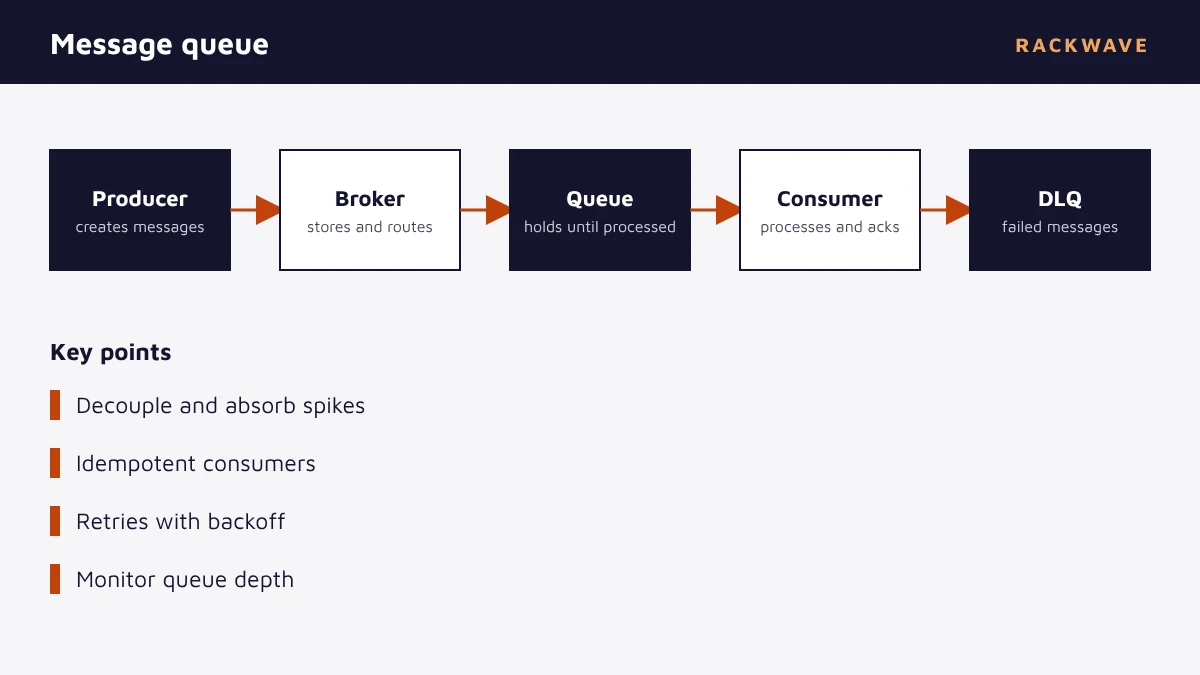
- A producer creates a message with a payload and metadata.
- The message is sent to a queue or broker and stored durably.
- A consumer receives the message, either pushed by the broker or pulled by the consumer.
- The consumer processes it and sends an acknowledgement.
- On success the broker removes the message. On failure it is retried or moved to a dead letter queue.
- Monitoring tracks queue depth, age of the oldest message and error rates.
Messaging patterns
| Pattern | How it works | Use case |
|---|---|---|
| Point to point (work queue) | Each message goes to exactly one consumer | Background jobs, order processing |
| Publish subscribe | Each message goes to all interested subscribers | Notifications, event broadcast |
| Request reply | Response returned through a reply queue | Asynchronous remote calls |
| Routing and topics | Messages routed by keys or patterns | Selective delivery |
| Priority queues | Urgent messages processed first | Mixed workloads |
| Dead letter queue | Holds messages that could not be processed | Troubleshooting and replay |
Delivery guarantees
| Guarantee | Meaning | Trade off |
|---|---|---|
| At most once | Message delivered zero or one time | May lose messages, fastest |
| At least once | Delivered one or more times | No loss, requires idempotent consumers |
| Exactly once | Processed once in effect | Complex and often limited to specific scopes |
| Ordered delivery | Messages processed in sequence | Limits parallelism |
Message queue versus event streaming
| Aspect | Message queue | Event streaming log |
|---|---|---|
| Model | Messages removed once consumed | Events retained and replayable |
| Consumers | Compete for work | Many groups read independently |
| Best for | Task distribution, workflows | Analytics, event sourcing, data pipelines |
| Examples | RabbitMQ, Amazon SQS, Azure Service Bus | Apache Kafka, Pulsar, Kinesis |
Benefits of message queues
- Decoupling: producers and consumers evolve and scale independently.
- Resilience: messages wait if a consumer is down.
- Load levelling: spikes are absorbed and processed steadily.
- Scalability: add workers to drain a backlog.
- Faster user experience by moving slow work out of the request path.
- Auditability when messages are logged and traced.
Design practices and pitfalls
- Make consumers idempotent, so duplicates do no harm.
- Set visibility timeouts, retries with backoff and a dead letter queue.
- Keep messages small and reference large data by link.
- Use schemas and versioning for message contracts.
- Monitor queue depth and message age, not only server health.
- Avoid hidden coupling through shared message formats without governance.
How to introduce a message queue
- Find the asynchronous work. Identify slow, bursty or failure prone steps that can happen later.
- Pick a broker. Choose by features, throughput, ordering needs, hosting and skills.
- Define message contracts. Document schemas, versions and ownership.
- Design for failure. Add retries, backoff, dead letter handling and idempotency.
- Secure it. Use authentication, encryption and least privilege access to queues.
- Observe and tune. Dashboard depth, latency and errors, and scale consumers on backlog.
Our system integration service designs reliable messaging architectures, and our DevOps service runs and monitors them in production.
A worked example: absorbing order spikes
An online retailer processes payments, stock updates, invoices and emails synchronously when an order is placed. During promotions the invoicing service slows down and checkout times out. The team keeps payment synchronous but publishes an order placed message to a queue. Separate consumers handle stock, invoicing, email and CRM updates at their own pace.
Checkout stays fast during a flash sale while the backlog drains over minutes. A failed invoice call retries with backoff and finally moves to a dead letter queue, where support can inspect and replay it. Queue depth alerts trigger extra consumers automatically, and no orders are lost when the email service has an outage.
Idempotency, ordering and retries in practice
Reliable messaging depends on handling the awkward cases. Because at least once delivery can repeat a message, consumers should record processed message identifiers or design updates so that repeating them changes nothing. If order matters, partition by a key such as customer or order so related messages are handled in sequence while unrelated ones run in parallel. Use exponential backoff for retries, cap the number of attempts and alert on dead letter queue growth so failures are investigated rather than ignored.
Security and operations
Queues carry business data, so secure them like databases. Use authenticated, encrypted connections, limit which applications can publish to or read from each queue and avoid putting secrets or unnecessary personal data in payloads. Plan capacity for peak backlog, set retention and size limits, back up broker configuration and test failover. Document runbooks for common events such as a stuck consumer, a poison message or a broker restart.
Choosing a broker
| Need | Good fit | Notes |
|---|---|---|
| Rich routing and flexible patterns | RabbitMQ | Mature, many protocols |
| Fully managed on a public cloud | Amazon SQS and SNS, Azure Service Bus, Google Pub/Sub | Less to operate, cloud specific |
| High volume event streams and replay | Apache Kafka | Retained log, strong ecosystem |
| Enterprise integration with transactions | Message brokers in integration suites | Fits ESB style estates |
| Lightweight, low latency messaging | NATS and similar | Simple and fast |
Evaluate brokers against real requirements: throughput, ordering, retention, latency, protocol support, security model and the skills of your team. A managed cloud service is often the fastest path, while self hosting suits strict data residency or very high volumes.
When not to use a message queue
Queues add moving parts. If a caller needs an immediate answer to continue, a direct synchronous call is simpler. If the workload is small and a single service handles it, a queue may be unnecessary overhead. Avoid using a queue as a database or as a way to hide an unreliable service. Use it where asynchronous handling genuinely improves resilience, scale or user experience, and keep the architecture as simple as the requirement allows.
Start small: move one slow, failure prone step behind a queue, measure the effect on response time and error rates and expand only when the pattern proves its value.
Key takeaways
- A message queue stores messages so producers and consumers can work asynchronously.
- It decouples systems, absorbs spikes and improves resilience.
- Choose point to point or publish subscribe patterns and understand delivery guarantees.
- Design idempotent consumers, retries, backoff and dead letter queues.
- Monitor depth and message age, and secure queues like any data store.
Quick glossary
| Term | Meaning |
|---|---|
| Producer | An application that sends messages |
| Consumer | An application that receives and processes messages |
| Broker | The server that stores and routes messages |
| Dead letter queue | A queue for messages that repeatedly fail |
| Idempotent | Safe to process more than once |
Read next: What Is API Management? Lifecycle, Features, Tools · What Is RabbitMQ? Exchanges, Queues and Use Cases · What Is Single Sign-On (SSO)? How It Works
Frequently asked questions
What is a message queue in simple terms?
It is a waiting line for messages between applications. One system drops work into the queue and another picks it up and processes it when ready.
Why use a message queue?
To decouple services, handle traffic spikes, improve reliability and keep user facing requests fast by moving slow work to the background.
What is the difference between a queue and publish subscribe?
In a queue each message goes to one consumer. In publish subscribe each message goes to every subscriber that is interested.
What is a dead letter queue?
A dead letter queue stores messages that could not be processed after several attempts, so they can be inspected and replayed.
What does at least once delivery mean?
The broker guarantees a message is delivered, possibly more than once, so consumers must tolerate duplicates.
Is Kafka a message queue?
Kafka is an event streaming platform that can act like a queue, but it keeps events in a replayable log, unlike traditional queues that delete messages once consumed.
What are popular message queue technologies?
RabbitMQ, Amazon SQS, Azure Service Bus, Google Pub/Sub, ActiveMQ, and Apache Kafka for streaming.
What can go wrong with message queues?
Duplicate or lost messages, poison messages, growing backlogs, hidden coupling and weak monitoring if they are not designed and operated carefully.