
How do Twilio webhooks work? Twilio webhooks are HTTP requests that Twilio sends to your server when something happens, such as an incoming message, an incoming call or a status change on a message or call. Your server receives the request, does some work and responds, often with instructions that tell Twilio what to do next. This guide explains webhook types, how requests are structured, how to validate that a request really came from Twilio, how to respond correctly and quickly, how to design for retries, duplicates and downtime, how to test locally and the mistakes that cause lost events or security problems. Behaviour and defaults change, so confirm details in current Twilio documentation.
Short answer: Expose an HTTPS endpoint, validate the request signature, respond quickly with the expected format, process work asynchronously, handle duplicates and failures and monitor the endpoint like any production service.
What is a webhook?
A webhook is a callback over HTTP. Instead of your application repeatedly asking whether something has happened, the platform tells you when it does. Twilio uses webhooks widely: for inbound messages and calls, for delivery status updates and for flows such as Studio. The general pattern is explained in what is a webhook. It is a core part of integrating with Twilio.
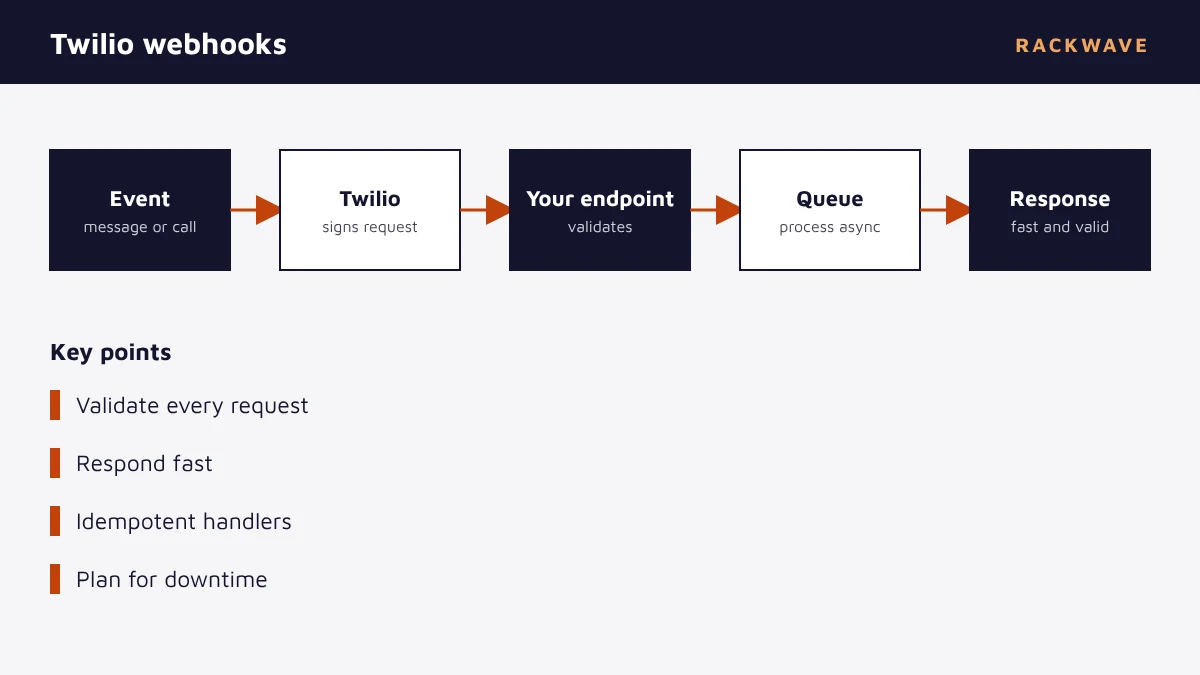
Common Twilio webhooks
| Webhook | When it fires | Typical response |
|---|---|---|
| Incoming message | A message arrives at your number or service | TwiML or an empty response, plus your own processing. See programmable SMS |
| Message status callback | A message status changes, such as sent or delivered | A simple success response |
| Incoming call | A call arrives at your number | TwiML instructions. See programmable voice |
| Call status callback | A call changes state or ends | A simple success response |
| Events from other products | Verification, conversations, task routing and more | Depends on the product |
Each webhook delivers form-encoded or JSON parameters, depending on the product, including identifiers such as the message or call SID.
Validating the request
Anyone can send an HTTP request to your URL, so you must check that Twilio sent it. Twilio signs each request with a header that is calculated from the full URL, the request parameters and your account auth token. Your server recomputes the signature and compares it. Twilio helper libraries provide a validation function, which is the safest way to do it. Reject requests that fail, use HTTPS and make sure the URL you validate matches exactly what Twilio called, including any proxy or scheme differences. See API security.
Responding correctly
- Respond within the time limit, which is typically a few seconds, so keep handlers fast.
- Return the right content type and a valid body. For voice, return valid TwiML, and for messaging, return TwiML or an empty response with a success code.
- Respond with a success code once you have safely accepted the event, and do heavy work afterward.
- Avoid redirects and slow external calls inside the handler.
- Configure a fallback URL for critical numbers so Twilio can use it if the main URL fails.
Designing for duplicates and failures
| Situation | Design response |
|---|---|
| The same event arrives twice | Make handlers idempotent using the message or call SID as a key |
| Events arrive out of order | Use event time or status rank, and never move a status backward |
| Your server is down | Use a fallback URL, monitoring and alerts, and plan how to reconcile missed events from the API |
| A burst of events | Queue them and process in the background with rate control |
| A slow dependency | Time-box calls and respond quickly, then retry later |
Treat webhooks as at-least-once delivery. Assume you will sometimes see duplicates, and design so that is harmless.
How to build a reliable webhook endpoint
- Create an HTTPS endpoint. Use a valid certificate and a stable URL.
- Validate the signature. Reject unsigned or invalid requests.
- Parse the parameters. Read identifiers, sender, body and status.
- Enqueue the work. Store the event and process it asynchronously.
- Respond fast. Return the expected response immediately.
- Handle duplicates. Use the SID as an idempotency key.
- Monitor. Track response times, error rates and queue depth.
Testing and local development
- Use a secure tunnel tool to expose a local server during development, and never leave it open in production.
- Use the debugger and logs in the Twilio console to see requests, responses and errors.
- Replay sample payloads in automated tests, including failure cases and duplicates.
- Test signature validation with both valid and tampered requests.
- Test behaviour when your server is slow or returns errors.
Security and operations
| Topic | Practice |
|---|---|
| Secrets | Store the auth token in a secret manager and rotate it |
| Network | Use HTTPS only and consider rate limits at your edge |
| Data | Avoid logging sensitive message content |
| Access | Limit who can change webhook URLs in the console |
| Monitoring | Alert on spikes in failures and on missing events |
A changed webhook URL can silently break a business process or redirect events, so treat it as a controlled change with review.
Reconciliation and recovery
Even a well-built endpoint can miss events, for example during an outage or a deployment mistake. Plan reconciliation as a normal process. Use the Twilio API to list recent messages or calls and compare their statuses with your records, and fix any that differ. Run the check on a schedule and after any incident. Keep identifiers in your own database so matching is simple, and keep a log of events you processed so you can prove what happened when someone disputes a delivery.
Webhook design checklist
- The endpoint uses HTTPS and a stable, documented URL.
- Signature validation runs before any other work.
- Handlers respond in well under the time limit.
- Work is queued, and queue depth and age are monitored.
- Duplicates are harmless because the SID is used as a key.
- A fallback URL and alerting exist for critical numbers.
- Secrets and URLs are stored in configuration, not in code.
Webhooks beyond messaging and voice
Many Twilio products send webhooks, including verification, conversations, task routing and email event streams. The same principles apply to all of them: validate, acknowledge quickly, process asynchronously and handle duplicates. Keep a shared module that implements these rules so every new integration starts from the same safe base.
Common mistakes
- Skipping signature validation.
- Doing slow work inside the handler, causing timeouts.
- No idempotency, so duplicates create duplicate records or replies.
- Validating against the wrong URL behind a proxy.
- No alerts when the endpoint fails.
A worked example
A bike sharing company receives inbound texts from riders. The webhook validates the signature, stores the message and responds immediately with an empty response, while a background worker identifies the rider, creates a support case and sends a reply through the API. Status callbacks update the case timeline using the message SID as a key.
When the support system was down for an hour, queued events were processed once it recovered, and no rider messages were lost. The example is illustrative.
Best practices and support
- Keep one well-tested webhook library or module for all products.
- Document each webhook URL, owner and purpose.
- Use separate URLs for development and production.
- Review error rates weekly and fix recurring causes.
Our API development service builds secure, resilient webhook handlers, and our system integration service connects them to CRM and operations systems.
Key takeaways
- Webhooks tell your server when events happen.
- Always validate the request signature.
- Respond quickly and process work asynchronously.
- Make handlers idempotent and plan for downtime.
- Monitor endpoints like production services.
Quick glossary
| Term | Meaning |
|---|---|
| Webhook | HTTP callback sent when an event occurs |
| Signature | A header used to verify the sender |
| Idempotency | Safe handling of repeated events |
| Fallback URL | Backup endpoint if the main one fails |
| SID | Unique identifier for a Twilio resource |
Read next: What Is API Management? Lifecycle, Features, Tools · What Is a Message Queue? Patterns and Best Practices · What Is RabbitMQ? Exchanges, Queues and Use Cases
Frequently asked questions
What is a Twilio webhook?
An HTTP request Twilio sends to your server when an event happens, such as an incoming message or call or a status change.
How do I verify a webhook is from Twilio?
Validate the signature header using the full URL, parameters and your auth token, preferably with the helper library.
How fast must I respond?
Within a few seconds, so acknowledge quickly and do heavy work in the background.
What if my server is down?
Configure a fallback URL, alert on failures and reconcile missed events using the API.
Can I receive the same event twice?
Yes, so make handlers idempotent using identifiers such as the message or call SID.
How do I test webhooks locally?
Use a secure tunnel to expose your local server and check the console logs and debugger.
What should I return for incoming messages?
TwiML or an empty successful response, depending on whether you want Twilio to send an automatic reply.
Where should I store the auth token?
In a secret manager, never in source code, and rotate it on a schedule.