
What are Twilio Messaging Services? A Twilio Messaging Service is a container that groups senders, such as phone numbers, short codes and sender IDs, and applies shared settings to them. When you send through a messaging service instead of a single number, Twilio can pick the best sender, keep conversations on the same number, handle opt-outs, link registrations such as A2P 10DLC campaigns and scale across many senders. This guide explains what a messaging service does, its main features, how to set one up, how to design sender pools for volume and geography, how it supports compliance and monitoring and the mistakes to avoid. Features change, so confirm details in current Twilio documentation.
Short answer: Use a messaging service for anything beyond a prototype. Add your senders to a pool, enable features such as sticky sender and opt-out handling, attach registered campaigns and send using the service identifier instead of a fixed number.
What is a messaging service?
Sending from a single phone number works for tests, but it does not scale. Numbers have throughput limits, regulations differ by country and opt-outs must be consistent across all numbers a customer might see. A messaging service solves this by acting as one sender identity backed by many senders. You send with the service identifier and Twilio chooses the sender according to the rules you set. It is a central concept for reliable use of programmable SMS on Twilio.
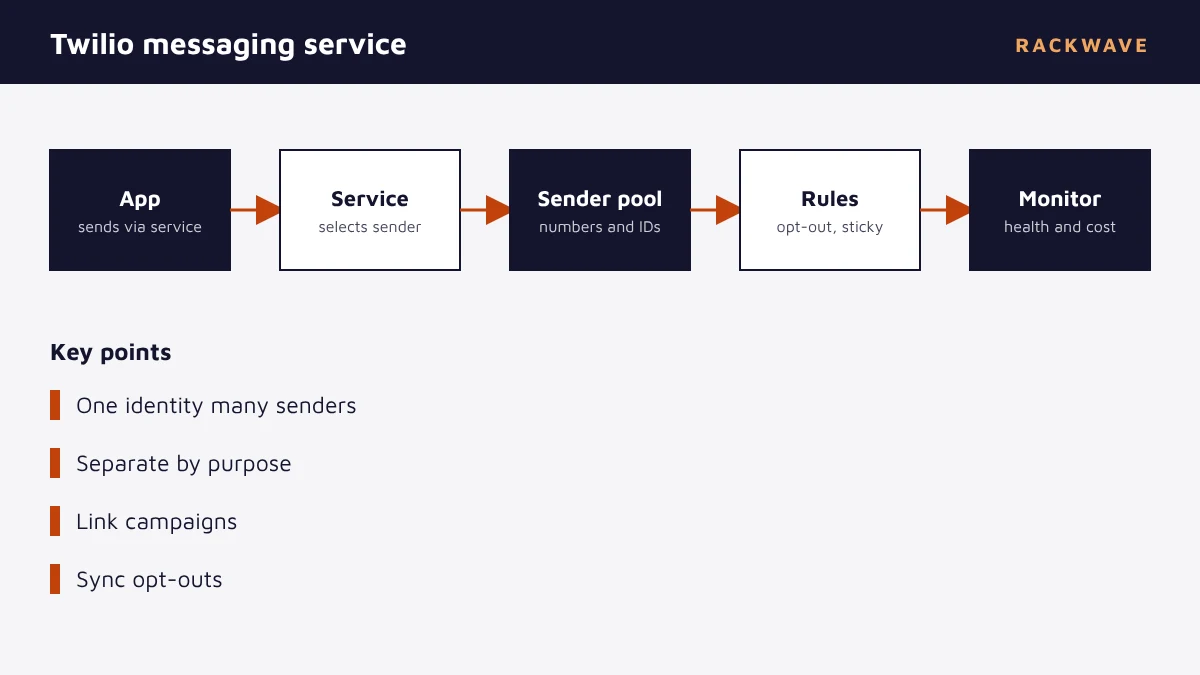
Main features
| Feature | What it does | Why it matters |
|---|---|---|
| Sender pool | Holds numbers, short codes and sender IDs | Spreads load and supports several countries |
| Sticky sender | Keeps using the same sender for the same recipient | Consistent conversations |
| Geo-match and area code matching | Prefers a sender local to the recipient | Better trust and response in some markets |
| Opt-out handling | Processes keywords such as STOP across the pool | Consistent compliance |
| Smart encoding and content tools | Adjusts characters and manages message content | Fewer surprises in segment counts |
| Campaign association | Links the service to registered A2P campaigns. See A2P 10DLC | Required for compliant US traffic |
| Scaling and throughput features | Uses several senders to raise capacity | Needed for bursts and campaigns |
| Callbacks and inbound settings | Sets status and inbound webhook URLs once for all senders. See webhooks | Simpler configuration |
The exact feature list changes, so check current documentation when planning.
How to set up a messaging service
- Create the service. Name it by brand, region or use case, such as appointments or alerts.
- Add senders. Add numbers, short codes or sender IDs that match the destination countries.
- Associate registrations. Link approved brand and campaign registrations where required.
- Configure webhooks. Set inbound and status callback URLs and secure them.
- Enable features. Turn on sticky sender, opt-out handling and any matching features you need.
- Send using the service. Pass the messaging service identifier in your API request instead of a from number.
- Monitor. Review delivery, errors and sender usage.
Designing sender pools
- Separate services by brand and by message type, for example transactional alerts and marketing, so reputation and consent do not mix.
- Match sender types to countries. A US number pool does not help with sending in other countries.
- Size the pool for peak volume, using throughput limits and expected burst patterns.
- Keep a reserve of numbers for replacement if one is flagged.
- Retire numbers that perform poorly and record why.
- Document which senders belong to which service and owner.
Compliance and opt-out
A messaging service helps enforce consistent rules. Opt-out keywords can apply across all senders in the service so a person who replies STOP to one number stops receiving messages from all of them. Link the service to the correct registered campaign, keep consent records in your own system and sync opt-outs in both directions. Quiet hours and content rules are still your responsibility. See SMS marketing and GDPR for the broader obligations.
Throughput and scaling
| Topic | Guidance |
|---|---|
| Queues | Twilio queues messages and sends within sender limits, so plan for delivery time on large bursts |
| Registered campaigns | Throughput depends on registration and trust, so check limits for each campaign |
| Short codes | Suit very high volume where registration for long codes is not enough |
| International traffic | Use country appropriate senders and check local rules |
| Rate control in your app | Spread sends over time instead of one large burst |
If time-sensitive messages share a pool with a large marketing send, they may wait. Separate services protect critical traffic.
Monitoring
- Track delivery rate, errors and filtering by service, country and sender.
- Watch sender health and replace numbers that show falling delivery.
- Monitor opt-out and complaint rates, and investigate spikes.
- Review usage and cost by service each month.
- Alert on sudden changes in traffic or error codes.
Choosing sender types for your use case
| Use case | Sender suggestion | Notes |
|---|---|---|
| Appointment reminders in the US | Registered local numbers in a service | Sticky sender helps replies |
| One-time passcodes | A dedicated service with high-trust senders | Keep separate from marketing. See Twilio Verify |
| Large promotional campaigns | Larger pool or short code | Check registration limits |
| Branded alerts in some countries | Alphanumeric sender ID where allowed | Usually one-way |
| Support conversations | Local numbers with inbound handling | Route replies to agents |
Review the sender plan each year, because country rules, carrier filters and your own volumes change.
Operational checklist
- Name the owner and purpose for every service and keep that list current.
- Confirm each sender in the pool is registered where required.
- Check inbound and status webhooks respond correctly.
- Test an opt-out reply and confirm it appears in your consent records.
- Send a small test to every country you serve before a campaign.
- Review delivery and complaint data after each major send.
Migrating to a messaging service
If you currently send from individual numbers, move in stages. Create the service, add the existing numbers and registrations, switch one low-risk programme to send with the service identifier and compare delivery and replies. Keep inbound webhooks consistent so conversations are not interrupted, and tell support teams which number customers will see. Then move the remaining programmes and retire direct number sends from your code so nobody bypasses the service by accident.
Common mistakes
- Sending from individual numbers directly in production.
- Mixing transactional and promotional traffic in one service.
- Forgetting to associate registered campaigns, so traffic is filtered.
- No process to retire or replace flagged numbers.
- Not syncing opt-outs with the CRM.
A worked example
A retail chain runs three programmes: order alerts, appointment reminders and promotions. It creates three messaging services with separate sender pools and registered campaigns. Order alerts use sticky sender so customers always see the same number, promotions use a larger pool for bursts and all three share opt-out rules synced with the CRM.
When a promotion drew complaints, only the promotions service was affected, and order alerts kept their delivery rate. The example is illustrative.
Best practices and support
- Name services clearly and record the owner, purpose and registration for each.
- Review the pool and registrations quarterly.
- Test new senders with a small send before adding them to production.
- Keep the number of services manageable, since too many creates confusion.
Our API development service integrates messaging services with your applications, and our CRM and lifecycle service aligns consent and journeys.
Key takeaways
- A messaging service groups senders behind one identifier.
- Use it for any production messaging.
- Separate services by brand and message type.
- Link registered campaigns and sync opt-outs.
- Monitor delivery, sender health and cost.
Quick glossary
| Term | Meaning |
|---|---|
| Messaging service | A container of senders and shared settings |
| Sender pool | The set of numbers and IDs in a service |
| Sticky sender | Reuses the same sender for a recipient |
| Opt-out | A recipient request to stop messages |
| Campaign | A registered messaging use case |
Read next: What Is API Management? Lifecycle, Features, Tools · What Is a Message Queue? Patterns and Best Practices · What Is RabbitMQ? Exchanges, Queues and Use Cases
Frequently asked questions
What is a Twilio Messaging Service?
A container that groups senders and applies shared settings so you can send from a pool through a single service identifier.
Why use a messaging service instead of a single number?
It scales across senders, applies consistent opt-out handling, supports sticky sender and links registered campaigns.
What is sticky sender?
A feature that keeps using the same sender for the same recipient so conversations stay consistent.
Do I need a messaging service for A2P 10DLC?
Registered campaigns are associated with messaging services, so it is the normal way to send compliant US traffic.
Can I mix transactional and marketing in one service?
It is better to separate them so reputation, consent and throughput do not interfere.
How does opt-out work in a service?
Opt-out keywords can be processed for the whole service so a recipient stops hearing from all of its senders.
How many senders do I need?
Enough for your peak volume and registration limits, plus a reserve for replacements.
How do I monitor a service?
Track delivery, errors, opt-outs and sender health, and review cost and usage regularly.