
What is Twilio Verify? Twilio Verify is an API for verifying that a user controls a phone number, email address or authenticator, most often through a one-time passcode. Instead of building code generation, delivery, expiry, retry, rate limiting and fraud controls yourself, you start a verification and then check the code the user enters. This guide explains how Verify works, which channels it supports, how to design sign-up and login flows, how to defend against SMS pumping and other fraud, how to handle failures and localisation, how to test and what to measure. Features and channels change, so confirm details in current Twilio documentation.
Short answer: Start a verification for a phone or email, let the user enter the code and check it. Add rate limits, fraud protection and a fallback channel, and treat one-time passcodes as one factor in a wider authentication design.
What is Twilio Verify?
Verification proves that someone has access to a channel at a moment in time. It is used to confirm new accounts, secure sensitive actions and add a second factor to logins. Verify wraps the messy parts: choosing a route, formatting the message by locale, expiring codes, limiting attempts and reporting results. It is part of the Twilio platform and complements an identity design based on OAuth or single sign-on.
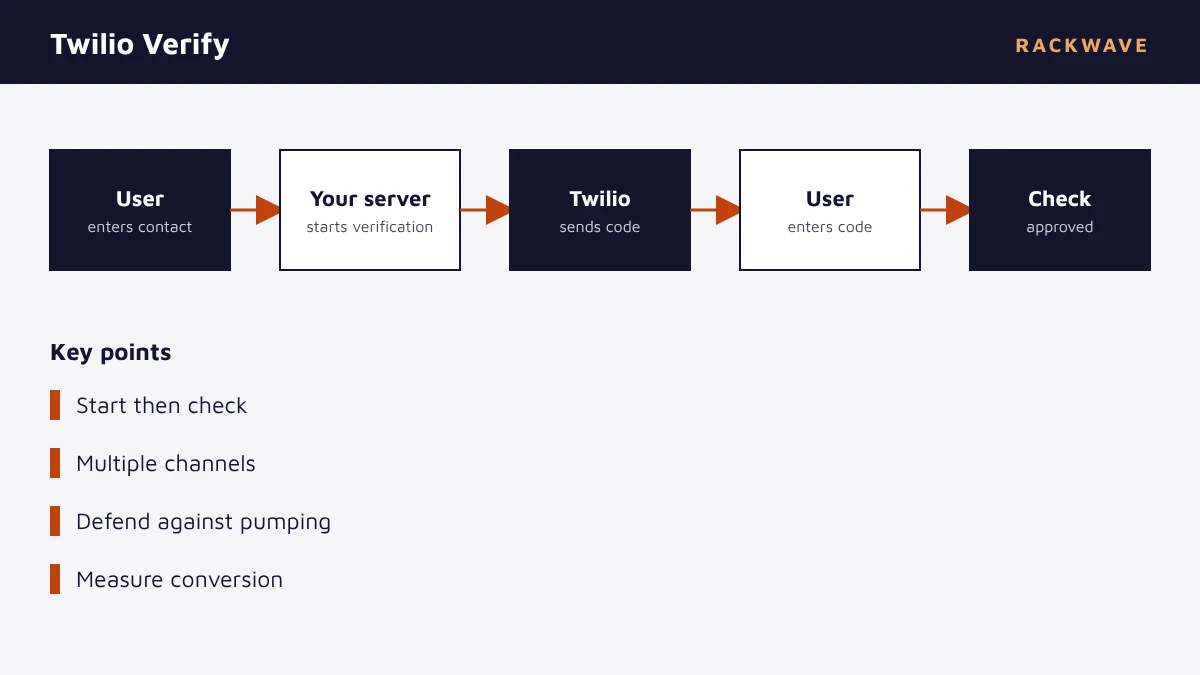
How a verification flow works
- The user enters a phone number or email. Normalise the number to international format before sending.
- Your server starts a verification. Call the API with the recipient and the channel.
- Twilio sends the code. By SMS, voice call, email, WhatsApp or another supported channel.
- The user enters the code. Your app collects it and sends it to your server.
- Your server checks the code. The API returns whether it is approved, pending or invalid.
- You complete the action. Create the account, sign in or authorise the change, and record the result.
Channels and methods
| Channel or method | Strength | Consider |
|---|---|---|
| SMS | Familiar to users, works on any phone | Can be intercepted or abused for pumping, not available everywhere |
| Voice call | Works for landlines and accessibility | Slower and costlier |
| Cheap and widely available | Depends on inbox access and deliverability | |
| High open rates in some markets | Needs channel setup. See WhatsApp integration | |
| Authenticator app (TOTP) | No carrier dependency, more secure than SMS | Needs enrolment and recovery paths |
| Push-based approval | Smooth user experience | Needs app and device registration |
Offer more than one channel where possible, and make the safer options such as authenticator apps available for high-risk actions.
Fraud and abuse protection
Attackers abuse verification endpoints to trigger messages to premium or attacker-controlled numbers, a pattern called SMS pumping or traffic pumping, which creates large bills. Defend in layers. Put rate limits on your own endpoint by IP address, device and account, block destinations you do not serve, use the fraud protection features provided by Twilio, require a CAPTCHA or other proof of a real user before sending and monitor for spikes by country and prefix. Set spend alerts so an attack is noticed within hours, not at the invoice. See API security.
Design for a good user experience
- Pre-fill the country code from the browser or profile, and validate numbers before sending.
- Show a clear message about where the code was sent and how long it lasts.
- Offer a resend after a short delay with a limit, and offer a different channel after repeated failure.
- Support one-tap or auto-fill codes on mobile where the platform allows.
- Localise the message language, and keep the message short and recognisable with your brand name.
- Provide a recovery route for users who have lost access to their phone.
Security design notes
| Topic | Guidance |
|---|---|
| Code lifetime | Use a short expiry and limit attempts per code |
| Replay | Invalidate codes after success and after too many failures |
| Binding | Tie a verification to the session or device that requested it |
| SIM swap risk | For high-value actions, add stronger factors than SMS |
| Storage | Never log codes or store them in plain text |
| Enumeration | Return the same response for known and unknown users where possible |
A one-time passcode proves possession of a channel, not identity on its own. Combine it with other signals for sensitive operations, in line with zero trust thinking.
Testing and monitoring
- Test numbers from each country you serve, including landlines and numbers on different carriers.
- Test failure paths: wrong code, expired code, too many attempts and unreachable number.
- Track conversion from started to approved verification, by channel and country.
- Track delivery time to code entry, since slow codes cause abandonment.
- Alert on unusual volume, high start-to-approve gaps and spend.
Choosing a verification method by risk
| Action | Risk | Suggested method |
|---|---|---|
| Newsletter sign-up confirmation | Low | Email link or code |
| New account creation | Medium | SMS or email code with rate limits and fraud controls |
| Password reset | Medium to high | Code to a verified channel plus checks on the session |
| Change of payout details or large transfer | High | Authenticator app or push approval, with a cooling-off period |
| Admin access to business systems | High | Hardware key or authenticator app, not SMS alone |
Matching the method to the risk keeps friction low for simple actions and protects the actions where fraud would cost the most. Document the policy so product, security and support teams agree on it, and review it after any fraud incident or regulatory change.
Operational runbook
- Define normal volumes by country and hour, so a spike is obvious.
- Create alerts for send volume, error rates and spend.
- Write the steps to block a country or prefix quickly during an attack.
- Keep a contact route to Twilio support for urgent incidents.
- Review the incident afterwards, add the lesson to your controls and share a short summary with product and support teams.
Common mistakes
- Exposing the send endpoint with no rate limits or CAPTCHA.
- Sending to every country by default when you only serve a few.
- Relying on SMS alone for high-value actions.
- Logging the code or the full request in plain text.
- No fallback channel for users who do not receive SMS.
A worked example
A fintech app used SMS verification at sign-up. A spike of requests from unfamiliar country prefixes doubled its monthly messaging bill. The team restricted sending to countries it served, added a rate limit per device and IP, required a challenge before the first send and enabled fraud protection. They also added an authenticator app option for withdrawals.
Costs returned to normal within a week, and conversion rose slightly because legitimate users saw faster, clearer flows. The example is illustrative.
Best practices and support
- Keep sending logic server side, never in the client, and never expose API credentials in a mobile app or web page.
- Review country allow lists and fraud settings monthly.
- Document the recovery process and test it with support staff.
- Report verification metrics alongside sign-up and login metrics.
Our API development service and system integration service build secure verification and identity flows, and our CRM and lifecycle service connects verified contact data to your customer records.
Key takeaways
- Verify starts a verification and checks the code.
- Offer multiple channels and stronger factors for risky actions.
- Defend against SMS pumping with rate limits and country rules.
- Design clear, localised, recoverable flows.
- Monitor conversion, speed and spend.
Quick glossary
| Term | Meaning |
|---|---|
| OTP | One-time passcode |
| Verification | A proof of control of a channel |
| SMS pumping | Fraud that triggers many paid messages |
| TOTP | Time-based code from an authenticator app |
| Rate limit | A cap on requests in a time window |
Read next: What Is API Management? Lifecycle, Features, Tools · What Is a Message Queue? Patterns and Best Practices · What Is RabbitMQ? Exchanges, Queues and Use Cases
Frequently asked questions
What is Twilio Verify?
It is an API for verifying phone numbers, emails or authenticators with one-time passcodes and related methods.
Which channels does Verify support?
SMS, voice, email, WhatsApp and other methods such as authenticator and push, depending on current availability.
How do I check a code?
After starting a verification, send the code the user entered to the check endpoint and read the returned status.
What is SMS pumping?
Fraud where attackers trigger many messages to numbers they profit from, causing large costs. Rate limits and fraud controls reduce it.
Is SMS verification secure enough?
It is useful but weaker than authenticator apps or hardware keys, so use stronger factors for high-risk actions.
How long should a code last?
Use a short expiry and limit attempts, following your risk policy and Twilio defaults.
How do I reduce verification cost?
Limit countries, add rate limits, use cheaper channels where suitable and monitor for abuse.
What if a user has no phone access?
Provide a recovery process with identity checks, such as backup codes or support verification.