
What is OAuth? It is an open standard for delegated authorisation that lets an application access a user data or an API on that user behalf, without the user sharing their password with the application. When you click sign in with Google and approve an app to read your calendar, or when a CRM connects to your email account, OAuth is usually what makes it possible. The application receives a limited, time bound access token instead of credentials, and the user can revoke that access at any time. This guide explains how OAuth 2.0 works, the roles and flows, how it differs from OpenID Connect and SAML, how to apply it securely to your own APIs and the common mistakes to avoid.
Short answer: OAuth lets a user grant an app limited access to a resource through an authorisation server, which issues access tokens with specific scopes and lifetimes. It separates who you are from what an app may do, so passwords are never shared and access can be narrow and revocable.
What is OAuth?
The OAuth article on Wikipedia describes the framework, standardised as OAuth 2.0 in RFC 6749 and extended by later specifications. OAuth handles authorisation, which means what an app is allowed to do. Authentication, which means who the user is, is handled by OpenID Connect, a thin identity layer on top of OAuth. OAuth is the standard way to secure APIs and is typically enforced at an API gateway.
The roles in OAuth
| Role | Description | Example |
|---|---|---|
| Resource owner | The user who owns the data | An employee with a calendar |
| Client | The application requesting access | A scheduling app |
| Authorisation server | Authenticates the user and issues tokens | Identity provider |
| Resource server | The API holding the protected data | Calendar API |
| Scope | A named permission the client requests | calendar.read |
| Access token | A short lived credential presented to the API | Bearer token |
| Refresh token | A longer lived token used to obtain new access tokens | Stored securely by the client |
How OAuth works: the authorisation code flow
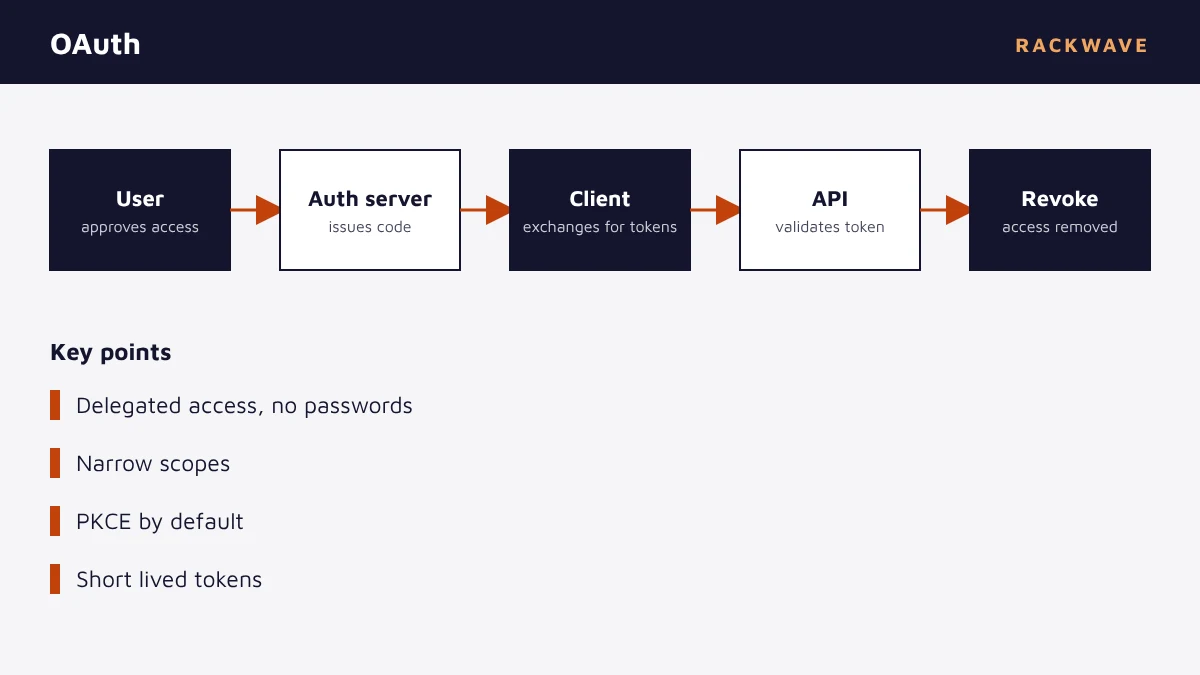
- The client redirects the user. The app sends the user to the authorisation server with its client id, requested scopes and a redirect address.
- The user signs in and consents. The authorisation server authenticates the user and shows what access is requested.
- A code is returned. The server redirects back to the app with a short lived authorisation code.
- The client exchanges the code. Using its credentials and a PKCE verifier, it calls the token endpoint to receive an access token and often a refresh token.
- The client calls the API. It sends the access token in the request, usually in an Authorization header.
- The API validates the token. It checks signature, expiry, audience and scopes before returning data.
- Tokens expire or are revoked. The client uses the refresh token for new access tokens until the user or administrator revokes access.
OAuth grant types
| Grant type | Used for | Notes |
|---|---|---|
| Authorisation code with PKCE | Web, mobile and single page apps with a user | Recommended default |
| Client credentials | Server to server access with no user | Machine identity, protect the secret |
| Device code | Devices with limited input such as TVs | User approves on another device |
| Refresh token | Obtaining new access tokens | Store securely, rotate |
| Implicit and password grants | Older flows | Avoid, now discouraged |
OAuth, OpenID Connect and SAML compared
| Standard | Purpose | Typical use |
|---|---|---|
| OAuth 2.0 | Delegated authorisation to APIs | Letting an app call an API on behalf of a user |
| OpenID Connect | Authentication built on OAuth | Sign in with a social or corporate identity |
| SAML | XML based single sign on | Enterprise web single sign on |
| API keys | Simple identification of a caller | Low risk or internal APIs, with weaker security |
Benefits of OAuth
- Users never share passwords with third party apps.
- Access is limited by scope and time, which reduces damage if a token leaks.
- Users and administrators can revoke access without changing passwords.
- One consistent standard works across many platforms and languages.
- Central policies, multi-factor authentication and logging at the authorisation server.
- Supports both user delegated and machine to machine access.
How to implement OAuth securely
- Use an established identity provider. Prefer a proven product or service over building an authorisation server yourself.
- Choose the right flow. Use authorisation code with PKCE for user facing apps and client credentials for services.
- Design scopes carefully. Offer narrow, meaningful scopes and request only what the app needs.
- Keep tokens short lived. Use brief access token lifetimes, rotate refresh tokens and bind them to the client where possible.
- Validate tokens properly. Check signature, issuer, audience, expiry and scopes on every API call.
- Protect secrets and redirects. Register exact redirect addresses and store client secrets in a vault.
- Log and monitor. Record grants, refreshes and revocations and alert on unusual patterns. See what is DevSecOps.
Common OAuth mistakes
- Using the implicit or password grant in new applications.
- Skipping PKCE in public clients such as mobile and single page apps.
- Accepting wildcard or unregistered redirect addresses.
- Storing tokens in insecure places such as local storage without protection.
- Using OAuth for authentication without OpenID Connect and then trusting the wrong claims.
- Granting overly broad scopes and never reviewing them.
Our API development service secures APIs with OAuth and OpenID Connect, our DevOps service automates secrets and pipelines and our system integration service connects identity across platforms.
A worked example: connecting a CRM to email
A sales team wants its CRM to log emails automatically from corporate mailboxes. Asking users for passwords would be insecure and would break whenever they change them. Instead, the CRM registers as a client with the company identity provider and requests the narrow scope to read mail metadata. Each user is redirected to sign in with multi-factor authentication and approves the request, and the CRM receives tokens through the authorisation code flow with PKCE.
The CRM stores the refresh token encrypted, uses short lived access tokens to call the mail API and logs every sync. When an employee leaves, the administrator revokes their tokens and the connection stops at once. A quarterly review lists all apps with access and their scopes, and removes unused ones. The integration gives the sales team accurate activity records while keeping credentials safe and access under control.
Machine to machine access and tokens in services
Services also need to call each other securely. The client credentials grant lets one service obtain a token under its own identity, with scopes that reflect exactly what it needs to do. Keep secrets in a vault, rotate them automatically and prefer certificate based client authentication for sensitive systems. When a service calls another on behalf of a user, pass a token exchanged for the right audience rather than forwarding the original token everywhere. Short lifetimes, narrow audiences and central logging make a compromised token far less useful to an attacker.
Related reading: what is a webhook for securing callbacks, what is an ESB for central integration security and what is iPaaS for managed connectors that handle OAuth for you.
Key takeaways
- OAuth is an open standard for delegated authorisation using scoped, time limited access tokens.
- Roles are the resource owner, client, authorisation server and resource server.
- Use authorisation code with PKCE for user apps and client credentials for services.
- OpenID Connect adds authentication on top of OAuth, and SAML serves enterprise single sign on.
- Keep tokens short lived, validate them on every call and protect secrets and redirects.
Quick glossary
| Term | Meaning |
|---|---|
| Access token | A credential an app presents to call an API |
| Scope | A named permission an app requests |
| PKCE | A protection that secures the authorisation code flow |
| OpenID Connect | An identity layer on top of OAuth |
| Client credentials | A grant for machine to machine access |
Read next: What Is API Management? Lifecycle, Features, Tools · What Is a Message Queue? Patterns and Best Practices · What Is RabbitMQ? Exchanges, Queues and Use Cases
Frequently asked questions
What is OAuth in simple terms?
OAuth is a standard that lets you give an app limited access to your data without handing over your password, using tokens that can expire and be revoked.
What is the difference between OAuth and OpenID Connect?
OAuth handles authorisation, which is what an app may do. OpenID Connect adds authentication on top, which tells the app who the user is.
What is the difference between OAuth and SAML?
SAML is an older XML based standard mainly for enterprise web single sign on. OAuth and OpenID Connect are lighter, JSON based and better suited to APIs and mobile apps.
What is an OAuth access token?
It is a short lived credential issued by the authorisation server that an app presents to an API to prove it has been granted specific permissions.
What is a scope in OAuth?
A scope is a named permission, such as read calendar, that the app requests and the user approves. Narrow scopes limit the risk if a token is misused.
What is PKCE and why is it used?
PKCE is an extension that protects the authorisation code flow from interception, and it is recommended for all clients, especially mobile and single page apps.
Is OAuth 2.0 secure?
It is secure when implemented correctly with modern flows, PKCE, short lived tokens, exact redirect checks and proper token validation. Mistakes in implementation cause most problems.
When should I use client credentials?
Use it for server to server calls where no user is involved, such as a service calling an internal API, and protect the client secret or use certificates.