
What is iPaaS? Integration platform as a service is a cloud based platform that lets organisations connect applications, data and processes without building and running their own integration infrastructure. It provides pre-built connectors for popular systems such as Salesforce, SAP, Workday and Microsoft 365, visual tools to design data flows and automations, and managed hosting, monitoring and security. iPaaS has become the fastest route to connect SaaS applications and cloud services, and it is widely used for both application integration and workflow automation. This guide explains how iPaaS works, its components, how it differs from an ESB and from custom code, and how to choose and govern a platform.
Short answer: iPaaS is a managed cloud service for building and running integrations with connectors, mapping tools, orchestration and monitoring. It speeds delivery and lowers operating effort, but needs governance of cost, security and who is allowed to build what.
What is iPaaS?
The iPaaS article on Wikipedia describes cloud based integration as a suite of services that connect data and applications across cloud and on premises systems. iPaaS grew as businesses adopted SaaS and found that custom point to point code and heavy on premises buses were too slow. It is a modern form of system integration and is often used with APIs and event streaming.
How iPaaS works
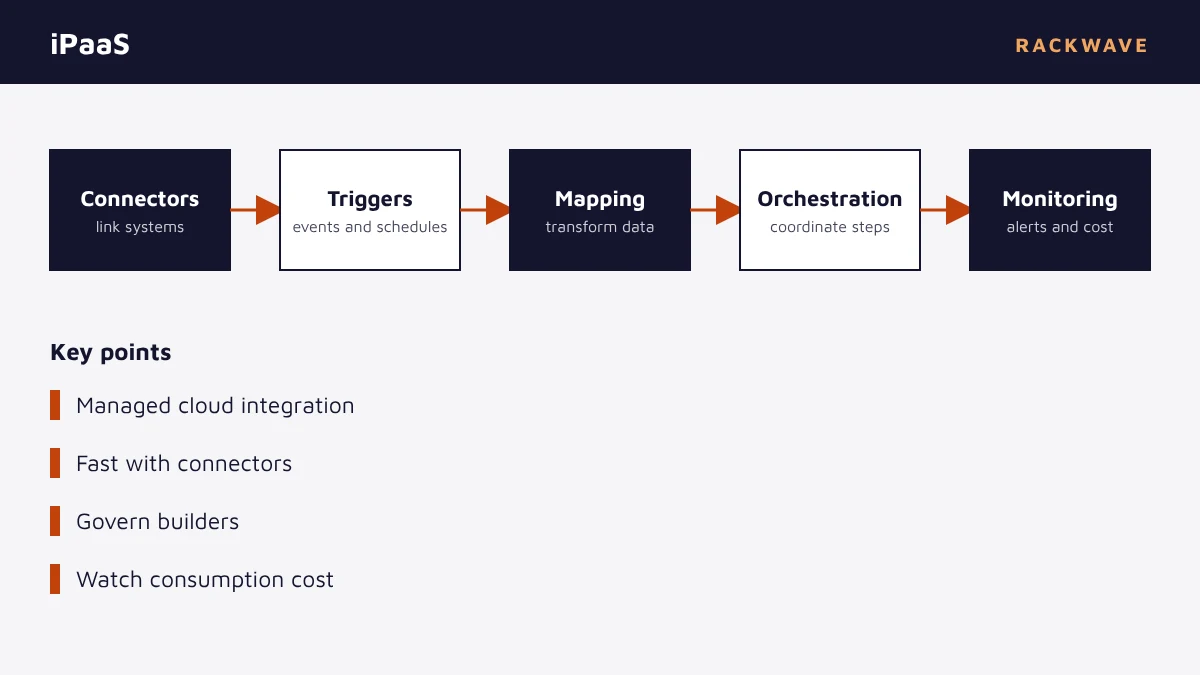
- Connect. Pick a connector for each system and authenticate securely. Agents or gateways reach on premises systems behind firewalls.
- Trigger. A flow starts from an event, a schedule, a webhook or an API call.
- Map and transform. Visual mapping tools convert fields and formats, apply rules and look up reference data.
- Orchestrate. Logic handles branching, loops, approvals and calls to several systems in order.
- Handle errors. Retries, alerts and queues deal with failures and let people resolve items.
- Deploy and promote. Flows move through development, test and production environments with version control.
- Monitor and improve. Dashboards show volumes, failures and latency, and teams tune flows over time.
Core capabilities of an iPaaS
| Capability | What it provides | Why it matters |
|---|---|---|
| Pre-built connectors | Ready links to common applications and protocols | Speeds delivery and reduces code |
| Visual design | Drag and drop flows and mappings | Lets more people contribute, with governance |
| API management | Design, publish and secure APIs | Reuse and partner access |
| B2B and EDI | Partner exchange and standards. See what is EDI | Supplier and customer connectivity |
| Data integration | Batch movement and transformation | Feeds analytics and warehouses |
| Event and webhook support | Real time triggers. See what is a webhook | Faster reaction to change |
| Monitoring and governance | Logs, alerts, roles and environments | Control and auditability |
iPaaS compared with other approaches
| Aspect | iPaaS | ESB. See what is an ESB | Custom code | Workflow automation tools |
|---|---|---|---|---|
| Hosting | Managed cloud | Often self managed | You operate it | Managed cloud |
| Time to value | Fast | Slower | Slowest | Fastest for simple tasks |
| Flexibility | High within the platform | High | Unlimited | Limited for complex needs |
| Operating effort | Low to medium | High | High | Low |
| Cost model | Subscription by usage or connectors | Licence and infrastructure | Engineering time | Subscription |
| Best for | SaaS and hybrid integration | Large legacy estates | Unique or high performance needs | Simple departmental automations |
Typical iPaaS use cases
- Syncing customers and orders between CRM, ERP and billing.
- Onboarding employees across HR, identity and IT systems.
- Feeding data to a warehouse or lakehouse for analytics.
- Exposing internal data as secure APIs for apps and partners.
- Automating approvals and notifications across tools.
- Connecting marketing platforms and customer data. See what is a customer data platform.
How to select an iPaaS
| Criterion | Questions to ask |
|---|---|
| Connector coverage | Are the systems we use supported with maintained, deep connectors? |
| Hybrid support | Can it reach on premises systems securely? |
| Scale and performance | What volumes, latency and concurrency does it handle? |
| Security and compliance | Which certifications, encryption, secrets and access controls apply, and where is data processed? |
| Developer experience | Does it support version control, testing and CI/CD? |
| Governance | Are there roles, environments, approvals and cost controls? |
| Pricing | How are messages, connectors and environments charged as usage grows? |
| Exit options | Can flows and mappings be exported, or is there heavy lock in? |
How to run an iPaaS successfully
- Set an integration strategy. Decide which patterns to use for APIs, events and batch, and which platform serves each.
- Define ownership. A central platform team sets standards, and domain teams build flows within them.
- Create reusable assets. Build shared connectors, templates, error handling and logging.
- Automate delivery. Use version control, testing and promotion pipelines. See what is CI/CD.
- Secure it. Manage secrets centrally, apply least privilege and review access regularly.
- Monitor and control cost. Track failures, throughput and consumption, and set alerts and budgets.
- Review the portfolio. Retire unused flows and document each remaining one.
Common iPaaS mistakes
- Letting every team build flows without standards, creating shadow integration.
- Moving business logic into flows that nobody owns.
- Ignoring consumption pricing until costs surprise the business.
- Skipping testing and monitoring because visual tools look simple.
- Choosing a platform on connector count rather than depth for the systems that matter.
- No exit plan if requirements or vendors change.
Our system integration service selects and implements iPaaS platforms, and our MuleSoft practice delivers enterprise API and integration programmes. We also build services with our API development team.
A worked example: connecting CRM, ERP and billing
A software distributor sells through a CRM, fulfils from an ERP and invoices from a billing system. Staff re-key orders, which causes delays and errors. The company implements an iPaaS with connectors to all three. When a deal is marked won in the CRM, a flow creates the customer and order in the ERP, sends a billing schedule to the billing system and writes the resulting numbers back to the CRM.
The team builds shared error handling, so that failed records go to a queue and trigger an alert to the finance operations team, and it adds a daily reconciliation report. Order entry time falls from a day to minutes, invoice errors drop and finance closes the month faster. A platform team defines naming standards, reviews new flows and tracks monthly consumption, which stays within budget as new integrations are added.
Governance in the age of citizen integrators
Low code tools let business analysts build integrations, which can accelerate delivery but also create risk. Define which kinds of flows citizen integrators may build, for example internal notifications, and which need engineering review, such as anything touching financial data or customers. Provide templates and guardrails, require registration of every flow with an owner, and scan regularly for flows that nobody maintains. Good governance gives speed without losing control.
Security and compliance checklist
An integration platform sees sensitive data in motion, so treat it as a critical system. Store credentials and keys in a managed secrets vault rather than inside flows, and rotate them on a schedule. Restrict who can create, edit and run flows with role based access, and separate duties between development and production. Encrypt data in transit and at rest, mask personal data in logs and set retention periods that match your policies.
Check where the platform processes and stores data, especially for regulated or cross border information, and confirm the vendor certifications that matter to you, such as ISO 27001 and SOC 2. Include the platform in penetration testing and disaster recovery plans, and make sure you can restore flows from version control. Document these controls once and reuse them as evidence for audits.
Key takeaways
- iPaaS is a managed cloud platform with connectors, mapping, orchestration and monitoring for integration.
- It speeds up SaaS and hybrid integration and lowers operating effort.
- Compare it with an ESB, custom code and simple automation tools for your needs.
- Choose on connector depth, hybrid support, security, governance, pricing and exit options.
- Set standards, ownership, testing and cost monitoring from the start.
Quick glossary
| Term | Meaning |
|---|---|
| iPaaS | Integration platform as a service |
| Connector | A pre-built link to an application or protocol |
| Orchestration | Coordinating steps across systems |
| Citizen integrator | A business user building integrations with low code tools |
| Consumption pricing | Charging by usage such as messages or API calls |
Read next: What Is API Management? Lifecycle, Features, Tools · What Is a Message Queue? Patterns and Best Practices · What Is RabbitMQ? Exchanges, Queues and Use Cases
Frequently asked questions
What is iPaaS in simple terms?
It is a cloud service for connecting your business applications and data, with ready made connectors and visual tools, so you do not need to build and host your own integration software.
What is the difference between iPaaS and an ESB?
iPaaS is delivered as a managed cloud service with pre-built connectors, while an ESB is typically software you install and run yourself. iPaaS is quicker to adopt, ESBs may offer deeper control.
What is the difference between iPaaS and an API?
An API is an interface to a system. iPaaS is a platform that builds integrations, and can also design, publish and manage APIs.
What are examples of iPaaS platforms?
Examples include MuleSoft Anypoint, Boomi, Workato, Informatica Cloud, Azure Integration Services and SnapLogic.
Is iPaaS secure?
It can be, with strong encryption, secret management, role based access, audit logs and compliance certifications. Review where data is processed and who can build flows.
Can iPaaS connect on premises systems?
Yes, usually through secure agents or gateways installed inside your network that connect outbound to the cloud platform.
When should I not use iPaaS?
Avoid it when you need extreme performance or highly custom logic that the platform cannot support, or when cost at your volume would exceed building your own.
How much does iPaaS cost?
Pricing varies by vendor and is often based on connectors, environments or message volume, so model your expected usage and growth before choosing.