
What is WhatsApp Business API integration? WhatsApp Business API integration is the work of connecting your own systems, such as a CRM, an order system, a support desk or a marketing platform, to the WhatsApp Business Platform so that messages can be sent and received automatically. The core pieces are authenticated API calls to send messages, webhooks that deliver incoming messages and delivery statuses to your server, template handling, media handling and monitoring. This guide explains the integration architecture, authentication and webhook security, how to send and receive messages, how to handle statuses and errors, how to design for scale and reliability, how to test and monitor and which mistakes cause lost messages or security gaps. APIs and limits change, so confirm details in current Meta documentation.
Short answer: Integrate by sending messages through the Cloud API and receiving events through secured webhooks. Handle templates, statuses, errors and retries, protect tokens and monitor delivery.
What is WhatsApp Business API integration?
It makes the WhatsApp Business Platform part of your systems. It uses message templates, respects opt in and powers chatbots. Background is in what is an API, what is a webhook and what is OAuth.
Integration architecture
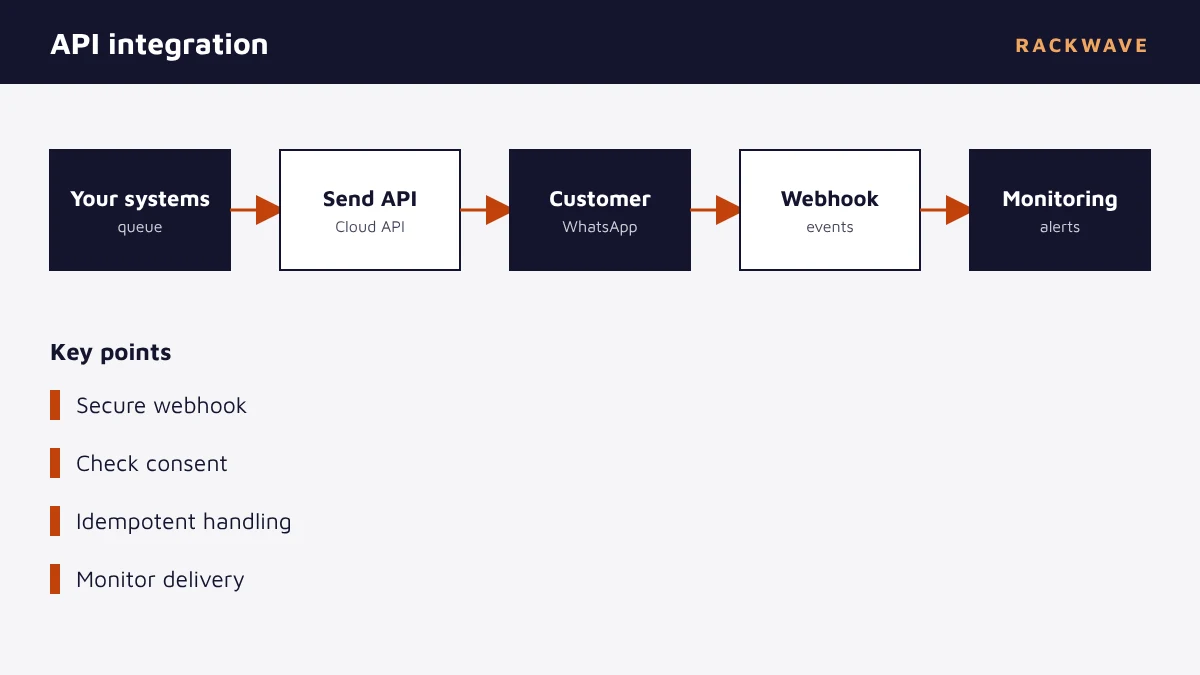
| Component | Role | Notes |
|---|---|---|
| Access token | Authenticates API calls | Use a long lived system user token and protect it |
| Send endpoint | Sends templates and free form messages | Respect rate limits |
| Webhook endpoint | Receives messages and statuses | Public HTTPS with verification |
| Queue | Buffers outgoing and incoming work | Absorbs spikes and retries |
| Media handling | Uploads and downloads files | Observe size and type rules |
| Datastore | Keeps conversations, statuses and consent | Links to CRM records |
| Monitoring | Tracks errors, latency and delivery | Alerts on failure |
Sending and receiving messages
| Direction | What happens | Design points |
|---|---|---|
| Outgoing template | Send a template with variables | Check consent and category first |
| Outgoing free form | Reply within the service window | Verify the window is open |
| Incoming message | Webhook delivers text, media or interactive reply | Acknowledge quickly and process asynchronously |
| Status update | Sent, delivered, read or failed | Update your records and retry where suitable |
| Interactive reply | Button or list selection | Map to workflow steps |
Security essentials
- Verify webhook requests with the signature provided by the platform.
- Store access tokens in a secrets manager and rotate them.
- Use HTTPS with a valid certificate on the webhook.
- Limit who can send messages through your system.
- Validate and sanitise incoming data before using it.
- Log access without storing sensitive content longer than needed.
How to build the integration
- Plan flows. List messages to send and events to receive.
- Set up access. Create the business account, number and token.
- Build the webhook. Expose a secured endpoint, verify requests and acknowledge fast.
- Build sending. Create a service that checks consent, selects templates and calls the API.
- Handle statuses and errors. Store statuses, retry temporary failures and alert on permanent ones.
- Connect data. Link contacts and messages to CRM and support records.
- Test and launch. Test with sample numbers, then release gradually and monitor.
Common mistakes
- Doing slow work inside the webhook handler.
- No signature verification.
- Ignoring status events, so failures go unnoticed.
- Sending without checking consent or the service window.
- Hard coding tokens in code.
- No retry or rate limit handling.
Our API development service builds WhatsApp integrations and our system integration service connects them to CRM and support platforms.
A worked example: order notifications
An order system publishes events to a queue. A messaging service reads them, checks that the customer has opted in, selects the right template and language, fills variables and calls the API. The call returns a message ID, which is stored with the order. A webhook receives status updates and updates the record for each message.
When a customer replies, the webhook stores the message and routes it to the support tool, with the order context attached. Failures, such as an invalid number, create a task for the team to contact the customer another way. Dashboards show delivery rates and error counts, and alerts warn the team of spikes.
Reliability and scale
Plan for spikes such as sales events. Use a queue to smooth load, respect rate limits with backoff and make processing idempotent, so that a repeated webhook or retry does not create duplicate actions. Keep the webhook fast by acknowledging first and processing afterwards. Store message IDs and statuses to reconcile with provider reports. Test with realistic volumes, because behaviour at peak is different from a small test.
Error handling and retries
Errors come in two kinds. Temporary errors, such as timeouts and rate limits, should be retried with increasing delays, while permanent errors, such as an invalid number or a template that is not approved, should be reported and not retried endlessly. Map error codes to clear actions, and record them with the message. Review error trends weekly, since new patterns often reveal policy or data problems that can be fixed upstream.
Testing and monitoring
Test sending and receiving with real phones, including media, buttons and lists, and check how the system behaves when the API is slow or unavailable. Monitor send success, delivery, read and failure rates, webhook latency and queue depth. Set alerts for sudden changes. Keep a runbook that explains what to do when messages stop arriving or tokens expire, so that incidents are handled quickly and consistently.
Privacy and data handling
Conversations contain personal data. Store only what you need, set retention rules and restrict access to those who need it. Make sure deletion and access requests cover WhatsApp conversations, logs and backups. Review which fields from the CRM are included in messages, and avoid sensitive details unless there is a clear need. See what is GDPR for principles and review designs with legal advisers.
Handling media and interactive messages
Customers send photos, documents, voice notes and location, and your system must receive, store and scan them safely. Download media promptly, since links can expire, check file types and sizes and scan for malware before passing files to agents or other systems. For outgoing messages, use buttons and lists to guide customers, and map each reply to a clear step in your workflow. Keep a library of interactive layouts that have been tested on several phone models.
Environments, versions and releases
Keep separate environments for development, testing and production, each with its own numbers or test accounts, tokens and webhook endpoints. Pin the API version you use, read release notes and plan upgrades before old versions are retired. Test every release against a standard script, and deploy gradually. Document the configuration, including webhook URLs, subscribed fields and owners, so that a new engineer can understand and maintain the integration.
Working with a business solution provider
If you use a provider, check which parts of the API they expose, how they handle webhooks and whether you can receive raw events. Confirm who owns the number, templates and conversation history, and how data can be exported. Ask about rate limits, uptime commitments and support. A good provider reduces work, but you should still keep your own records of consent, messages and statuses, so that you are never dependent on one system for key information.
Key takeaways
- Integrate by sending through the API and receiving through secured webhooks.
- Check consent, category and the service window before sending.
- Acknowledge webhooks quickly, process asynchronously and make handling idempotent.
- Protect tokens and verify signatures.
- Monitor delivery, errors and latency, and retry temporary failures.
Quick glossary
| Term | Meaning |
|---|---|
| Cloud API | The Meta hosted API for sending and receiving WhatsApp messages |
| Webhook | An HTTP callback that delivers messages and status updates |
| Access token | A credential used to authenticate API calls |
| Idempotent | Safe to repeat without duplicate effects |
| Backoff | Increasing delays between retries |
Read next: What Is API Management? Lifecycle, Features, Tools · What Is a Message Queue? Patterns and Best Practices · What Is RabbitMQ? Exchanges, Queues and Use Cases
Frequently asked questions
What is WhatsApp Business API integration?
It connects your systems to the WhatsApp Business Platform to send and receive messages automatically.
How are messages received?
Through a webhook that the platform calls with incoming messages and status updates.
How do I secure the webhook?
Use HTTPS, verify request signatures and validate incoming data.
How do I send messages?
Call the API with templates or free form messages, after checking consent and the service window.
What are statuses?
Updates showing whether a message was sent, delivered, read or failed.
How do I handle errors?
Retry temporary errors with backoff and report permanent ones.
Where should I store tokens?
In a secrets manager, with rotation and limited access.
How do I monitor the integration?
Track delivery, failures, webhook latency and queue depth, with alerts.