
What are WhatsApp chatbots? WhatsApp chatbots are automated assistants that hold conversations with customers on the WhatsApp Business Platform, answering questions, collecting information, guiding purchases and handing over to a human agent when needed. They range from simple menu based bots that use buttons and lists to assistants that use natural language understanding or large language models to interpret free text and retrieve answers from knowledge sources. This guide explains what WhatsApp chatbots can do, how to design conversations, how to combine rules and AI, how to hand over to people, how to measure quality, how to handle privacy and safety and which mistakes frustrate customers. Platform features and AI capabilities change, so confirm details in current documentation.
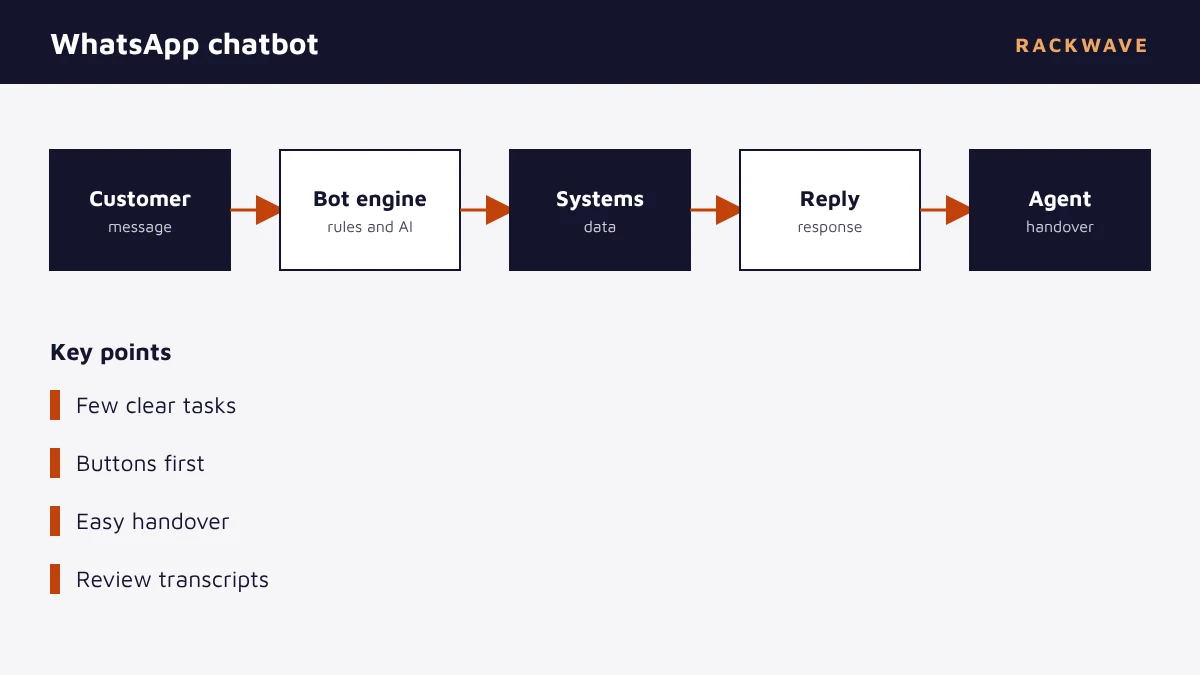
Short answer: A good WhatsApp chatbot solves a few clear tasks, guides users with buttons, uses reliable data, hands over smoothly to people and is measured on resolution and satisfaction.
What are WhatsApp chatbots?
Chatbots run on the WhatsApp Business Platform through the API integration. They can start journeys with flows and sell with the catalogue. See also workflow automation and customer engagement.
Types of chatbot
| Type | How it works | Best for |
|---|---|---|
| Menu based | Buttons and lists guide the user | Simple, predictable tasks |
| Rule based | Keywords and decision trees | Structured processes |
| AI assisted | Understands free text and finds answers | Varied questions with a knowledge base |
| Transactional | Connects to systems to check or change data | Order status, bookings, payments |
| Hybrid | Rules for key steps and AI for open questions | Most business uses |
Good conversation design
- Say clearly that the customer is talking to a bot and what it can do.
- Offer buttons for the common choices, and keep each message short.
- Ask one question at a time and confirm important details.
- Let people say they want a human at any point.
- Handle misunderstandings politely and offer alternatives.
- Keep a consistent tone that matches your brand.
Bot and human handover
| Situation | Action |
|---|---|
| Customer asks for a person | Hand over at once with context |
| Bot cannot answer after two attempts | Offer an agent or a callback |
| Sensitive or complaint topics | Route to a trained agent |
| High value or urgent case | Prioritise in the queue |
| Outside working hours | Explain when a person will reply and collect details |
How to build a chatbot
- Choose tasks. Pick a few frequent questions or tasks that the bot can complete.
- Map conversations. Write the paths, including errors and handover points.
- Connect data. Link order, booking or knowledge systems through APIs.
- Build and test. Create the flows and test with real examples.
- Pilot. Launch to a small group and review transcripts.
- Measure. Track resolution, handover, satisfaction and failure reasons.
- Improve. Update content and flows weekly at first.
Common mistakes
- Trying to answer everything at launch.
- Hiding the option to speak to a person.
- Long messages and unclear choices.
- Letting an AI answer without reliable sources.
- No review of transcripts and failures.
- No handling of consent and personal data.
Our API development service connects chatbots to your systems and our AI and machine learning service designs safe assistants.
A worked example: an order support bot
A retailer launches a bot for the most frequent request, where is my order. The customer taps a button, enters or confirms the order number and the bot calls the order system and replies with status and a tracking link. For returns, it collects the order number and reason and creates a ticket.
If the customer writes something the bot does not understand twice, it offers to connect to an agent and passes the conversation history. The team reviews failed conversations weekly and adds new answers. After two months the bot resolves a large share of status requests, and agents spend their time on complex cases.
Using AI responsibly
AI can understand varied wording and draft answers, but it can also be wrong. Ground answers in approved content, limit what the bot may do, and avoid giving legal, medical or financial advice. Test with difficult questions, and log answers for review. Make sure customers can reach a person, and consider extra checks for actions that change data or money. Review your approach with legal and security teams, and keep human oversight in place.
Measuring chatbot performance
Track containment, which is the share of conversations the bot resolves, handover rate, customer satisfaction, time to resolution, fallback rate and the most common failed intents. Compare with agent only handling for the same request types, and look at cost per resolved conversation. Review a sample of transcripts every week, since numbers alone hide tone and clarity problems. Share a summary with support and product teams to guide improvements.
Privacy, consent and safety
Bots collect personal data, so apply the same rules as for any messaging. Make sure customers have opted in, tell them how their data is used and avoid asking for sensitive details such as full card numbers in chat. Redact sensitive data in logs, set retention periods and restrict access. See opt in and consent and what is GDPR for related principles.
Scaling to more languages and topics
Add topics gradually, based on volume and value, and avoid copying a bot into many languages without testing. Work with native speakers to review wording, local terms and tone, and track results per language. Reuse components such as authentication and handover, and keep a shared library of approved answers. A steady, measured expansion preserves quality while the bot takes on more of the workload.
Choosing a platform and build approach
You can build a bot from code, use a provider with a visual builder or combine both. Visual tools are quick for menu and rule based flows, while custom code gives control for complex integrations and AI. Compare ease of use, connectors to your systems, analytics, handover to agents, language support and cost. Make sure you can export conversation data and flows if you change platform, and check how the provider handles security and data residency.
Knowledge content and maintenance
A bot is only as good as its content. Keep answers in a central knowledge base with an owner for each topic, a review date and a source. Update them when policies, prices or processes change, and remove outdated material. Use failed conversations to find gaps, and write short answers that fit a chat screen with a link for detail. Treat content upkeep as an ongoing task, not a one time project.
Testing before launch
Test with real customer messages, including typos, mixed languages, abbreviations and angry or unclear requests. Try to break the bot with unexpected inputs and check that it fails gracefully. Test handover during and outside working hours, and check that agents receive full context. Ask colleagues who did not build the bot to try it, since builders tend to follow the paths they designed and miss the ones customers actually use.
Key takeaways
- WhatsApp chatbots automate conversations on the WhatsApp Business Platform.
- Start with a few clear tasks, use buttons and keep messages short.
- Combine rules for key steps with AI for open questions, grounded in approved content.
- Always offer a smooth handover to a person with context.
- Measure resolution and satisfaction, review transcripts and protect privacy.
Quick glossary
| Term | Meaning |
|---|---|
| Chatbot | An automated assistant that holds conversations with users |
| Containment | The share of conversations resolved without a human |
| Handover | Passing a conversation from a bot to an agent |
| Intent | The goal behind a customer message |
| Fallback | A response used when the bot does not understand |
Read next: What Is API Management? Lifecycle, Features, Tools · What Is a Message Queue? Patterns and Best Practices · What Is RabbitMQ? Exchanges, Queues and Use Cases
Frequently asked questions
What is a WhatsApp chatbot?
It is an automated assistant that talks with customers on WhatsApp through the Business Platform.
What can it do?
Answer questions, collect details, check orders, book appointments and hand over to agents.
Should it use AI?
AI can help with free text, but it should be grounded in approved content and supervised.
How do I hand over to a human?
Offer an agent on request or after failed attempts, passing the conversation history.
How do I measure a bot?
Track containment, handover, satisfaction, resolution time and fallback rate.
Do customers know it is a bot?
Tell them clearly at the start of the conversation.
How do I protect data?
Collect only what you need, redact logs, set retention and apply consent.
How do I start?
Pick a few frequent tasks, design simple flows, pilot with a small group and improve weekly.