
What are WhatsApp Flows? WhatsApp Flows is a feature of the WhatsApp Business Platform that lets a business show structured, multi screen forms and interactions inside the chat, so customers can complete tasks such as booking an appointment, signing up, giving feedback or filling in an application without leaving WhatsApp. A flow is built from screens that contain components such as text, inputs, dropdowns, date pickers and buttons, it can connect to your own endpoint for dynamic data and validation, and the completed answers are sent back to your system. This guide explains what flows are, how they differ from free text and buttons, how to design and build them, how to connect data, how to test and measure and which mistakes frustrate users. Features change, so confirm details in current Meta documentation.
Short answer: WhatsApp Flows give structured forms inside the chat. Keep screens short, validate input, connect to your systems for live data and measure completion.
What are WhatsApp Flows?
Flows are part of the WhatsApp Business Platform and are often launched from a message template or by a chatbot. They connect to your systems through the API integration and relate to workflow automation. For commerce uses, see catalogue and commerce.
How flows work
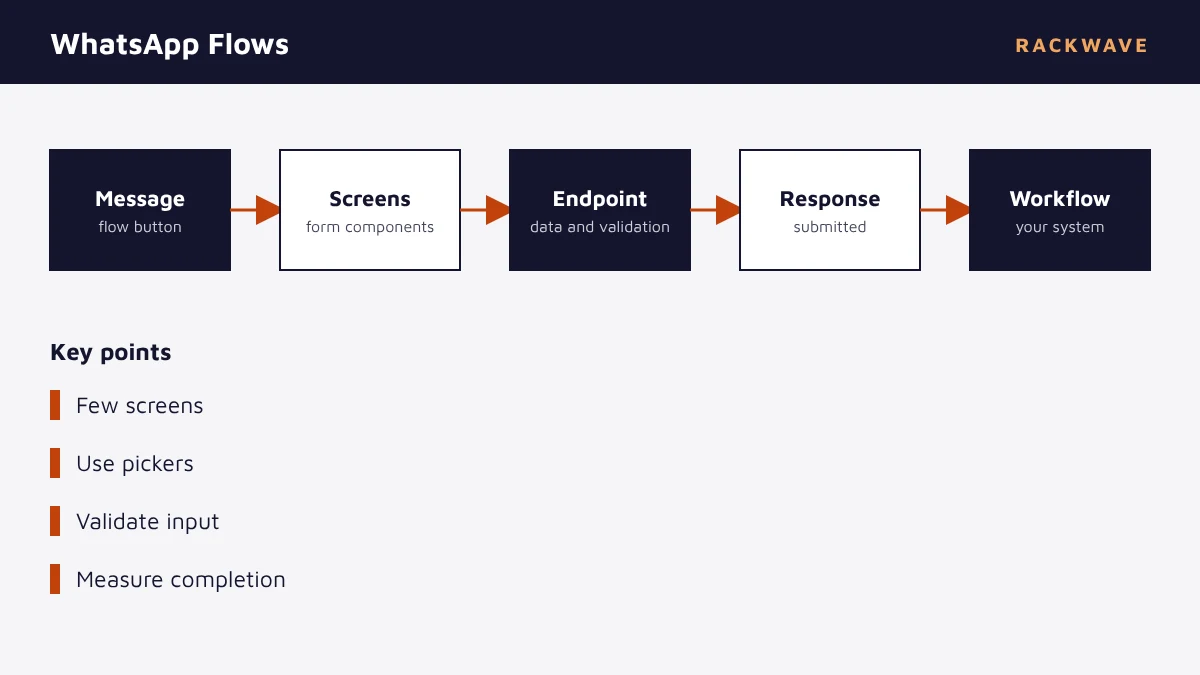
| Element | Purpose | Example |
|---|---|---|
| Screen | One step with components | Choose a date and time |
| Components | Text, inputs, dropdowns, date pickers, buttons | Name, email, service type |
| Navigation | Moves between screens | Next and back |
| Endpoint | Provides live data and validation | Available appointment slots |
| Response | Submitted answers sent to you | Booking details |
| Entry point | Message or template with a flow button | Reminder with Book now |
When to use flows
| Need | Best option |
|---|---|
| Simple choice | Reply buttons or list |
| Short answer | Free text with bot |
| Structured data with several fields | WhatsApp Flow |
| Live availability or validation | Flow with an endpoint |
| Browse products | Catalogue messages |
Design principles
- Keep each screen focused on one task, and limit the number of screens.
- Ask only for what you need, and use defaults when possible.
- Use dropdowns, date pickers and radio buttons instead of free text.
- Validate input as early as possible and explain errors clearly.
- Show progress and allow users to go back.
- Confirm the outcome at the end with a clear message.
How to build a flow
- Define the task. Choose a process such as booking or lead capture.
- Design screens. Sketch the screens, fields and navigation.
- Build the flow. Create it in the builder or with the JSON definition.
- Connect data. Add an endpoint where live options or validation are needed.
- Launch from a message. Add the flow to a template or a conversation step.
- Test. Test on several phones, including error and back paths.
- Measure. Track starts, completions, drop off and outcomes.
Common mistakes
- Too many screens or fields.
- Free text where a picker would avoid errors.
- No validation, so bad data reaches the system.
- An endpoint that is slow or unreliable.
- No confirmation message after submission.
- Collecting sensitive data without a clear need.
Our API development service builds flow endpoints and our system integration service connects responses to CRM and scheduling tools.
A worked example: appointment booking
A clinic sends a reminder template with a Book follow up button. The flow opens with a screen for the type of visit, followed by a screen showing available dates fetched from the scheduling system through an endpoint, then a screen for time slots and a final screen to confirm contact details.
When the patient submits, the response creates a booking and the system sends a confirmation template. The clinic measures how many people start and finish the flow and where they drop off. Shortening the contact details screen raises completion, and a reminder before the visit reduces no shows.
Endpoints, data and security
Flows can call your endpoint to fetch options and to validate answers, and your server receives encrypted payloads that it must decrypt and answer within strict time limits. Build the endpoint for speed and reliability, protect keys, and log requests without keeping personal data longer than needed. Handle slow back ends with caching, and return clear errors. See what is an API for background on secure interfaces.
Testing and quality assurance
Test flows on different phone models and versions, with slow connections and with unexpected input. Check each navigation path, including back buttons, validation errors and timeouts of the endpoint. Test the full chain from the first message to the record in your system, and confirm that confirmations and follow up messages arrive. Keep a checklist for every new flow, and repeat the tests after changes to the flow or the endpoint.
Measuring completion and outcomes
Track starts, completion rate, drop off by screen, time to complete and the business result, such as bookings or qualified leads. Compare flows with alternatives, such as a web form or a conversation with an agent. Look at customer satisfaction and error rates. Share a monthly summary with owners of the process, and use findings to simplify screens, remove fields or add helpful defaults.
Privacy and consent
Forms collect personal data, so apply the same care as for any channel. Make sure customers have opted in, explain why you ask for each detail and avoid sensitive categories unless there is a clear need. Set retention periods for responses, and make sure access and deletion requests cover them. See opt in and consent and what is GDPR for related principles.
Governance and maintenance
Keep a register of flows with purpose, owner, version, endpoint and review date. Version changes and test them before release, because a broken flow stops a business process. Retire flows that are no longer used, and update content when policies or services change. Assign a technical and a business owner for each flow, so that problems are fixed quickly and improvements are prioritised.
Accessibility and language
Make flows usable for everyone. Use clear labels, short instructions and plain language, and avoid jargon. Offer the flow in the languages of your customers, with wording reviewed by native speakers, and check that date and number formats match local habits. Keep text readable on small screens and avoid long paragraphs. A flow that is easy to understand reduces mistakes, lowers support requests and raises completion.
Common use cases to start with
Good first flows are short and have a clear business outcome. Appointment booking, lead capture, customer feedback, returns requests and account updates all fit well. Choose a process where a web form is currently losing people, or where agents spend time collecting the same details. Pilot it with a small group, compare completion and quality of data with the current method, and expand when results are clear.
Versioning and change control
Flows change as processes change, so manage versions deliberately. Keep a draft for edits, test it fully and publish only when ready, and record what changed and why. Tell support and operations teams before a change goes live, and keep the previous version available for rollback. Check that your endpoint still matches the screens, since a mismatch is a common cause of errors after an update.
Key takeaways
- WhatsApp Flows provide structured multi screen forms inside the chat.
- Use them for tasks with several fields, such as booking, sign up and feedback.
- Keep screens few and focused, use pickers and validate input.
- Connect an endpoint for live data and secure it carefully.
- Measure completion and outcomes, and keep a register of flows.
Quick glossary
| Term | Meaning |
|---|---|
| WhatsApp Flow | A multi screen interactive form inside a WhatsApp chat |
| Screen | One step of a flow with its components |
| Endpoint | A server interface that provides data and validation |
| Component | An element on a screen such as an input or dropdown |
| Completion rate | The share of users who finish a flow |
Read next: What Is API Management? Lifecycle, Features, Tools · What Is a Message Queue? Patterns and Best Practices · What Is RabbitMQ? Exchanges, Queues and Use Cases
Frequently asked questions
What are WhatsApp Flows?
They are multi screen forms and interactions that run inside a WhatsApp chat.
What can I build with them?
Bookings, sign ups, feedback forms, applications and other structured tasks.
Do flows need an endpoint?
Not always, but an endpoint is needed for live data and server side validation.
How do customers open a flow?
From a message or template that includes a flow button.
How do flows differ from buttons?
Buttons offer simple choices, while flows collect several structured inputs across screens.
How do I test a flow?
Use several phones, test all paths and errors and check the full chain to your system.
How do I measure success?
Track starts, completion rate, drop off by screen and business outcomes.
What about privacy?
Collect only what you need, apply consent and set retention for responses.