
What are WhatsApp message templates? WhatsApp message templates are pre approved message formats that a business uses to start a conversation with a customer on the WhatsApp Business Platform, for example an order confirmation, an appointment reminder or a one time password. Each template has a name, a category, a language, a body with variables, and optional header, footer and buttons, and it must be reviewed by Meta before it can be sent. Templates exist to protect users from unwanted messages, and they shape how you design notifications. This guide explains template categories, components, how to write and submit them, how variables and buttons work, how to avoid rejection, how to manage and measure templates and which mistakes cause delays or poor results. Rules and pricing categories change, so confirm details in current Meta documentation.
Short answer: Templates are approved messages for business initiated conversations. Choose the right category, write clear specific content with sample values, include opt out where appropriate and manage them in a library.
What are WhatsApp message templates?
Templates are a core part of the WhatsApp Business Platform and depend on opt in and consent. Their cost depends on category, as covered in WhatsApp pricing, and their quality affects quality rating and limits. A similar idea for text messages appears in SMS marketing.
Template categories
| Category | Purpose | Examples |
|---|---|---|
| Utility | Messages about a transaction or account the user expects | Order update, delivery notice, appointment reminder |
| Authentication | One time passcodes and verification | Login code |
| Marketing | Promotion, offers and awareness | Sale announcement, product launch |
| Service (free form) | Replies inside the service window | Support answers, not a template |
Categories affect review and cost, and Meta may reclassify a template if its content does not match the category you chose.
Template components
| Component | Description | Notes |
|---|---|---|
| Name | Internal identifier | Lowercase with underscores |
| Language | Language and locale of the template | One version per language |
| Header | Optional text, image, video or document | Keep it relevant |
| Body | Main text with variables | Clear and specific |
| Footer | Optional short line | Often used for opt out text |
| Buttons | Quick replies, links, phone, copy code | Use for clear actions |
| Variables | Placeholders filled at send time | Provide sample values |
Writing templates that get approved
- Be specific about the purpose and the recipient, and avoid vague text.
- Use variables for names, order numbers and dates, with realistic samples.
- Do not place variables next to each other or at the very start or end without context.
- Avoid misleading claims, threats and requests for sensitive data.
- Choose the correct category and describe the use accurately.
- Keep marketing language honest and include a clear way to opt out.
How to create and manage templates
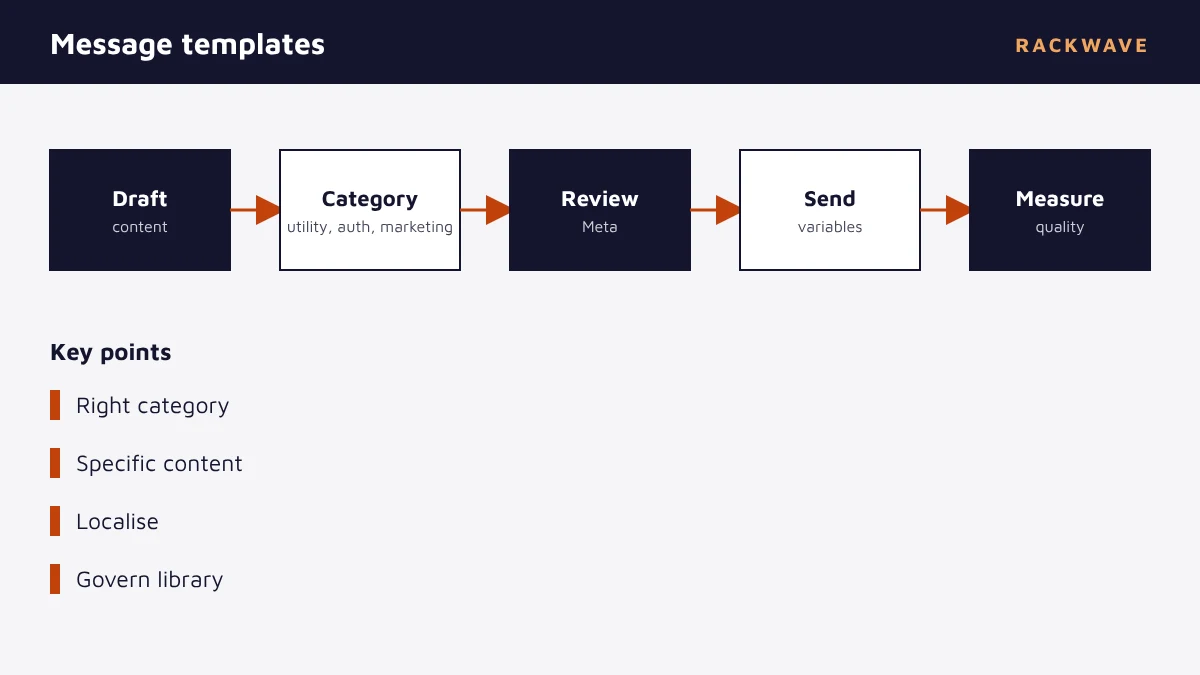
- Define the use case. State the event that triggers the message and the audience.
- Draft the content. Write body, header, buttons and variables.
- Submit for review. Add sample values and choose category and language.
- Handle the outcome. Fix and resubmit if rejected, or note the approval.
- Integrate. Map variables to data fields in your system.
- Test. Send to test numbers and check formatting and links.
- Measure and maintain. Review delivery, reads, replies and quality, and retire weak templates.
Common mistakes
- Using a utility category for promotional content.
- Variables without sample values.
- Template text that is too generic.
- Missing translations for markets you serve.
- No naming convention, so the library becomes confusing.
- Sending templates to contacts who have not opted in.
Our system integration service connects templates to your data and our CRM and lifecycle service designs messaging journeys.
A worked example: an appointment reminder
A clinic wants to reduce missed appointments. It creates a utility template with the patient first name, the date, the time and the location as variables, and two quick reply buttons to confirm or ask to reschedule. The name follows the convention appointment_reminder_en, and an equivalent version exists in other languages.
The booking system sends the template through the API 24 hours before the appointment, and replies are routed to the reception team. The clinic measures confirmations and no shows, and finds that the buttons raise the confirmation rate. The template library lists owner, purpose and approval date for each version.
Variables, buttons and media
Variables personalise messages but need care. Provide sample values that look real, handle missing data with a fallback and keep the order of variables stable. Buttons help customers act quickly, whether to confirm, call or open a link, and each type has its own rules, so check the current limits. Media headers such as images or documents can make a message clearer, but file sizes and formats must follow the platform requirements, and the content must be relevant to the message.
Localisation and multiple languages
Templates are approved per language, so a global business needs a version for each market. Work with native speakers rather than relying on direct translation, and keep the meaning and the category consistent. Use a naming convention that includes the language, and track approval status for each. Check cultural points such as formality and date formats. A well localised template feels natural and reduces confusion, complaints and blocks.
Template library and governance
Keep a library with name, purpose, category, language, owner, approval date and status for each template. Require a short request and review for new templates, so that categories and content are checked before submission. Retire templates that are unused or that attract complaints, and avoid creating many near duplicates. Link the library to the integration code, so that developers use the right names and variables.
Measuring template performance
Track delivery, read rates, button clicks, replies and downstream outcomes such as orders or confirmations. Compare templates with similar purposes and test small changes, such as wording or button labels. Watch quality signals, such as blocks and reports linked to a template, and pause those that cause problems. Share findings with the teams that own the use cases, so that improvements are practical and repeated.
Handling rejections and reclassification
A rejected template is normal. Read the reason, adjust the content or the category and resubmit with clearer samples. If Meta reclassifies a template, for example from utility to marketing, review the cost and the opt in basis, because promotional content needs a suitable permission. Keep a log of rejections and fixes, so that writers learn the patterns. Avoid trying many tiny variations at once, which wastes time and can raise questions about quality.
Testing and quality assurance
Before a launch, send each template to test numbers on several phones and check that variables, line breaks, links and buttons display correctly. Test long and short values, missing data and special characters. Confirm that replies and button taps reach the right system and trigger the intended workflow. Keep a checklist for every new template, and repeat the checks after changes to the integration, since small code changes can break variable order.
Key takeaways
- WhatsApp message templates are pre approved formats for business initiated conversations.
- Choose the right category, because it affects review and cost.
- Write specific content with variables, samples, buttons and a clear opt out where needed.
- Localise for each market and keep a governed library.
- Measure delivery, reads, replies and quality, and retire weak templates.
Quick glossary
| Term | Meaning |
|---|---|
| Message template | A pre approved message format for business initiated conversations |
| Utility template | A template for transactional or account messages the user expects |
| Marketing template | A template for promotions and offers |
| Variable | A placeholder filled with data at send time |
| Quick reply button | A button that sends a predefined reply when tapped |
Read next: What Is API Management? Lifecycle, Features, Tools · What Is a Message Queue? Patterns and Best Practices · What Is RabbitMQ? Exchanges, Queues and Use Cases
Frequently asked questions
What is a WhatsApp message template?
It is a pre approved message format used to start a business conversation on WhatsApp.
Why are templates needed?
They protect users from unwanted messages and are required outside the service window.
What categories exist?
Utility, authentication and marketing, and the category affects review and cost.
Why do templates get rejected?
Common causes are vague content, wrong category, missing samples and policy violations.
Can I use variables?
Yes, with sample values and careful placement.
Do I need a template per language?
Yes, templates are approved per language.
Can I reply without a template?
Yes, inside the service window after a customer message, subject to current rules.
How do I measure a template?
Track delivery, reads, clicks, replies and downstream outcomes.