
What is WhatsApp conversation pricing? WhatsApp conversation pricing is the way Meta charges businesses for messaging on the WhatsApp Business Platform, and it is the term many teams still use for the cost model even though the details have changed over time. Earlier models charged per 24 hour conversation by category, while newer models charge per delivered template message by category, with replies inside a customer service window treated differently. Rates depend on the message category, such as marketing, utility or authentication, and on the country of the recipient, and providers may add their own fees. This guide explains how the cost model works in principle, which factors drive cost, how to estimate and control spend, how to compare providers and which mistakes inflate bills. Pricing changes often, so always confirm current rates in Meta documentation and with your provider.
Short answer: WhatsApp cost depends on message category, recipient country, volume and provider fees. Estimate by use case, use the right template category, reduce waste and check Meta current rate cards.
What is WhatsApp conversation pricing?
The cost model belongs to the WhatsApp Business Platform and is tied to message templates and quality and limits. Compare channels in WhatsApp vs SMS and see SMS marketing for the alternative cost structure.
Factors that drive cost
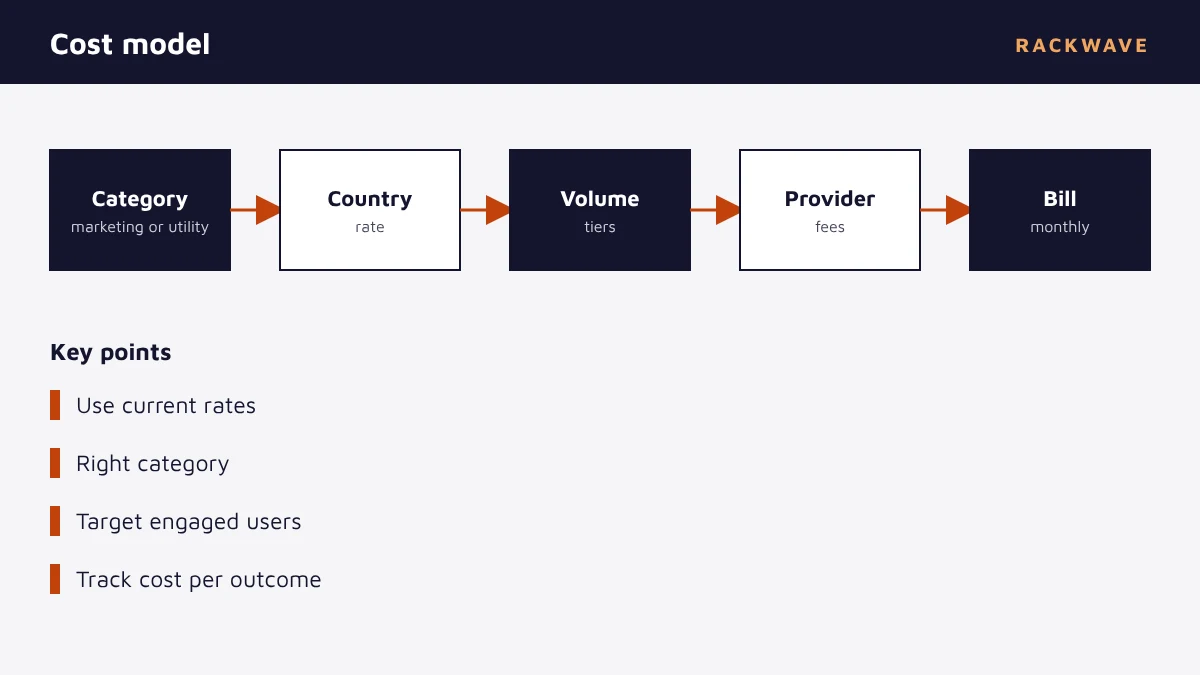
| Factor | Effect | Notes |
|---|---|---|
| Message category | Marketing usually costs most, utility and authentication less | Category depends on content, not on your choice alone |
| Recipient country | Rates vary by market | Check the current rate card |
| Service window | Replies to customer messages inside the window can be free or lower cost | Rules change, so confirm |
| Volume | Some models offer tiered discounts | Depends on current policy |
| Provider fees | Platform, seat or markup fees | Vary by provider |
| Currency and tax | Billing currency and local taxes | Affect the final amount |
Estimating your spend
| Step | Question |
|---|---|
| List use cases | Which messages will you send, and in which categories |
| Estimate volumes | How many recipients and messages per month per country |
| Apply rates | Multiply by the current rates for each category and country |
| Add provider fees | Include platform, seat and support charges |
| Add buffer | Plan for growth and seasonal peaks |
| Compare value | Compare cost per outcome with other channels |
Ways to control cost
- Send only to opted in and engaged contacts.
- Use utility templates for genuine transactional messages and keep marketing for real campaigns.
- Use the free service window to answer customers instead of sending new templates.
- Combine information in one message instead of several.
- Remove invalid and inactive numbers.
- Monitor spend by template and country, and stop low value sends.
How to build a cost model
- Collect current rates. Download the official rate card and note its date.
- Build a sheet. List each template, category, country and monthly volume.
- Calculate Meta charges. Apply rates to volumes.
- Add provider costs. Include fixed and variable fees from your provider.
- Add scenarios. Model low, expected and high volumes.
- Track actuals. Compare invoices with the model each month.
- Review. Adjust templates and campaigns where cost per outcome is high.
Common mistakes
- Using outdated rates in planning.
- Choosing a cheaper category that does not match the content.
- Ignoring provider markup and seat fees.
- Sending marketing to lists with low engagement.
- Not tracking cost per outcome.
- Forgetting taxes and currency effects.
Our system integration service builds reporting on message costs and our data analytics service measures cost per outcome.
A worked example: planning a retail rollout
A retailer plans WhatsApp in two countries. It estimates monthly volumes for order confirmations, shipping updates, back in stock alerts and promotions, and assigns each to a category. It builds a sheet with current rates for each country, adds its provider fee and models a base case and a high case.
The model shows that promotions are the largest cost driver, while order updates are cheap and valuable. The team decides to limit promotions to engaged customers, to use the free service window for support and to track revenue per marketing message. After three months, actual invoices match the model within a small margin, and they adjust the plan for peak season.
Comparing providers
Providers differ in fees, features and support. Compare the platform fee, any per message markup, seat costs for agents, charges for chatbots and campaigns and the cost of extra numbers. Ask how they pass through Meta charges, whether they show them separately and how invoices are issued in your currency. Check contract terms, minimum commitments and how easily you can move your number if you change provider.
Measuring return on spend
Cost matters only in relation to value. Track revenue, savings and satisfaction by use case, and compare cost per outcome with other channels. For example, a delivery update that reduces support calls may be worth far more than its cost, while a weak promotion may not cover its charge. Share a monthly report with finance and marketing leaders, and use it to decide where to expand and where to stop.
Budgeting and governance
Set a monthly budget by use case and alert when spend nears the limit. Require approval for large campaigns, and monitor sends in real time so that errors, such as repeated messages, are stopped quickly. Keep a log of rate card changes and their effect on cost. Assign an owner who reviews invoices, checks them against reports and raises questions with the provider early.
Keeping up with pricing changes
Meta has changed its pricing structure more than once, and may do so again. Subscribe to official updates, ask your provider to notify you of changes and review your model each quarter. When a change is announced, estimate its effect on each template and country before it takes effect, and adjust campaigns if needed. Treat the cost model as a living document, with a clear date for the rates it uses.
Reporting and reconciliation
Build a monthly process that compares your internal message logs with the provider invoice and with Meta reports. Differences may come from time zones, failed deliveries, category changes or tax. Investigate gaps early, and keep notes of the explanation. Reconciliation gives finance confidence in the numbers, finds sending errors that waste money and makes it easier to challenge charges when something looks wrong.
Hidden costs to include
The Meta charge is only part of the total. Include engineering time for integration and monitoring, agent time for handling conversations, chatbot or inbox licences, template creation and translation, and consent management. Consider the cost of lost reach if quality problems reduce limits. A full view of cost lets you compare WhatsApp fairly with other channels, which may look cheaper per message but deliver less value per customer.
Negotiating with providers and planning commitments
Larger senders can often negotiate provider fees, seat prices and support terms. Bring your expected volumes, a clear view of use cases and quotes from alternatives. Avoid long commitments before you know your real volumes, and ask for the right to review pricing when Meta changes its model. Keep an exit plan that covers moving your number, templates and conversation history, so that you are never locked in by cost.
Key takeaways
- WhatsApp cost depends on message category, recipient country, volume and provider fees.
- Models have changed over time, so always use the current official rate card.
- Estimate spend by use case and country, and add provider fees and taxes.
- Control cost by targeting engaged, opted in contacts and using the right templates.
- Track cost per outcome and review pricing changes regularly.
Quick glossary
| Term | Meaning |
|---|---|
| Rate card | The official list of message prices by category and country |
| Utility message | A transactional message the customer expects |
| Marketing message | A promotional message that usually costs more |
| Service window | The period after a customer message when replies are allowed |
| Cost per outcome | Total spend divided by the number of results achieved |
Read next: What Is API Management? Lifecycle, Features, Tools · What Is a Message Queue? Patterns and Best Practices · What Is RabbitMQ? Exchanges, Queues and Use Cases
Frequently asked questions
What is WhatsApp conversation pricing?
It is the cost model Meta uses to charge for messaging on the WhatsApp Business Platform, which has changed over time.
What affects the price?
Message category, recipient country, volume, provider fees and taxes.
Is every message charged?
Rules differ by category and window and change over time, so check the current rate card.
Which category costs most?
Marketing usually costs more than utility or authentication, but confirm current rates.
Do providers add fees?
Many providers add platform, seat or per message fees on top of Meta charges.
How can I reduce cost?
Target engaged opted in contacts, use the right categories and use the service window for replies.
Where do I find current rates?
In Meta official documentation and from your provider.
How do I judge value?
Compare cost per outcome with other channels, such as SMS or email.