
What are Snowflake streams and tasks? Streams and tasks are the native Snowflake pair for change-driven data pipelines. A stream records the changes made to a table, and a task runs SQL on a schedule or when new data appears. Together they let you build incremental transformations and simple orchestration without an external scheduler. This guide explains how streams capture change data, how tasks and task graphs run, how to combine them into a reliable pipeline, how to handle errors and cost and when a dynamic table or external tool is a better fit. Features change, so confirm details in current Snowflake documentation.
Short answer: A stream tracks inserts, updates and deletes on a table since you last consumed them. A task runs SQL on a schedule or chain. Use them together to process only new data, and check the stream has data before running costly work.
What is a stream?
A stream is an object that sits on a table, view or similar source and records change data capture information. It does not copy the data. It keeps an offset, so a query on the stream returns the rows that changed since the offset, along with metadata columns that say whether each row was inserted or deleted and whether it is part of an update. When you consume the stream in a DML statement, the offset advances. It is the Snowflake form of change data capture inside the platform.
What is a task?
A task is a scheduled unit of SQL or a call to a stored procedure. A task can run on a fixed interval or a cron schedule, and tasks can be chained into a graph where child tasks start after parent tasks finish. A task uses either a warehouse you name or serverless compute that Snowflake manages. Tasks make it easy to orchestrate straightforward pipelines, while more complex workflows may still use Apache Airflow or a similar tool.
Streams and tasks together
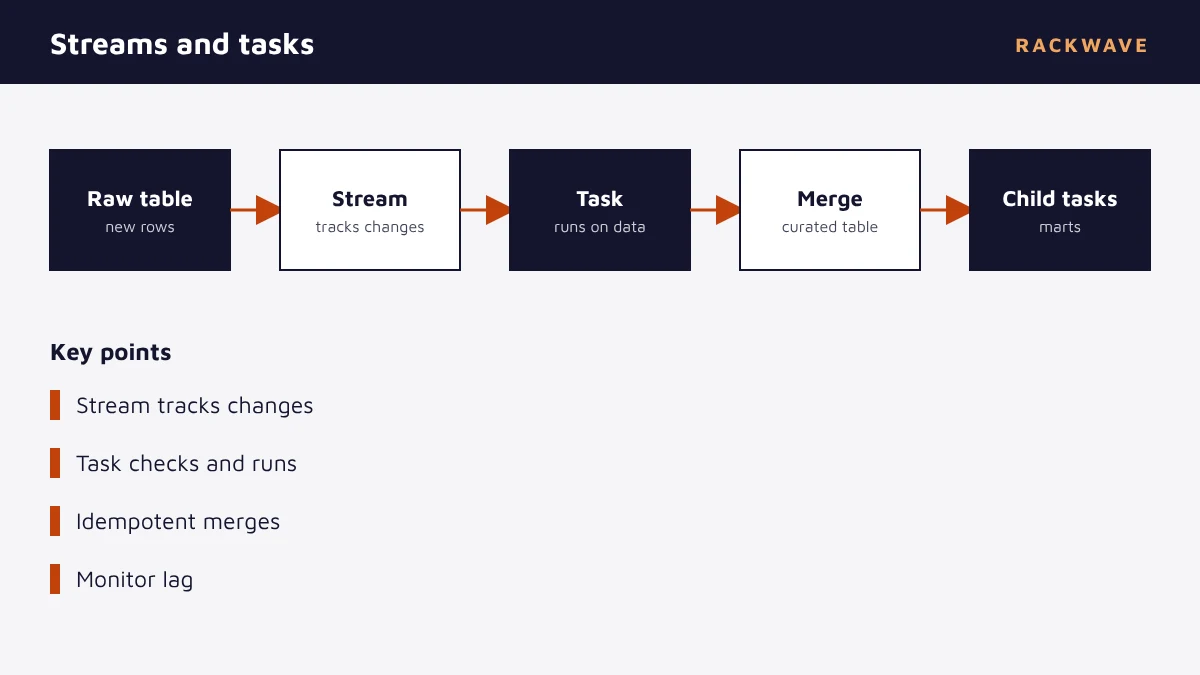
- Land raw data. Load files or rows into a raw table, for example with Snowpipe.
- Create a stream on the raw table. The stream tracks new rows as they arrive.
- Create a task that checks the stream. Add a condition so it runs only when the stream has data.
- Merge into the curated table. Use a MERGE or INSERT that reads from the stream, which consumes the changes.
- Chain downstream tasks. Refresh marts or aggregates after the merge completes.
- Monitor and alert. Track task history, failures and lag.
Stream types and metadata
| Item | What it means |
|---|---|
| Standard stream | Tracks inserts, updates and deletes on a table |
| Append-only stream | Tracks inserts only, useful for event or log tables and cheaper to maintain |
| Metadata action | Whether the row was inserted or deleted |
| Metadata is-update | Marks insert and delete pairs that represent an update |
| Offset | The point up to which changes have been consumed |
Updates appear as a delete of the old row and an insert of the new one, so write MERGE logic with that in mind.
Writing a task graph
A root task holds the schedule and child tasks run after it. Keep each task small and focused so failures are easy to find and restart. Use the system function that checks whether a stream has data in the task condition so an empty run costs almost nothing. Choose serverless tasks for small, bursty jobs and a dedicated warehouse for heavy transformations that need predictable sizing, as described in virtual warehouses.
CREATE TASK curate_orders
  WAREHOUSE = transform_wh
  SCHEDULE = '5 MINUTE'
  WHEN SYSTEM$STREAM_HAS_DATA('raw.orders_stream')
AS
  MERGE INTO curated.orders t
  USING raw.orders_stream s ON t.order_id = s.order_id
  WHEN MATCHED THEN UPDATE SET t.status = s.status
  WHEN NOT MATCHED THEN INSERT (order_id, status) VALUES (s.order_id, s.status);
This is a simplified pattern. Handle deletes and the metadata columns that fit your data, and test with real changes.
Reliability and error handling
- Make merges idempotent, so a retried run does not duplicate rows.
- Remember that a stream offset advances only when a transaction that reads it commits, so a failed task does not lose changes.
- Watch for stream staleness. If a stream is not consumed for longer than the source retention allows, it can become stale and need to be recreated and the gap reloaded.
- Set task retry and error notifications, and log run results to an audit table.
- Suspend tasks during deployments and resume them after validation.
Streams and tasks compared with alternatives
| Option | Strength | Limit |
|---|---|---|
| Streams and tasks | Full SQL control, native, event aware | You manage logic, ordering and errors |
| Dynamic tables | Declarative, define the result and target lag | Less control over each step |
| External orchestrator | Rich scheduling, cross-system dependencies | More infrastructure to run |
| dbt incremental models | Version controlled SQL with testing | Needs a scheduler and runs on warehouse |
See dynamic tables for the declarative approach and dbt for tested transformation projects.
Monitoring and cost control
Query the task history to see run status, duration and errors, and the stream status to check whether changes are waiting. Alert when a task fails, when it has not run for longer than expected or when the stream backlog grows. For cost, prefer a condition on stream data over a tight schedule, size the warehouse to the merge and not to the busiest day, and review serverless task credits in the usage views each month. Document each pipeline with its source, target, schedule, owner and recovery steps so any engineer can take over.
| Signal | What to watch | Action |
|---|---|---|
| Task failures | Error text and repeat count | Fix logic, then resume the task |
| Run duration | Trend over weeks | Tune the merge or resize compute |
| Stream backlog | Rows waiting between runs | Run more often or in smaller batches |
| Stale stream warning | Age against source retention | Recreate stream and backfill |
| Credits per pipeline | Serverless and warehouse use | Right-size or reduce frequency |
Common mistakes
- Scheduling a task every minute with no stream check, so it runs warehouse time for nothing.
- Consuming a stream in a SELECT only and expecting the offset to advance.
- Writing logic that ignores deletes and update pairs.
- Letting a stream go stale after a long pause.
- Building one giant task that is hard to test and restart.
A worked example
An online marketplace loads order events into a raw table. A stream on that table feeds a five-minute task that merges changes into a curated orders table, followed by two child tasks that refresh a daily revenue summary and a customer status table. The task graph runs only when the stream has data, so quiet hours cost almost nothing. A final task writes a row to a monitoring table with counts and duration.
When a bad file once produced duplicate order ids, the team fixed the merge to deduplicate by the latest event time and replayed the raw data. Because the pipeline was idempotent, the repair needed no manual deletes. The details are illustrative.
Governance and support
Give pipeline tasks a dedicated role with only the privileges they need, following access control. Keep task definitions in version control and deploy them through a pipeline, not by hand. Our data warehousing service designs these pipelines, and our data analytics service builds the models on top.
Key takeaways
- Streams capture changes without copying data.
- Tasks run SQL on schedules or after other tasks.
- Check the stream before running so empty runs cost little.
- Make merges idempotent and watch for stale streams.
- Choose dynamic tables for declarative needs and tasks for control.
Quick glossary
| Term | Meaning |
|---|---|
| Stream | An object that tracks table changes since the last consumption |
| Task | A scheduled unit of SQL or a procedure |
| Offset | The point up to which a stream has been consumed |
| Task graph | A chain of dependent tasks |
| Idempotent | Safe to run more than once with the same result |
Read next: BigQuery vs Snowflake: Which Cloud Data Platform? · BigQuery Streaming Inserts: Real-Time Ingestion Guide · BigQuery Access Control: IAM, Policy Tags and Row Security
Frequently asked questions
What is a Snowflake stream?
A stream records the changes made to a table since the last time they were consumed, giving you change data capture inside Snowflake.
What is a Snowflake task?
A task runs SQL or a stored procedure on a schedule or after another task, and can be chained into graphs.
Do streams copy data?
No. A stream stores an offset and returns changed rows when queried, without copying the table.
How does a stream represent an update?
As a delete of the old row and an insert of the new one, with metadata columns that identify them.
When does a stream offset advance?
When the stream is consumed in a DML statement that commits, not when it is only queried.
Can a task run only when new data exists?
Yes. Use a condition that checks whether the stream has data so empty runs are skipped.
What happens if a stream becomes stale?
Changes older than the source retention window may be lost to the stream, so you must recreate it and reload the gap.
Should I use tasks or dynamic tables?
Use tasks when you need control over each step, and dynamic tables when you prefer to declare the result and target freshness.