
What are Snowflake virtual warehouses? A Snowflake virtual warehouse is a named cluster of compute resources that runs queries, loads data and performs transformations. Storage and compute are separate in Snowflake, so you can create many warehouses that read the same data without competing for resources. This guide explains how virtual warehouses work, how sizes and credits relate, when to use multi-cluster warehouses, how auto-suspend and auto-resume control cost, and how to organise warehouses by workload. Features and editions change, so confirm details in current Snowflake documentation.
Short answer: A virtual warehouse is independent compute in Snowflake. Pick a size per workload, enable auto-suspend and auto-resume, use multi-cluster warehouses only for concurrency and separate warehouses for loading, transformation and reporting.
What is a Snowflake virtual warehouse?
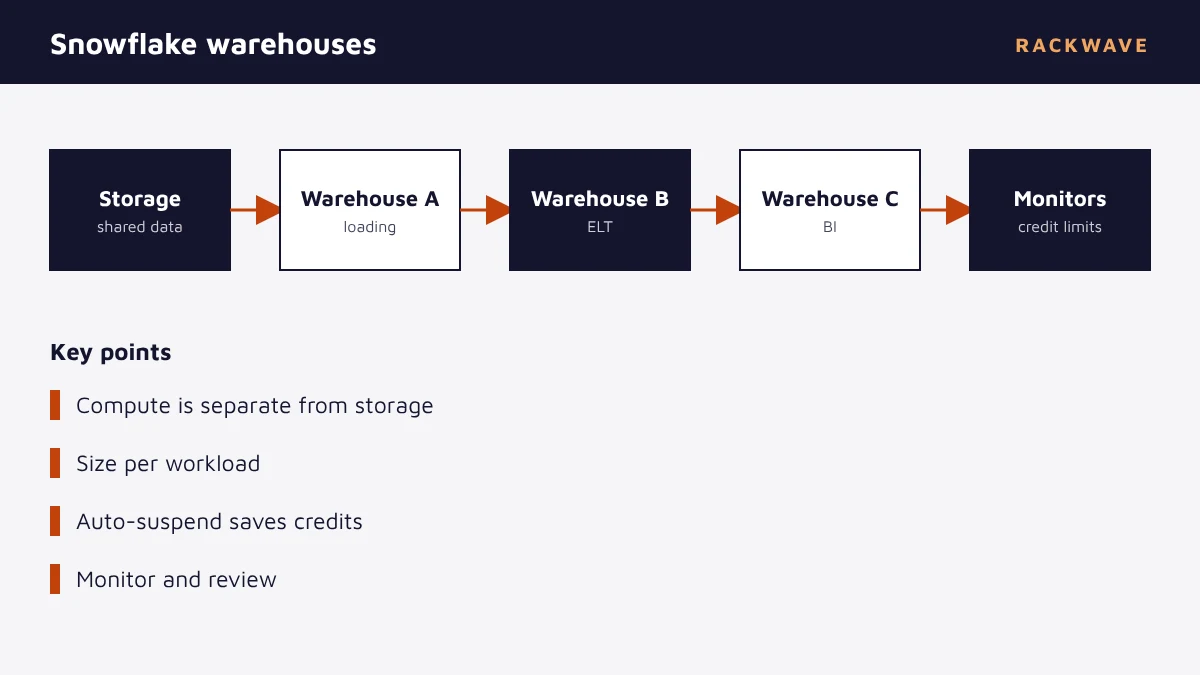
A warehouse supplies the CPU, memory and temporary storage needed to execute SQL. It does not hold your data. Data lives in Snowflake storage, and any warehouse with the right privileges can query it. This design is the core idea behind Snowflake and the reason it behaves differently from a traditional data warehouse.
Because warehouses are independent, a heavy transformation job can run on one warehouse while analysts query on another and neither slows the other. You pay for compute only while a warehouse is running.
Warehouse sizes and credits
Warehouses come in T-shirt sizes. Each step up roughly doubles the compute and doubles the credits consumed per hour while the warehouse runs.
| Size | Relative compute | Credits per hour (typical) | Typical use |
|---|---|---|---|
| X-Small | 1x | 1 | Development, light BI, small loads |
| Small | 2x | 2 | Departmental reporting |
| Medium | 4x | 4 | Shared analytics, mid-size transformations |
| Large | 8x | 8 | Heavy joins, larger ELT jobs |
| X-Large and above | 16x and up | 16 and up | Very large scans, bulk processing |
Billing is per second with a short minimum each time a warehouse starts, so a warehouse that suspends quickly costs little. Credit prices depend on edition, cloud and region, so check your contract.
How warehouses start, suspend and resume
- Auto-resume starts a suspended warehouse when a query arrives, so users never start it manually.
- Auto-suspend stops the warehouse after a period of inactivity that you set, which stops credit consumption.
- A cold start clears the local cache, so the first queries after resume can be slower than warm ones.
- Very short auto-suspend values save credits for sporadic use, while steady dashboards benefit from a slightly longer value that keeps the cache warm.
The right value depends on query patterns. Test a few settings against real workloads rather than guessing.
Scaling up versus scaling out
| Approach | What changes | Best for |
|---|---|---|
| Scale up (larger size) | More compute per query | Slow individual queries, large scans, complex joins |
| Scale out (multi-cluster) | More clusters running in parallel | Many users or queries at the same time, queuing |
| Query acceleration | Extra serverless compute for eligible queries | Occasional large outliers on an otherwise small warehouse |
A larger warehouse does not fix queuing caused by many concurrent users, and more clusters do not fix one slow query. Diagnose which problem you have first by checking query history for queue time versus execution time.
Multi-cluster warehouses
A multi-cluster warehouse, available in higher editions, can add clusters automatically between a minimum and maximum you define. A standard scaling policy favours starting clusters quickly to avoid queuing, while an economy policy keeps clusters busy longer to save credits. Use this for BI workloads with spiky concurrency. Do not use it to hide an inefficient query.
Organising warehouses by workload
- Loading and ingestion: a dedicated warehouse sized for the load, often suspended between batches.
- Transformation and ELT: a medium or larger warehouse used by scheduled jobs, linked to dbt or similar tools.
- BI and dashboards: a warehouse sized for steady concurrency, possibly multi-cluster.
- Data science and ad hoc work: a separate warehouse so experiments never slow production reports.
- Per-team warehouses with resource monitors make chargeback simple.
Naming conventions such as env_team_workload make usage reports readable and help with FinOps reviews.
How to set up a warehouse
- Define the workload. Decide whether it is loading, transformation, reporting or exploration.
- Pick a starting size. Begin small, usually X-Small or Small, and measure.
- Set auto-suspend and auto-resume. Use a short suspend for sporadic use and a longer one for steady dashboards.
- Add a resource monitor. Set credit quotas with notify and suspend actions.
- Grant access by role. Give usage rights to the roles that need the warehouse and no one else.
- Test and tune. Run representative queries and compare queue time, execution time and credits.
- Review monthly. Check usage and resize or merge warehouses that are idle.
Caching and performance
Snowflake caches results and data on the warehouse. A repeated identical query can return from the result cache without using compute, and recently read data stays in the local cache while the warehouse is running. Suspending clears the local cache, which is why very aggressive suspend settings can make steady dashboards slower. Clustering, well modelled tables and selective filters reduce the data scanned and matter more than raw size. Check the query profile for partitions scanned and spilling before adding compute.
| Symptom | Likely cause | First action |
|---|---|---|
| Queries wait before starting | Too many concurrent queries | Add clusters or split workloads |
| One query is slow | Large scan or spill | Rewrite, filter earlier or scale up |
| First query each morning is slow | Cold cache after suspend | Tune auto-suspend or pre-warm |
| Credits rise with no new users | Idle warehouse left running | Check auto-suspend and monitors |
Common mistakes
- One large shared warehouse for every workload, so reports queue behind batch jobs.
- Leaving auto-suspend disabled or set to a long period on idle warehouses.
- Choosing a size once and never revisiting it as data and users grow.
- Using multi-cluster to mask inefficient queries.
- No resource monitors, so a runaway job consumes the monthly budget.
- Giving every user the right to create warehouses.
A worked example
A retail company ran everything on one Large warehouse. Dashboards queued every morning at nine, and overnight loads kept it running for hours. The team split the workload into three warehouses: a Medium for transformation that runs only when scheduled, a Small multi-cluster for dashboards with up to three clusters, and an X-Small for analyst exploration. Each has auto-suspend and a resource monitor.
Morning queue time disappeared, overnight compute stopped when jobs finished and the finance team could now see credits per team. They reviewed query history monthly and moved one slow dashboard query to an optimised model rather than a bigger warehouse.
Monitoring and governance
Use the account usage views for warehouse metering and query history to track credits, queue time and spill to local or remote storage. Spilling suggests the warehouse is too small for the query or the query needs rewriting. Tag queries by team or project so costs can be allocated, and control who can create or resize warehouses through role-based access control. For cost patterns beyond sizing, read Snowflake cost optimization.
Our data warehousing service designs Snowflake environments, and our data analytics service builds reporting on top of them.
Key takeaways
- A virtual warehouse is independent compute and does not store data.
- Sizes roughly double compute and credits per step, billed per second.
- Scale up for slow single queries and scale out for concurrency.
- Separate warehouses by workload and add resource monitors.
- Review usage regularly and resize with evidence.
Quick glossary
| Term | Meaning |
|---|---|
| Virtual warehouse | A named cluster of compute used to run queries and loads |
| Credit | The unit Snowflake uses to bill compute |
| Auto-suspend | Setting that stops a warehouse after idle time |
| Multi-cluster | A warehouse that adds clusters to handle concurrency |
| Resource monitor | A control that tracks and limits credit use |
Read next: BigQuery vs Snowflake: Which Cloud Data Platform? · BigQuery Streaming Inserts: Real-Time Ingestion Guide · BigQuery Access Control: IAM, Policy Tags and Row Security
Frequently asked questions
What is a virtual warehouse in Snowflake?
It is a named cluster of compute resources that runs queries, loads and transformations, separate from storage.
Does a warehouse store data?
No. Data is stored in Snowflake storage and any authorised warehouse can query it.
How are warehouse credits calculated?
Credits depend on size and run time, billed per second with a short minimum each time a warehouse starts.
When should I use a multi-cluster warehouse?
Use it when many concurrent queries cause queuing, such as busy dashboards, not for one slow query.
What does auto-suspend do?
It stops the warehouse after a set idle time so it stops consuming credits, and auto-resume restarts it on the next query.
Should I use a bigger warehouse for faster queries?
Often yes for large single queries, but check query history first because queuing needs more clusters, not a larger size.
How many warehouses should I create?
Create one per distinct workload or team so loads, reports and exploration do not compete, and so costs are easy to allocate.
How do I control warehouse spending?
Use resource monitors, sensible auto-suspend, query tags and regular reviews of metering history.