
How do you reduce Snowflake cost without slowing the business? Snowflake cost optimization is the practice of matching compute, storage and serverless features to real workloads so that every credit buys useful work. Snowflake bills separately for compute, storage and some serverless services, which means savings come from several places and not just from smaller warehouses. This guide covers where the money goes, the controls that matter most, how to find waste with account usage data and how to build a monthly review. Pricing and features change, so confirm details with Snowflake and your contract.
Short answer: Control warehouse run time first, right-size by workload, add resource monitors, tune expensive queries, trim storage retention and track cost by team with query tags. Review monthly.
Where Snowflake cost comes from
| Cost area | What drives it | Main lever |
|---|---|---|
| Virtual warehouse compute | Size multiplied by run time | Auto-suspend, sizing, workload separation |
| Storage | Table data, Time Travel and Fail-safe history, stages | Retention, transient tables, cleanup |
| Serverless features | Snowpipe, automatic clustering, materialized views, search optimisation, tasks | Enable only where the benefit is proven |
| Data transfer | Moving data between regions or clouds | Keep workloads and replicas close |
| AI and other add-ons | Usage based services | Set budgets and monitor |
For most customers compute is the largest line, so start there. See virtual warehouses for how sizing and billing work.
Quick wins on compute
- Enable auto-suspend on every warehouse and keep the value as low as the workload tolerates.
- Stop warehouses that run overnight for no reason by scheduling jobs together and letting them suspend.
- Right-size by testing: many workloads run well on a smaller size than the one chosen at launch.
- Separate loading, transformation and reporting so each can be sized and suspended on its own.
- Use multi-cluster scaling only for concurrency, and cap the maximum clusters.
- Remove unused warehouses and users.
Resource monitors and budgets
Resource monitors track credits at account or warehouse level and can notify or suspend when thresholds are reached. Set a notify action at a sensible percentage, such as seventy five percent, and a suspend action near the quota for non-critical warehouses. For production reporting warehouses, prefer notification over automatic suspension so business users are not locked out. Budgets in Snowflake can also alert owners about spend trends. Assign each monitor to a named owner.
Find expensive queries
Use the account usage views for query history and warehouse metering to find the queries that consume the most execution time, scan the most data or spill to storage. Tag queries with project or team names so you can group cost by owner.
- Look at the top queries by total elapsed time and by bytes scanned.
- Check partitions scanned against partitions total to find missing filters or poor clustering.
- Look for repeated identical queries that could be cached or materialised.
- Find queries that spill to remote storage, which signals memory pressure.
- Review long-running dashboards that refresh far more often than needed.
Reduce storage cost
- Lower Time Travel retention on large, easily rebuilt tables, since longer retention keeps more history.
- Use transient tables for staging and scratch data that does not need Fail-safe.
- Drop old clones, stale staging files and unused tables. See Time Travel and cloning.
- Avoid loading the same data repeatedly into multiple copies.
- Review stage contents, which can hold large forgotten files.
Serverless features: enable with evidence
Automatic clustering, materialized views, search optimisation and continuous loading with Snowpipe use serverless compute. They are valuable when the benefit is measured, but they can quietly add cost on volatile tables. Review the serverless usage views monthly and switch off features that no longer pay for themselves.
Build a monthly review
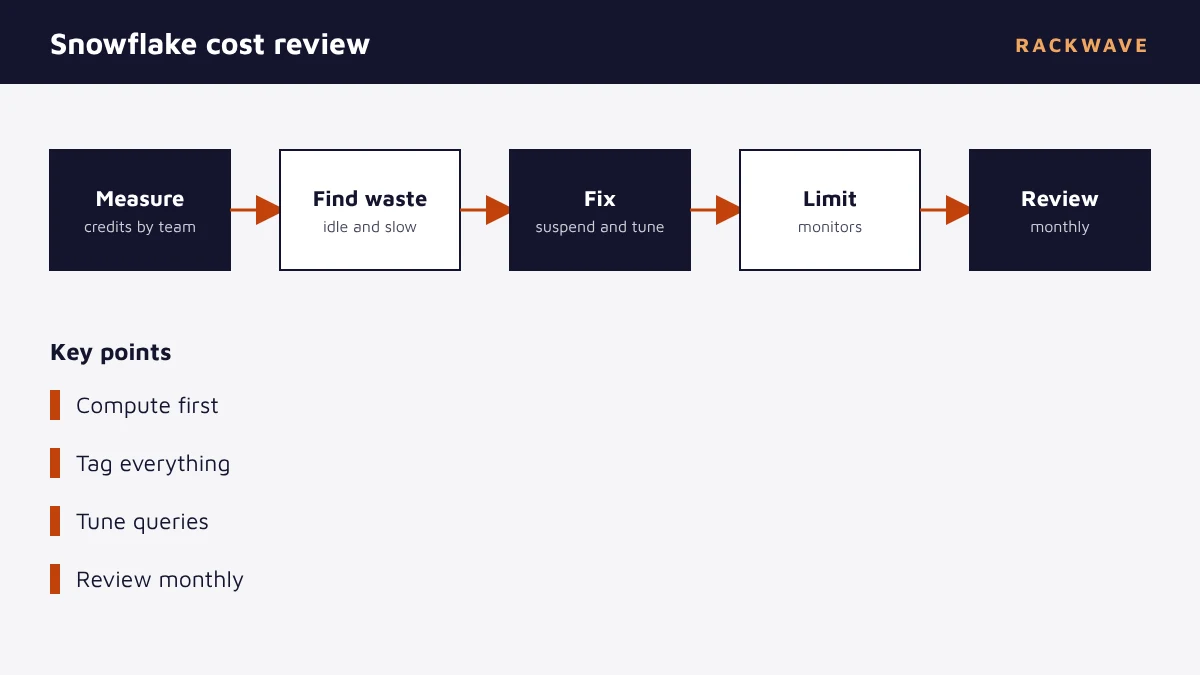
- Pull the cost report. Group credits by warehouse, team and query tag.
- Compare with last month. Flag changes above an agreed threshold.
- Review the top ten queries. Assign owners to fix or accept each one.
- Check idle and oversized warehouses. Resize, merge or remove.
- Review storage growth. Clean up retention, clones and stages.
- Record decisions. Keep a short log so progress is visible.
Query-level tuning techniques
| Technique | What it does | When to use it |
|---|---|---|
| Filter early and select only needed columns | Reduces data scanned | Wide tables and exploratory queries |
| Use clustering keys on very large tables | Improves partition pruning | Large tables filtered on a few columns |
| Materialise repeated heavy logic | Computes once and reuses | Many dashboards sharing one expensive join |
| Avoid unnecessary DISTINCT and sorts | Removes costly operations | Queries that use them out of habit |
| Replace repeated full refreshes with incremental loads | Processes only new data | Large daily rebuilds |
Measure before and after with the query profile. A change that cuts scanned partitions or removes a spill is a real saving, while a change that only moves cost elsewhere is not. Clustering and materialized views have their own maintenance cost, so apply them only to tables where the benefit is clear.
Cost allocation and showback
Teams spend more carefully when they can see their own bill. Give each team its own warehouse or use query tags consistently, then publish a monthly showback report with credits, storage and the top queries by owner. Keep the report simple, with trend lines and a short list of actions. Showback is lighter than chargeback and often enough to change behaviour. If you do charge teams, agree the rules for shared platform costs in advance, such as ingestion warehouses and governance tooling.
- Agree a tagging standard and enforce it in service accounts and BI tools.
- Show cost per dashboard or per data product where possible, not just per warehouse.
- Set an owner and a budget for every warehouse, and review exceptions together.
Common mistakes
- Shrinking every warehouse blindly and then paying for slow queries and frustrated users.
- Treating cost as an engineering problem alone, with no business owner for each warehouse.
- Ignoring storage until it becomes the second largest line.
- Turning on serverless features everywhere by default.
- No tagging, so spend cannot be attributed.
A worked example
A fintech team saw credits rise forty percent in a quarter. Review showed three causes: a dashboard refreshing every minute on a Large warehouse, a development warehouse with auto-suspend disabled and a staging schema keeping ninety days of Time Travel on a table rebuilt nightly. They changed the dashboard to refresh every fifteen minutes on a Small multi-cluster warehouse, turned on auto-suspend and moved staging tables to transient with one day retention.
Credits fell by roughly a third the next month with no complaints, and the team added monthly reviews and query tags so each department saw its own spend. The numbers are illustrative and your results will differ.
Governance
Cost control works best when it is shared. Give each team a budget view, define who may create warehouses through access control, and include Snowflake in your wider FinOps practice. Our data warehousing service includes cost reviews and design for efficient models.
Key takeaways
- Compute is usually the largest cost, so start with warehouse run time.
- Use resource monitors, tags and budgets to create accountability.
- Tune the most expensive queries before adding compute.
- Trim retention and use transient tables for scratch data.
- Review monthly and keep a short decision log.
Quick glossary
| Term | Meaning |
|---|---|
| Credit | Unit used to bill Snowflake compute |
| Resource monitor | Control that tracks and limits credits |
| Transient table | A table without Fail-safe, cheaper for scratch data |
| Query tag | A label used to attribute query cost |
| Serverless feature | A service billed on usage rather than warehouse time |
Read next: BigQuery vs Snowflake: Which Cloud Data Platform? · BigQuery Streaming Inserts: Real-Time Ingestion Guide · BigQuery Access Control: IAM, Policy Tags and Row Security
Frequently asked questions
What drives Snowflake cost?
Mainly virtual warehouse compute, followed by storage, serverless features and data transfer.
What is the fastest way to cut Snowflake cost?
Enable auto-suspend, remove idle warehouses and separate workloads so each runs only when needed.
Do resource monitors stop spending?
They can notify or suspend warehouses at credit thresholds, which limits runaway usage when configured.
How do I find expensive queries?
Use query history and metering views, ranking by elapsed time, bytes scanned and spilling, and tag queries by team.
Does Time Travel add storage cost?
Yes. Longer retention keeps more historical data, so reduce it for tables that are easy to rebuild.
Are serverless features expensive?
They bill on usage, so they can be efficient or costly depending on table behaviour. Measure before enabling widely.
How often should we review Snowflake cost?
Monthly is a good rhythm, with alerts for sudden changes between reviews.
Can smaller warehouses hurt performance?
Yes if sized blindly. Test workloads and compare run time and credits before changing size.