
What are Snowflake Time Travel and zero-copy cloning? Snowflake Time Travel lets you query, restore or clone data as it existed at an earlier point within a retention period, and zero-copy cloning creates an instant copy of a database, schema or table without duplicating storage. Together they make recovery from mistakes and safe testing far easier than in traditional systems. This guide explains how each works, how retention and Fail-safe differ, how to restore dropped objects, how to clone for development and what to watch for in cost. Features depend on edition, so confirm details in current Snowflake documentation.
Short answer: Time Travel queries or restores data from a past point within its retention period, and cloning creates an instant zero-copy copy that stores only later changes. Use both for recovery and testing, and set retention with cost in mind.
What is Time Travel?
Time Travel keeps historical versions of changed or deleted data for a retention period. During that period you can query a table as it was, restore a table, schema or database you dropped, or clone from a point in the past. The default retention for permanent objects is one day, and some editions allow longer settings up to ninety days. Temporary and transient objects have shorter limits.
This is a core feature of Snowflake, and it changes how teams think about backups for operational mistakes such as a bad update or an accidental drop.
Time Travel in practice
| Need | Approach |
|---|---|
| See a table as it was yesterday | Query with AT or BEFORE using a timestamp, offset or statement id |
| Undo an accidental drop | Use UNDROP on the table, schema or database |
| Recover rows deleted by a bad job | Clone or query the earlier state and insert the missing rows |
| Compare before and after a change | Query the past version side by side with the current one |
Always check the retention period first. After it ends, data is no longer available through Time Travel.
Retention and Fail-safe
| Feature | What it is | Who can use it |
|---|---|---|
| Time Travel | Self-service access to historical data for the retention period | You, with the right privileges |
| Fail-safe | A further period, usually seven days, kept by Snowflake for disaster recovery of permanent tables | Snowflake support only, not for routine use |
Fail-safe is not a backup you manage. Plan recovery around Time Travel, cloning and your own copies for longer retention requirements, in line with your disaster recovery plan.
What is zero-copy cloning?
A clone creates a new object that initially shares the same underlying storage as the source. No data is copied, so a clone of a large database is created almost instantly and costs nothing extra at first. Storage is used only for data that changes in either the source or the clone afterward. Clones are independent, so changes to one do not affect the other.
Common uses for cloning
- Create a development or test environment from production data in minutes.
- Take a snapshot before a risky migration so you can compare or roll back.
- Run experiments or training jobs on a copy without affecting production.
- Create a point-in-time copy for audit or investigation by combining a clone with Time Travel.
Remember that a clone of production data carries production privacy obligations. Mask or restrict access in non-production, as described in data governance.
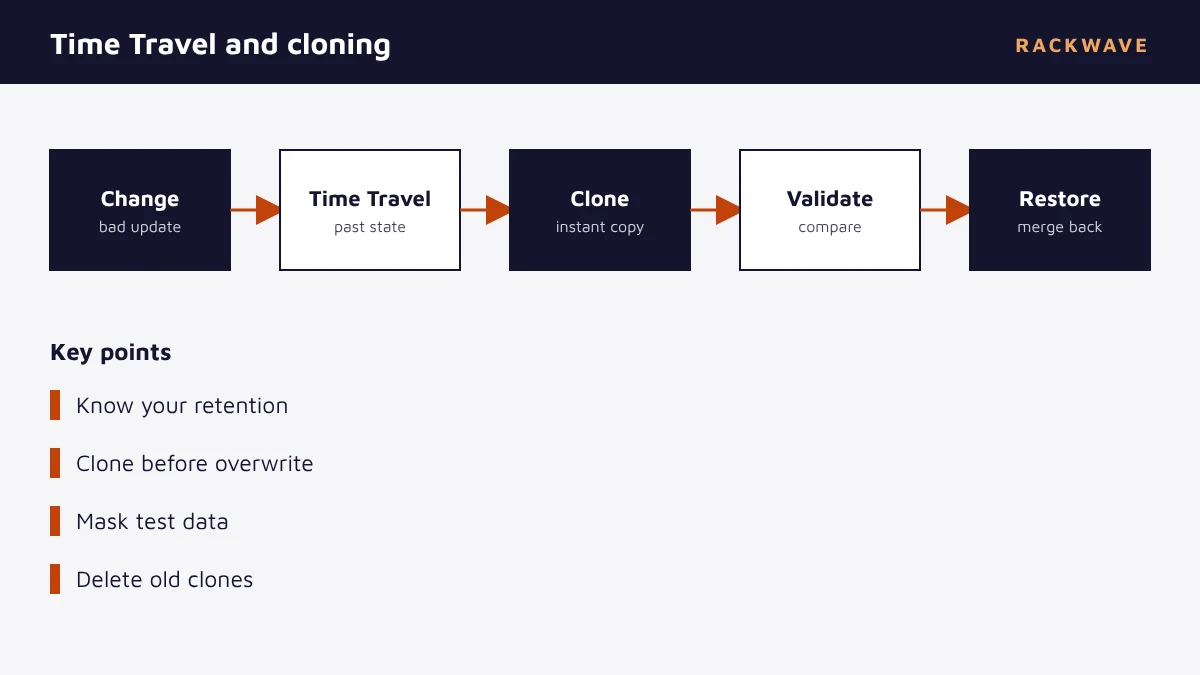
How to restore or clone safely
- Identify the problem and time. Find when the bad change happened using query history.
- Check retention. Confirm the object is still inside its Time Travel window.
- Clone from the past. Create a clone at a timestamp just before the change instead of overwriting anything.
- Validate the clone. Compare row counts and key fields with the current table.
- Restore selectively. Insert or merge only the rows or objects you need, or swap tables once validated.
- Record and prevent. Document the cause and add controls such as reviews or smaller privileges.
Cost considerations
- Longer Time Travel retention keeps more historical data and increases storage.
- High-churn tables, such as tables rewritten every day, accumulate more history than static ones.
- Clones are cheap at first but grow as they diverge, and forgotten clones keep old data alive.
- Transient tables avoid Fail-safe and are a good fit for staging data that can be rebuilt.
Set retention by value: longer for critical reference data, short for rebuildable intermediate tables. See Snowflake cost optimization for a wider review.
Example commands
These examples show the general pattern. Check names and syntax against current documentation before using them in production.
-- query a table as it was one hour ago
SELECT * FROM orders AT(OFFSET => -3600);

-- clone a table from just before a bad statement
CREATE TABLE orders_recovered CLONE orders BEFORE(STATEMENT => '<query_id>');

-- restore a dropped table
UNDROP TABLE orders;

-- clone a database for testing
CREATE DATABASE dev_sales CLONE prod_sales;
Prefer recovering into a new object, validating it and then swapping or merging. Overwriting production in the middle of an incident adds risk.
Designing environments with cloning
| Environment | Source | Refresh | Protection |
|---|---|---|---|
| Development | Clone of production or a masked subset | Weekly or on demand | Masking policies and limited roles |
| Testing and QA | Clone at a fixed point for repeatable tests | Per release | Read-only for most users |
| Analytics sandbox | Clone of curated marts | Daily or weekly | Budgeted warehouse |
| Audit snapshot | Clone at quarter end | Quarterly | Locked down, retained as required |
Automate clone creation and teardown with a scheduled task or pipeline so old copies do not pile up, and tag each clone with an owner and expiry date.
Testing your recovery process
A recovery feature that has never been used is a recovery plan on paper. Once a quarter, pick a non-critical table, change it, then practise finding the query id, cloning from before the change, validating and restoring. Time the exercise and write down the steps that confused people. Include a practice run for an accidentally dropped schema, because dropped objects are common in real incidents and recovery is quick when people know the command and the window.
Common mistakes
- Assuming Time Travel is a long-term backup when the retention window may be a single day.
- Leaving old clones in place for months.
- Cloning production into environments without masking sensitive columns.
- Overwriting a table before validating the recovered data.
- Setting maximum retention on every table with no cost check.
A worked example
An analyst ran an update without a filter and changed every customer status. The data team found the statement in query history, cloned the table to a timestamp just before it ran, compared the clone with production and merged the correct statuses back within an hour. They then reduced who could run updates on that table and added a test clone step to their release checklist.
For development, they refreshed a test database each Monday by cloning production and applying masking policies, which replaced a slow weekend copy job. Details are illustrative.
Governance
Document retention settings by table class, review them each quarter and test a restore at least once so the process is known. Control who can drop or clone through role-based access control. Our data warehousing service designs recovery and environment strategies for Snowflake.
Key takeaways
- Time Travel gives self-service access to past data within retention.
- Fail-safe is a Snowflake-managed last resort, not routine backup.
- Cloning is instant and stores only changes after cloning.
- Clone from a point before the problem and validate before restoring.
- Set retention by value and clean up old clones.
Quick glossary
| Term | Meaning |
|---|---|
| Time Travel | Access to historical data within a retention period |
| Fail-safe | Extra period kept by Snowflake for disaster recovery |
| Clone | A zero-copy copy of an object |
| UNDROP | Command that restores a dropped object |
| Transient table | A table without Fail-safe |
Read next: BigQuery vs Snowflake: Which Cloud Data Platform? · BigQuery Streaming Inserts: Real-Time Ingestion Guide · BigQuery Access Control: IAM, Policy Tags and Row Security
Frequently asked questions
What is Snowflake Time Travel?
It lets you query, clone or restore data as it was at an earlier time within the retention period.
How long does Time Travel last?
The default for permanent objects is usually one day, with longer settings available in some editions and shorter limits for transient and temporary objects.
What is Fail-safe?
A further period kept by Snowflake for disaster recovery of permanent tables, accessible through Snowflake support rather than self-service.
What is zero-copy cloning?
It creates an instant copy of an object that shares storage with the source until data changes.
Do clones cost extra?
Not at first. They use storage only for changes made to the clone or the source after cloning.
Can I recover a dropped table?
Yes, with UNDROP while the object is still within Time Travel retention.
Is Time Travel a backup?
It protects against mistakes within its window but is not a replacement for a long-term backup strategy.
Should test environments use clones of production?
They can, but mask or restrict sensitive data first.