
How does Snowflake access control work? Snowflake access control combines role-based access control with discretionary ownership, so every privilege is granted to a role and roles are granted to users or to other roles. Getting the role design right is the difference between a platform that is safe and easy to audit and one where everyone has too much access. This guide explains system roles, privilege inheritance, functional and access role patterns, future grants, row and column policies and the common mistakes to avoid. Features change, so confirm details in current Snowflake documentation.
Short answer: Grant privileges to roles, never to users. Build a hierarchy of access roles that own privileges on objects and functional roles that group them for jobs, keep ACCOUNTADMIN rarely used and add masking and row policies for sensitive data.
How Snowflake access control works
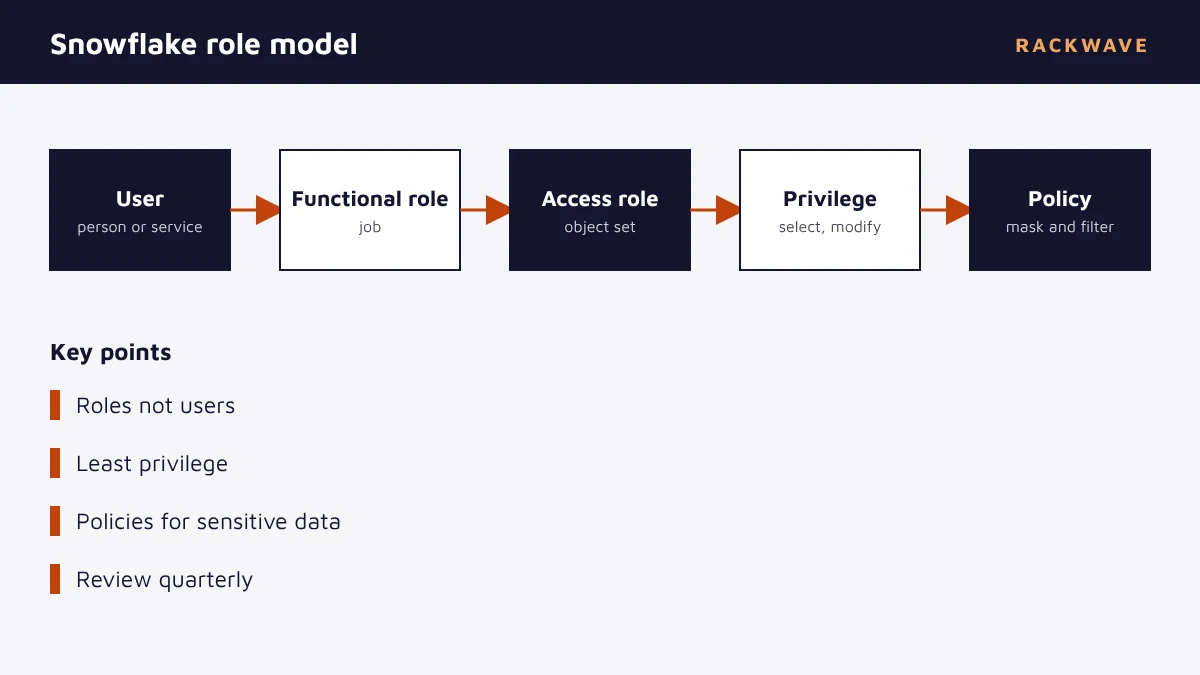
Every object has an owner role. Privileges such as USAGE, SELECT or MODIFY are granted to roles, and a user acts through an active role. Roles can be granted to other roles, forming a hierarchy in which a parent role inherits the privileges of its children. This model underlies Snowflake security and fits the principle of least privilege described in zero trust.
System-defined roles
| Role | Purpose |
|---|---|
| ACCOUNTADMIN | Top-level role for account settings and billing. Use sparingly with strong authentication |
| SECURITYADMIN | Manages grants and, with USERADMIN, users and roles |
| USERADMIN | Creates and manages users and roles |
| SYSADMIN | Creates and manages databases, schemas and warehouses |
| PUBLIC | Automatically granted to every user, so keep it nearly empty |
Do not run daily work as ACCOUNTADMIN. Create custom roles beneath SYSADMIN for each team and job.
Functional and access roles
A common and clear pattern separates two kinds of roles. Access roles hold privileges on a set of objects, such as read on the sales schema. Functional roles represent a job, such as analyst or data engineer, and are granted the access roles they need. Users receive functional roles only.
| Layer | Example | Contains |
|---|---|---|
| Access role | sales_read | SELECT on all tables in the sales schema |
| Access role | sales_write | INSERT, UPDATE and DELETE in the sales schema |
| Functional role | marketing_analyst | sales_read and marketing_read |
| Functional role | data_engineer | sales_write, raw_write and warehouse usage |
This keeps grants understandable, makes joiners and leavers simple and gives auditors a clear map.
Future grants and managed access
- Use future grants so new tables and views in a schema are covered by the same access roles automatically.
- Use managed access schemas so only the schema owner or a role with manage grants can grant privileges, which stops object owners handing out access freely.
- Grant ownership to a role, not to a person, so objects survive staff changes.
Protecting sensitive data
Role access alone does not hide a column inside a table that a role can read. Use masking policies to show masked values to roles without a need to see the original, and row access policies to filter rows by role or attribute. Combine them with tags for classification, for example marking columns that contain personal data, as part of your data governance approach and your GDPR obligations.
How to design a role model
- List the data domains. For example sales, finance and marketing.
- Create access roles per domain and level. Typically read and write, sometimes admin.
- Create functional roles per job. Grant them the access roles they need.
- Apply grants and future grants. Cover current and new objects consistently.
- Assign functional roles to users. Prefer mapping through your identity provider with SCIM and SSO.
- Review quarterly. Remove unused roles and privileges, and re-certify access.
Integrating with identity management
Authenticate users through single sign-on and map identity provider groups to Snowflake roles with SCIM so joiners, movers and leavers update automatically. See single sign-on and SAML. Use key-pair or OAuth for service accounts and rotate credentials, and require multi-factor authentication for human users with elevated roles.
Privilege reference
| Privilege | Applies to | What it allows |
|---|---|---|
| USAGE | Warehouses, databases, schemas | Use the object or see inside it |
| SELECT | Tables and views | Read rows |
| INSERT, UPDATE, DELETE | Tables | Change rows |
| CREATE TABLE and similar | Schemas | Create new objects in the schema |
| MONITOR | Warehouses, tasks, pipes | See activity without changing it |
| OWNERSHIP | Any object | Full control, including granting to others |
Grant the smallest privilege that does the job. USAGE on a database and schema is required before SELECT on a table works, which is a frequent cause of access requests that look correct but fail.
Separating environments and service accounts
- Use separate databases or accounts for development, test and production, with different roles in each.
- Give each pipeline, BI tool and application its own service user and role, so you can see what each one does and revoke it independently.
- Prefer key-pair or OAuth authentication for service users, and avoid shared passwords.
- Restrict network access with network policies where your design allows, and review them when addresses change.
- Keep break-glass access to ACCOUNTADMIN documented, monitored and tested.
Quarterly access review
Every quarter, export the list of users, their roles and the last login. Ask each data owner to confirm or remove access for their domain, and remove roles with no members. Review who holds ACCOUNTADMIN and SECURITYADMIN, check that multi-factor authentication is enforced and compare grants against the role model you designed. Keeping the review short and regular is more effective than an annual audit that nobody has time to finish.
Common mistakes
- Granting privileges directly to users, which becomes unauditable.
- Using ACCOUNTADMIN for daily analytics or pipelines.
- Putting broad grants on PUBLIC.
- Forgetting future grants, so new tables appear with no access or with accidental access.
- No separation between production and development roles.
- Never reviewing who still holds privileged roles.
A worked example
A healthcare analytics firm began with a handful of administrators and grew to two hundred users. They restructured into access roles per schema and functional roles per team, enforced future grants, moved to managed access schemas and mapped identity provider groups to functional roles. Patient identifiers were tagged and masked for all roles except a small audited group.
Onboarding changed from a ticket to a group change and a quarterly access review took hours instead of weeks. The example is illustrative.
Auditing and evidence
Auditors ask three questions: who can see this data, who did see it and how do you know access is reviewed. The role model answers the first, access history answers the second and your quarterly review log answers the third. Keep the evidence together in one place.
Auditing and support
Use the access history and login history views to review who read sensitive data and from where, and report exceptions to the data owner. Our data governance service designs role models and policies for Snowflake, and our data warehousing service builds the platform around them. For cost controls linked to roles see cost optimization.
Key takeaways
- Grant privileges to roles and roles to users.
- Keep ACCOUNTADMIN rarely used.
- Use access roles per object set and functional roles per job.
- Add masking and row policies for sensitive data.
- Map identity groups to roles with SCIM and review quarterly.
Quick glossary
| Term | Meaning |
|---|---|
| Role | A set of privileges granted to users or other roles |
| Access role | A role that holds privileges on a set of objects |
| Functional role | A role that represents a job function |
| Future grant | A grant that applies to objects created later |
| Masking policy | A rule that hides column values from some roles |
Read next: BigQuery vs Snowflake: Which Cloud Data Platform? · BigQuery Streaming Inserts: Real-Time Ingestion Guide · BigQuery Access Control: IAM, Policy Tags and Row Security
Frequently asked questions
How does Snowflake access control work?
Privileges are granted to roles and roles are granted to users or other roles, with ownership held by a role.
What is ACCOUNTADMIN?
It is the highest system role, used for account-level administration. Use it rarely and protect it with strong authentication.
What are functional and access roles?
Access roles hold privileges on objects, and functional roles represent jobs and are granted access roles.
What are future grants?
They apply privileges automatically to objects created later in a schema or database.
How do I hide columns from some users?
Use masking policies, and use row access policies to filter rows by role or attribute.
What is a managed access schema?
A schema where only the schema owner or a role with manage grants can grant privileges on its objects.
Should users have privileges granted directly?
No. Grant to roles so access is reviewable and easy to change.
How do I manage users at scale?
Use SSO and SCIM so identity provider groups map to Snowflake roles automatically.