
What is Snowpipe in Snowflake? Snowpipe is Snowflake continuous data loading service. It loads files into tables shortly after they arrive in a stage, using serverless compute so you do not manage a warehouse for loading. This guide explains how Snowpipe works, how auto-ingest uses cloud storage notifications, how it differs from bulk COPY and from Snowpipe Streaming, how to design for reliability and how to monitor cost and failures. Features and pricing change, so confirm details in current Snowflake documentation.
Short answer: Snowpipe loads files continuously as they land in cloud storage, using serverless compute. Use it for steady micro-batch ingestion, use COPY for scheduled bulk loads, and use Snowpipe Streaming for row-level, low-latency ingestion.
What is Snowpipe?
A pipe is a Snowflake object that holds a COPY statement describing how to load files from a stage into a table. Snowpipe runs that statement when new files arrive, usually within a minute or so. You are billed for the serverless compute used, not for a running warehouse. It is a core building block of an ELT pipeline on Snowflake.
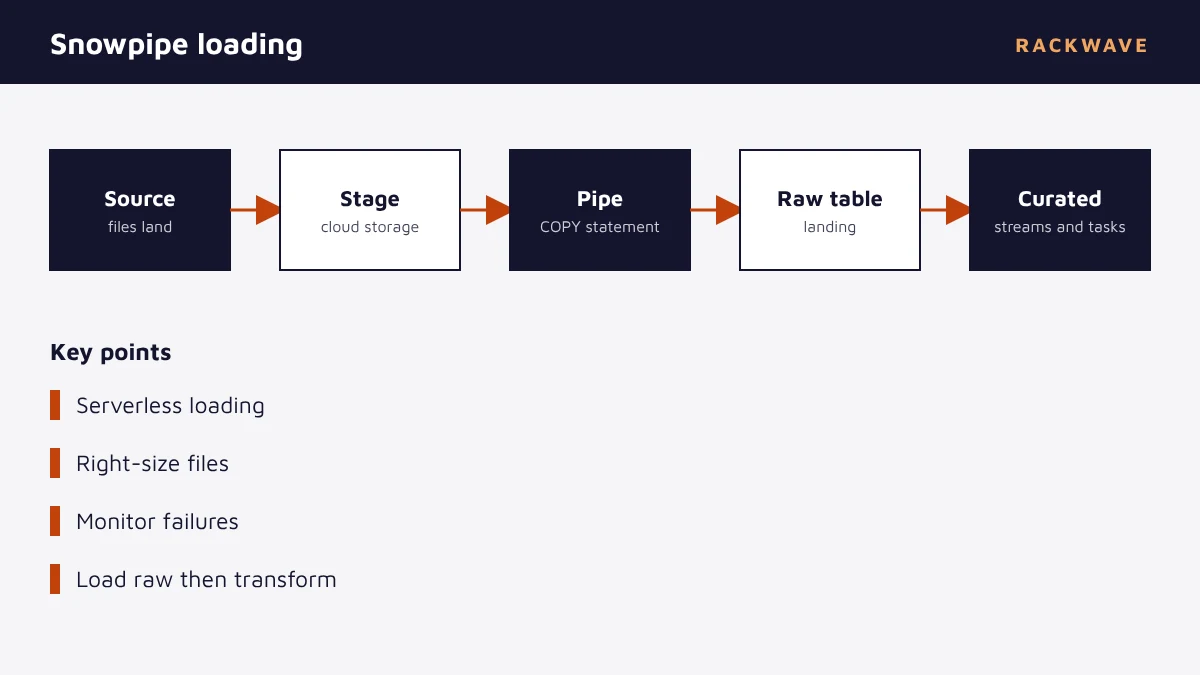
How auto-ingest works
- Files land in cloud storage. An upstream system writes files to an external stage such as an object storage bucket.
- A notification is sent. The storage service publishes an event to a queue that Snowpipe listens to.
- Snowpipe queues the file. The pipe receives the file name and schedules a load.
- Serverless compute loads it. The COPY statement runs and inserts rows into the target table.
- Load history is recorded. Snowflake tracks which files were loaded so they are not loaded twice.
Snowpipe, COPY and Snowpipe Streaming
| Option | Trigger | Compute | Best for |
|---|---|---|---|
| COPY INTO | Run by you or a scheduler | Your warehouse | Scheduled bulk loads, one-off backfills |
| Snowpipe (files) | New files in a stage | Serverless | Steady micro-batches of files |
| Snowpipe Streaming | Rows sent through an API or connector | Serverless | Low-latency event and stream ingestion |
Pairing streaming ingestion with sources such as Apache Kafka is common for event data, while files from partners suit standard Snowpipe.
Designing for reliable loading
- Use a consistent folder structure and file naming so partitions and replays are easy.
- Keep files a sensible size. Very many tiny files add overhead and cost, while huge files delay loads. Aim for moderate compressed sizes as suggested in current documentation.
- Define file formats explicitly and set error handling such as skip or abort for bad rows.
- Load to a raw landing table first and transform afterward. See ETL versus ELT.
- Make loads idempotent so re-sent files do not create duplicates.
Transforming after load
Snowpipe loads data into raw tables. Downstream, use streams and tasks or dynamic tables to transform new rows into curated models. This separates ingestion from business logic and makes failures easier to isolate.
Monitoring and error handling
- Check pipe status and recent load history for pending or failed files.
- Alert on files stuck in the queue or on rising error counts.
- Keep a way to reload failed files after fixing the source or the file format.
- Watch serverless credits for pipes to catch runaway file volumes.
- Test notification wiring in each cloud region, since missing events cause silent gaps.
Example setup
A simplified pattern looks like this. Confirm exact syntax and cloud-specific steps in current documentation.
CREATE PIPE raw.events_pipe AUTO_INGEST = TRUE AS
  COPY INTO raw.events
  FROM @raw.events_stage
  FILE_FORMAT = (TYPE = JSON)
  ON_ERROR = SKIP_FILE;

-- check pipe state
SELECT SYSTEM$PIPE_STATUS('raw.events_pipe');
Set ON_ERROR to match your tolerance. Skipping a file keeps the pipeline moving, while aborting makes errors loud. Whichever you choose, route skipped files to review so data is not quietly lost.
Cost model
Snowpipe bills for the serverless compute used to load files plus a small per-file overhead, so cost depends on both volume and the number of files. Fewer, larger files are generally cheaper per row than many tiny ones. Compare against a scheduled COPY on a small warehouse for steady, predictable volumes, because a short, well-sized warehouse run every few minutes can sometimes cost less. Test both with real data and review the usage views each month. See Snowflake cost optimization for the wider picture.
Schema changes, replay and backfill
- Use a flexible raw layer, such as a variant column for semi-structured data, so new fields do not break loads.
- Keep original files in storage for as long as your recovery needs require, so you can replay them after a bug fix.
- For a large backfill, use COPY on a suitably sized warehouse instead of pushing history through a pipe.
- Version file formats and document changes with the upstream team.
- Test the replay process before an incident, not during one.
Choosing between ingestion options
| Scenario | Suggested approach | Reason |
|---|---|---|
| Partner files arrive all day | Snowpipe with auto-ingest | Steady micro-batches without a warehouse |
| One large nightly extract | Scheduled COPY on a sized warehouse | Simple and predictable |
| Application events at high volume | Snowpipe Streaming or a Kafka connector | Lower latency and no file handling |
| One-off historical backfill | COPY with parallel files | Best control over size and retries |
| Database changes from operational systems | CDC tool landing to Snowflake | Keeps tables in step with the source |
Many platforms use more than one option. Pick per source based on latency needs, volume and operational ownership, and record the choice in your data catalogue so support teams know which pipe feeds which table. See change data capture for database sources.
Operating model
Assign each pipe an owner and an on-call route, document its expected arrival pattern and write a short runbook for the three common failures: files not arriving, files arriving but failing to load, and loads succeeding with the wrong data. A weekly report listing files loaded, files skipped and average latency by pipe gives early warning of upstream drift. Teams that run ingestion this way find problems from the data, not from a business user.
Common mistakes
- Using Snowpipe for a once-a-day large batch where COPY is simpler and cheaper.
- Producing millions of tiny files.
- Skipping error handling, so one bad file blocks understanding of the gap.
- Forgetting to monitor notifications after a storage or permission change.
- Applying heavy transformations inside the load statement.
A worked example
A logistics company receives scan events as small JSON files every few seconds. Their first design wrote a file per event and Snowpipe cost climbed. They changed the producer to batch events into files of a sensible size every minute, kept a raw landing table with the file name and load time, and used a stream and task to build a clean events table. Load latency stayed under two minutes and cost fell sharply.
They added alerts for pipes with no files for ten minutes, since silence often meant a broken upstream job. Numbers are illustrative.
Security and governance
Grant the pipe only the stage and table privileges it needs, and store cloud credentials through storage integrations rather than keys in code. Classify landing data for privacy and apply policies as described in data governance. Our data warehousing service builds ingestion on Snowflake, and our system integration service connects source systems.
Key takeaways
- Snowpipe loads files continuously using serverless compute.
- Auto-ingest relies on cloud storage notifications.
- Use COPY for scheduled bulk loads and Streaming for row-level ingestion.
- Avoid tiny files and keep loads idempotent.
- Monitor load history, stuck files and serverless credits.
Quick glossary
| Term | Meaning |
|---|---|
| Pipe | Snowflake object that holds the COPY statement for loading |
| Stage | Location where files wait to be loaded |
| Auto-ingest | Loading triggered by storage notifications |
| Snowpipe Streaming | Row-level low-latency ingestion |
| Landing table | Raw table that receives loaded data |
Read next: BigQuery vs Snowflake: Which Cloud Data Platform? · BigQuery Streaming Inserts: Real-Time Ingestion Guide · BigQuery Access Control: IAM, Policy Tags and Row Security
Frequently asked questions
What is Snowpipe?
It is Snowflake continuous loading service that loads files into tables shortly after they arrive in a stage using serverless compute.
How is Snowpipe different from COPY?
COPY runs when you trigger it and uses a warehouse, while Snowpipe runs automatically on new files with serverless compute.
What is auto-ingest?
It uses cloud storage event notifications to tell Snowpipe about new files so loading starts without manual calls.
What is Snowpipe Streaming?
It ingests rows directly through an API or connector for lower latency than file-based loading.
How does Snowpipe avoid duplicate loads?
It records load history for files so the same file is not loaded twice within the tracking period.
What file size should I use?
Use moderate compressed file sizes as recommended in Snowflake documentation, avoiding many tiny files.
How do I monitor Snowpipe?
Check pipe status and load history, and alert on stuck or failed files and unusual serverless credit use.
Can I transform data during loading?
Light changes are possible, but loading raw first and transforming afterward is easier to operate.