
What are Snowflake dynamic tables? Dynamic tables are tables in Snowflake that you define with a query and a target freshness, and Snowflake keeps them updated automatically. Instead of writing separate streams, tasks and merge logic, you declare the result you want and a maximum lag, and Snowflake manages the refresh. This guide explains how dynamic tables work, how target lag and refresh modes behave, how to chain them into pipelines, how they compare with streams and tasks, how to control cost and the limits to be aware of. Features change, so confirm details in current Snowflake documentation.
Short answer: A dynamic table materialises a query and refreshes itself within a target lag you choose. Use it for declarative transformation pipelines, and choose streams and tasks when you need step-by-step control.
What is a dynamic table?
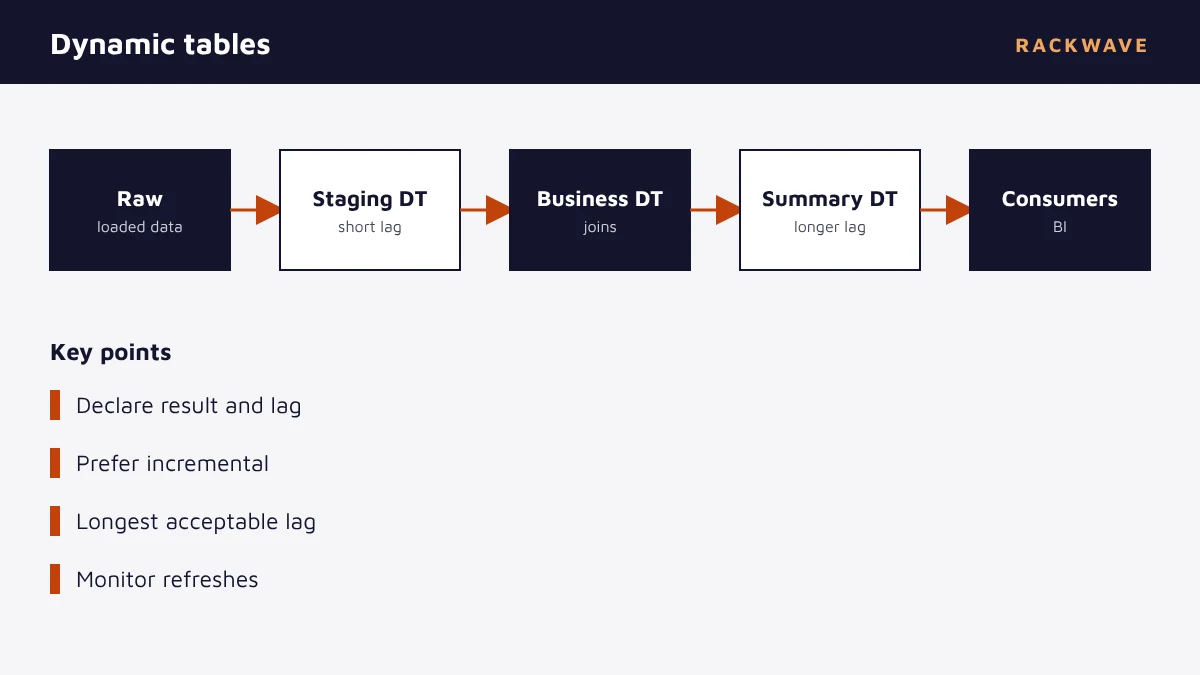
A dynamic table stores the result of a SELECT query. You set a TARGET_LAG, such as five minutes or one hour, and a warehouse for the refresh. Snowflake then schedules refreshes so the table is no more stale than the target lag, where possible. It reads from base tables or other dynamic tables, so you can build a chain of transformations that stay in step. It is a declarative alternative to hand-built pipelines in Snowflake.
How refresh works
| Aspect | Behaviour |
|---|---|
| Target lag | The maximum acceptable staleness. Shorter lag means more frequent refreshes and more cost |
| Incremental refresh | Processes only changed data when the query supports it |
| Full refresh | Recomputes the whole result when incremental is not possible |
| Refresh mode | Chosen automatically or set explicitly, so check which mode your query uses |
| Dependencies | Downstream tables refresh in an order that respects upstream lag |
Queries that use certain constructs may fall back to full refresh, which can be expensive on big tables. Check the refresh history to see which mode runs.
Dynamic tables compared with other approaches
| Approach | Style | Best for |
|---|---|---|
| Dynamic tables | Declarative, lag based | Layered transformations with clear freshness needs |
| Streams and tasks | Imperative, event based | Custom merge logic and fine control. See streams and tasks |
| Materialized views | Single table query, automatic | Simple aggregations over one table |
| dbt models | Version-controlled SQL | Tested projects with documentation, see dbt |
They also work with dbt, which can create dynamic tables as a materialisation, combining testing and lineage with automatic refresh. This is a practical route for teams that already have a dbt project and want Snowflake to handle scheduling.
How to build a pipeline with dynamic tables
- Land raw data. Use Snowpipe or another loader into raw tables.
- Define a staging dynamic table. Clean and type the data with a short target lag.
- Define business-level tables. Join and aggregate staging tables in further dynamic tables.
- Set target lag by need. Use the longest lag the business accepts, since lag drives cost.
- Choose the warehouse. Size it for the refresh and monitor its credits.
- Monitor refresh history. Check mode, duration and failures and alert on lag breaches.
Choosing the target lag
- Ask the data consumer how stale the data may be before it hurts a decision.
- Use shorter lag only for operational dashboards and alerting, and longer lag for finance and reporting.
- Let downstream tables use a lag expressed in terms of upstream tables so freshness flows through the chain.
- Review lag settings when usage changes, because a forgotten one-minute lag can quietly be the largest cost.
Cost and performance
Refresh costs come from warehouse time and sometimes serverless components. Incremental refresh is usually far cheaper than full refresh, so design queries that support it by keeping joins and aggregations straightforward. Avoid heavy nondeterministic functions, test new definitions on a sample and watch refresh duration. For general guidance see Snowflake cost optimization.
Design patterns
| Pattern | Description | Watch for |
|---|---|---|
| Staging and marts | Clean tables feed business-level tables | Keep joins simple enough for incremental refresh |
| Slowly changing dimensions | Dynamic table builds history from change events | Test late arriving data and deletes |
| Aggregate rollups | Hourly, daily and monthly summaries chained together | Align lag between layers |
| Feature tables for ML | Fresh features built from events | Check refresh cost against model needs |
| Reverse-ready audiences | A table of customers ready to sync to tools | Pair with reverse ETL |
Start with a thin slice of the pipeline, prove the refresh mode and cost, and then extend it. It is easier to add layers than to untangle a deep chain.
Testing and deployment
- Keep definitions in version control and deploy through a pipeline with review, as for application code.
- Test a new definition on a sample or a clone, compare results with the old logic and check the refresh mode before switching consumers.
- Use data quality checks on key tables, such as row counts, null rates and uniqueness. See data observability.
- Plan how to change a definition that other tables depend on, because changes can trigger a full refresh downstream.
- Record the lag and cost of each table in your data catalogue so owners can discuss trade-offs openly.
Limits to be aware of
Dynamic tables are an evolving feature, and not every SQL construct supports incremental refresh. Some functions, deep nesting and certain joins can force full refresh. There are also limits on how sources can be changed, and on how deeply tables can be chained. Always read the current documentation for your edition and test with realistic data volumes before committing a design. Where a requirement does not fit, fall back to a task-based pipeline for that step only.
Common mistakes
- Setting a very short lag everywhere by default.
- Writing queries that force full refresh on very large tables without noticing.
- Creating deep chains of dynamic tables with no ownership or documentation.
- Ignoring failed refreshes until a dashboard looks wrong.
- Using dynamic tables where an external system must trigger exact timing.
A worked example
A subscription business builds a revenue model from payments, subscriptions and plans. Raw tables load continuously. A staging dynamic table cleans each source with a five-minute lag, a customer revenue dynamic table joins them with a fifteen-minute lag and a monthly summary uses a one-hour lag. Finance reads the summary and operations reads the customer table.
The team replaced eleven tasks and three streams with five dynamic table definitions held in version control, and a short monitoring query alerts when any table exceeds its lag. Details are illustrative.
Questions to answer before you build
- Who consumes this table and what freshness do they truly need?
- Can the query refresh incrementally, and have we tested it?
- What will it cost per day at the chosen lag?
- Who owns the table and who is on call when it breaches lag?
- How will we roll back a bad definition?
Governance and support
Document each dynamic table with its owner, lag, source tables and consumers, and apply the same access controls as for any other table. Our data warehousing service designs layered Snowflake models, and our data analytics service builds the reporting on them.
Key takeaways
- Dynamic tables keep a query result fresh within a target lag.
- Incremental refresh is cheaper than full refresh.
- Choose lag by business need because it drives cost.
- Use streams and tasks when you need custom control.
- Document owners and monitor refresh history.
Quick glossary
| Term | Meaning |
|---|---|
| Dynamic table | A table defined by a query that Snowflake refreshes automatically |
| Target lag | The maximum allowed staleness |
| Incremental refresh | Refresh that processes only changes |
| Full refresh | Refresh that recomputes the whole result |
| Refresh history | Log of refresh runs and modes |
Read next: BigQuery vs Snowflake: Which Cloud Data Platform? · BigQuery Streaming Inserts: Real-Time Ingestion Guide · BigQuery Access Control: IAM, Policy Tags and Row Security
Frequently asked questions
What is a Snowflake dynamic table?
It is a table defined by a query and a target lag that Snowflake refreshes automatically.
What is target lag?
It is the maximum acceptable staleness for the table, which drives how often it refreshes.
Is refresh incremental?
It can be, when the query supports it. Otherwise Snowflake performs a full refresh, so check the refresh mode.
How do dynamic tables differ from materialized views?
Dynamic tables support multi-table queries and chained pipelines, while materialized views are limited to a single table query.
Should I use dynamic tables or streams and tasks?
Use dynamic tables for declarative pipelines and streams and tasks when you need custom step-by-step control.
What drives dynamic table cost?
Refresh frequency, the warehouse size, the data scanned and whether refreshes are incremental or full.
Can dbt create dynamic tables?
Yes, dbt can use dynamic tables as a materialisation so you keep tests and lineage.
How do I monitor them?
Use refresh history to check mode, duration and failures, and alert when lag is breached.