
What is Apache Airflow? It is an open source platform for authoring, scheduling and monitoring workflows as code. Originally created at Airbnb and now a top level Apache project, Airflow lets data and platform teams define pipelines in Python as directed acyclic graphs, called DAGs, of tasks with explicit dependencies. The scheduler runs tasks on time, retries failures, tracks history and shows everything in a web interface. Airflow is widely used to orchestrate data pipelines, machine learning workflows, reporting jobs and infrastructure tasks. This guide explains how Airflow works, its core concepts and architecture, how it compares with alternatives, best practices for building reliable DAGs and the mistakes that cause trouble.
Short answer: Airflow orchestrates tasks defined in Python code as DAGs. It schedules them, manages dependencies, retries failures, records every run and provides a UI for monitoring. It coordinates work done by other systems rather than processing data itself.
What is Apache Airflow?
The Apache Airflow article on Wikipedia describes a workflow management platform for data engineering pipelines. It is a central tool in data engineering, orchestrating ETL pipelines, dbt runs, Spark jobs and MLOps workflows. Managed versions exist on all major clouds.
How Airflow works
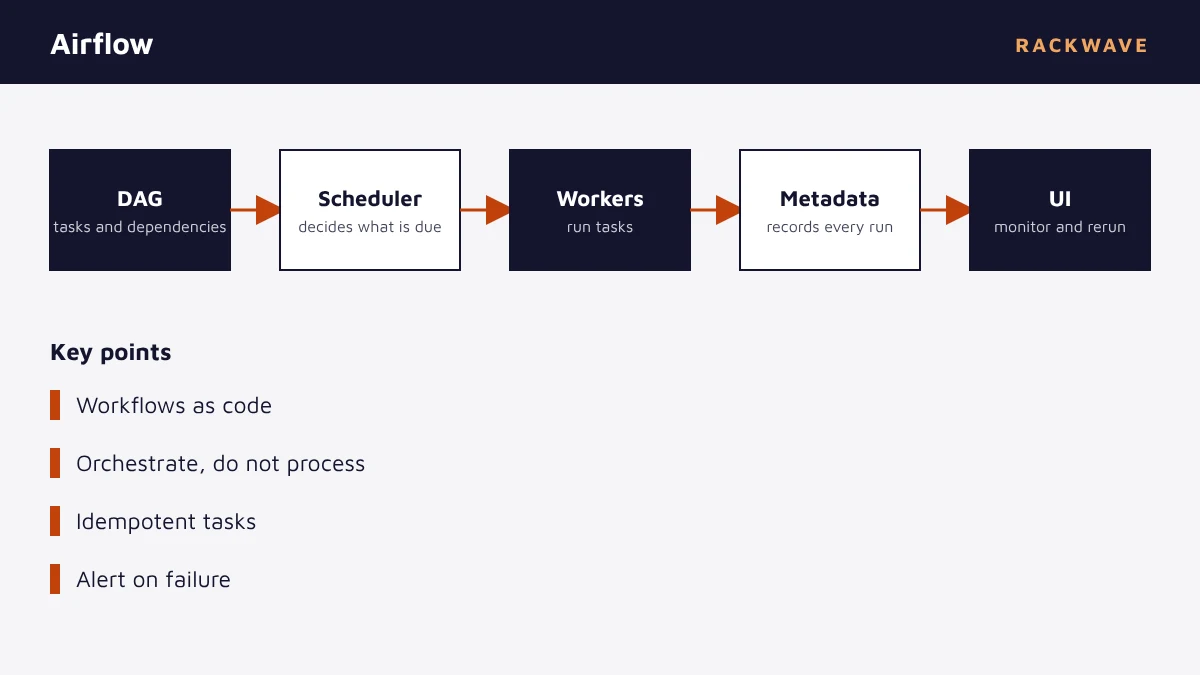
- Define a DAG in Python. A file declares tasks and the order in which they depend on each other.
- The scheduler parses DAG files. It decides which runs are due based on schedules and data intervals.
- Tasks are queued. When dependencies are met, tasks are placed on an executor.
- Workers execute tasks. They run operators that call databases, APIs, containers or other services.
- State is recorded. Each attempt, log and result is saved in the metadata database.
- Failures are retried or alerted. Retries, timeouts and callbacks handle problems.
- Users monitor in the UI. Teams see run history, durations, logs and can rerun or backfill tasks.
Core Airflow concepts
| Concept | Meaning | Example |
|---|---|---|
| DAG | A graph of tasks with dependencies and a schedule | Daily sales pipeline |
| Task | A unit of work in a DAG | Run a SQL transformation |
| Operator | A template for a kind of task | BashOperator, PythonOperator, provider operators |
| Sensor | A task that waits for a condition | Wait for a file to arrive |
| Hook and connection | Reusable interface and stored credentials for external systems | Connect to Snowflake or an API |
| XCom | Small messages passed between tasks | Pass a file path to the next task |
| Executor | How tasks are run | Local, Celery, Kubernetes |
| Backfill | Running a DAG for past intervals | Reprocess last month after a fix |
| Dataset or asset scheduling | Trigger DAGs when data updates | Run reports when a table is refreshed |
Airflow architecture
| Component | Role |
|---|---|
| Scheduler | Parses DAGs, schedules runs and queues tasks |
| Executor and workers | Execute tasks, locally, on a queue or as Kubernetes pods |
| Web server | Provides the UI and API |
| Metadata database | Stores state, history and configuration |
| DAG repository | Source controlled Python files, synced to the scheduler |
| Logs and monitoring | Task logs, metrics and alerts |
Airflow compared with alternatives
| Tool | Style | Notes |
|---|---|---|
| Apache Airflow | Python DAGs, scheduled batch | Mature, huge ecosystem of providers |
| Dagster | Asset oriented, strong testing | Modern developer experience |
| Prefect | Python flows, dynamic | Easy to start, cloud or self hosted |
| Cloud workflow services | Managed, such as Azure Data Factory and AWS Step Functions | Less to operate, tied to a cloud |
| Cron and scripts | Simple schedules | No dependencies, retries or visibility |
| Kafka and streaming engines | Continuous processing. See what is Apache Kafka | Different problem: not batch orchestration |
Best practices for reliable DAGs
- Make tasks idempotent, so rerunning them gives the same result.
- Keep tasks small and focused, with clear inputs and outputs.
- Do heavy computation in the target system, not in Airflow workers.
- Use data intervals and avoid relying on the current time inside tasks.
- Store secrets in a secrets backend, not in code.
- Set sensible retries, timeouts and alerts on failures and missed schedules.
- Keep DAG files light, since the scheduler parses them often.
- Test DAGs in CI for import errors and structure.
How to adopt Airflow
- Decide managed or self hosted. Managed services reduce operations work. Self hosting offers control but needs expertise.
- Choose an executor. Kubernetes suits elastic, isolated tasks. Celery suits steady workloads.
- Set up source control and CI. Store DAGs in Git, test them automatically and deploy through a pipeline.
- Define standards. Agree naming, owners, tags, retry policies and alerting for every DAG.
- Build a first valuable pipeline. Pick a daily load and transformation with clear business value.
- Monitor and set service levels. Track duration, failure rate and freshness for key DAGs.
- Grow with governance. Review DAGs regularly, retire unused ones and manage access by team.
Common Airflow mistakes
- Running heavy data processing inside Airflow workers instead of delegating it.
- Non idempotent tasks that duplicate data on retry.
- Passing large datasets through XCom.
- Using top level code in DAG files that slows scheduling.
- No alerting, so silent failures stop reports.
- Creating hundreds of unowned DAGs with no standards.
Our data analytics service builds and operates orchestrated pipelines, and our DevOps service runs Airflow reliably on Kubernetes with CI/CD and monitoring.
A worked example: orchestrating a daily analytics pipeline
A media company loads data from advertising platforms, a subscription system and web analytics into its warehouse every morning. Previously each load ran from cron, and when one failed the later steps ran on stale data, leaving dashboards wrong until someone noticed. The team builds an Airflow DAG with sensors that wait for each source file or API window, tasks that load raw data, a dbt run that transforms it and tests that gate publication.
Retries handle transient API errors, and a failure alert pages the data on call if the pipeline is not complete by 7 am. A final task refreshes the dashboards and sends a summary to the team channel. When an upstream provider corrects data, engineers use a backfill to reprocess a week with one command. Reliable, visible runs replace the morning scramble, and leaders trust that dashboards are current.
Scaling and operating Airflow
As the number of DAGs grows, treat Airflow as a shared platform. Separate environments for development and production, isolate teams with pools and queues so that one heavy job does not starve others, and monitor scheduler latency and task queue depth. Pin dependency versions in task containers so upgrades do not break pipelines, plan Airflow version upgrades regularly and track cost of the underlying compute. Provide templates and shared operators that encode company standards, so new pipelines start from a reliable base.
Airflow in machine learning and platform workflows
Airflow is not limited to data loads. Teams use it to retrain models on a schedule, run evaluation and promotion steps, trigger infrastructure jobs and coordinate reports. The same principles apply: small idempotent tasks, clear dependencies, observable runs and automated tests. For event driven needs that must react within seconds, combine Airflow with messaging or streaming tools, keeping it for the scheduled and dependency heavy work where it excels.
Key takeaways
- Airflow defines workflows as Python DAGs and schedules, runs and monitors them.
- It orchestrates work performed by other systems and does not process data itself.
- Idempotent small tasks, secrets management, alerting and CI testing make DAGs reliable.
- Choose managed or self hosted, and the right executor for your workloads.
- Alternatives such as Dagster, Prefect and cloud services suit different needs.
Quick glossary
| Term | Meaning |
|---|---|
| DAG | Directed acyclic graph of tasks with dependencies |
| Operator | A template that defines what a task does |
| Sensor | A task that waits for something to happen |
| Backfill | Running a workflow for past time intervals |
| Idempotent | Safe to run more than once with the same result |
Read next: BigQuery vs Snowflake: Which Cloud Data Platform? · BigQuery Streaming Inserts: Real-Time Ingestion Guide · BigQuery Access Control: IAM, Policy Tags and Row Security
Frequently asked questions
What is Apache Airflow in simple terms?
It is a tool for scheduling and monitoring workflows written as Python code, making sure tasks run in the right order, on time and with retries when something fails.
What is a DAG in Airflow?
A DAG is a directed acyclic graph that defines tasks and their dependencies, so Airflow knows what to run and in which order, without loops.
Is Airflow an ETL tool?
Not exactly. Airflow orchestrates ETL and other jobs but does not transform data itself. The heavy work runs in databases, Spark, dbt or other systems.
What is the difference between Airflow and dbt?
dbt transforms data with SQL models. Airflow schedules and coordinates tasks, including running dbt. They complement each other.
Can Airflow handle real time data?
Airflow is designed for batch and scheduled workflows. For real time streaming, use tools such as Kafka or Flink, possibly orchestrated alongside Airflow.
Should I use managed Airflow?
Often yes. Services such as Amazon MWAA, Google Cloud Composer and Astronomer reduce operations work, though self hosting may suit specialised needs.
What are Airflow sensors?
Sensors are tasks that wait for a condition, such as a file arriving or another process finishing, before downstream tasks run.
How do I make Airflow pipelines reliable?
Use idempotent tasks, retries and timeouts, alerting, tested DAGs, secrets management and heavy processing delegated to external systems.