
What are Segment destinations? Segment destinations are the tools that receive data from Segment, such as analytics platforms, email and engagement tools, advertising networks, CRMs, support systems and data warehouses. A destination is connected to one or more sources, and Segment sends the events and profile data that the destination needs, in the format it expects, either through cloud mode on the server side or through device mode in the browser or app. This guide explains how destinations work, the difference between cloud mode and device mode, how to map events and properties, how to filter and test data, how to monitor delivery and which mistakes cause missing, duplicated or misrouted data. Capabilities change, so confirm details in current Segment documentation.
Short answer: Segment destinations deliver your data to other tools. Choose cloud or device mode deliberately, map events carefully, filter what each tool receives and monitor delivery.
What are Segment destinations?
Destinations are the output side of what is Segment, fed by sources and governed by Protocols. Data can also flow from the warehouse with reverse ETL. Related guides include Engage audiences and what is data integration.
How destinations work
| Category | Examples of purpose | Typical data |
|---|---|---|
| Analytics | Product and behaviour analysis | Events and traits |
| Email and engagement | Messaging and journeys | Events, traits, audiences |
| Advertising | Conversion tracking and audiences | Purchase events, hashed identifiers |
| CRM and sales | Lead and account updates | Identify and group data |
| Support | Context for agents | User traits and key events |
| Warehouse | Long term storage and modelling | All events and profiles |
Cloud mode and device mode
| Aspect | Cloud mode | Device mode |
|---|---|---|
| Where data is sent from | Segment servers | The browser or app |
| Page weight | Light | Adds the vendor library |
| Reliability | Less affected by blockers | Can be blocked by browsers |
| Features | Server side API features | Full client features such as session replay |
| Control | Central filtering and mapping | Less central control |
| Best for | Most tools and sensitive data | Tools that need client side code |
Mapping and filtering
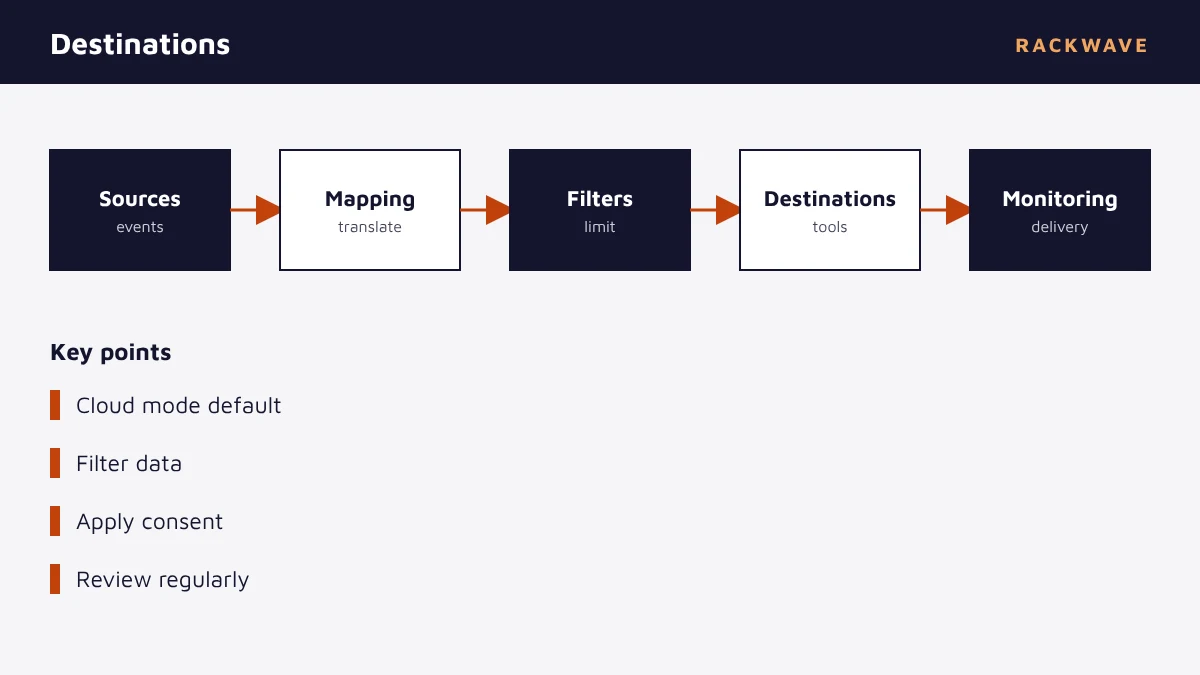
- Map Segment events to the event names the tool expects.
- Send only the events and properties each tool needs.
- Filter out internal traffic and test data.
- Hash or remove personal fields before sending to advertising tools.
- Respect consent categories for each destination.
- Document every mapping so changes can be traced.
How to add and test a destination
- Define the need. State what the team will do with the data.
- Choose the mode. Pick cloud or device mode.
- Connect and configure. Add credentials and settings, then map events.
- Filter. Limit events and properties to what the tool needs.
- Test. Send sample events and check them in the destination.
- Enable for production. Turn on for live traffic with monitoring.
- Review. Check delivery, errors and value on a regular basis.
Common mistakes
- Sending all data to every destination.
- Duplicate events because a tag and Segment both send them.
- No consent filtering for advertising tools.
- Unclear ownership of each destination.
- Ignoring delivery errors until reports break.
- Leaving unused destinations enabled.
Our system integration service connects destinations and our CRM and lifecycle service helps teams use the data well.
A worked example: connecting analytics, email and the warehouse
A subscription app connects three destinations. The analytics tool receives all behavioural events in cloud mode. The email platform receives identify calls and a small set of lifecycle events, such as Trial Started and Payment Failed. The warehouse receives everything for modelling.
A filter keeps internal staff out of every destination, and a consent rule stops advertising data being sent for users who have not agreed. Delivery dashboards show rates and errors per destination, and an owner for each tool reviews them weekly. When the team adds an advertising network later, it reuses the same events with fewer properties.
Replay and recovery
Mistakes happen, such as a wrong mapping or a destination outage. Check whether your plan allows replay of past events, and use it to repair gaps after fixing the cause. Keep the warehouse as a complete record, since it can be used to backfill tools that cannot receive historical data directly. Document the recovery steps and test them occasionally, so that a real incident is handled calmly and quickly.
Performance and data volumes
Every destination adds cost, either in licence fees or in page weight. Review which tools actually use the data, remove unused destinations and trim properties that nobody reads. In device mode, test the effect on page speed and mobile performance. In cloud mode, watch volumes against plan limits, and consider sampling or filtering high volume, low value events before they reach expensive tools.
Security and access control
Destination credentials give access to downstream systems, so store them securely and limit who can edit them. Use separate credentials for test and production, rotate them on a schedule and log changes. Review which destinations receive personal data and keep a list for privacy and security teams. Include destinations in regular access reviews and when staff leave, since forgotten connections are a common source of risk.
Privacy and consent by destination
Different tools have different purposes and legal bases, so consent should be applied per destination or per category. Map each destination to a category such as analytics, marketing or advertising, and send data only when the user has agreed to that category. Provide a way to stop sending and to delete data from destinations. See what is GDPR for principles, and review the set up with legal advisers.
Governance and documentation
Maintain a register of destinations with owner, purpose, mode, data sent and review date. Review it quarterly and remove tools that are no longer used. Require a short request for a new destination that explains the use case and the data needed. This lightweight governance prevents tool sprawl, limits data exposure and keeps the pipeline understandable as the company grows.
Working with advertising destinations
Advertising platforms use conversion events to optimise campaigns, so accuracy matters. Send purchase and sign up events with consistent values, include the identifiers the platform needs in the format it requires and avoid sending the same conversion from both a browser tag and the server without deduplication. Keep sensitive data out, apply consent rules and compare reported conversions with your own records. Regular reconciliation shows whether the integration helps campaigns or distorts them.
Monitoring delivery and alerting
Track the number of events delivered, failed and retried for each destination, and set alerts for sudden drops or rises. Compare counts between Segment and the destination, because differences often reveal mapping errors or rate limits. Keep a runbook that explains how to check a failing destination, who to contact and how to replay data. Simple monitoring turns silent failures into quick fixes before anyone relies on wrong reports.
Key takeaways
- Segment destinations deliver data to analytics, marketing, advertising, CRM and warehouse tools.
- Choose cloud or device mode deliberately, with cloud mode as the usual default.
- Map events carefully and filter data to what each tool needs.
- Apply consent per destination, secure credentials and monitor delivery.
- Keep a register of destinations and review it regularly.
Quick glossary
| Term | Meaning |
|---|---|
| Destination | A tool that receives data from Segment |
| Cloud mode | Sending data from Segment servers to a tool |
| Device mode | Sending data from the browser or app using the tool library |
| Mapping | Translating Segment events to the format a tool expects |
| Replay | Resending stored events to a destination after a problem |
Read next: BigQuery vs Snowflake: Which Cloud Data Platform? · BigQuery Streaming Inserts: Real-Time Ingestion Guide · BigQuery Access Control: IAM, Policy Tags and Row Security
Frequently asked questions
What is a Segment destination?
It is a tool that receives data from Segment, such as analytics, email, advertising or a warehouse.
What is the difference between cloud and device mode?
Cloud mode sends from Segment servers, while device mode sends from the browser or app using the vendor library.
How do I avoid duplicate events?
Remove direct tags that send the same events or use only one route per tool.
Can I send different data to different tools?
Yes, use filters and mappings to control events and properties for each destination.
How do I handle consent?
Map destinations to consent categories and send data only when users agree.
How do I test a destination?
Send sample events and check them in the tool before enabling for production.
What if a destination fails?
Check delivery errors, fix the cause and use replay or the warehouse to backfill where possible.
How many destinations should I have?
Only as many as you use, and review them regularly.