
What are Segment Engage audiences? Segment Engage audiences are groups of users or accounts defined in Segment from profile traits, event history and computed values, which can be sent to marketing, advertising, sales and support tools so that every team targets the same people. An audience can be built without code, updates as profiles change and can be delivered to several destinations at once, which removes the need to rebuild the same list in each tool. This guide explains how audiences work, how to design and test them, how to use computed traits and journeys, how to send audiences to destinations, how to measure results and which mistakes cause stale lists or privacy problems. Capabilities and packaging change, so confirm details in current Segment documentation.
Short answer: Segment Engage audiences define one group of customers from unified profiles and send it to many tools. Build them from clear goals, test sizes, apply consent and monitor sync.
What are Segment Engage audiences?
Audiences are built on Unify profiles and delivered to destinations. They work with warehouse data from reverse ETL and follow the principles of customer segmentation. For background, read what is Segment and customer engagement.
How audiences work
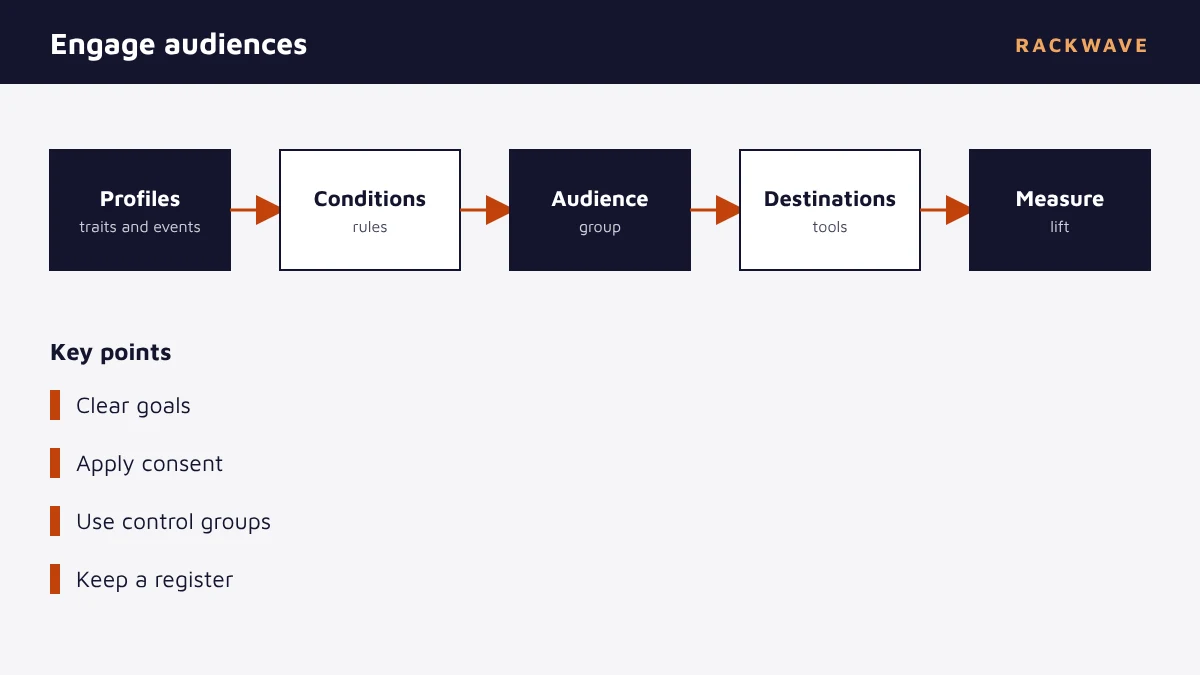
| Element | Purpose | Example |
|---|---|---|
| Conditions | Rules on traits and events | Purchased in the last 30 days |
| Computed traits | Calculated inputs for conditions | Total spend, last active date |
| Audience | The resulting group of profiles | High value lapsing customers |
| Destinations | Tools that receive the audience | Email, ads, CRM |
| Journeys | Multi step flows using audiences | Welcome and win back paths |
| Exclusions | Rules that remove users | Opted out, internal users |
Designing useful audiences
- Start with the action you want, such as reducing churn or promoting a feature.
- Combine behaviour and traits for precision.
- Use time windows that match the buying cycle.
- Exclude users without consent or in sensitive states.
- Check size and sample users before sending.
- Name audiences by purpose, owner and date.
Audience types and uses
| Type | Description | Use |
|---|---|---|
| Behavioural | Based on events | Cart abandoners, active trial users |
| Trait based | Based on attributes | Plan, region, industry |
| Computed | Based on calculated values | High lifetime value |
| Account level | Based on company data | Accounts with low adoption |
| Suppression | Excludes users | Existing customers from acquisition ads |
How to build and use an audience
- Define the goal. State the action and the channel.
- Check the data. Confirm that required events and traits exist on profiles.
- Build conditions. Create rules with windows and exclusions.
- Preview. Check size and sample profiles.
- Connect destinations. Send the audience to the tools that will use it.
- Measure. Compare outcomes with a control group.
- Maintain. Review audiences regularly and retire unused ones.
Common mistakes
- Audiences built on profiles with poor identity quality.
- No consent or suppression rules.
- Sending very small audiences to advertising platforms that need larger ones.
- Duplicating audiences in each tool.
- No control group.
- Leaving old audiences syncing and consuming cost.
Our CRM and lifecycle service designs audience strategy and our data analytics service measures results.
A worked example: converting active trial users
A software company defines an audience of trial users who have created a project and invited a colleague but have not upgraded. The audience is sent to the email tool for a guidance sequence and to the CRM so that sales can prioritise outreach. Users who opted out and internal accounts are excluded.
A control group receives no extra communication. The treated group upgrades at a higher rate, and the team uses the result to build a second audience for trial users who have not invited anyone, with a different message. Sync status and audience sizes are monitored weekly.
Journeys and orchestration
Audiences can also feed journeys that combine steps over time, such as a welcome message, a reminder after several days and a check for the goal. Keep journeys simple, with a clear entry, exit and goal, and avoid overlapping paths for the same user. Coordinate with other tools that also send messages, so that customers are not contacted twice. See customer journey orchestration for principles.
Syncing audiences to advertising platforms
Advertising platforms match audiences using hashed identifiers and need minimum sizes. Send only the identifiers that are required and permitted, apply consent, and expect match rates below 100 percent. Use suppression audiences to avoid advertising to existing customers, and refresh lists at a sensible interval. Compare results with and without the audience to confirm value, and review privacy terms of each platform with legal advisers.
Measuring audience performance
Compare conversion, revenue and opt out rates between audiences and control groups. Track how many people enter and leave each audience, since movement shows whether engagement is improving. Review sync health, including delays and errors in each destination. Share a short monthly summary with marketing, sales and product teams and use the findings to refine rules and to create new audiences from proven patterns.
Privacy and governance
Audiences use personal data to target people, so consent and purpose limitation matter. Record consent on profiles and make sure each destination respects it. Avoid targeting based on sensitive categories without a clear legal basis. Keep a register of audiences with owner, purpose and destinations, and review it quarterly. See what is data governance and what is GDPR for related guidance.
Testing audiences before launch
Before sending an audience to a live tool, preview the size, sample a few profiles and compare the result with what you expect from other reports. Check that key traits are populated for most users, since missing data silently shrinks an audience. Test with a small internal group first, confirm that the destination receives them and that exclusions work. Record the checks so that a later change can be compared against a known good state.
Aligning marketing, sales and product
Shared audiences work only when teams agree what they mean. Define core audiences, such as active trial users or at risk customers, in plain language and publish them with owners. Let marketing, sales and product use the same definitions, and discuss differences openly rather than creating private copies. A shared library reduces confusion about numbers, makes campaigns easier to coordinate and shows leaders a consistent picture of the customer base.
Cost and performance considerations
Audience features and syncs can add cost through profile counts, computed traits and destination volumes. Review which audiences are in use, remove duplicates and avoid very frequent syncs where daily updates are enough. Keep computed traits that serve real needs and retire the rest. Watch the time between a change in behaviour and the update in a tool, and set expectations with teams, since near real time is not needed for every campaign.
Common audience patterns to start with
Teams new to audiences can begin with a short list of proven patterns: new sign ups without activation, active users without a key feature, customers who have not returned for a set time, high value customers at risk and recent purchasers to exclude from acquisition ads. Each pattern has a clear action, a modest size and an obvious measure. Build these first, learn from the results and then extend to more detailed audiences as confidence and data quality grow.
Key takeaways
- Segment Engage audiences define groups from unified profiles and send them to many tools.
- Build from clear goals, using behaviour, traits and computed values.
- Always apply consent and suppression rules, and check size before sending.
- Use journeys sparingly and coordinate with other messaging tools.
- Measure with control groups and keep a register of audiences.
Quick glossary
| Term | Meaning |
|---|---|
| Audience | A group of profiles defined by rules on traits and events |
| Computed trait | A calculated value used in audience rules |
| Suppression audience | A group excluded from a campaign |
| Match rate | The share of an audience an ad platform can match |
| Journey | A multi step flow that uses audiences |
Read next: BigQuery vs Snowflake: Which Cloud Data Platform? · BigQuery Streaming Inserts: Real-Time Ingestion Guide · BigQuery Access Control: IAM, Policy Tags and Row Security
Frequently asked questions
What are Segment Engage audiences?
They are groups of users or accounts defined from profile traits and events and sent to other tools.
Do audiences update automatically?
Yes, membership updates as profiles change, and changes sync to destinations.
Can I send an audience to several tools?
Yes, one audience can be delivered to many destinations.
What data do audiences use?
Traits, events and computed values stored on unified profiles.
How do I handle consent?
Store consent on profiles and exclude users who have not agreed.
Why is my advertising audience small?
Match rates are below 100 percent and platforms need minimum sizes.
How do I measure impact?
Use control groups and compare conversion and revenue.
How often should I review audiences?
Review them quarterly and retire those that are unused.