
What is Segment reverse ETL? Segment reverse ETL is the capability that reads modelled data from a data warehouse, such as Snowflake, BigQuery, Redshift or Databricks, and sends it to Segment so that it can reach marketing, sales, support and advertising tools. It turns the warehouse from a place where data is only analysed into a source of operational data, so that attributes like lifetime value, churn risk or product usage can be used in campaigns and workflows. This guide explains how reverse ETL works, how to model data for it, how to set up a sync with the right identifiers and update rules, how to monitor and secure it, and which mistakes cause overwritten data or heavy warehouse costs. Capabilities change, so confirm details in current Segment documentation.
Short answer: Segment reverse ETL sends modelled warehouse data to tools through Segment. Model clean tables with identifiers, choose a sync mode, map fields and monitor runs.
What is Segment reverse ETL?
It complements the collection side described in what is Segment and feeds destinations and Engage audiences. The general pattern is explained in what is reverse ETL, and the warehouse side in what is a data warehouse and what is dbt.
How it works
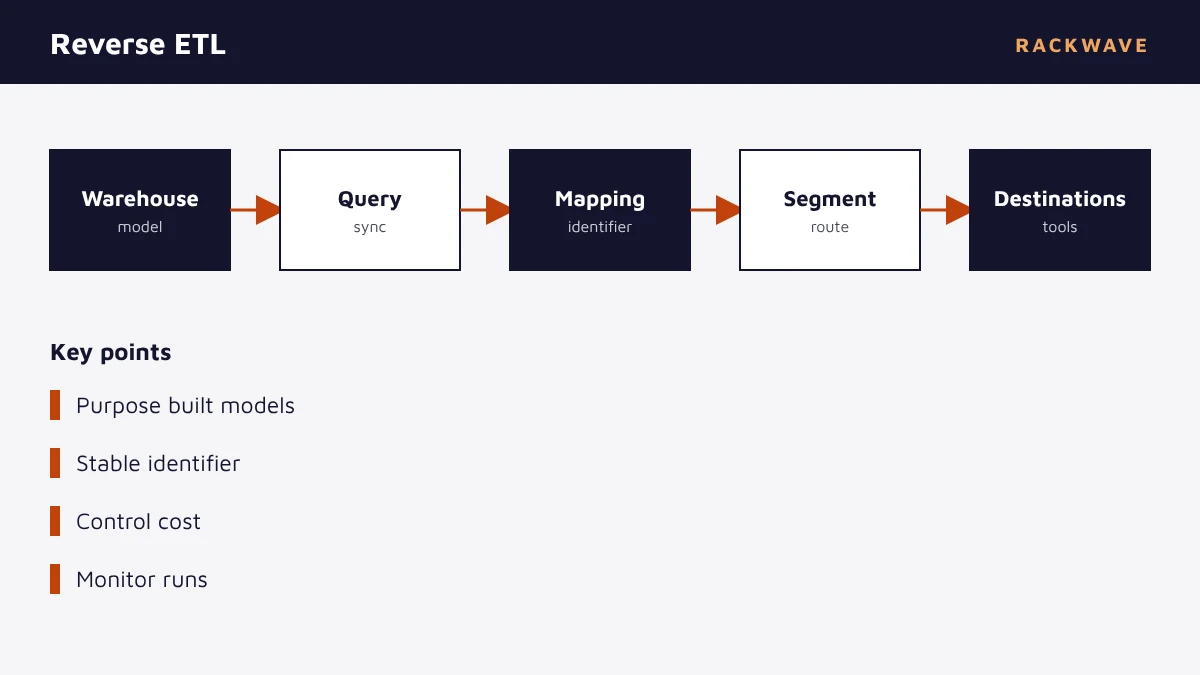
| Step | Description | Notes |
|---|---|---|
| Model | A table or view with one row per entity | Built with SQL or dbt |
| Source connection | Segment reads from the warehouse | Use a read only role |
| Sync mode | Upsert, insert, update or delete behaviour | Match the destination needs |
| Mapping | Columns mapped to traits or event properties | Include a stable identifier |
| Schedule | How often the sync runs | Daily or more frequent |
| Delivery | Data goes to destinations or profiles | Respect consent |
Preparing data in the warehouse
- Create a clear model per use case, such as customer scores or account health.
- Include a unique identifier that matches Segment or the destination.
- Use stable column names and data types.
- Add an updated at column so changes can be detected.
- Filter out test data and users who have not consented.
- Document each model with owner and purpose.
Typical use cases
| Use case | Data sent | Destination |
|---|---|---|
| Lifecycle marketing | Lifetime value, churn score | Email and engagement tools |
| Sales prioritisation | Product qualified lead score | CRM |
| Advertising | Customer lists and suppression audiences | Ad platforms |
| Support | Account health and plan details | Help desk |
| Finance and renewals | Renewal date, billing status | CRM and success tools |
How to set up a sync
- Define the use case. Name the action the data will enable.
- Build the model. Create a table with identifier, fields and updated time.
- Connect the warehouse. Add credentials with read only access to the schema.
- Create the sync. Choose the model, sync mode and mappings.
- Test. Run a sample and check data in the destination.
- Schedule and monitor. Set frequency and alerts for failures.
- Review. Check value and cost regularly.
Common mistakes
- Syncing large raw tables instead of purpose built models.
- No stable identifier, so records duplicate.
- Overwriting fields set by other systems.
- Very frequent syncs that raise warehouse costs.
- Ignoring consent and deletion in models.
- No owner for sync failures.
Our data warehousing service builds the models and our system integration service connects them to operational tools.
A worked example: product qualified leads
A software company calculates a product usage score in its warehouse from events such as projects created, teammates invited and integrations enabled. A model contains the account ID, score, tier and updated time. A daily sync sends the score as an account trait to Segment, and from there to the CRM.
Sales sees the score on the account record and prioritises those in the highest tier. Marketing builds an audience of accounts with rising scores for an adoption campaign. The team monitors sync runs and compares conversion between scored and unscored accounts to confirm that the model helps.
Sync modes and change detection
Choose the sync mode that fits the destination. Upserts create or update records based on the identifier, inserts only add new ones and deletes remove records that disappear from the model. Change detection compares the current model with the previous run, so that only changed rows are sent, which saves cost and API calls. Test how deletions behave before enabling them, since removing a row from a model can remove or clear data in a live tool.
Cost and performance in the warehouse
Reverse ETL queries run in your warehouse and consume compute. Keep models efficient, use incremental logic where possible and schedule heavy syncs outside peak hours. Watch run times and costs, and increase frequency only where freshness has real value. Review the warehouse bill after the first month, and adjust. A sync that costs more than the value it creates should be simplified or stopped.
Security and access
Grant the sync a read only role limited to the schemas it needs, and store credentials securely. Avoid exposing columns that contain sensitive data unless they are needed, and mask or hash where possible. Log who creates and edits syncs, and review access when people change roles. Include the integration in regular security reviews, and document which fields flow to which tools and why.
Privacy and consent
Models should apply consent before data leaves the warehouse, for example by filtering out users who have opted out of marketing. Make sure deletion requests are handled in the warehouse and propagate to Segment and destinations. Keep the data sent to the minimum needed for the use case. See what is GDPR for principles, and review the design with legal advisers, especially for advertising uses.
Monitoring and troubleshooting
Set alerts for failed runs, long run times and unusual changes in row counts. Compare the number of rows in the model with the records updated in the destination, since gaps point to mapping or identifier problems. Keep a runbook that explains how to check a failing sync and who to contact. Review run history weekly at first, and then monthly once the process is stable.
Choosing between reverse ETL and event streaming
Reverse ETL suits modelled, slower changing data such as scores, tiers and lifetime value, while event streaming suits fast signals such as a payment failure or a cart abandonment. Many programmes use both: events for timing and the warehouse for context. When deciding, ask how fresh the data must be, how complex the calculation is and where the logic already lives. Avoid recalculating the same metric in two places, and keep one definition that every tool uses.
Governance of models and syncs
Treat each model and sync as a product with an owner, a purpose and a review date. Require a short request for a new sync, which states the use case and the fields to be sent, and review privacy and cost before approval. Version models and test changes in a development warehouse. Retire syncs that are no longer used, and keep documentation that shows how data moves from the warehouse to each tool.
Key takeaways
- Segment reverse ETL sends modelled warehouse data to tools through Segment.
- Build purpose built models with a stable identifier and an updated time.
- Choose sync modes carefully, and avoid overwriting data owned by other systems.
- Control cost, secure access and apply consent in the model.
- Monitor runs and review the value of each sync.
Quick glossary
| Term | Meaning |
|---|---|
| Reverse ETL | Moving modelled data from a warehouse to operational tools |
| Model | A prepared table or view used as a data source |
| Upsert | Create a record or update it if it exists |
| Change detection | Sending only rows that changed since the last run |
| Read only role | A warehouse role that can query but not modify data |
Read next: BigQuery vs Snowflake: Which Cloud Data Platform? · BigQuery Streaming Inserts: Real-Time Ingestion Guide · BigQuery Access Control: IAM, Policy Tags and Row Security
Frequently asked questions
What is Segment reverse ETL?
It reads modelled data from a warehouse and sends it through Segment to other tools.
Which warehouses are supported?
Common cloud warehouses are supported, but confirm the current list in the documentation.
Why use reverse ETL?
It lets teams use modelled data, such as scores and lifetime value, in operational tools.
What does a model need?
A unique identifier, stable columns and an updated time.
How often should it sync?
As often as the use case needs, balancing freshness with cost.
How do I avoid overwriting data?
Define which system owns each field and map only fields that the warehouse owns.
How do I handle consent?
Filter models so only consenting users are sent and propagate deletions.
How do I monitor syncs?
Set alerts for failures, run times and row count changes.