
What are Segment Unify profiles? Segment Unify is the identity and profile layer of Segment, which stitches together events and traits from different sources, devices and identifiers into a single profile for each person or account, using identity resolution rules. The result is a profile that holds traits, a timeline of events, linked identifiers and computed values, which can feed audiences, destinations and analysis. This guide explains how identity resolution works, how to configure identifiers and priorities, how to use traits and computed values, how to avoid wrong merges, how profiles relate to a warehouse and a single customer view, and which mistakes make profiles unreliable. Capabilities and packaging change, so confirm details in current Segment documentation.
Short answer: Segment Unify builds one profile per customer by resolving identifiers across sources. Choose identifiers and priorities carefully, test merges and govern traits and consent.
What are Segment Unify profiles?
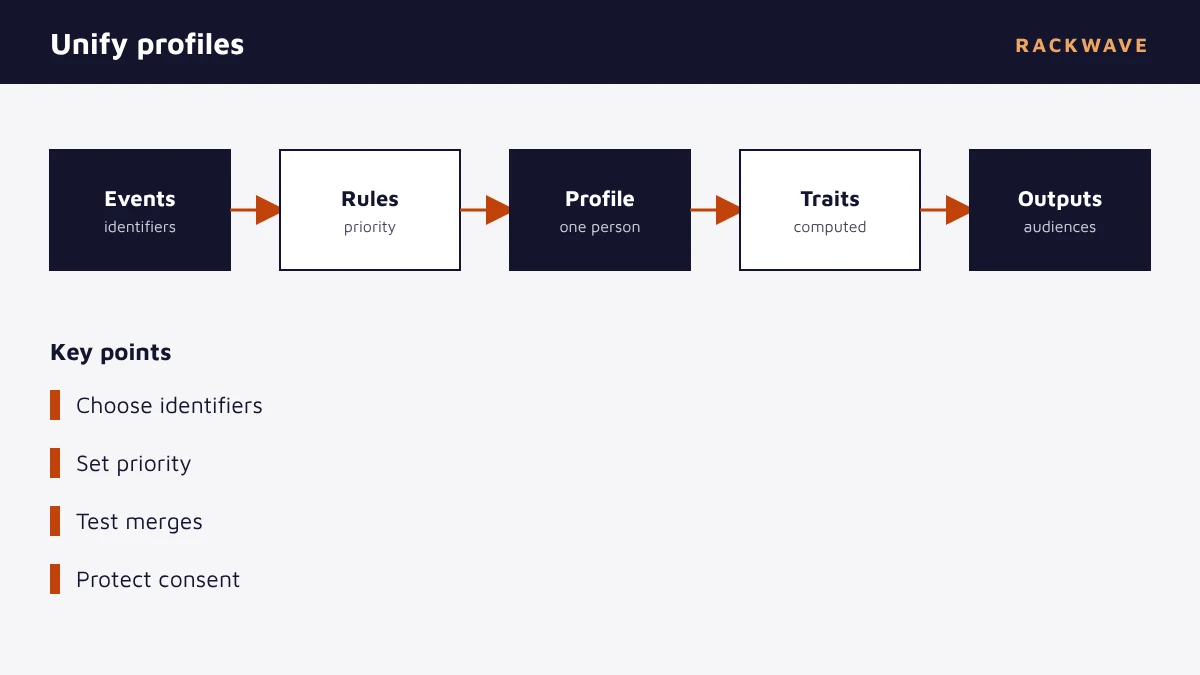
Unify turns the stream from sources into profiles, which support Engage audiences and delivery to destinations. It implements ideas from single customer view and customer data platform, and it relates to master data management. For background, read what is Segment.
How identity resolution works
| Identifier | Typical source | Notes |
|---|---|---|
| Anonymous ID | Browser or app install | Changes per device or cookie reset |
| User ID | Login or account system | Most reliable for known users |
| Forms, login, CRM | Good for linking but can be shared | |
| Device ID | Mobile devices | Useful for app users |
| Phone | Sign up, messaging | Format needs normalising |
| External IDs | CRM, billing, support | Link back to other systems |
Configuring identity rules
- Choose which identifiers are allowed to link profiles.
- Set priority so that stronger identifiers win in a conflict.
- Limit how many values of one identifier a profile can hold.
- Block known shared values, such as test emails or generic addresses.
- Normalise formats, for example lowercase emails and standard phone numbers.
- Test the rules on sample users before applying them widely.
Traits and computed values
| Element | Description | Example |
|---|---|---|
| Trait | An attribute stored on the profile | Plan, country, signup date |
| Computed trait | A value calculated from events | Total orders in 90 days |
| SQL trait | A trait created from warehouse data | Predicted lifetime value |
| Event history | Timeline of events per profile | Last ten purchases |
| Consent attributes | Stored permissions | Email marketing opted in |
How to set up Unify
- List identifiers. Decide which identifiers exist in each source.
- Define rules and priority. Configure which identifiers link profiles and which win.
- Connect sources. Send identify calls with consistent identifiers.
- Test merges. Check sample users, including shared devices and multiple accounts.
- Create traits. Add computed traits that serve audiences and reports.
- Connect outputs. Send profiles and traits to destinations and the warehouse.
- Monitor. Watch merge counts, conflicts and trait quality.
Common mistakes
- Linking on identifiers that many people share.
- No priority rules, so conflicts create odd merges.
- Inconsistent identify calls across sources.
- Forgetting consent attributes on the profile.
- Treating the profile as perfect and ignoring errors.
- Computed traits nobody uses.
Our data analytics service designs profile models and our data governance service covers consent and ownership.
A worked example: joining web, app and CRM data
A software company has anonymous web visitors, signed in app users and leads in a CRM. The team sends identify calls with the user ID and email on sign in, and sends the CRM record ID as an external identifier from a server source. Identity rules link anonymous ID, user ID and email, with the user ID taking priority.
A profile for a customer now shows pre sign up page views, in-app usage and the owner in the CRM. Computed traits record trial activity in the last seven days, and an audience of active trial users without a sales contact is sent to the CRM for follow up. The team monitors merges to catch any wrong links early.
Avoiding wrong merges
A wrong merge combines two people into one profile, which can lead to messages sent to the wrong person or to data exposed in the wrong place. Avoid linking on shared values, such as a family tablet or a company address used by many staff. Use priority so that a user ID is trusted more than a device. Review the largest profiles and those with many identifiers, since they often reveal rules that are too loose. Have a process to split or correct profiles when errors are found.
Profiles and the warehouse
Profiles are most powerful when combined with warehouse data. Send events and profile data to the warehouse for modelling, and bring modelled values such as propensity scores or lifetime value back as traits. Keep definitions in one place, so that reports and audiences use the same logic. Agree which system owns each trait, and document the flow. See what is a data warehouse for background on the storage side.
Privacy, consent and deletion
A unified profile concentrates personal data, so privacy needs care. Store consent on the profile and make sure destinations respect it. Provide a process for access and deletion requests that removes the profile, its events and copies in destinations and the warehouse. Limit traits to what is needed, and avoid sensitive categories. See what is GDPR for principles and review designs with legal advisers.
Measuring profile quality
Track the share of events linked to a known profile, the number of profiles with several identifiers, the rate of conflicts and the fill rate of key traits. Compare profile counts with your customer system to spot gaps. Review the metrics monthly, and investigate sudden changes after releases. Reliable measures give confidence that audiences are built on solid ground and show where to improve tracking.
Governance and ownership
Assign an owner for identity rules, traits and consent attributes. Record each change to rules with a date and reason, because small edits can alter many profiles. Use a request process for new computed traits, with a purpose and a review of cost and privacy. Retire unused traits regularly. Clear ownership keeps the profile layer trustworthy as more teams depend on it.
Account level profiles for business products
For business to business products, a person is only part of the picture, because buying decisions involve accounts with several users. Use group calls to link users to companies, and store account traits such as plan, size and renewal date. Audiences can then target accounts as well as individuals, for example accounts where several users are active but no admin has enabled a key feature. Keep the link between user and account accurate, since people change roles and companies.
Testing and rollout
Roll out identity rules in stages. Start with a development space and a small set of sources, review the resulting profiles and fix rules before adding more data. Prepare a list of tricky test cases, such as shared devices, users with several emails and employees using test accounts, and check each one. Plan communication with teams that use the profiles, since a change to rules can change audience sizes and campaign results.
Key takeaways
- Segment Unify resolves identifiers into one profile per person or account.
- Choose linking identifiers and priorities carefully, and test merges.
- Use traits and computed values to power audiences and reports.
- Prevent wrong merges, protect consent and support deletion.
- Measure profile quality and govern rules and traits.
Quick glossary
| Term | Meaning |
|---|---|
| Identity resolution | Linking identifiers that belong to the same person |
| Profile | A unified record of traits, events and identifiers |
| Computed trait | A trait calculated from events |
| Identifier priority | The order that decides which identifier wins in a conflict |
| External ID | An identifier from another system such as a CRM |
Read next: BigQuery vs Snowflake: Which Cloud Data Platform? · BigQuery Streaming Inserts: Real-Time Ingestion Guide · BigQuery Access Control: IAM, Policy Tags and Row Security
Frequently asked questions
What is Segment Unify?
It is the identity and profile layer that links events and traits from many sources into one profile.
What is identity resolution?
It is the process of linking identifiers, such as device, email and user ID, that belong to the same person.
How do I avoid wrong merges?
Do not link on shared values, set priorities and review profiles with many identifiers.
What is a computed trait?
It is a value calculated from events, such as orders in the last 90 days.
Can I use warehouse data on profiles?
Yes, modelled values can be brought back as traits.
How does Unify help audiences?
Profiles and traits provide the data for audiences used in marketing and sales tools.
How do I handle deletion requests?
Remove the profile, events and copies in destinations and the warehouse.
How do I measure profile quality?
Track linked event share, conflicts, identifier counts and trait fill rates.