
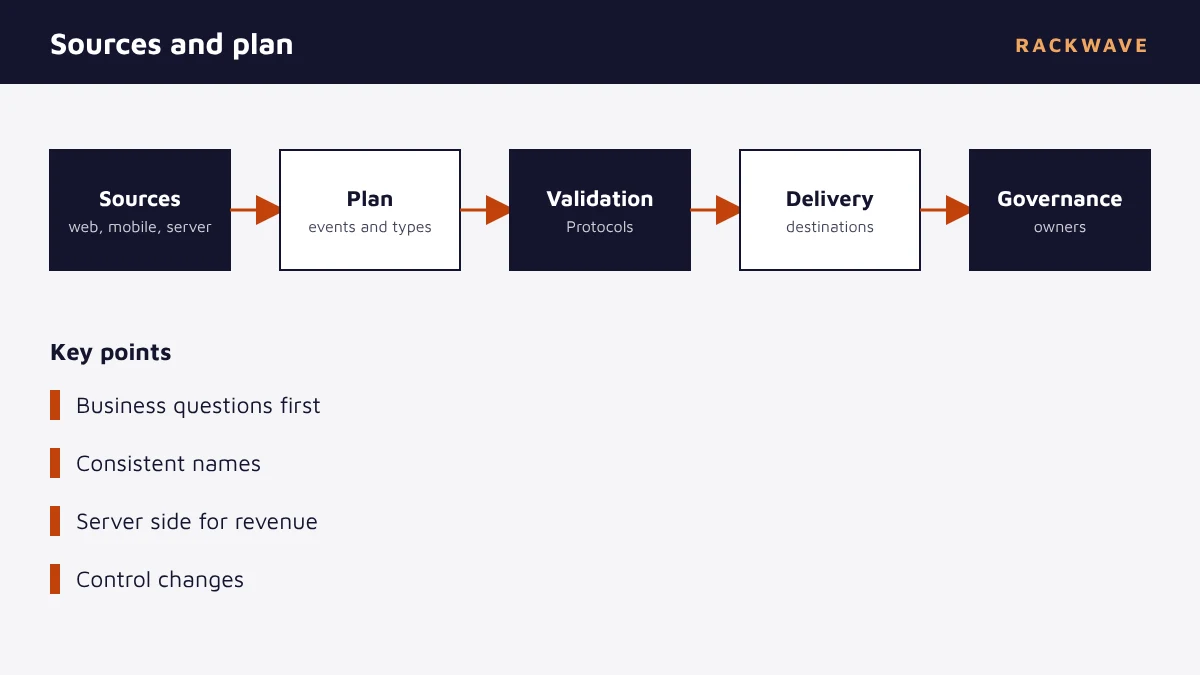
What are Segment sources and tracking plan basics? In Segment, a source is any place that sends data into the platform, such as a website, a mobile app, a server or a cloud application, and a tracking plan is the document that defines which events and properties those sources should send, with their names, types and rules. Segment sources and tracking plan decisions together decide whether the data that reaches your tools is consistent and useful. A source without a plan produces noise, and a plan without enforcement drifts as teams ship new features. This guide explains source types, how to design a tracking plan, how to name events and properties, how to implement and validate it, how to govern changes and which mistakes lead to messy data. Capabilities change, so confirm details in current Segment documentation.
Short answer: Segment sources collect the data, and the tracking plan defines it. Design the plan from business questions, use consistent naming, validate in code and govern changes.
What are Segment sources and a tracking plan?
They are the entry point of what is Segment and a key part of any customer data platform. Enforcement is covered in Segment Protocols, and delivery in Segment destinations. Browser and web implementation is covered in Analytics.js.
Types of source
| Source type | Typical data | Notes |
|---|---|---|
| Website | Page views, clicks, forms | Use the JavaScript library |
| Mobile app | Screens, taps, purchases | Use native SDKs for iOS and Android |
| Server | Orders, payments, subscription changes | Most reliable for important events |
| Cloud app | Support, billing, CRM objects | Pulled in through connectors |
| Reverse ETL | Warehouse tables | Used to send modelled data to tools |
| Functions | Custom or third party feeds | Code that receives and shapes data |
Designing a tracking plan
- Start from business questions, such as which step of checkout loses customers.
- List the events and properties needed to answer them.
- Choose one naming pattern and use it everywhere.
- Define the data type and allowed values for each property.
- Record which source sends each event and who owns it.
- Mark which events are essential and which are optional.
Naming conventions
| Element | Good practice | Example |
|---|---|---|
| Event names | Object and past tense verb in title case | Order Completed |
| Properties | Lowercase with underscores | order_value |
| Traits | Consistent with property rules | plan_type |
| Currency | Separate field with a standard code | currency: USD |
| Booleans | Prefix with is or has | is_trial |
| Dates | Standard format with time zone | ISO 8601 |
How to build and roll out a tracking plan
- Gather questions. Interview product, marketing and analytics owners.
- Draft the plan. List events, properties, types and owners in a shared sheet or in Protocols.
- Review. Agree names and priorities with engineering and data teams.
- Instrument. Add tracking calls to web, mobile and server code.
- Validate. Check events against the plan in a development environment.
- Release gradually. Monitor volumes and violations after launch.
- Maintain. Review the plan monthly and retire unused events.
Common mistakes
- Tracking every click without a purpose.
- Different names for the same action across web and app.
- Changing property types after launch.
- Putting personal data into properties without need.
- No owner, so nobody approves changes.
- Relying on client side events for revenue.
Our data analytics service designs tracking plans and our API development service builds server side tracking.
A worked example: an online marketplace
A marketplace wants to understand search to purchase conversion. The team lists the events needed: Search Performed, Product Viewed, Product Added, Checkout Started and Order Completed, each with product, category, price and currency properties. They agree names, types and owners, and write the plan in Protocols.
Web and mobile send the browsing events, while the server sends Order Completed from the order system, so that revenue is reliable. Validation catches a mobile build that sends price as a string, and the fix is released before it affects reports. The plan is reviewed monthly and each new event needs an owner and a use case.
Client side and server side tracking
Client side tracking captures browsing and interaction, but it can be blocked by browsers, extensions or connection problems. Server side tracking is more reliable for important events such as payments and subscriptions, and it can include data the client does not know. Use both where it makes sense, and make sure they share identifiers so that events join up. Document which events come from which side, so that analysts understand the strengths and limits of each.
Identity in the tracking plan
Define how users are identified in each source. Use an anonymous identifier before login and a stable user ID after, and call identify when the user signs in. For business products, also use group calls to link users to accounts. Decide what happens on logout and on shared devices, and test merges. A tracking plan without identity rules produces events that cannot be joined, which weakens every report and audience built on them.
Governance and change control
Treat the plan as a product. Use a request process for new events, with a purpose, an owner and a review by data and engineering. Version the plan, record the date of each change and communicate changes to teams that use the data. Retire events that are no longer sent, and document the reason. Link this with wider data governance practice, so that definitions survive team changes.
Testing and quality assurance
Test tracking in development and staging with a debugger, and check each event for name, type and required properties. Compare event counts with other analytics for a period, since gaps often point to errors. Add checks to the release process, so that new features cannot ship without the agreed tracking. Keep test users and a script for key journeys, and repeat the checks after changes to the app or the website.
Privacy and data minimisation
Collect only what you need. Avoid sending sensitive data in events and traits unless there is a clear legal basis, and hash or omit identifiers where possible. Include consent information in the data, and make sure destinations respect it. Prepare a way to find and delete data about a person across the warehouse and destinations. See what is GDPR for the principles behind these practices.
Documenting and sharing the plan
A plan only works if people can find and read it. Keep it in one shared place, with a short guide to naming rules, a list of owners and examples of correct calls. Add the plan to onboarding for new engineers and analysts, and link it from the release checklist. Record decisions about why an event exists, since the reason is often forgotten while the event stays in the code for years.
Evolving the plan as the product grows
Products change, and so do the questions asked of the data. Review the plan after major launches, add events for new features and retire those that no longer apply. When you change a property, add a new one and deprecate the old rather than altering meaning in place, so that history stays understandable. A plan that evolves in a controlled way remains trusted, while one that is never touched slowly stops describing the product.
Key takeaways
- Segment sources send data in, and the tracking plan defines what that data should be.
- Design the plan from business questions, with consistent names, types and owners.
- Use server side tracking for critical events and share identifiers across sources.
- Validate in development, monitor in production and control changes.
- Minimise personal data and apply consent.
Quick glossary
| Term | Meaning |
|---|---|
| Source | A place that sends data into Segment |
| Tracking plan | A document defining events, properties and rules |
| Event | A record of an action taken by a user |
| Trait | An attribute of a user or account |
| Violation | An event that does not match the tracking plan |
Read next: BigQuery vs Snowflake: Which Cloud Data Platform? · BigQuery Streaming Inserts: Real-Time Ingestion Guide · BigQuery Access Control: IAM, Policy Tags and Row Security
Frequently asked questions
What is a source in Segment?
It is a website, app, server or cloud tool that sends data into Segment.
What is a tracking plan?
It is a document that defines events, properties, types and owners.
How should I name events?
Use one pattern, such as object plus past tense verb, and apply it everywhere.
Should I track on the client or server?
Use both, with server side tracking for critical events such as payments.
How do I validate tracking?
Use a debugger and tools such as Protocols to check events against the plan.
Who owns the plan?
A named data or analytics lead, with review from engineering.
How often should I review it?
Review it monthly and retire unused events.
Can I avoid sending personal data?
Yes, minimise traits, avoid sensitive fields and use consent controls.