
What is computer vision? It is the field of artificial intelligence that enables computers to interpret and act on visual information from images and video. A computer vision system can recognise objects, read text, measure dimensions, track movement, detect defects and understand scenes. It is used in manufacturing quality control, retail, healthcare imaging, logistics, security and vehicles. Most modern systems are built on deep learning, and in particular convolutional neural networks and vision transformers. This guide explains how computer vision works, the main tasks, how to build a project, and the practical and ethical issues to manage.
Short answer: Computer vision turns pixels into decisions. A camera captures images, a trained model finds patterns such as objects or defects, and software uses the result to alert people, move equipment or record data. Quality depends on good images, well labelled training data and careful testing in real conditions.
What is computer vision?
The computer vision article on Wikipedia describes a field that began in the 1960s. Early systems used hand written image rules, but accuracy leapt after deep learning arrived, because neural networks can learn visual features directly from labelled examples. It is one of the most commercially mature areas of artificial intelligence.
How computer vision works
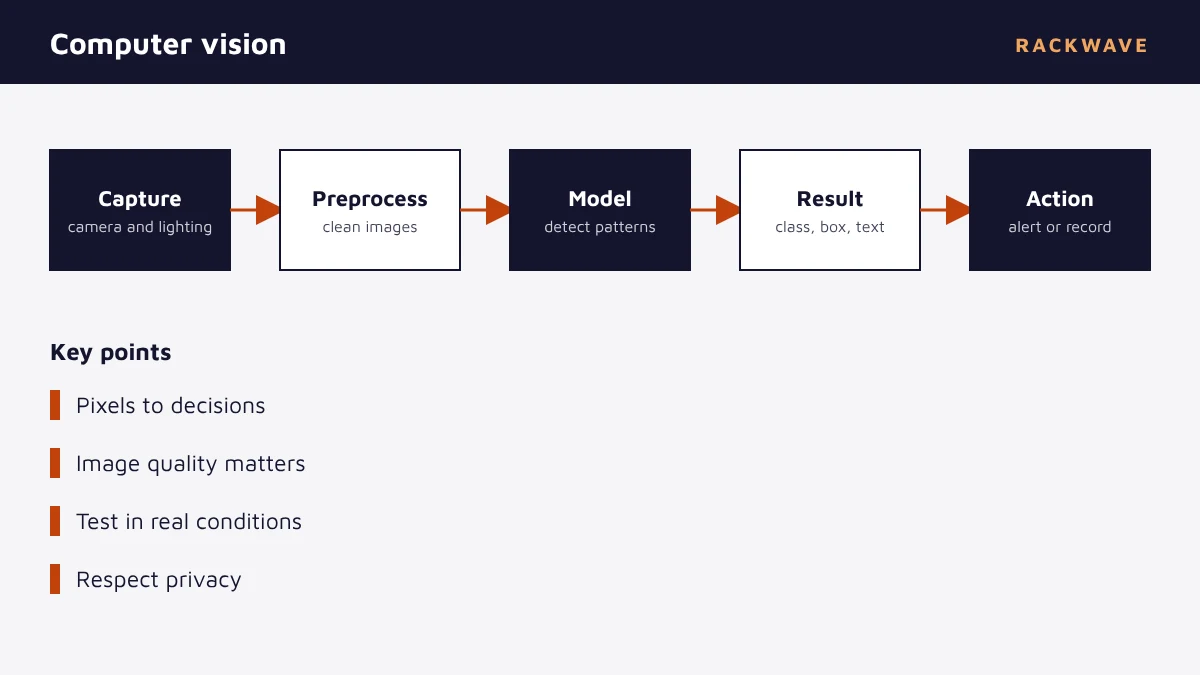
- Capture. Cameras, scanners or drones produce images or video. Lighting, angle and resolution strongly affect results.
- Preprocess. Images are resized, normalised and cleaned, and sometimes augmented with flips or brightness changes for training.
- Extract features. Layers of a neural network detect edges, textures, shapes and then whole objects.
- Predict. The model outputs a class, a box around an object, a mask, a measurement or a text string.
- Post process. Rules filter results, apply confidence thresholds and combine frames in video.
- Act. The result triggers an alert, rejects a part, updates an inventory record or goes to a person for review.
- Monitor. Accuracy is tracked as lighting, products and cameras change. See what is MLOps.
Main computer vision tasks
| Task | What it does | Example |
|---|---|---|
| Image classification | Labels a whole image | Is this part good or defective |
| Object detection | Finds and locates objects with boxes | Counting products on a shelf |
| Segmentation | Labels every pixel | Measuring the area of damage on a roof |
| Optical character recognition | Reads text in images | Extracting data from invoices and plates |
| Pose estimation | Finds body or object positions | Workplace safety and sport analysis |
| Object tracking | Follows objects across frames | Traffic and warehouse flow |
| Face detection and recognition | Finds or matches faces | Access control, with strict legal limits |
| Anomaly detection | Flags what looks unusual | Surface faults with few defect examples |
Industry uses of computer vision
| Sector | Use | Value |
|---|---|---|
| Manufacturing | Defect and assembly inspection | Fewer escapes and less rework |
| Retail | Shelf monitoring and self checkout | Better availability and less loss |
| Logistics | Parcel reading and damage checks | Faster handling |
| Healthcare | Support for reading scans, under clinician control | Earlier detection and consistency |
| Agriculture | Crop and disease monitoring from drones | Targeted treatment |
| Insurance | Claims photo assessment | Faster settlement |
| Energy and utilities | Inspection of lines and equipment | Safer, cheaper inspection |
How to run a computer vision project
- Define the decision. State what the system must detect and what action follows, and what error rate is acceptable.
- Design image capture. Fix lighting, camera position and resolution before collecting data. Consistent capture beats clever models.
- Collect and label. Gather images that cover normal and rare cases and label them with clear guidelines and reviewer checks.
- Start from a pretrained model. Fine tune an existing model to save time and data.
- Evaluate in real conditions. Test on new shifts, products and weather, not only on a clean test set.
- Deploy at the edge or cloud. Choose by latency, bandwidth and privacy. Edge devices process video on site.
- Keep a person in the loop. Route low confidence cases to staff and feed their decisions back as training data.
Edge or cloud processing
| Factor | Edge | Cloud |
|---|---|---|
| Latency | Very low, near the camera | Higher, depends on network |
| Bandwidth | Little needs to be sent | High for video |
| Privacy | Images can stay on site | Images leave the site, needs controls |
| Scaling and updates | Manage many devices | Easy central updates |
| Cost | Hardware per site | Usage based |
Common computer vision mistakes
- Training only on clean images that do not match the factory floor or the street.
- Letting lighting or camera positions drift after the pilot.
- Measuring accuracy only, not the cost of false alarms and missed detections.
- Ignoring privacy rules when cameras capture people.
- Skipping retraining, so accuracy falls when products change.
- Using face recognition without a legal basis and a clear policy. See what is responsible AI.
Our AI and machine learning service delivers computer vision systems from data collection to deployment, and our system integration service connects results to plant, warehouse and business systems.
A worked example: inspecting packaged goods
A food packaging company inspects sealed trays for contamination and sealing faults, and a team of eight staff check samples by eye. The company installs cameras above the line with controlled lighting and gathers 30,000 images, including several hundred defects of each type. After labelling, a pretrained detection model is fine tuned, and results are tested on a month of new production.
The system finds 98 percent of seal faults at a false rejection rate the plant can accept. Rare contamination types are weaker, so an anomaly detector is added to flag anything unusual for human review. The plant inspects every tray rather than a sample, rework drops and complaints fall. Each confirmed rejection becomes a new training example, and a monthly review checks for drift when packaging suppliers change film colour.
Privacy and ethics in computer vision
Cameras capture people, often without them noticing, so legal and ethical questions matter as much as accuracy. Define a clear purpose, collect the minimum, blur or discard images of people where possible, tell people when they are being recorded and set short retention periods. Test for performance differences across groups, because some vision systems have shown higher error rates for certain skin tones and conditions. Involve legal and privacy teams early, and be prepared to choose a less intrusive design when it meets the business need.
Data quality for computer vision
The most common reason vision projects underperform is the data, not the algorithm. Images should cover every product variant, lighting condition, camera angle and background the system will meet, and they should include enough examples of rare faults. Labels must follow written guidelines, and a second reviewer should check a sample, because inconsistent labels teach the model confusion. Keep a held out set that is never used for training, and collect it at a different time from the training images, so that it reflects reality.
Plan for the long term as well. Store images and labels with versions, record which model was trained on which dataset, and keep a simple way to add new examples from production. This turns the live system into a source of improvement, and it is the foundation for the practices described in data quality.
Key takeaways
- Computer vision enables machines to interpret images and video to detect, measure, read and track.
- Deep learning, especially convolutional networks and vision transformers, drives modern accuracy.
- Image capture quality and labelled data matter as much as the model.
- Evaluate in real conditions and keep humans in the loop for uncertain cases.
- Handle privacy, bias and retention carefully when cameras capture people.
Quick glossary
| Term | Meaning |
|---|---|
| Object detection | Finding and locating objects in an image |
| Segmentation | Labelling every pixel of an image |
| OCR | Optical character recognition, reading text from images |
| Edge computing | Processing data near where it is produced |
| Data augmentation | Creating varied training images from existing ones |
Read next: What Is Fine-Tuning? Methods, Data and Costs · What Is Feature Engineering? Techniques and Workflow · What Is Explainable AI? Methods, SHAP and LIME
Frequently asked questions
What is computer vision in simple terms?
It is technology that lets computers understand images and video, so they can recognise objects, read text, find defects and track movement.
How does computer vision work?
Cameras capture images, a trained neural network extracts visual features and predicts what is in the image, and software turns the result into an alert, record or action.
What are examples of computer vision?
Examples include factory defect inspection, shelf monitoring in stores, reading licence plates, medical image support, reading invoices and checking damage in insurance claims.
What is the difference between computer vision and image processing?
Image processing changes or enhances images, for example sharpening. Computer vision interprets what is in them, such as identifying objects.
How much data do I need for computer vision?
It varies. Fine tuning a pretrained model can work with hundreds to thousands of labelled images, while rare defects may need anomaly detection or synthetic data.
Should computer vision run on the edge or in the cloud?
Use the edge when you need low latency, limited bandwidth or on site privacy, and the cloud when you want central management and heavy processing.
Is computer vision accurate enough for safety critical use?
It can be, but only with rigorous testing in real conditions, fallback controls and human oversight. Accuracy should be proven for each use case.
What are the privacy risks of computer vision?
Cameras can capture identifiable people. Minimise collection, limit retention, inform people, secure data and avoid face recognition unless legally justified.