
What is Twilio Studio? Twilio Studio is a visual flow builder for designing communication workflows without writing everything in code. You drag widgets onto a canvas, connect them into a flow and attach the flow to a phone number, messaging service or API trigger. Studio can send messages, ask questions, branch on answers, call external services, run code functions and hand conversations to agents. This guide explains how Studio works, the main widgets, how to design reliable flows for SMS, chat and voice, how to call APIs and handle errors, how to test and version flows, where Studio is the right tool and where code is better. Features change, so confirm details in current Twilio documentation.
Short answer: Studio is a low-code builder for communication flows. Use it for menus, surveys, routing and simple automation, call out to your systems through HTTP requests and Functions, handle errors on every branch and test before publishing.
What is Studio?
A flow in Studio is a state machine. Each widget does one job, such as sending a message, waiting for a reply, splitting on a condition or making an HTTP request, and widgets connect through transitions that depend on the outcome. A flow starts when a trigger fires, such as an incoming message or call, a REST API request or a call from another flow. It is part of the Twilio platform and fits where business teams and developers collaborate on workflow automation.
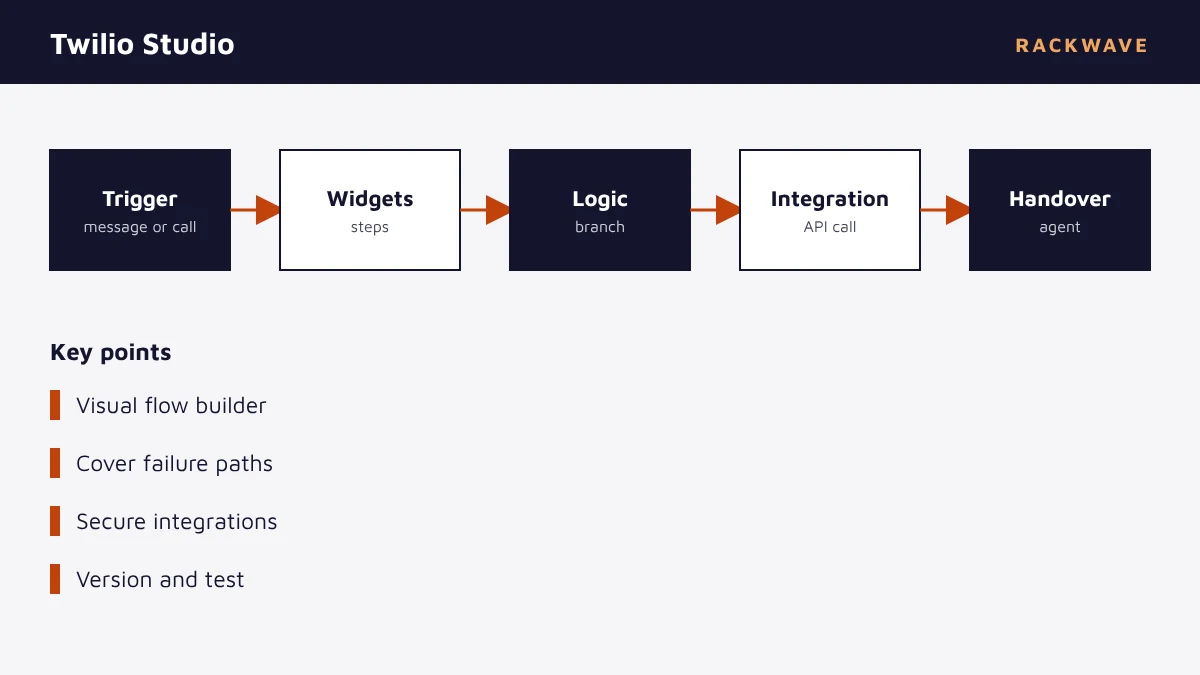
Common widgets
| Widget group | Examples | Use |
|---|---|---|
| Messaging | Send message, send and wait for reply | Conversations, surveys, confirmations |
| Voice | Say or play, gather input, connect call | IVR menus and routing |
| Logic | Split based on, set variables | Branch on answers, conditions or data |
| Integration | HTTP request, run function, call a subflow | Look up and update your systems |
| Handover | Send to Flex or another queue | Escalate to a person. See Twilio Flex |
| Utility | Enqueue, record, add TwiML | Special behaviour and advanced control |
Widget names and options change, so use the current library as your reference.
Typical use cases
- Appointment reminders that let people confirm, cancel or reschedule by reply.
- Support triage that asks for the topic, collects an order number and routes to the right queue.
- Customer surveys after an interaction, with results sent to a database.
- Order status lookups that call your API and return the result.
- Out-of-hours handling with callback requests.
- Simple IVRs that route by keypress. See programmable voice.
How to design a flow
- Define the goal and the data. State what the user wants and what information you need to collect or return.
- Draw the happy path. Create the main sequence of widgets from trigger to finish.
- Add every failure branch. Handle no reply, invalid input, timeouts and failed requests.
- Connect your systems. Use HTTP request or Functions to read and write data, with secure authentication.
- Add handover. Offer a route to a person where the flow cannot help.
- Test with real devices. Use test numbers and walk through every branch.
- Publish and monitor. Publish a version and watch executions and errors.
Calling your systems
Most useful flows need data. Use the HTTP request widget to call your API and read fields from the response, and use Functions for custom logic such as formatting, validation or calling several services. Keep secrets in environment variables, never in the flow, and keep responses small and fast, because the user is waiting. Set timeouts and handle failures with a friendly message and a handover. See what is an API and API security.
Studio or code?
| Choose Studio when | Choose code when |
|---|---|
| Business or operations teams need to change flows often | Logic is complex, performance critical or heavily tested |
| The flow is mostly menus, questions and routing | You need custom state, long-running processes or complex data handling |
| You want a visual record of the logic | You need strong version control, review and automated testing |
| Speed to launch matters | You are building a core product feature |
Many teams combine them: Studio for the conversation shell and code behind it for business logic.
Versioning, testing and governance
- Keep an export of each published flow in version control as a record of changes.
- Use separate accounts or sub-accounts for development and production.
- Document each flow with its purpose, owner, triggers and dependencies.
- Review who can edit and publish flows, because a mistake affects customers at once.
- Test with edge cases such as unexpected replies, empty input and very long messages.
Monitoring and metrics
| Metric | What it tells you |
|---|---|
| Executions started and ended | Volume and completion rate |
| Branch usage | Where users drop out or get stuck |
| Failed requests | Integration reliability |
| Time to complete | User effort and friction |
| Handover rate | How often the flow cannot resolve the need |
Review these monthly and simplify steps where many users fail or abandon.
Example flow outline
| Step | Widget | What happens |
|---|---|---|
| 1 | Trigger | Incoming message from a customer asking about an order |
| 2 | Send and wait for reply | Ask for the order number and wait for a response |
| 3 | Split based on | Check that the input looks like a valid order number |
| 4 | HTTP request | Call the order API and read the status field |
| 5 | Send message | Reply with status and expected delivery date |
| 6 | Split based on | If the API fails or the order is not found, offer a human agent |
| 7 | Handover | Send the conversation to the support queue with the order number as an attribute |
Notice that three of the seven steps exist only to handle problems. That ratio is normal in a good flow, and it is why planning failure branches early saves time.
Scaling and ownership
As the number of flows grows, give each one a clear owner, a naming convention and a short description of purpose and dependencies. Share common pieces, such as authentication of a customer or a handover routine, through subflows so a fix applies everywhere. Hold a monthly review where owners check metrics and retire flows that nobody uses. Without that routine, an account fills with old flows that still receive traffic and nobody remembers why.
Common mistakes
- Only building the happy path.
- Putting secrets in widget settings or message text.
- Asking for too many pieces of information in one conversation.
- No handover, so frustrated users hit a dead end.
- Editing a live flow without testing.
A worked example
A dental clinic builds a Studio flow for reminders. The flow sends a message two days before an appointment, waits for the reply and branches on confirm, cancel or reschedule. Confirm updates the booking through an HTTP request, cancel releases the slot and reschedule hands off to the front desk queue. If a patient replies with something unexpected, the flow offers the choices again, then hands over.
No-shows fell, and the front desk spent less time phoning patients. The example is illustrative.
Best practices and support
- Keep flows short and focused, and use subflows for repeated logic.
- Write messages that are clear, brief and consistent with your brand voice.
- Include opt-out and help keywords in messaging flows. See SMS marketing.
- Record consent and outcomes in your CRM.
Our API development service connects Studio flows to back-end systems, and our CRM and lifecycle service designs the customer journeys they support.
Key takeaways
- Studio is a visual state machine for communication flows.
- Handle every failure branch, not only the happy path.
- Call your systems through HTTP requests and Functions.
- Keep flows short, tested and versioned.
- Use code when logic becomes complex.
Quick glossary
| Term | Meaning |
|---|---|
| Flow | A visual workflow in Studio |
| Widget | A step in a flow |
| Trigger | What starts a flow |
| Execution | One run of a flow |
| Function | Serverless code called from a flow |
Read next: What Is API Management? Lifecycle, Features, Tools · What Is a Message Queue? Patterns and Best Practices · What Is RabbitMQ? Exchanges, Queues and Use Cases
Frequently asked questions
What is Twilio Studio?
A visual builder for communication flows that you attach to numbers, messaging services or API triggers.
Do I need to code to use Studio?
Not for simple flows, but integration, validation and complex logic usually involve APIs or Functions.
How does a flow start?
From a trigger such as an incoming message or call, a REST API request or a call from another flow.
Can Studio call my systems?
Yes, through the HTTP request widget and Functions.
How do I escalate to an agent?
Use a handover widget to send the conversation to Flex or another queue.
How should I test a flow?
Use test numbers, walk through every branch including failures and review the execution logs.
When should I use code instead?
For complex, performance critical or heavily tested logic that needs strong version control.
How do I version flows?
Publish versions in Studio and keep exported definitions in your own version control.