
What is Twilio Flex? Twilio Flex is a programmable contact centre platform. It gives support and sales teams a ready-made agent desktop for voice, SMS, chat, email and messaging apps, and lets developers change almost everything through plugins and APIs. Instead of buying a fixed contact centre product and adapting to it, a company can start with the standard interface and extend routing, screens, integrations and reporting to match its own processes. This guide explains how Flex works, its main building blocks, how routing and queues behave, how to integrate with a CRM, how to plan a rollout, what to measure and where Flex may not be the right fit. Products and packaging change, so confirm details in current Twilio documentation.
Short answer: Flex is a customisable contact centre built on Twilio communication APIs. Use it when you need tailored routing, screens and integrations, plan the agent experience and CRM links early and budget for engineering and ongoing change.
What is Twilio Flex?
Traditional contact centre software is configured through menus and vendor options. Flex exposes the pieces as building blocks. Agents work in a web-based desktop, supervisors see live and historical views and developers add plugins using JavaScript and React or call back-end APIs. It runs on the same infrastructure as Twilio voice and messaging, so channels can be added without new systems. It serves the needs described in customer service and help desk operations.
Building blocks
| Block | Role | Notes |
|---|---|---|
| Flex UI | The agent desktop for conversations, tasks and customer information | Customisable through plugins and components |
| TaskRouter | Routes work items to the best available agent | Uses queues, workers, skills and priorities |
| Conversations and channels | Voice, SMS, chat, email and messaging apps in one model | Channel availability varies. See voice and SMS |
| Studio flows | Pre-routing logic such as menus and data lookup | See Twilio Studio |
| Insights and reporting | Historical and real-time views of performance | Plus data export to your warehouse |
| Plugins and Functions | Extend the UI and backend logic | Version, test and deploy like any application |
You do not have to use everything. Many teams begin with the standard desktop and extend only where it saves agent time.
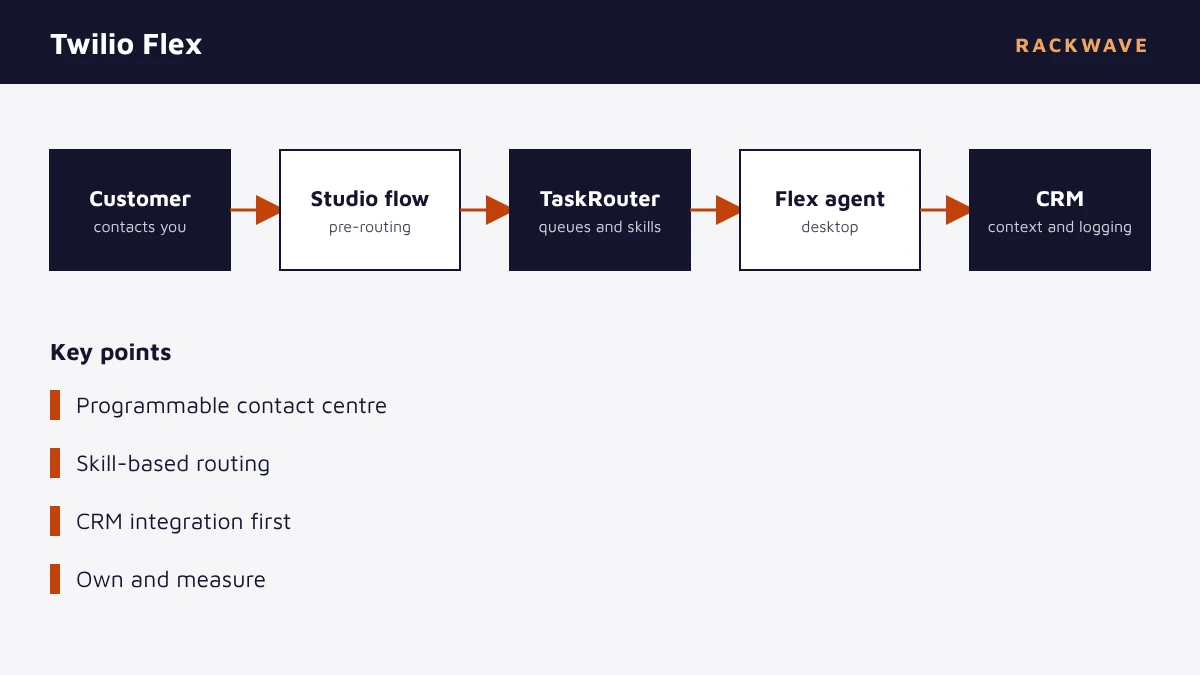
How work reaches an agent
- A customer contacts you. By phone, message or chat, through a number or channel you own.
- A flow handles the contact. Studio or code gathers intent, identifies the customer and sets priority.
- A task is created. TaskRouter creates a task with attributes such as language, topic and tier.
- Routing finds a worker. The task matches a queue and a worker with the right skills and availability.
- The agent accepts and works. The desktop shows the conversation and customer context.
- Wrap-up and data. Disposition, notes and metrics are saved, and the CRM is updated.
Routing and queue design
- Define queues by customer need, such as billing, technical support or sales, not by organisation chart.
- Use worker skills and languages so complex or regional contacts reach the right agents.
- Set priorities, for example to favour high-value customers or breached SLAs.
- Plan overflow and out-of-hours rules, with voicemail or callback options.
- Review queue rules monthly with workforce planning and supervisors.
Integrating with CRM and other systems
The best agent experience shows the customer record beside the conversation. Integrate Flex with your CRM so screens pop with account details, history and open cases, and so each contact is logged automatically. Typical patterns include a plugin that calls the CRM API, an embedded CRM component and server-side Functions that look up and update records. Use authentication and field-level permissions so agents see only what they need. See what is CRM, Salesforce Service Cloud and CRM integration.
Flex compared with other options
| Option | Strength | Consider |
|---|---|---|
| Twilio Flex | High customisation and API control | Needs engineering and ongoing ownership |
| Packaged contact centre suite | Fast setup with standard features | Less flexibility for unusual workflows |
| CRM service module with telephony add-on | Single agent environment | Channel and routing depth varies |
| Build on raw APIs | Maximum freedom | High cost to build and maintain a desktop |
Choose based on how unique your processes are and how much engineering capacity you have. A highly regulated or multi-brand operation may value Flex customisation, while a small team may prefer a packaged suite.
Rollout plan
- Map current contact types, volumes, channels and handling steps.
- Define success measures such as first contact resolution, average handle time and customer satisfaction.
- Start with one team and a few channels, using the standard desktop.
- Add CRM screen pop and logging before extra customisation.
- Train agents and supervisors, and collect feedback weekly.
- Scale by channel and team, and retire the old system after a full business cycle.
Metrics to track
| Metric | Why it matters |
|---|---|
| Service level and wait time | Customer experience and staffing accuracy |
| Average handle time | Efficiency, interpreted with quality |
| First contact resolution | Whether problems are truly solved |
| Customer satisfaction and effort | Voice of the customer. See customer satisfaction |
| Agent occupancy and adherence | Workload and scheduling health |
| Cost per contact | Financial view across channels |
Security, privacy and compliance
- Control who can edit Flex configuration, plugins and routing, and require approval for production changes.
- Mask sensitive data on screen and in recordings, such as payment card details. See data loss prevention.
- Set recording and transcript retention rules by country and contact type.
- Use single sign-on for agents and map roles to permissions. See single sign-on.
- Keep an audit trail of configuration changes and administrator actions.
Workforce and quality management
A contact centre is more than software. Plan staffing from forecast volumes and handle times, set shift schedules that match demand and track adherence. Pair quantitative metrics with quality reviews of sampled conversations, coaching and feedback to agents. Flex data can be exported to a warehouse so you can combine contact data with CRM and product data, and analyse drivers of contacts, such as a product defect or a confusing billing change. Feeding those insights back to the business reduces future contact volume, which is usually the cheapest improvement.
Common mistakes
- Customising too much before agents have used the standard desktop.
- Ignoring CRM integration and forcing agents to switch screens.
- No owner for plugins, so upgrades and bugs pile up.
- Routing rules so complex that nobody can explain them.
- Skipping accessibility and training for agents.
A worked example
A travel company handles booking changes by phone and chat in three languages. It adopts Flex with TaskRouter queues by language and booking type, a plugin that shows the itinerary from its booking system and Studio flows that collect the booking reference before routing. Supervisors use real-time views and a weekly report from exported data.
After three months, average handle time fell because agents no longer searched for bookings, and repeat contacts dropped. The example is illustrative.
Best practices and support
- Treat Flex as a product with an owner, a backlog and releases.
- Use version control and test environments for plugins and Functions.
- Document queue, skill and priority rules in plain language.
- Review quality, privacy and recording rules with compliance. See GDPR.
Our system integration service and API development service connect Flex to CRM and back-office systems, and our CRM and lifecycle service designs the service journeys.
Key takeaways
- Flex is a customisable contact centre on Twilio APIs.
- TaskRouter matches tasks to agents by queue, skill and priority.
- Integrate the CRM early for a better agent experience.
- Start with the standard desktop, then customise with purpose.
- Give Flex an owner, a backlog and measures.
Quick glossary
| Term | Meaning |
|---|---|
| Flex UI | The agent desktop |
| TaskRouter | Routing engine for tasks |
| Plugin | Custom extension to the Flex desktop |
| Queue | A line of tasks waiting for agents |
| Skill | An attribute used to match tasks to agents |
Read next: What Is API Management? Lifecycle, Features, Tools · What Is a Message Queue? Patterns and Best Practices · What Is RabbitMQ? Exchanges, Queues and Use Cases
Frequently asked questions
What is Twilio Flex?
A programmable contact centre platform with an agent desktop that you can extend through plugins and APIs.
What is TaskRouter?
The routing engine that matches tasks to the best available agents using queues, skills and priorities.
Which channels does Flex support?
Voice, SMS, chat, email and messaging apps, with availability depending on current product and configuration.
Can Flex integrate with my CRM?
Yes, through plugins, embedded components and API calls that show customer data and log contacts.
Do I need developers to use Flex?
You can start with the standard desktop, but meaningful customisation and integration need engineering skills.
When is Flex a good fit?
When you need tailored routing, screens and integrations that packaged contact centre products cannot easily provide.
How do I measure success?
Track service level, handle time, first contact resolution, satisfaction and cost per contact.
What are common risks?
Over-customisation, poor CRM integration, no clear ownership and overly complex routing rules.