
What is SFMC Mobile Studio? Mobile Studio is the group of Salesforce Marketing Cloud tools for reaching customers on mobile devices, covering SMS and MMS through MobileConnect, push notifications through MobilePush and chat messaging such as WhatsApp through Mobile Studio messaging features. It manages mobile contacts, opt in and opt out, keywords and short codes, message templates, sends and tracking, and it works with Journey Builder and Contact Builder so mobile messages join cross channel programmes. This guide explains what Mobile Studio includes, how SMS and push work, consent and compliance, how to design messages and journeys, how to measure results and the mistakes that cause blocked messages or opt outs. Features and country rules change, so confirm details in current Salesforce documentation.
Short answer: Mobile Studio covers SMS, push and chat messaging in Marketing Cloud. Success depends on proper opt in, registered sender details, relevant timing and integration with contacts and journeys.
What is SFMC Mobile Studio?
Mobile Studio extends the suite in what is SFMC to mobile. SMS follows the principles in our guide to SMS marketing and push follows push notifications. Messages use the contact model in Contact Builder and run in Journey Builder. Similar channels exist in Braze SMS and WhatsApp and Iterable push and in-app.
Mobile Studio components
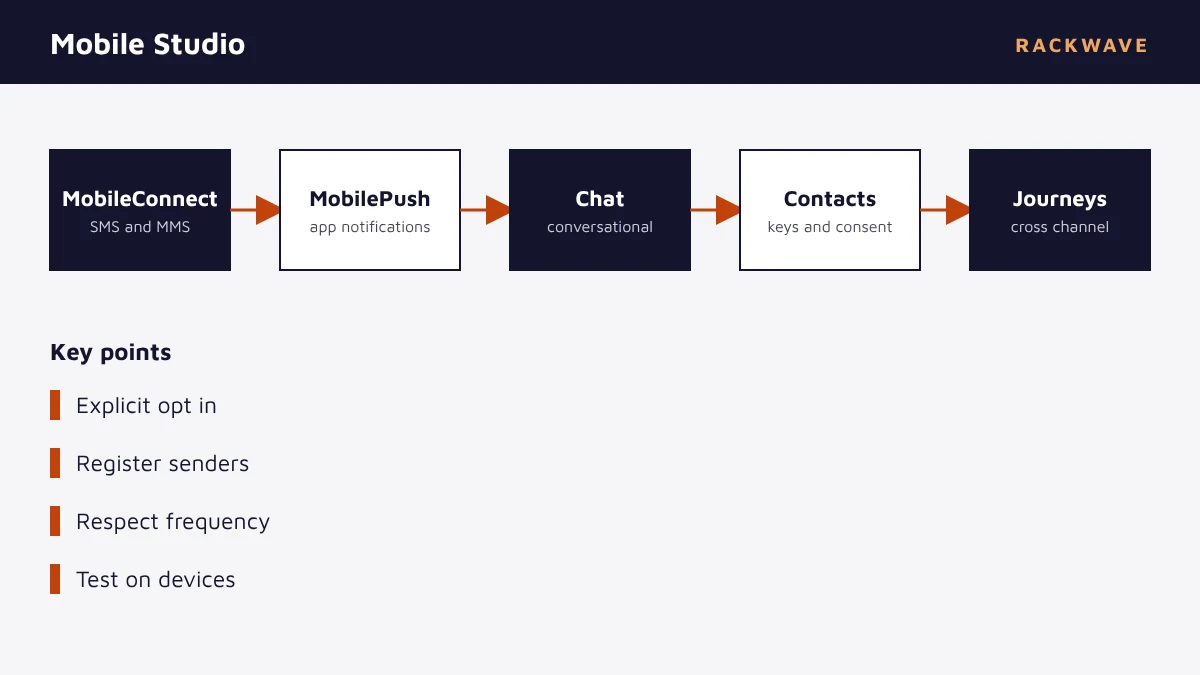
| Component | Channel | Typical use |
|---|---|---|
| MobileConnect | SMS and MMS | Alerts, offers, confirmations, two way keywords |
| MobilePush | Push notifications to apps | Reminders, updates and re-engagement |
| In-app messaging | Messages inside apps | Guidance and announcements |
| Chat messaging | Chat apps such as WhatsApp | Conversational service and notifications |
| Mobile contacts and lists | Opt in status and addresses | Consent and targeting |
SMS essentials
- Use short codes, long codes or sender ids according to country rules and volume needs.
- Collect explicit opt in, and keep records of consent and its source.
- Support keywords such as STOP and HELP and honour them immediately.
- Use opt in confirmation messages that state frequency and cost information.
- Keep messages concise with a clear call to action and a short, trackable link.
- Observe quiet hours and local regulations.
Push essentials
- Integrate the SDK in your app and register device tokens against contacts.
- Ask for permission at a moment of clear value.
- Use deep links to open the right screen.
- Segment by app behaviour and preferences.
- Respect frequency and time zones to avoid opt outs.
SMS versus push versus chat
| Aspect | SMS | Push | Chat messaging |
|---|---|---|---|
| Reach | Any mobile phone number | Only app users with permission | Users of the chat app with opt in |
| Cost | Per message cost | Low per message cost | Per conversation or message cost, varies |
| Rich content | Limited, MMS possible | Images and deep links | Rich templates and conversation |
| Best for | Urgent, high value alerts | Engagement within an app | Service conversations and notifications |
How to launch mobile messaging
- Define use cases. Choose a few high value messages, such as order alerts and appointment reminders.
- Set up channels. Register sender ids or numbers, configure the SDK and approve templates where needed.
- Build consent flows. Collect opt in through forms, keywords and in-app prompts, and record evidence.
- Connect contacts. Link mobile numbers and device tokens to contact keys.
- Create messages and journeys. Design content and journeys that combine channels with frequency rules.
- Test with devices. Check delivery, links and opt out handling on real devices and carriers.
- Measure and iterate. Track delivery, clicks, conversions and opt outs.
Common mistakes
- Sending without clear opt in or evidence of consent.
- Ignoring country specific sender registration rules.
- Using promotional language in message types that should be transactional.
- Overusing push and SMS so that opt outs rise.
- Not linking mobile identifiers to the contact key, causing duplicates.
- Skipping tests on real devices.
Our CRM and lifecycle service designs cross channel mobile programmes, and our system integration service connects apps, carriers and data platforms.
A worked example: appointment reminders
A clinic network sends appointment reminders. Patients opt in through the booking form, which records consent and source. A journey starts from a booking event, sends a confirmation by SMS, a reminder two days before and a final reminder on the morning of the visit. Patients can reply to confirm or reschedule, and STOP opts them out of all SMS.
App users also receive push reminders, and the journey avoids duplicates by choosing push first when a valid token exists. Missed appointments fall, and opt out rates stay low because messages are useful and infrequent. The team reviews delivery by carrier and updates content when numbers of failures rise.
Compliance and carrier considerations
Mobile messaging is closely regulated and carriers enforce rules. Requirements differ by country and may include sender registration, template approval, consent records, content restrictions and time limits. Work with legal advisers, keep evidence of opt in, include required opt out language and avoid restricted content categories. Monitor carrier filtering and delivery failures, and be ready to adjust sender setup or content. Review rules before expanding into new countries.
Measurement and optimisation
Track delivery rate, click rate, conversion, opt out rate and revenue per message, by use case and country. Test message timing, wording and link placement, and keep holdouts to measure incremental impact. Compare mobile with email on the same journeys to decide the best channel mix and apply frequency caps across channels. Use a monthly review to retire weak messages and expand those that deliver clear value.
Template and content standards for mobile
Create a library of approved SMS and push templates with fixed legal wording, such as the sender name and opt out instruction, and variable fields for personalisation. Keep SMS under the length that avoids splitting into multiple parts, use link tracking responsibly and avoid shortened links from unknown domains that carriers may block. For push, standardise title and body length, image sizes and deep link formats, and agree an approval process for new templates. Standards reduce errors and help messages pass carrier and platform checks.
Two way messaging and service use cases
Mobile channels work well for conversations. Keywords let customers reply to confirm an appointment, ask for help or join a programme, and chat messaging supports richer service flows. Plan the responses for each keyword, route unusual replies to a person and make sure opt out keywords are honoured across all numbers. Measure response rates and resolution times, and keep a clear handover between automated flows and human agents so customers are never stuck.
Cross channel orchestration and frequency
Mobile messages should join, not compete with, other channels. Use Journey Builder to decide the channel for each customer, for example push when a token exists and SMS when not, with email as a record. Apply frequency limits across channels, suppress messages for people who have just engaged elsewhere and keep consistent tone and offers. Review the combined message load per customer each month, and reduce volume where opt outs or complaints rise.
Key takeaways
- Mobile Studio includes SMS and MMS, push notifications, in-app and chat messaging in Marketing Cloud.
- Consent, sender registration and country rules are central to SMS and chat success.
- Push needs SDK integration, permission strategy and deep links.
- Link mobile identifiers to contact keys and use journeys for cross channel logic.
- Measure delivery, conversion and opt outs, and test on real devices.
Quick glossary
| Term | Meaning |
|---|---|
| MobileConnect | The Marketing Cloud tool for SMS and MMS |
| MobilePush | The tool for push notifications to apps |
| Short code | A short phone number used for high volume SMS |
| Keyword | A word a subscriber texts to trigger an action |
| Opt in | Clear permission from a person to receive messages |
Read next: What Is Lead Routing? Methods, Rules and Metrics · What Is a Sales Playbook? Contents and How to Build · What Is Account Planning? Template and Best Practices
Frequently asked questions
What is Mobile Studio?
It is the Marketing Cloud group of tools for SMS, MMS, push, in-app and chat messaging.
What is MobileConnect?
It is the tool for sending and managing SMS and MMS messages.
What is MobilePush?
It is the tool for sending push notifications to mobile apps.
How do I get consent for SMS?
Collect explicit opt in through forms, keywords or other clear actions, and store evidence of consent.
Do I need a short code?
It depends on volume, country rules and use case. Long codes and sender ids may suit some programmes.
Can mobile messages be part of journeys?
Yes, Mobile Studio channels can be used in Journey Builder alongside email.
How do I reduce opt outs?
Send relevant, infrequent messages at suitable times and honour preferences immediately.
How do I measure mobile impact?
Track delivery, clicks, conversions and opt outs, and use holdout groups for incremental lift.