
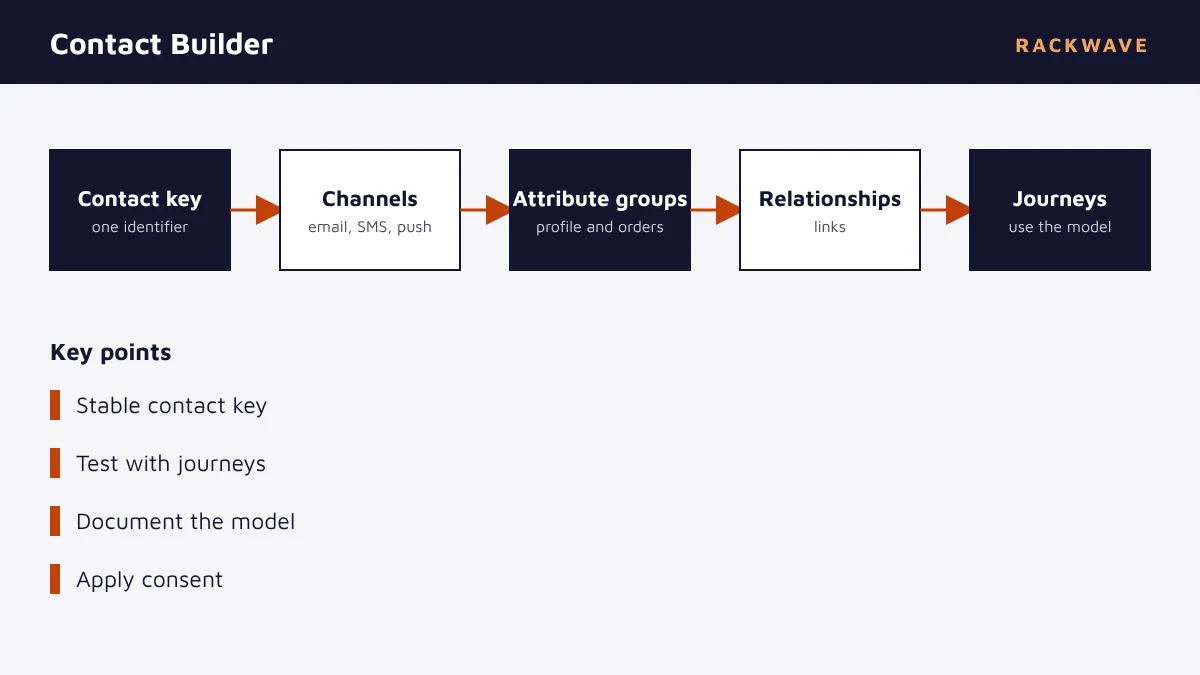
What is SFMC Contact Builder? Contact Builder is the Salesforce Marketing Cloud application that manages the contact data model, helping you create a unified view of each person by linking data extensions, channel addresses and external data to a single contact key. It includes Data Designer, where you define attribute groups and relationships, and tools for contact management, data sources and the identity of contacts across email, SMS and push. This guide explains what Contact Builder does, the contact model, Data Designer, attribute groups and relationships, how it supports Journey Builder and personalisation, how to design and maintain the model and the mistakes that cause duplicate or fragmented contacts. Interfaces and features change, so confirm details in current Salesforce documentation.
Short answer: Contact Builder defines how contact data is modelled in Marketing Cloud. A single contact key, well designed attribute groups and clean relationships give a unified view that journeys and personalisation can rely on.
What is SFMC Contact Builder?
Contact Builder sits at the centre of the contact model in what is SFMC. It connects data extensions to contacts and supplies data for Journey Builder and Email Studio. It is the Marketing Cloud version of a single customer view, and it links to Salesforce Data Cloud in unified setups.
Contact model concepts
| Concept | Description | Example |
|---|---|---|
| Contact key | The unique identifier for a person across channels | Customer id from the CRM |
| Contact | The record that represents a person in Marketing Cloud | One contact for one customer |
| Channel address | An email address, phone number or device token linked to the contact | Email and mobile number |
| Attribute group | A set of related data linked to the contact | Profile, orders, preferences |
| Relationship | How a data extension links to a contact or to another group | One to one, one to many |
| Data Designer | The tool where you build the model | Create groups and link tables |
Why a single contact key matters
- It prevents the same person appearing several times across email, SMS and push.
- It allows preferences and consent to be applied across channels.
- It lets journeys read data from all linked tables for one person.
- It supports accurate reporting of engagement by person, not by address.
- It reduces duplicate sends and improves customer experience.
Designing the model in Data Designer
- Choose the contact key, usually a stable CRM or customer id, and use it everywhere.
- List the data you need for journeys and personalisation, and map each to a data extension.
- Create attribute groups for profile data, orders, preferences and other entities.
- Define relationships, such as one contact to many orders.
- Link channel addresses, such as email and mobile, to the contact.
- Test the model with sample contacts and a journey that reads linked data.
- Document the model and ownership of each source.
Relationship types
| Relationship | Meaning | Example |
|---|---|---|
| One to one | One contact has one record | Primary profile |
| One to many | One contact has many records | Orders, interactions |
| Many to one | Many records link to a shared record | Orders linking to a store reference |
| Many to many | Complex links, handled with care | Contacts and groups |
How to implement and maintain Contact Builder
- Agree the contact key. Choose an identifier that exists in every source.
- Audit existing data. Find duplicates, inconsistent keys and missing channel addresses.
- Design attribute groups. Group data by entity and purpose.
- Build in Data Designer. Create links and relationships and populate with test data.
- Validate in journeys. Build a test journey that uses linked data and personalisation.
- Maintain. Add new sources through a change process and update documentation.
- Monitor quality. Track duplicate rates, missing keys and sync errors.
Common mistakes
- Using email address as the contact key when addresses change.
- Different keys in different systems, which creates duplicate contacts.
- Building overly complex relationships that slow journeys.
- Not testing with real sample data before launching programmes.
- Ignoring consent and preferences in the model.
- No documentation, so changes break journeys.
Our CRM and lifecycle service designs Marketing Cloud contact models, and our data analytics service aligns them with enterprise customer data.
A worked example: from fragmented to unified contacts
A telecom company has contacts created by email address in one system, phone number in another and a customer id in billing. Marketing Cloud shows the same person several times, and customers receive duplicate messages. The team adopts the billing customer id as the contact key, maps it in all imports and consolidates channel addresses under one contact.
They create attribute groups for profile, plan and usage, link them in Data Designer and test a journey that reads the plan data. Duplicate sends fall, preference handling improves and reports show engagement by person. A monthly check flags contacts without keys and sources that drift from the agreed identifier.
Syncing with CRM and enterprise data
Contact data often starts in a CRM or a warehouse. Decide which system owns each field, how often it syncs and how deletes and unsubscribes flow back. Use synchronised data extensions or API integrations where appropriate, and map the CRM identifier to the contact key. Test sync with sample records and watch for conflicts between systems. A clear data ownership model prevents arguments about which value is correct and keeps the contact view trustworthy.
Privacy, consent and access
The contact model holds personal data, so apply privacy controls. Store consent and preferences against the contact, apply them across channels and record source and time. Support access, correction and deletion by locating a person through the contact key, and restrict who can see sensitive attribute groups. Review the model with legal and security teams, and document what data is held and why. See what is GDPR for principles.
Contact Builder and Journey Builder together
Journey Builder reads from the contact model to decide who enters a journey, how decisions branch and which values appear in messages. Build entry sources from data extensions linked to contacts, use attribute groups in decision splits and make sure each field used in personalisation exists with defaults. Test journeys with contacts that have missing or unusual data. When the model changes, review journeys that depend on changed fields, because a renamed or removed attribute can stop a journey from working.
Cross channel identity and preferences
A unified contact makes cross channel programmes possible. With one key, you can send email, SMS and push to the same person and apply preferences consistently, for example allowing email but not SMS. Store channel specific consent with timestamp and source, make sure unsubscribes in one channel do not accidentally change another unless intended and test the combination of preferences in journeys. Cross channel frequency rules then become possible because the platform knows one person receives several messages.
Data quality routines
Create regular checks for the contact model. Count contacts without keys, find duplicate keys and addresses, look for contacts with no linked channel and compare totals with the CRM. Review a sample of contacts each month in detail, from key through attribute groups to channel addresses, and fix patterns at the source rather than patching in Marketing Cloud. Report the quality measures to data owners so that improvement is a shared goal.
Key takeaways
- Contact Builder manages the contact model in Marketing Cloud, linking data extensions and channel addresses to a contact key.
- A single stable contact key prevents duplicates and enables cross channel consistency.
- Design attribute groups and relationships in Data Designer around real use cases.
- Test with journeys and sample data, and document the model.
- Apply privacy and consent controls at the contact level.
Quick glossary
| Term | Meaning |
|---|---|
| Contact key | The unique identifier of a contact across channels |
| Data Designer | The tool for building the contact data model |
| Attribute group | A set of related data linked to a contact |
| Channel address | An email, phone or device identifier for a contact |
| Relationship | A link between data sets such as one to many |
Read next: What Is Lead Routing? Methods, Rules and Metrics · What Is a Sales Playbook? Contents and How to Build · What Is Account Planning? Template and Best Practices
Frequently asked questions
What is Contact Builder?
It is the Marketing Cloud application for managing the contact data model and building a unified view of each person.
What is a contact key?
It is the unique identifier for a person across channels, ideally a stable ID from your CRM or customer system.
What is Data Designer?
It is the tool in Contact Builder where you create attribute groups and define relationships between data extensions.
Why not use email as the key?
Email addresses change and can be shared, which can create duplicates or wrong merges.
How does it help Journey Builder?
Journeys can read linked data about a contact for entry, decisions and personalisation.
How do I avoid duplicate contacts?
Use one contact key across all sources and audit data for inconsistent identifiers.
Does it manage consent?
You store consent and preferences against the contact and apply them in sends, and you must design the process with legal teams.
How do I test the model?
Create test contacts and a journey that reads linked data, then check personalisation and relationships.