
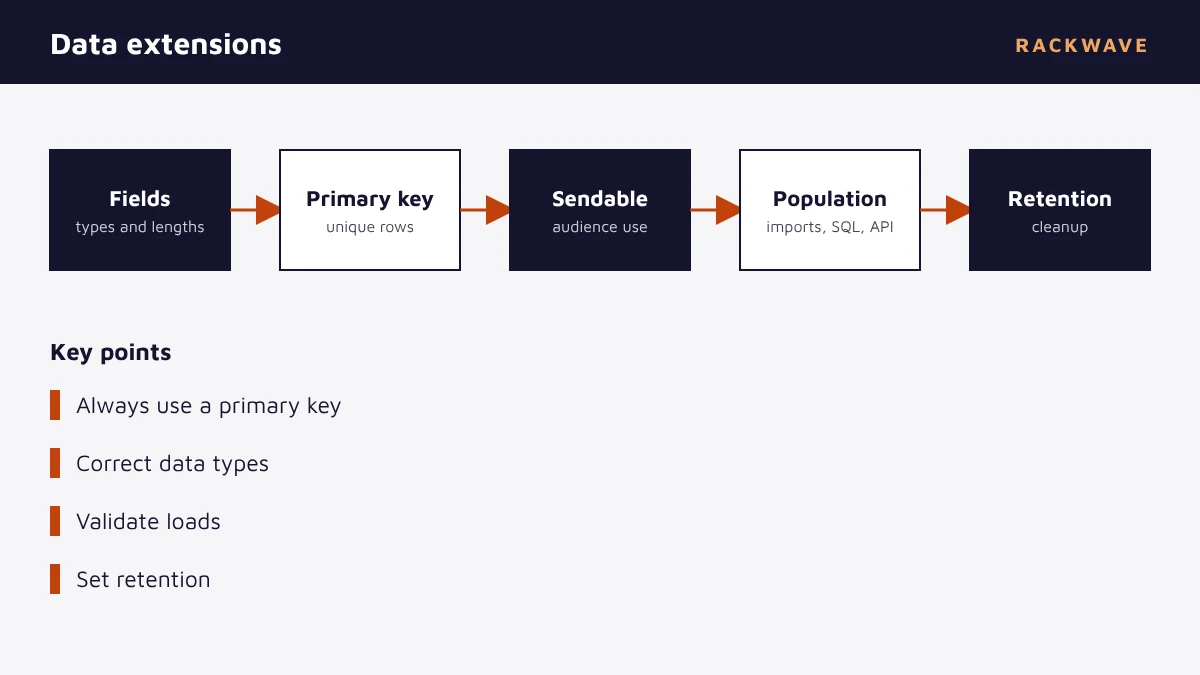
What are SFMC data extensions? Data extensions are tables in Salesforce Marketing Cloud that store structured data about contacts, products, transactions or any other records, and they are the main way to hold audiences and personalisation data for email, SMS, push and journeys. A data extension has fields with types and lengths, an optional primary key, and can be sendable, meaning it can be used as the audience for sends. This guide explains what data extensions are, how they differ from lists, how to design fields and keys, how they are created and populated, how to relate them to contacts, how to manage size and retention and the mistakes that cause failed sends or slow queries. Interfaces and limits change, so confirm details in current Salesforce documentation.
Short answer: Data extensions are flexible tables for audiences and personalisation data. Careful design of fields, keys, sendable relationships and retention makes sends reliable and queries fast.
What are SFMC data extensions?
They are the data layer used across what is SFMC. They supply audiences to Email Studio, are populated by Automation Studio and SQL queries, and connect to the contact model in Contact Builder. They are more flexible than the subscribers and lists model. For personalisation, see AMPscript.
Data extensions compared with lists
| Aspect | Data extension | List |
|---|---|---|
| Structure | Custom fields, types and lengths | Subscriber attributes, limited structure |
| Scale | Better for large volumes | Suitable for smaller audiences |
| Keys | Primary key option | Subscriber key and email |
| Relationships | Link to other data extensions and contacts | Limited |
| Sendable | Yes, if mapped to a subscriber key or email field | Yes |
| Typical use | Audiences, transactions, product and reference data | Simple subscription lists |
Types of data extension
| Type | Description | Example |
|---|---|---|
| Sendable | Has a field mapped to the subscriber key or email, so it can be a send audience | Daily campaign audience |
| Non sendable | Reference or lookup data not used as an audience | Product catalog, store list |
| Standard | A table you define yourself | Customer attributes |
| Filtered | Created from another data extension by rules | Active customers |
| Random | Created from a random sample of a data extension | Test group |
| Synchronised | Data synced from another cloud, such as Sales Cloud | CRM contacts |
Designing a data extension
- Define the purpose and who will use it, and choose sendable or non sendable.
- Choose a stable primary key, such as a customer id, to prevent duplicates.
- Use correct data types, such as date for dates and number for numbers.
- Set field lengths with room for growth, and avoid very wide text where not needed.
- Mark required fields and set defaults where sensible.
- Use consistent naming for fields across data extensions.
- Set a retention policy if data should expire.
Populating data extensions
- Import files from SFTP with an automation.
- Use SQL queries to build audiences from other data extensions.
- Use the API to insert or update rows from your systems.
- Use synchronised data extensions for connected Salesforce data.
- Use Journey Builder to write data during journeys.
- Always validate counts and sample rows after a load.
How to manage data extensions in practice
- Plan the model. List entities, relationships and who owns each.
- Create the structure. Define fields, keys and sendable settings.
- Load sample data. Test imports and queries with a small data set.
- Build automations. Refresh data on a schedule with validation.
- Set retention and cleanup. Remove old rows and unused tables.
- Control access. Use folders and permissions for sensitive data.
- Monitor. Track row counts, load failures and query times.
Common mistakes
- No primary key, which allows duplicate rows and confusing results.
- Wrong data types, such as storing dates as text.
- Sendable data extensions mapped to the wrong field.
- Overwriting production tables with unvalidated loads.
- Keeping years of data that is never used, slowing queries.
- Poor naming that makes tables hard to find and reuse.
Our data analytics service designs marketing data models and our CRM and lifecycle service implements them in Marketing Cloud.
A worked example: modelling retail data
A retailer creates a customer data extension with customer id as primary key, email, language, consent flags and loyalty tier. An order data extension holds order id, customer id, date, total and channel, and a product data extension holds product attributes for personalisation. Only the customer data extension is sendable.
An automation imports files nightly into staging tables, validates counts, then updates production tables. A SQL query builds a daily audience from customers with consent who have not ordered recently. A retention rule removes order rows older than three years after they are archived in the warehouse. Query times drop and sends become predictable.
Retention, size and performance
Data extensions grow quickly, and large tables slow queries and sends. Set retention on tables that do not need long history, archive old data in a warehouse and avoid copying the same data into many tables. Use primary keys to speed lookups, keep fields lean and build staging tables for transformations. Review the largest data extensions each quarter, delete unused ones and record owners so that old tables do not accumulate.
Privacy and access
Data extensions often hold personal data. Limit access by folder and role, avoid storing sensitive fields that you do not need, and keep consent and preference data current. Support deletion and access requests by being able to locate a person across tables, and document where personal data lives. Encrypt files used for loading and remove them after processing. See what is data governance for broader principles.
Common data extension patterns
Several patterns recur in healthy accounts. A master customer table holds one row per person with consent and key attributes. Transaction tables hold orders or interactions linked by customer id. Reference tables hold products, stores or content for lookups in AMPscript. Daily audience tables are rebuilt by queries from the master and transaction tables, and log tables record what each automation did. Keeping these roles separate makes the model easier to understand, lets you refresh audiences without touching master data and gives you a clear place to look when something goes wrong. Name tables by role so that new team members can find the right one quickly.
Testing and validating loads
Every load should be checked. Compare row counts with the source file, confirm that required fields are not empty, sample records to check data types and look for unexpected duplicates on the key. Load into a staging table first, run validation queries, and only then update the production table. Keep a log of load times and counts, and alert when a load is much smaller or larger than normal. These checks catch most data problems before they reach a send.
Naming and folder organisation
Use a consistent naming convention that shows purpose, source and refresh pattern, for example audience daily engaged customers or staging orders import. Organise tables into folders by business area, restrict access to sensitive folders and keep a register that lists each table, owner and retention rule. Archive or delete tables that are no longer used. A tidy structure saves time, reduces errors and makes handovers easy.
Key takeaways
- Data extensions are flexible tables in Marketing Cloud for audiences, transactions and reference data.
- Sendable data extensions can be used as send audiences, while non sendable ones serve lookups.
- Design with a primary key, correct data types, consistent names and retention.
- Populate through imports, SQL, API, synchronisation and journeys, and validate each load.
- Control access, size and performance as data grows.
Quick glossary
| Term | Meaning |
|---|---|
| Data extension | A table of structured data in Marketing Cloud |
| Primary key | A field that uniquely identifies each row |
| Sendable | Usable as an audience for sends |
| Staging table | A temporary table used to validate data before production use |
| Retention policy | A rule that deletes data after a period |
Read next: What Is Lead Routing? Methods, Rules and Metrics · What Is a Sales Playbook? Contents and How to Build · What Is Account Planning? Template and Best Practices
Frequently asked questions
What is a data extension?
It is a table in Marketing Cloud that stores structured data for audiences, personalisation and reference.
What is a sendable data extension?
One that has a field mapped to the subscriber key or email, so it can be used as a send audience.
Data extension or list?
Data extensions suit larger and more flexible data, while lists suit simple subscription needs.
Do I need a primary key?
It is strongly recommended to avoid duplicates and speed lookups.
How do I load data?
Import files, run SQL queries, call the API, sync from other clouds or write from journeys.
How do I keep data extensions fast?
Set retention, use primary keys, keep fields lean and avoid copying large tables unnecessarily.
Can data extensions relate to each other?
Yes, through relationships and keys, which is used with Contact Builder and for lookups.
How do I protect personal data?
Use folder permissions, store only needed fields and support deletion requests across tables.