
What is SFMC AMPscript? AMPscript is the proprietary scripting language of Salesforce Marketing Cloud that lets you personalise and add logic to emails, SMS, landing pages and other content at send time. With AMPscript you can read subscriber attributes, look up rows in data extensions, format dates and numbers, build conditional content, loop through records and write data back. This guide explains what AMPscript is, where it runs, the core concepts of variables, functions and blocks, common functions for lookups and formatting, how to debug and test, how it compares with server side JavaScript and Guide Template Language, performance and security practices and the mistakes that cause broken or slow messages. Syntax and functions change, so confirm details in current Salesforce documentation.
Short answer: AMPscript adds personalisation and logic to Marketing Cloud content. Use it for lookups, conditions and formatting, always with defaults, test with real data and keep scripts simple for speed and maintenance.
What is SFMC AMPscript?
AMPscript runs when a message is rendered, using data from the subscriber and from data extensions. It is used in Email Studio, CloudPages and Mobile Studio, and in templates described in Salesforce email templates. Similar ideas appear in Braze Liquid. For platform background, read what is SFMC.
Core concepts
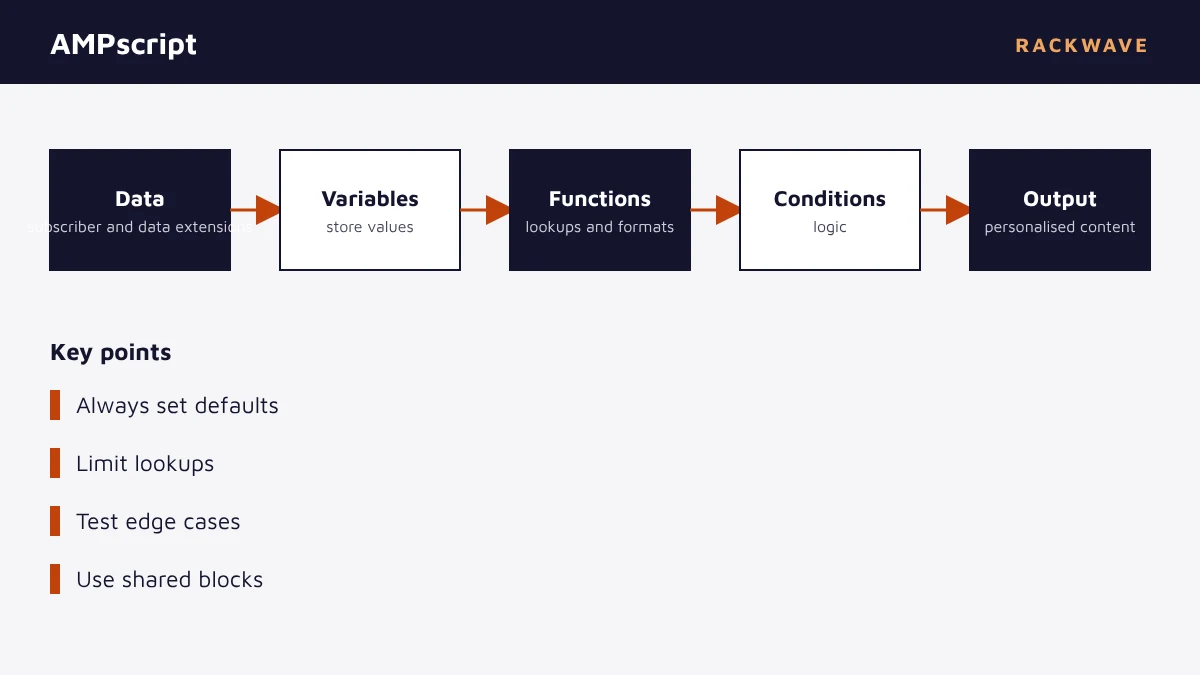
| Concept | Description | Example use |
|---|---|---|
| Variables | Named values set in a script block | Store a first name or a looked up price |
| Functions | Built in operations for text, dates, lookups and more | Format a date, look up a row |
| Script blocks | Multi line code areas that run logic | Set variables and conditions at the top of an email |
| Inline expressions | Short outputs placed in content | Insert a value into a sentence |
| Conditions | If, then, else logic | Show different content by tier |
| Loops | Repeat content for rows | List recent orders |
| Personalisation strings | Simple insertion of attributes | First name or other profile field |
Common function groups
| Group | Purpose | Examples of what they do |
|---|---|---|
| Lookup functions | Retrieve data from data extensions | Look up a single value or several rows |
| String functions | Work with text | Join, trim, change case, replace |
| Date and time functions | Format and calculate dates | Format by locale, add days |
| Math functions | Calculate numbers | Add, round, format currency |
| Content functions | Pull in content blocks or other content | Include a content block by name |
| Data modification functions | Write or update rows | Insert a row for a form submission |
| Output and utility functions | Control output and escape values | Show output, handle empty values |
Where AMPscript runs and where it does not
- It runs when emails and SMS are rendered at send time or preview.
- It runs on CloudPages and landing pages when pages are requested.
- It cannot run in the same way inside a web browser after the email is opened, because the email is already rendered.
- It is simpler than server side JavaScript, but less flexible for complex logic and API calls.
- Choose AMPscript for most personalisation and server side JavaScript for advanced tasks.
Writing reliable AMPscript
- Set all variables and lookups in one block near the top of the message.
- Check that lookups returned data before using the result.
- Provide default values for missing or empty fields.
- Keep logic simple and use comments to explain intent.
- Use content blocks for shared snippets so changes happen in one place.
- Test with subscribers who have complete, partial and missing data.
- Preview and test send before every campaign.
How to build an AMPscript personalisation
- Define the requirement. State what content should change and which data drives it.
- Check the data. Confirm the fields and data extension keys exist and are populated.
- Write the script. Set variables, look up data and add conditions, with defaults.
- Place output in content. Use inline expressions or blocks where values should appear.
- Test with edge cases. Use test subscribers with missing data, long names and unusual values.
- Review performance. Limit lookups and avoid unnecessary loops.
- Document. Describe the logic and data dependencies for the team.
Common mistakes
- No default values, so missing data shows as blank or an error.
- Too many lookups per message, which slows sends.
- Using attribute names that differ in different data extensions.
- Copying scripts between emails instead of using shared content blocks.
- Testing only with perfect data.
- Placing sensitive data into content without considering privacy.
Our CRM and lifecycle service builds and reviews Marketing Cloud personalisation, and our system integration service provides the data behind it.
A worked example: personalised product recommendations
A retailer wants an email that shows the three most recent products a customer viewed. A data extension holds view rows keyed by customer id with product id and timestamp. In a script block, the email looks up the rows for the subscriber, orders them by date and takes the top three. A second lookup retrieves product name, image and price from a product data extension.
The script checks that at least one row exists. If not, it displays a block of best sellers instead. Values are formatted for currency and locale, and a test list includes subscribers with no views, one view and many views. Click through improves, and the same pattern is reused as a shared content block in other emails.
Performance and safety
Every lookup adds time to rendering, and large sends multiply it. Keep the number of lookups small, use primary keys for lookups and avoid looping through very large row sets. Cache values in variables rather than repeating lookups. Escape any values that come from user input before output, and avoid placing secrets in content. Monitor send duration for emails with heavy logic, and simplify where sends slow down.
Governance and maintenance
Treat AMPscript as code. Use shared content blocks for common logic, keep a library of approved snippets and require review for scripts that write data or call external services. Add comments and document data dependencies so changes to a data extension do not break content unexpectedly. Version important blocks, record changes and retire old snippets. A short code review step before launch catches most errors and keeps the account maintainable as teams change.
Personalisation use cases beyond names
Good personalisation goes well beyond inserting a first name. Use AMPscript to show the nearest store from a reference table, to calculate days until a renewal date, to display loyalty points with correct number formatting, to choose a language specific content block or to hide an offer the customer has already used. Each example depends on clean data and a clear fallback. Start with the two or three personalisations that change behaviour most, measure results with tests and add more only when they prove value. Too much logic makes content hard to maintain and slows sends, so keep each message focused on one main idea.
Debugging and troubleshooting
When content renders wrongly, work step by step. Preview with the same subscriber that failed, check that the lookup key matches the data extension value exactly, including case and spaces, and print intermediate variable values in a test copy of the message to see where the logic goes wrong. Check for empty values, wrong data types and fields that were renamed. Review error messages in the send log, and test in a smaller audience before resending. Keep a record of common causes so the team solves repeated issues quickly.
Key takeaways
- AMPscript personalises Marketing Cloud content and adds logic at render time.
- Core elements are variables, functions, script blocks, conditions and loops.
- Lookups bring in data extension rows, and defaults protect against missing data.
- Test with edge case data and keep scripts simple for speed.
- Govern with shared blocks, review and documentation.
Quick glossary
| Term | Meaning |
|---|---|
| AMPscript | The Marketing Cloud scripting language for personalisation |
| Lookup | A function that retrieves data from a data extension |
| Script block | A section of code that runs logic |
| Content block | A reusable piece of content, often holding shared scripts |
| Default value | A fallback used when data is missing |
Read next: What Is Lead Routing? Methods, Rules and Metrics · What Is a Sales Playbook? Contents and How to Build · What Is Account Planning? Template and Best Practices
Frequently asked questions
What is AMPscript?
It is the Marketing Cloud scripting language used to personalise and add logic to emails, SMS and landing pages.
Where can I use AMPscript?
In emails, SMS, CloudPages and other Marketing Cloud content rendered by the platform.
What is a lookup?
A function that retrieves data from a data extension based on a key.
How do I avoid errors with missing data?
Check that lookups returned data and set default values for empty fields.
AMPscript or server side JavaScript?
AMPscript suits most personalisation, while server side JavaScript suits advanced logic and integrations.
Can AMPscript run after an email is opened?
No. It runs at render time, so the delivered email contains the result, not the script.
How do I test AMPscript?
Use preview with test subscribers, test sends and data that covers complete, partial and missing values.
How can I keep scripts maintainable?
Use shared content blocks, comments, documentation and a review step.