
What are SFMC SQL queries? SQL queries in Salesforce Marketing Cloud are activities, run in Automation Studio, that select and transform data from data extensions and system data views and write the results into a target data extension. They are used to build audiences, join tables, aggregate engagement, clean data and prepare reports without leaving the platform. Queries use a T-SQL style syntax with platform specific limits. This guide explains how SQL queries work in Marketing Cloud, what data they can read, the update modes, common query patterns, how to optimise and test them, how to use system data views for engagement analysis and the mistakes that cause timeouts or wrong audiences. Syntax and limits change, so confirm details in current Salesforce documentation.
Short answer: SFMC SQL query activities read data extensions and data views and write results to a target data extension. Efficient, tested queries with clear update modes are the backbone of reliable audience building.
What are SFMC SQL queries?
Queries are a core part of Automation Studio and work on data extensions. Their results feed Email Studio sends and Journey Builder entry sources. The approach resembles SQL transformation in a data warehouse and in dbt. For background, read what is SFMC.
Query activity basics
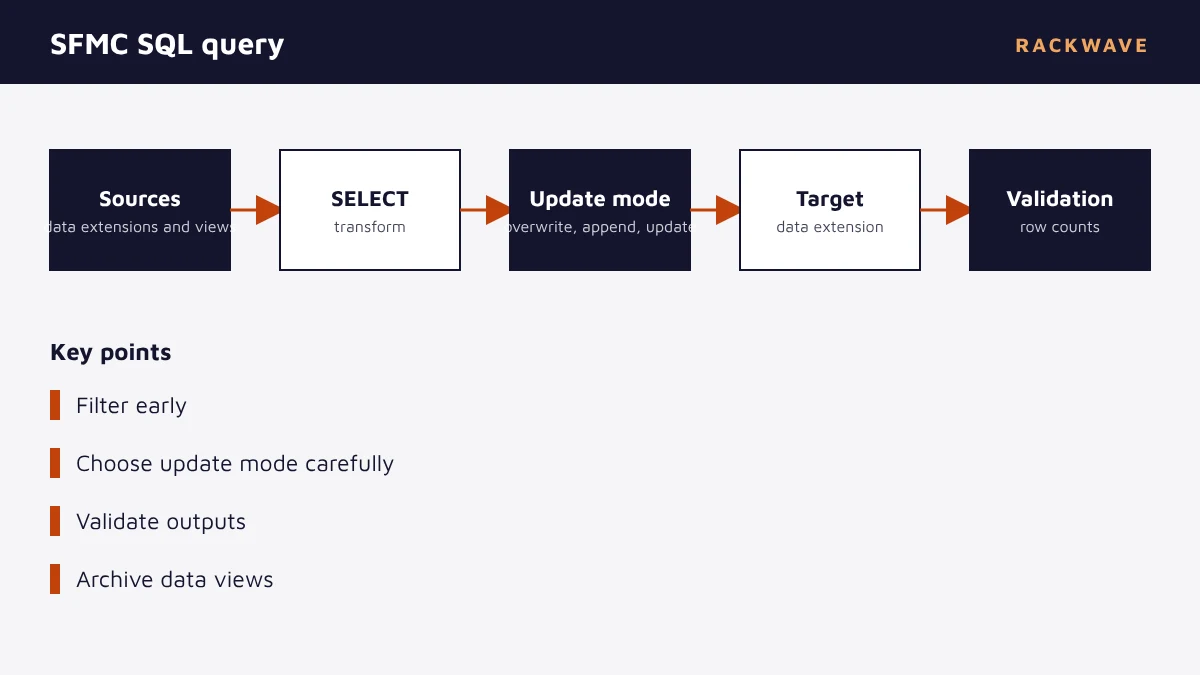
| Element | Description | Notes |
|---|---|---|
| SELECT statement | Defines the rows and columns returned | Only SELECT is supported in query activities |
| Source data | Data extensions and system data views | Joins across them are possible |
| Target data extension | Where results are written | Must exist with matching fields |
| Update mode | How results change the target | Overwrite, append or update |
| Schedule | Run within an automation | Chain after imports |
| Limits | Run time and complexity restrictions | Check current documentation |
Update modes
| Mode | Behaviour | Use |
|---|---|---|
| Overwrite | Deletes existing rows and writes new results | Daily rebuilt audiences |
| Append | Adds new rows without changing existing ones | Logs and history tables |
| Update | Adds or updates rows by primary key | Incremental maintenance of tables |
Always test the mode on a copy of the target before using it in production, since overwrite removes the previous data.
System data views for engagement
| Data view | Contains | Used for |
|---|---|---|
| Sent | Records of emails sent | Send volume and history |
| Open | Open events | Engagement segments |
| Click | Click events | Interest and link analysis |
| Bounce | Bounce events | List hygiene |
| Unsubscribe | Unsubscribe events | Suppression and reporting |
| Job | Details of send jobs | Campaign reporting |
| Subscribers and list data | Subscriber status and list membership | Audience checks |
Data view retention is limited, so archive engagement data if you need long term analysis.
Common query patterns
- Build an audience: select customers with consent who meet a rule and have not been mailed recently.
- Exclude recent purchasers by joining to an orders table and filtering on date.
- Create engagement segments from open and click data views over a defined period.
- Deduplicate by selecting the latest row per key with a window or grouping approach.
- Aggregate data into summary tables for reporting.
- Clean data by trimming text, standardising case and removing invalid values.
Writing efficient queries
- Select only the columns you need and avoid selecting everything.
- Filter early using date and key conditions.
- Join on indexed or primary key fields where possible.
- Break large logic into steps with intermediate data extensions.
- Avoid unnecessary functions on join and filter fields, which slow queries.
- Test on a small data set, then check run time on production volumes.
- Schedule heavy queries off peak.
How to build and operate queries
- Define the output. State the columns, rows and purpose of the target data extension.
- Create the target. Define fields with matching types and a primary key.
- Write and test the query. Run on sample data and inspect the results.
- Add to an automation. Place it after the imports it depends on.
- Validate output. Check row counts and sample rows before sends use the data.
- Monitor. Watch run time, failures and row count changes.
- Document. Record logic, owner, schedule and dependencies.
Common mistakes
- Target fields that do not match the query output, causing errors.
- Using overwrite on a table that must keep history.
- Joining large tables without filters, leading to timeouts.
- Forgetting data view retention limits.
- No validation of results before a send.
- Duplicating logic across many queries instead of reusing staged tables.
Our data analytics service builds query libraries and audience logic, and our CRM and lifecycle service schedules and monitors them in Marketing Cloud.
A worked example: engaged audience with purchase exclusion
A retailer wants a campaign for subscribers who clicked an email in the last ninety days, have marketing consent and have not purchased in the last thirty days. A query joins the click data view with the customer data extension on subscriber key, filters on consent, and uses a left join to an orders table to exclude recent purchasers. Results overwrite a daily audience data extension that is the sendable target.
The team adds a validation step that stops the automation if the row count is zero or differs from the previous day by more than a set percentage. They log row counts to a history table with append mode, and they archive click data to the warehouse weekly because the data view keeps a limited window.
Testing, quality and governance
Test queries like code. Keep sample data that covers edge cases such as nulls, duplicates and refunded orders, compare query results with independent counts and review logic with business owners in plain language. Store queries in a repository or shared register with owner and purpose, and review them each quarter to retire unused ones. Restrict who can edit production queries, record changes and keep rollback copies so that issues can be reversed quickly.
Query design for maintainability
Readable queries last longer. Use clear aliases, consistent formatting and comments that explain business rules, such as why a thirty day window was chosen. Build logic in layers, with staging tables for cleaned data and final tables for audiences, so each step can be tested. Avoid copying large blocks between queries, and reuse staged tables instead. When a rule changes, update it in one place and check every dependent automation.
Scheduling and dependencies
Queries rarely run alone. Place each query after the import or previous step that it depends on, use waits only when necessary and avoid scheduling two automations that write to the same target at the same time. Stagger heavy queries, and make sure sends start only after validation steps pass. Document the dependency chain so that anyone can see why a query runs at a particular time, and review schedules when data delivery times change.
Typical errors and fixes
Common failures include a target field that is too short for the result, a type mismatch between source and target, a missing primary key when using update mode, a query that runs longer than the limit and a reference to a field that has been renamed. Read the error message, run the query manually on a small sample, fix the specific cause and rerun. For timeouts, split the logic into staged queries and add filters. Keep a short catalogue of past errors and fixes in the team space.
Archiving and long term reporting
Because data views keep a limited history, copy engagement data into your own tables or an external warehouse on a schedule. Extract the previous day of sends, opens, clicks and bounces into append mode tables, then export to your warehouse for long term trends and cross channel analysis. Define retention for these archive tables and protect them with the same access controls as other personal data. This approach supports year on year reporting and attribution that the platform alone cannot provide.
Key takeaways
- SFMC SQL queries read data extensions and data views and write results to a target data extension in Automation Studio.
- Update modes decide whether results overwrite, append or update the target.
- System data views support engagement analysis but have limited retention.
- Write efficient queries with early filters, needed columns and staged steps.
- Validate outputs, document logic and govern changes.
Quick glossary
| Term | Meaning |
|---|---|
| Query activity | An Automation Studio step that runs SQL and writes results |
| Update mode | The way results change the target data extension |
| Data view | A system table of engagement and subscriber data |
| Staging table | An intermediate table used to build final results |
| Primary key | A field that uniquely identifies each row |
Read next: What Is Lead Routing? Methods, Rules and Metrics · What Is a Sales Playbook? Contents and How to Build · What Is Account Planning? Template and Best Practices
Frequently asked questions
What is a SQL query activity in SFMC?
It is an Automation Studio activity that runs a SELECT on data extensions and data views and writes results to a target data extension.
What update modes are available?
Overwrite, append and update, which control how results change the target data extension.
Can I read engagement data?
Yes, through system data views such as sent, open, click and bounce, within their retention limits.
How do I avoid timeouts?
Filter early, select needed columns, join on keys, break logic into steps and run heavy queries off peak.
Can I use INSERT or UPDATE statements?
Query activities use SELECT statements, and the update mode controls how results are written.
How do I validate results?
Check row counts, sample rows and compare with independent counts before sends use the data.
How long are data views kept?
Retention is limited, so confirm current periods and archive data you need long term.
How do I document queries?
Record the logic, owner, schedule and dependencies in a shared register.