
What are SFMC subscribers and lists? In Salesforce Marketing Cloud, a subscriber is a person who can receive messages, identified by a subscriber key and an email address, and a list is a collection of subscribers used for sending and for managing subscription status. Subscriber status, such as active, unsubscribed, held or bounced, controls whether messages can be sent, and the All Subscribers list is the master record across the account. This guide explains subscribers, subscriber keys, list types, subscription status, how lists and data extensions differ, how unsubscribes and preferences work, how to manage list health and compliance and the mistakes that cause duplicate subscribers or accidental sends to opted out people. Interfaces and rules change, so confirm details in current Salesforce documentation.
Short answer: Subscribers are the people, and lists are one way to group them. A stable subscriber key, correct status handling and clear preference management keep sends compliant and accurate.
What are SFMC subscribers and lists?
The subscriber model is the foundation of email in what is SFMC and is used by Email Studio. It connects to the broader contact model in Contact Builder and to audience tables in data extensions. Consent concepts follow what is GDPR, and sender health follows SFMC deliverability.
Subscriber concepts
| Concept | Description | Notes |
|---|---|---|
| Subscriber key | Unique identifier for a subscriber | Should match your customer or contact id |
| Email address | Where emails are delivered | Can change over time |
| All Subscribers list | Master list of every subscriber in the account or business unit | Holds global status |
| Subscriber status | Active, unsubscribed, held, bounced or deleted | Controls whether sends can reach the subscriber |
| List | A group of subscribers with its own list level status | Public, private or publication |
| Publication list | A list used for preference management by topic | Often used for newsletters |
| Suppression list | Subscribers who should never receive certain sends | Used for exclusions |
Subscriber statuses
| Status | Meaning | Can receive email |
|---|---|---|
| Active | Subscribed and eligible | Yes |
| Unsubscribed | Opted out | No |
| Held | Temporarily held, for example after repeated soft bounces | No until released |
| Bounced | Address has hard bounced | No |
| Deleted | Removed from the account | No |
Confirm current status behaviour, including list level versus account level status, in Salesforce documentation.
Lists versus data extensions
| Aspect | List | Data extension |
|---|---|---|
| Best for | Simple subscription and publication management | Large audiences and custom data |
| Attributes | Subscriber attributes with limits | Custom fields and types |
| Unsubscribe handling | Built in at list level | Handled by send classification and status |
| Scale | Smaller audiences | Large audiences |
| Recommended use | Preference centres and simple newsletters | Campaign audiences, as described in the data extension guide |
Managing consent and preferences
- Collect clear consent at sign up and record source and time.
- Use a stable subscriber key that matches your CRM or customer id.
- Offer topic and frequency preferences, not only unsubscribe.
- Honour unsubscribes immediately in all systems.
- Use suppression lists for compliance and for people who should never be mailed.
- Remove or review held and bounced subscribers regularly.
- Document how consent flows between systems.
How to manage subscribers well
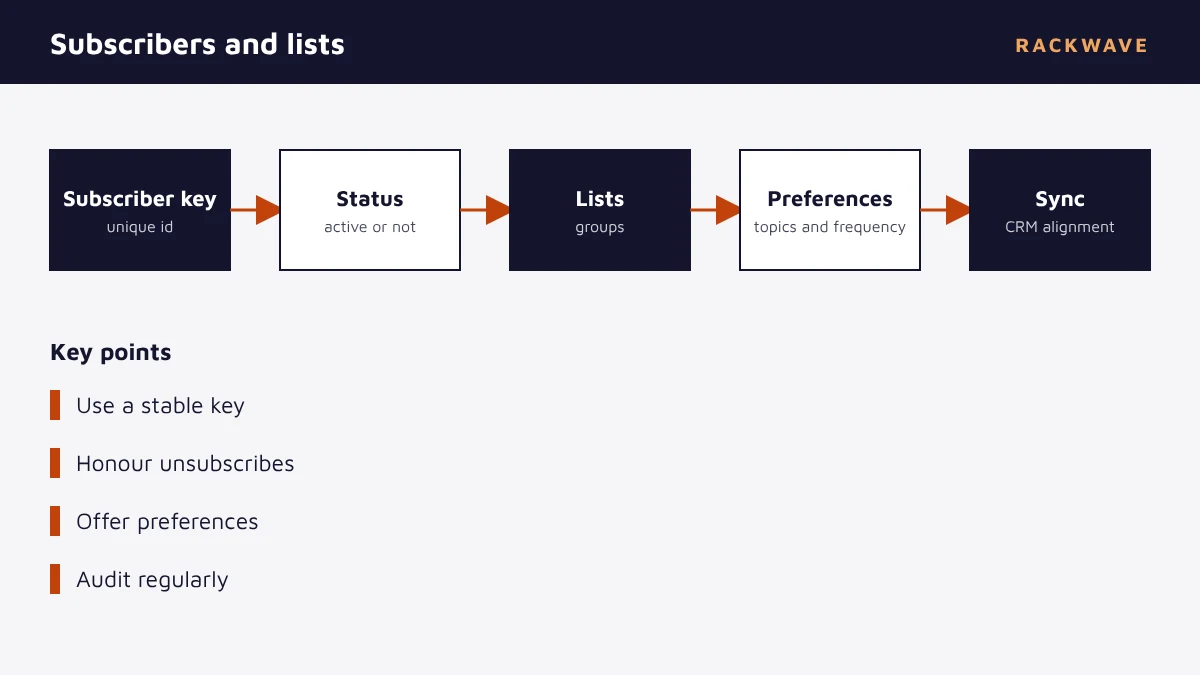
- Define the subscriber key. Choose a stable identifier and apply it in every import and integration.
- Set up status handling. Agree rules for unsubscribes, holds and re-subscribes.
- Design lists and preferences. Create publication lists for topics and a preference centre.
- Clean imports. Validate addresses and keys before loading.
- Sync with CRM. Align status and consent between Marketing Cloud and your CRM.
- Monitor list health. Track bounces, unsubscribes and complaints.
- Audit regularly. Check for duplicates, missing keys and wrong statuses.
Common mistakes
- Using email address as subscriber key so changes create duplicates.
- Re-importing unsubscribed people as active.
- Mixing list level and account level status without understanding the difference.
- Sending to data extensions without applying suppression.
- Only offering an unsubscribe all option.
- Not syncing unsubscribes back to the CRM.
Our CRM and lifecycle service designs subscriber and consent models, and our data governance service sets the policies around them.
A worked example: preference based newsletters
A media company sends all newsletters to one list, and unsubscribes remove readers from everything. The team creates publication lists for each newsletter, a preference centre and a rule that unsubscribe all remains available. The subscriber key is set to the customer id, and imports are updated to include it.
A suppression data extension covers legal exclusions, and an automation syncs unsubscribes to the CRM nightly. Complaints fall, total unsubscribes drop as readers keep the topics they like and the team gains better insight into topic interest. A quarterly audit checks duplicates, held subscribers and status mismatches between systems.
Importing and migrating subscribers
Imports are the most common source of subscriber problems. Before loading, clean the file, normalise emails, confirm that each row has a subscriber key and check consent evidence. Import suppression and unsubscribe data first so that nobody is mailed by mistake, use update modes that do not reset status and test with a small file. When migrating from another platform, bring consent history and dates, warm up sending gradually and keep the old system available for reference until the new one is stable.
Reporting and list health
Report on list growth, active rate, bounce rate, unsubscribe rate and complaint rate, by source and campaign. Use engagement segments to find inactive subscribers, run a re-engagement series and then suppress those who do not respond. Compare list quality by acquisition channel, since some sources bring poor quality addresses. Share a monthly list health summary with marketing and compliance teams so that action is taken before deliverability suffers.
Subscriber key strategy in detail
The subscriber key is the single most important decision in the model. Choose an identifier that exists in your CRM, billing and commerce systems, never changes and is never reused. Apply it in every import, API call and journey entry source, so a person has one record across email, SMS and push. If you currently use email address as the key, plan a migration: map each address to the customer id, update the key in a controlled batch and test on a small group first. After migration, validate that sends, unsubscribes and reports still match, and update documentation and integrations.
Business units and multi brand accounts
Larger organisations use business units for brands or regions. Decide whether subscribers are shared across units or kept separate, and how consent applies in each case. Keep the subscriber key consistent across units, apply suppression rules that span them when required and avoid sending several brands to the same person on the same day without coordination. Review permissions so that users only see the data they need, and test unsubscribe behaviour between units before launch.
Privacy requests and retention
Subscribers have rights to access, correct and delete their data. Maintain a process that finds a person by key and email across lists, data extensions and tracking data, applies the request and records completion. Set retention for inactive subscribers and tracking history in line with your policy, and avoid keeping data without a purpose. Document where subscriber data lives and who owns each location.
Key takeaways
- Subscribers are identified by a subscriber key and email address, and lists group them for sends and preferences.
- Use a stable subscriber key that matches your customer identifier.
- Status controls whether a subscriber can receive messages, and unsubscribes must be honoured immediately.
- Use lists for simple subscription management and data extensions for large, flexible audiences.
- Sync consent with the CRM and audit list health regularly.
Quick glossary
| Term | Meaning |
|---|---|
| Subscriber key | The unique identifier of a subscriber |
| All Subscribers | The master list of all subscribers |
| Publication list | A list used to manage subscriptions by topic |
| Suppression list | A group of subscribers who must not be sent to |
| Held status | A status that stops sends to a subscriber temporarily |
Read next: What Is Lead Routing? Methods, Rules and Metrics · What Is a Sales Playbook? Contents and How to Build · What Is Account Planning? Template and Best Practices
Frequently asked questions
What is a subscriber in Marketing Cloud?
It is a person who can receive messages, identified by a subscriber key and an email address.
What is the All Subscribers list?
It is the master list of all subscribers and holds their account level status.
What should the subscriber key be?
A stable identifier, such as your customer or contact id, rather than an email address.
What is a publication list?
A list used to manage subscriptions to specific topics or newsletters, often with a preference centre.
Lists or data extensions?
Lists suit simple subscription management, while data extensions suit large and flexible audiences.
What does held status mean?
The subscriber is temporarily excluded from sends, for example after repeated soft bounces.
How do I handle unsubscribes?
Honour them immediately, apply them across systems and sync them with your CRM.
How do I keep lists healthy?
Collect clean consent, validate addresses, remove bounces, re-engage then suppress inactive subscribers and audit regularly.