
What are Iterable push and in-app messages? Iterable push and in-app messages are mobile and web channels that let you reach users directly on their devices. Push notifications are delivered to the device outside the app, while in-app messages appear inside the app while a user is active. Iterable supports mobile push on iOS and Android, web push and in-app messages through its SDKs, and both channels can be used in campaigns and workflows alongside email and SMS. This guide explains how each channel works, how to set up the SDK and permissions, how to design messages and deep links, how to measure results and which mistakes cause low opt in and high uninstall rates. Capabilities change, so confirm details in the current Iterable documentation.
Short answer: Use push for timely, relevant alerts that reach users outside the app, and in-app messages for contextual guidance while they are active. Both rely on a correct SDK setup, permission strategy and relevant content.
What are Iterable push and in-app messages?
Both channels extend the cross channel approach described in what is Iterable. General principles for notifications are covered in our guide to push notifications. Teams using other tools can compare with Braze push notifications and Braze in-app messages.
Channel comparison
| Aspect | Push notification | In-app message |
|---|---|---|
| Where it appears | Device notification area or lock screen | Inside the app while it is open |
| User state | App closed or in the background | App active |
| Permission | Required on most platforms | Not required beyond app use |
| Best for | Time sensitive alerts and reminders | Onboarding tips, feature announcements, offers |
| Risk | Opt out and uninstall if overused | Interrupting a task if poorly timed |
| Deep link | Opens a screen in the app or page on the web | Buttons can link to screens or actions |
Setting up push and in-app
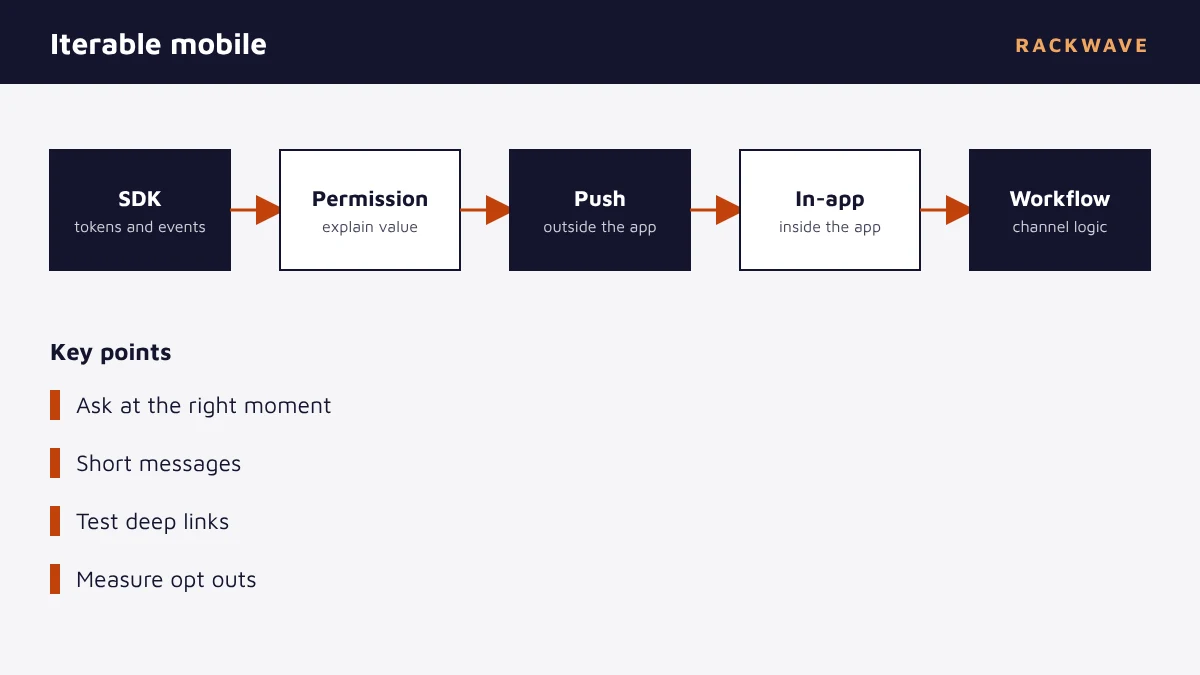
- Integrate the mobile SDK or web SDK and register device tokens against user profiles.
- Configure push credentials for each platform and test with a development build.
- Define a permission strategy: explain value first, then ask at a relevant moment.
- Set up deep links so messages open the right screen with the right parameters.
- Configure in-app display rules such as screen, delay, frequency and dismissal.
- Send test messages to real devices on supported operating systems before launch.
Designing effective messages
| Element | Push guidance | In-app guidance |
|---|---|---|
| Headline | Short, clear and specific | Direct and benefit focused |
| Body | One idea, under platform limits | Concise with a single call to action |
| Image | Use sparingly and test rendering | Use to support the message, not decorate |
| Timing | Respect time zones and quiet hours | Show at a relevant moment in the journey |
| Personalisation | Use name, item or status when helpful | Reflect the screen and user state |
| Call to action | Deep link to the exact content | Buttons with clear labels |
Using push and in-app in workflows
- Send an in-app tip to new users at their first session, then an email if they do not return.
- Use push for order status and delivery updates, with email as a record.
- Fall back from push to email or SMS when a user has not enabled notifications.
- Suppress in-app messages for users who have already completed the action.
- Coordinate channels with frequency rules so a user is not messaged on every channel at once.
The orchestration side is described in Iterable workflows.
How to launch push and in-app programmes
- Set goals. Choose outcomes such as activation, retention or purchases for each channel.
- Complete the technical setup. Install SDKs, configure credentials and validate tokens.
- Plan opt in. Design a pre permission prompt that explains the value.
- Build templates. Create reusable push and in-app templates with deep links.
- Create workflows. Add channel logic, fallbacks and frequency controls.
- Test on devices. Check delivery, rendering and links on several devices and versions.
- Measure and iterate. Track delivery, open or tap rates, conversions and opt out rates.
Common mistakes
- Asking for notification permission at first launch with no context.
- Sending generic broadcasts that cause opt outs.
- Broken deep links that open the home screen instead of the target.
- Not removing invalid device tokens.
- Showing in-app messages that block key tasks.
- Ignoring time zones and quiet hours.
Our CRM and lifecycle service designs mobile engagement programmes, and our API development service supports the backend events and deep link services behind them.
A worked example: improving opt in and activation
A fitness app asks for push permission on the first screen and only a third of users agree. The team adds a pre permission message after the first completed workout that explains the benefit of reminders. Opt in rises to nearly half. A workflow then sends an in-app tip about saving a plan, a push reminder the next day and an email if the user has not returned within three days.
Deep links open the plan screen directly, and frequency rules limit pushes to one per day. Week four retention increases and the opt out rate stays low. The team reviews tap rates by message type monthly and retires reminders that do not perform.
Privacy, permissions and platform rules
Respect platform policies and user choices. Explain why notifications are useful, honour system level settings and provide in-app preference controls. Avoid sending sensitive information in notification text, because it can appear on lock screens. Keep records of consent and handle token data securely. Platform rules change, so review operating system guidance and update prompts and templates when new requirements appear.
Measurement and optimisation
Measure what matters beyond taps. Track delivery rate, tap rate, conversion, uninstall rate and opt out rate by message type and audience. Use experiments to test timing and copy, and keep a holdout group to measure incremental impact. Review results by operating system and app version, because rendering and delivery differ. A monthly review that retires weak messages and scales strong ones keeps the programme healthy.
Content ideas and message types
Strong programmes use a mix of message types. Transactional pushes such as order updates, delivery alerts and security notices have the highest value and should be reliable. Behavioural messages respond to actions, for example a reminder to finish a setup step or a nudge about a saved item. Promotional messages should be rarer and highly targeted. In-app messages suit onboarding checklists, feature tours, feedback requests and contextual offers shown on the screen where they matter. Plan a content calendar by message type, keep a short library of approved templates and review the mix regularly so that value outweighs promotion.
Testing and quality assurance
Create a device matrix covering the main iOS and Android versions, screen sizes and web browsers your users have. Test permission flows, token registration, delivery with the app closed, background and foreground, and deep links from a cold start. Check that rich media renders, that localised text fits and that in-app messages respect display rules. Keep the matrix in a shared document and rerun it before each major release or SDK upgrade, as these changes are a common cause of silent failures.
Key takeaways
- Push reaches users outside the app and needs permission, while in-app messages appear inside the app.
- Set up SDKs, credentials, tokens and deep links carefully and test on real devices.
- Design short, relevant messages and ask for permission at a moment of clear value.
- Use workflows to coordinate channels, fallbacks and frequency.
- Measure incrementally and monitor opt out and uninstall rates.
Quick glossary
| Term | Meaning |
|---|---|
| Push token | A device identifier used to deliver notifications |
| Deep link | A link that opens a specific screen in an app |
| Pre permission prompt | An in-app explanation shown before the system permission request |
| In-app message | A message displayed inside the app while it is open |
| Quiet hours | Times when notifications are not sent |
Read next: What Is Lead Routing? Methods, Rules and Metrics · What Is a Sales Playbook? Contents and How to Build · What Is Account Planning? Template and Best Practices
Frequently asked questions
What is the difference between push and in-app messages?
Push notifications reach users outside the app and need permission, while in-app messages appear inside the app during a session.
Which channels does Iterable support on mobile?
Iterable supports mobile push, in-app messages, web push and embedded messaging, depending on setup.
Do in-app messages need user permission?
No system permission is needed, but they appear only when the user opens the app.
How do I increase push opt in?
Explain the value before the system prompt and ask at a relevant moment rather than at first launch.
What is a deep link?
It is a link that opens a specific screen or action in your app from a message.
How often should I send push notifications?
Only as often as is relevant. Use frequency rules and monitor opt out and uninstall rates.
Can I combine push with email?
Yes. Workflows can use push first and fall back to email or SMS when notifications are disabled.
How do I measure push and in-app impact?
Track delivery, taps, conversions and opt outs, and use holdout groups for incremental lift.