
What are Iterable workflows? Iterable workflows are visual, multi step journeys that start when a trigger fires, such as a user joining a list, performing an event or matching a segment, and then move each person through steps like sending a message, waiting, branching on conditions, updating profile data or calling an external service. They are the core automation tool in Iterable, used for onboarding, cart recovery, re-engagement and transactional programmes. This guide explains how workflows are structured, the main node types, entry and exit rules, design patterns, testing and common mistakes, so that teams build journeys that are reliable and easy to maintain. Capabilities evolve, so confirm details in the current Iterable documentation.
Short answer: An Iterable workflow is a canvas of connected nodes that defines when users enter, what they receive, how long they wait and where they branch. A clear trigger, explicit exit conditions and reusable templates make workflows dependable.
What are Iterable workflows?
Workflows are the Iterable way to implement customer journey orchestration and workflow automation. They sit on top of the data described in Iterable user profiles and events and use content from Iterable templates. For background on the platform, read what is Iterable. The concept is similar to Braze Canvas and Salesforce Journey Builder.
Workflow anatomy
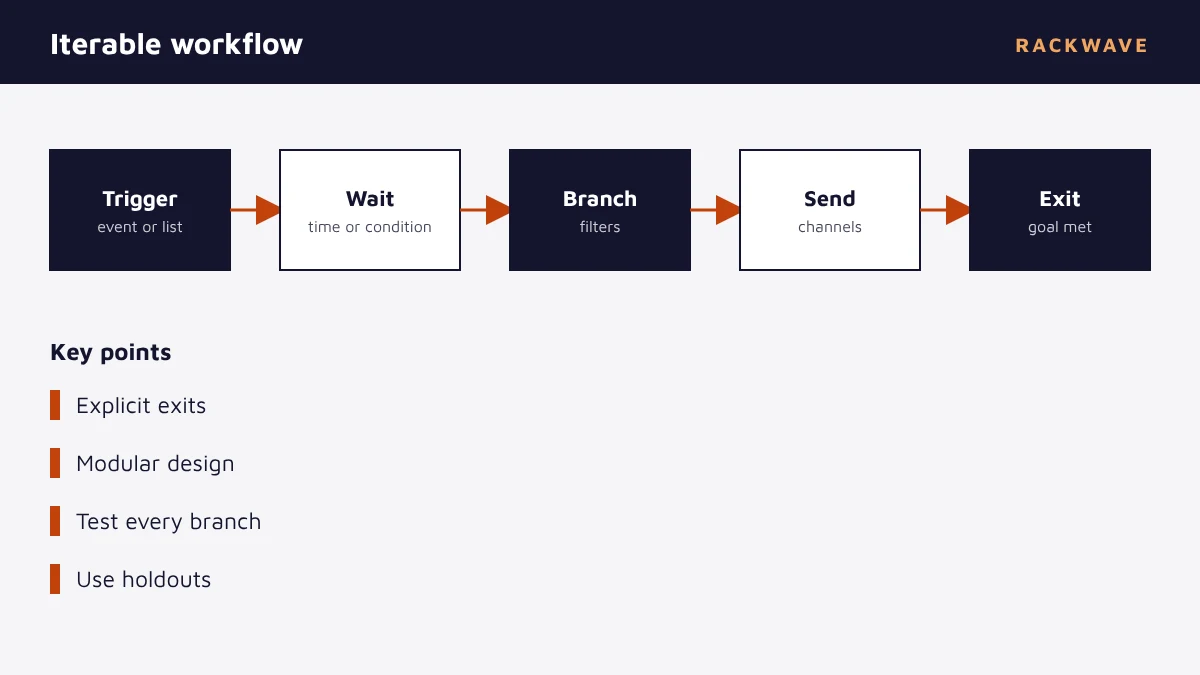
| Node type | Purpose | Example |
|---|---|---|
| Trigger | Starts the workflow for a user | Event received, list subscribed or segment entered |
| Send | Delivers a message on a channel | Email, SMS, push or in-app message |
| Wait | Pauses for a duration or until a time | Wait two days or until 9am local time |
| Filter or branch | Splits users by conditions | Purchased or not, preferred category, channel eligibility |
| Update | Changes profile data or list membership | Add to list, set a field, track an event |
| Webhook or external call | Sends data to another system | Notify a CRM or support tool |
| Experiment | Splits users to test variants | Compare subject lines or offers |
| Exit | Ends the journey | Goal met or conversion event |
Entry, re-entry and exit rules
- Define one clear entry trigger per workflow and avoid overlapping triggers that enrol the same user twice.
- Decide whether users can re-enter, and how long they must wait before doing so.
- Set goal based exits, for example leave an abandoned cart journey as soon as a purchase event arrives.
- Respect channel eligibility and message type subscriptions before every send.
- Use timeouts for long waits so users do not stay in a workflow indefinitely.
Design patterns that work
| Pattern | Description | Use |
|---|---|---|
| Linear series | Messages sent on a fixed schedule | Welcome or education series |
| Event triggered branch | Branch on whether an event occurred during a wait | Cart recovery, trial activation |
| Channel fallback | Try push, then email if there is no engagement | Time sensitive reminders |
| Preference split | Route by interest or product category | Personalised content |
| Holdout and experiment | Reserve a control group and test variants | Measure incremental impact |
| Hub and spoke | A central workflow calls smaller reusable ones | Large programmes with shared steps |
How to build a reliable workflow
- Write the journey brief. State the audience, trigger, goal, exit condition and success metric in one page.
- Confirm the data. Check the events and fields that the trigger and branches rely on exist and are populated.
- Draft the map. Sketch nodes on paper first, including waits, branches and exits.
- Build with templates. Reuse approved templates and keep sends modular.
- Add guardrails. Set re-entry limits, send time windows and frequency rules.
- Test with seed users. Trigger the workflow with test profiles and inspect every branch and message.
- Launch and monitor. Start with a pilot, watch entries, drop offs and errors, then scale.
Common mistakes
- Triggering on an event that is sent more than once, causing duplicate enrolments.
- Forgetting a goal exit, so converted users keep receiving reminders.
- Building one giant workflow instead of modular ones that are easy to change.
- Using waits in local time without checking time zone data quality.
- Editing live workflows without a change log or test plan.
- Ignoring consent and message type rules inside branches.
Our CRM and lifecycle service designs journey architectures, and our workflow and system integration work connects them to your product and commerce events.
A worked example: trial activation workflow
A software company triggers a workflow when a user starts a free trial. The workflow sends a welcome email, waits one day and branches on whether the user created a first project. Users who did receive a tips email. Users who did not receive an in-app message and an email with a short video. After five days, a filter checks whether the user invited a teammate and, if not, sends a nudge.
The workflow exits when the user upgrades or the trial ends. A holdout group of ten percent receives no messages so the team can measure lift. After a quarter, activation is eleven points higher than the control, and the team splits the branch logic into reusable sub workflows for other products.
Testing, monitoring and maintenance
Workflows need ongoing care. Keep a test plan that covers every branch and every channel, use seed accounts with different attributes and review the send logs after launch. Watch for errors in webhooks and data lookups, monitor the share of users stuck in waits and review exits regularly. Archive workflows that are no longer used, document owners and keep a change log so that anyone can understand why a journey behaves as it does. Pair this with the reporting approach in the Braze reporting guide to standardise measurement across tools.
Performance, volume and frequency control
As programmes grow, many workflows run in parallel and the same person can qualify for several at once. Plan the combined message load per user, set a priority order so that transactional and high value journeys win over promotional ones and use send time windows to avoid late night messages. Frequency rules and suppression lists protect the customer experience, while rate controls on webhooks and data lookups protect downstream systems from bursts. Review volume by channel each month and compare it with unsubscribe and complaint rates, because rising opt outs are an early signal that journeys overlap or lack relevance.
Documentation and ownership
Every workflow should have a named owner, a one page brief, a link to its templates and a record of its entry rules and goals. Keep naming conventions consistent, for example channel, audience and purpose in the name, so that search and reporting work. Store the brief and test plan in a shared location and update them whenever the journey changes. When people leave or teams change, documented workflows can be handed over without risk, and audits become a simple review instead of an investigation. A short quarterly clean up archives unused journeys and keeps the account fast and understandable.
Using data and personalisation inside workflows
Workflows become more effective when each step reads fresh data. Use profile fields for names and preferences, event fields for the product or order that triggered the journey and catalog or feed lookups for current prices and availability, as described in Iterable catalogs and Iterable data feeds. Always provide a fallback value for missing fields so that a message never shows a blank or an error, and test branches with profiles that lack data. Where several systems contribute data, agree which one is the source of truth and how quickly changes must reach Iterable.
Key takeaways
- Workflows are Iterable visual journeys built from triggers, waits, branches, sends and updates.
- Define entry, re-entry and exit rules explicitly, including goal based exits.
- Use proven patterns such as event branches, channel fallback and holdouts.
- Build modular, template based workflows and test every branch with seed users.
- Monitor performance, keep a change log and archive unused journeys.
Quick glossary
| Term | Meaning |
|---|---|
| Trigger | The event or condition that enrols a user |
| Wait node | A step that pauses the journey for a time or until a condition |
| Goal exit | A condition that removes users once they achieve the objective |
| Holdout | A control group that does not receive messages |
| Sub workflow | A reusable workflow called from another workflow |
Read next: What Is Lead Routing? Methods, Rules and Metrics · What Is a Sales Playbook? Contents and How to Build · What Is Account Planning? Template and Best Practices
Frequently asked questions
What is a workflow in Iterable?
It is a visual automation that moves users through sends, waits, branches and updates after they meet an entry trigger.
What triggers an Iterable workflow?
Common triggers are a custom event, a list subscription, a segment entry or an API call.
Can users re-enter a workflow?
Yes, depending on settings. Teams usually allow re-entry only after a defined period to avoid duplicate messaging.
How do I stop users once they convert?
Add a goal or exit condition tied to the conversion event so the user leaves the journey immediately.
Can workflows use more than one channel?
Yes. A workflow can send email, SMS, push and in-app messages and can branch based on channel eligibility.
How do I test a workflow?
Create seed profiles, trigger them manually or with test events and review every branch, message and update before launching.
Should I build one large workflow or several small ones?
Several modular workflows are easier to test, change and reuse, and they reduce the risk of errors.
How do I measure workflow impact?
Use a holdout group and compare conversion, revenue or retention against it, rather than relying on opens and clicks alone.