
What are Iterable data feeds? Iterable data feeds are connections to external web endpoints that return live data, such as prices, stock levels, weather, scores or recommendations, which Iterable fetches at send time and makes available inside templates. Instead of storing every value in a profile or catalog, a template calls a feed URL, receives structured data, usually in JSON, and renders the result in the message. This guide explains how data feeds work, when to use them instead of catalogs or profile fields, how to design a reliable feed endpoint, how to secure it, how to handle failures and which mistakes cause slow or broken sends. Features change, so confirm details in the current Iterable documentation.
Short answer: Data feeds let an Iterable message pull live data from your own endpoint at send time. They suit fast changing or personalised values, but they need fast, secure, well monitored endpoints with fallbacks.
What are Iterable data feeds?
A data feed is a configured URL that Iterable calls while rendering a message. The response is exposed to the template so content can use the latest data. It sits beside Iterable catalogs and Iterable user profiles and events. The idea matches Braze Connected Content, which also fetches data at send time through an API. For platform background, read what is Iterable.
Feed, catalog or profile field: which to use
| Need | Best choice | Why |
|---|---|---|
| Value changes rarely, such as plan name | Profile field | Stored with the user and cheap to read |
| Item details used by many users | Catalog | Central, fast and reusable |
| Value changes minute by minute, such as stock or price | Data feed | Always current at send time |
| Personalised result computed per user | Data feed | Endpoint can compute using the user identifier |
| Content from a third party, such as weather | Data feed | Avoids copying external data |
How a feed call works
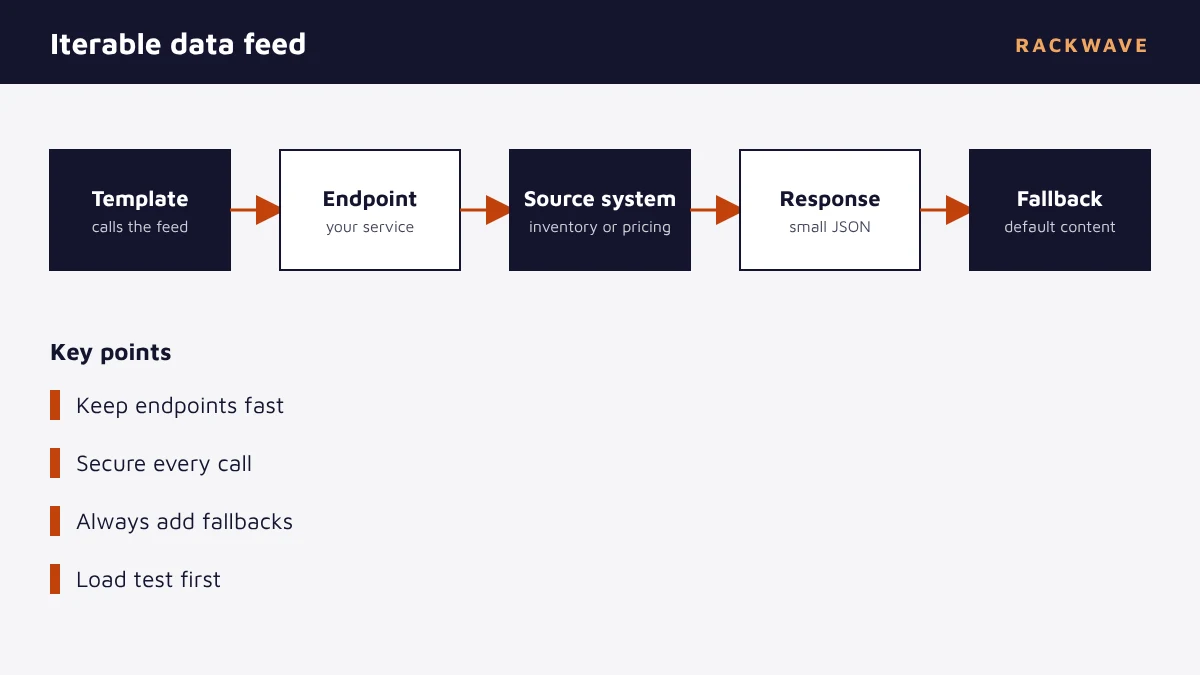
- A message starts rendering for a user, and the template references a feed with parameters such as user id or item id.
- Iterable calls your endpoint with those parameters, usually with authentication headers.
- Your service looks up or computes the data and returns a small JSON response.
- Iterable parses the response and inserts the values into the message.
- If the call fails or times out, the template falls back to default content or the send is skipped, depending on setup.
Designing a reliable feed endpoint
| Requirement | Guidance |
|---|---|
| Speed | Respond in well under a second, because slow feeds delay sends and can time out |
| Payload size | Return only the fields the template needs |
| Availability | Use redundancy, caching and monitoring, because failures affect message delivery |
| Idempotency | Calls should be safe to repeat and should not change data |
| Security | Authenticate with keys or tokens, use HTTPS and restrict access. See what is OAuth |
| Versioning | Keep response structure stable and version changes carefully |
| Rate handling | Plan for high concurrency during large campaigns |
How to implement a data feed
- Define the use case. Choose values that truly need to be live, such as stock or a personalised score.
- Design the endpoint. Specify inputs, outputs, authentication and response time targets.
- Build and test the service. Add caching, input validation and logging, then load test with campaign scale volumes.
- Configure the feed. Register the URL, headers and parameters in Iterable.
- Add fallbacks in templates. Define what to show when the feed returns nothing or fails.
- Pilot with a small audience. Send test messages and compare rendered values with the source system.
- Monitor in production. Track latency, error rate and fallback usage, and alert on thresholds.
Common mistakes
- Calling a slow internal API directly from a template without caching.
- Returning large payloads that are mostly unused.
- No fallback content, so a feed failure produces an empty or broken message.
- Exposing the endpoint without authentication or rate limits.
- Changing the response structure without coordinating with template owners.
- Using feeds for static values that belong in a catalog or profile.
Our API development service builds secure, fast feed endpoints, and our system integration service connects them to commerce, pricing and data platforms.
A worked example: live stock and price in a back in stock message
A retailer wants a back in stock email to show the current price and remaining quantity. The team builds a small endpoint that accepts an item id, reads from an inventory cache refreshed every minute and returns price, currency and a low stock flag. The template calls the feed, shows a low stock banner when the flag is true and falls back to a generic message if the response is empty.
Before a large send, the team load tests the endpoint at ten times the expected rate and adds a content delivery layer in front. Click through improves, complaints about wrong prices disappear and the team reuses the same pattern for price drop alerts. Dashboards track latency and the share of messages that used the fallback.
Security, privacy and resilience
Feed endpoints often receive user identifiers and may return personal or commercial data, so apply least privilege. Use signed tokens or keys with rotation, accept calls only from known sources where possible and log access. Avoid returning more personal data than the message needs, and keep responses free of sensitive fields. For resilience, add caching with short lifetimes, circuit breakers that return defaults when the source is slow and clear runbooks for incidents. Consider the effect of a feed outage on revenue messages, and decide in advance whether to skip or send with fallback content.
Governance and testing
Document every feed with its owner, purpose, input and output fields, service level and the templates that use it. Review the list quarterly and retire unused feeds. Include feed calls in the template test plan, run seed sends against a staging endpoint before production and keep a contract test that fails when the response structure changes. Coordination between the engineering team that owns the endpoint and the marketing team that owns the message prevents most production issues.
Cost, caching and scale planning
Every feed call costs compute and adds latency, so plan for scale. Estimate peak sends per minute, multiply by the number of feed calls per message and size the endpoint with headroom. Cache responses that are identical across users, such as a price for a given item, for a short period, and avoid per user lookups when a shared cache is enough. Schedule very large campaigns in batches to flatten demand, and agree a freeze window during major sales events. Reviewing these numbers before each big campaign prevents slow sends and surprise infrastructure cost.
Choosing between feeds and pre computed data
If a value can be computed ahead of time and stored, a catalog or profile field is usually cheaper and safer. Reserve feeds for cases where freshness at the moment of sending changes the outcome, such as stock levels or auction prices.
Key takeaways
- Iterable data feeds fetch live data from your own endpoint at send time and expose it to templates.
- Use feeds for fast changing or per user computed values, and catalogs or profile fields for stable data.
- Endpoints must be fast, secure, small, versioned and monitored.
- Always define fallback content for empty or failed calls.
- Load test before large sends and document owners and contracts.
Quick glossary
| Term | Meaning |
|---|---|
| Data feed | An external endpoint Iterable calls at send time |
| Fallback | Content shown when the feed fails or returns nothing |
| Latency | The time the endpoint takes to respond |
| Circuit breaker | A pattern that returns defaults when a service is unhealthy |
| Contract test | An automated check that the response structure has not changed |
Read next: What Is Lead Routing? Methods, Rules and Metrics · What Is a Sales Playbook? Contents and How to Build · What Is Account Planning? Template and Best Practices
Frequently asked questions
What is a data feed in Iterable?
It is a configured endpoint that Iterable calls while rendering a message, so templates can use live external data.
When should I use a feed instead of a catalog?
Use a feed when values change very frequently or are computed per user, and a catalog when item data is stable and shared.
What format should the feed return?
JSON is the common format, kept small and containing only the fields the template needs.
What happens if the feed fails?
It depends on configuration, but you should define fallback content or skip rules so messages never show broken values.
How do I secure a feed?
Use HTTPS, authentication keys or tokens, restricted access and logging, and avoid returning unnecessary personal data.
Do feeds slow down sending?
They can if the endpoint is slow, so keep responses fast, cache results and load test before large campaigns.
Can I pass the user id to a feed?
Yes, parameters such as user or item identifiers can be passed so the endpoint returns personalised data.
How do I monitor feeds?
Track latency, error rate and fallback usage with alerts, and review them after each large send.