
What are Iterable templates? Iterable templates are reusable message designs for email, SMS, push notifications, in-app messages and other channels, stored in the platform so that campaigns and workflows can send consistent, personalised content without rebuilding it each time. A template holds the layout, text, images, subject line, links and merge logic, and it can pull in profile fields, event data and catalog items. This guide explains the template types, how personalisation and conditional content work, how to structure a template library, how to test and approve content and which mistakes cause broken or off brand messages. Features change over time, so confirm details in the current Iterable documentation.
Short answer: Iterable templates are reusable, personalised message designs. A well governed template library keeps messages consistent, speeds up launches and reduces errors across campaigns and workflows.
What are Iterable templates?
Templates are the content layer of Iterable, used by campaigns and by Iterable workflows. They rely on data from Iterable user profiles and events and can show items from Iterable catalogs. The same ideas appear in Salesforce email templates and Braze Liquid, so teams working across tools can share design principles. For an overview of the platform, see what is Iterable.
Template types and what they contain
| Template type | Typical content | Key considerations |
|---|---|---|
| Subject, preheader, HTML body, links, footer | Responsive design, accessibility, unsubscribe link, plain text version | |
| SMS | Short text, link, opt out language | Character limits, consent, sender identity |
| Push | Title, body, image, deep link | Length limits, platform differences, deep link validity |
| In-app | Message layout, buttons, display rules | Timing, dismissal, device size |
| Web push | Title, body, icon, click action | Browser support and permission prompts |
| Embedded | Content placed in an app or site surface | Placement rules and data binding |
Personalisation and conditional content
- Insert profile fields such as first name, plan or preferred language, always with a fallback value.
- Insert event fields such as product name, order total or cart items from the triggering event.
- Use conditional blocks to show different content by segment, language or lifecycle stage.
- Loop through catalog items to render product or content recommendations.
- Pull live data with feeds where the content must be current at send time.
- Preview with several test profiles, including ones with missing data, before approval.
Structuring a template library
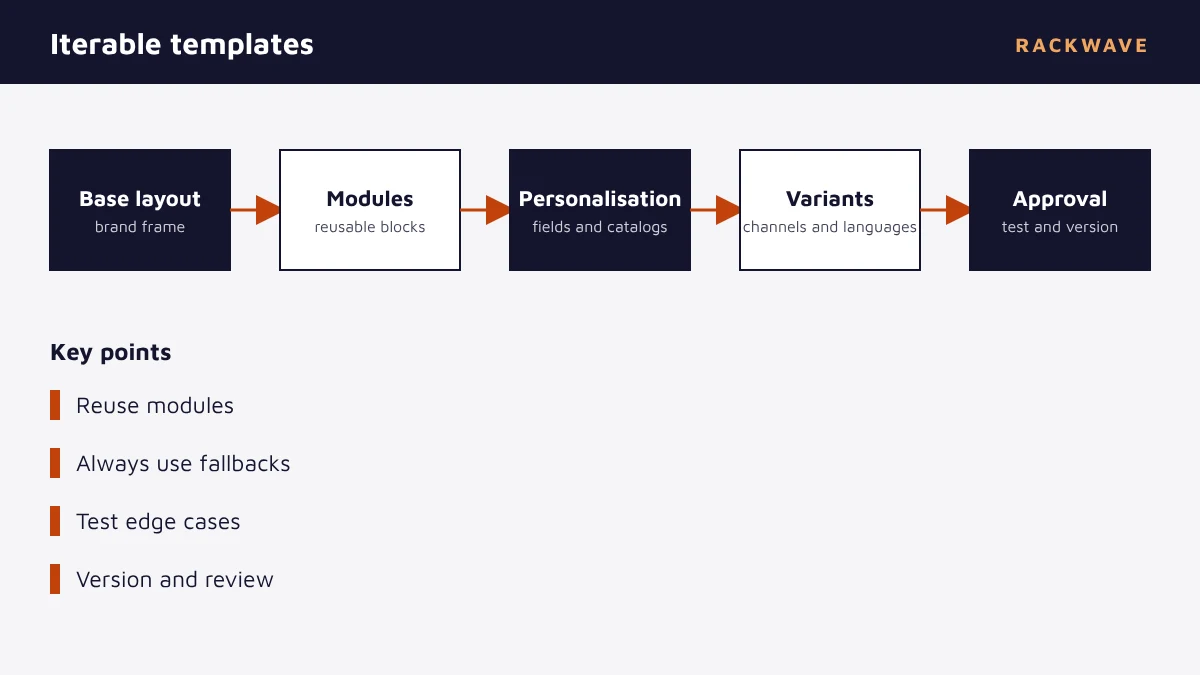
| Layer | Purpose | Example |
|---|---|---|
| Base layouts | Brand frame with header, footer and styles | One responsive email shell per brand |
| Content modules | Reusable blocks | Hero banner, product grid, offer strip |
| Journey templates | Complete messages for a purpose | Welcome 1, cart reminder, receipt |
| Channel variants | Matching SMS and push versions | Short urgency text with a deep link |
| Localised versions | Language specific copy | English, German, French |
How to create and govern templates
- Define brand and accessibility standards. Agree fonts, colours, spacing, alt text rules and dark mode behaviour.
- Build the base layout. Create a responsive shell and test it across major email clients and devices.
- Create reusable modules. Build blocks for common sections so campaigns assemble quickly.
- Add personalisation safely. Insert fields with fallbacks and conditional logic, and avoid complex logic that is hard to maintain.
- Test thoroughly. Run rendering tests, link checks, spam checks and seed sends with varied profiles.
- Approve and version. Use a review step, name templates consistently and keep a change history.
- Review performance. Compare click and conversion results by template and retire weak ones.
Common mistakes
- Missing fallback values, which show blank names or broken text.
- Hard coding links and discount codes that later expire.
- Skipping the plain text version and accessibility checks.
- Creating one off templates for every campaign instead of reusing modules.
- Overly complex conditional logic that no one can maintain.
- Not testing deep links, UTM parameters and unsubscribe links before launch.
Our CRM and lifecycle service builds governed template libraries and design systems for messaging, and our system integration service connects content to product and commerce data.
A worked example: a modular template library
A retailer runs forty one off email designs, each built by a different person. The team replaces them with one responsive base layout and eight content modules, including a hero, a product grid, a loyalty banner and a footer. Journey templates for welcome, cart and receipt assemble these modules, while push and SMS variants reuse the same headlines.
Build time for a new campaign falls from two days to four hours, rendering defects drop sharply and click through improves because layouts are tested and consistent. A quarterly review retires modules with weak performance and adds new ones for seasonal events.
Accessibility, localisation and compliance
Templates should be readable by everyone. Use semantic structure, sufficient contrast, meaningful alt text and sensible link text, and test with screen readers where possible. For international audiences, keep copy in separate localised versions, support right to left languages where needed and format dates, numbers and currencies by locale. Include the legal footer, sender identity and a working unsubscribe or opt out mechanism for every channel, and keep marketing and transactional content clearly separated. A short compliance checklist attached to the approval step prevents most issues before they reach customers.
Performance and deliverability considerations
Heavy images, broken markup and spam triggering phrases can hurt delivery and engagement. Keep email size reasonable, host images reliably, balance image and text and avoid link shorteners that damage reputation. Use consistent sender names and authenticated domains, and review Iterable deliverability guidance alongside design choices. Monitor click, complaint and unsubscribe rates by template so that poor performers are fixed quickly.
Measuring template performance and iterating
Track clicks, conversions, unsubscribes and complaints by template and by module, not only by campaign. Compare variants through controlled tests, change one element at a time and record the result so lessons are shared across teams. Retire modules that consistently underperform and promote the ones that win into the base library. Review accessibility and rendering when email clients change, and refresh seasonal content on a calendar. A monthly template review, owned by one person, keeps the library healthy and prevents the slow build up of outdated designs, broken links and inconsistent wording that erodes customer trust over time.
Roles and approvals
Assign clear roles for template work: designers own layouts and modules, marketers own copy and journeys, developers own data bindings and an approver checks compliance and brand. Use a simple checklist at approval covering links, fallbacks, accessibility, legal footer and rendering. Keep drafts separate from approved templates, require a second reviewer for anything sent to a large audience and record who approved what and when. This reduces last minute errors and makes audits straightforward when questions arise about a past message.
Template change management
Treat template edits like software changes. Duplicate before editing a live template, keep a short note describing the change and the reason, and test the new version with seed sends before switching journeys to it. Avoid editing a template that is used by a running workflow at peak sending times, and keep a rollback copy so a faulty change can be reversed in minutes.
Key takeaways
- Iterable templates are reusable message designs across email, SMS, push, in-app and other channels.
- Personalisation uses profile fields, event data, catalogs and feeds, always with fallback values.
- A layered library of layouts, modules and journey templates speeds launches and keeps brand consistent.
- Test rendering, links, accessibility and edge case data before approval.
- Govern with naming, versioning, review and performance based clean up.
Quick glossary
| Term | Meaning |
|---|---|
| Base layout | The shared brand frame used by many messages |
| Content module | A reusable block such as a hero or product grid |
| Fallback value | Text shown when a personalisation field is empty |
| Deep link | A link that opens a specific screen in an app |
| Seed test | A send to test profiles to check rendering and data |
Read next: What Is Lead Routing? Methods, Rules and Metrics · What Is a Sales Playbook? Contents and How to Build · What Is Account Planning? Template and Best Practices
Frequently asked questions
What is a template in Iterable?
It is a stored, reusable message design for a channel, with layout, copy and personalisation that campaigns and workflows can send.
Can I personalise templates?
Yes, using profile fields, event data, catalog items and feeds, with conditional blocks to vary content.
How do I avoid blank personalisation?
Always provide fallback values and test with profiles that have missing data.
Should I create a template per campaign?
Usually not. Reusable layouts and modules reduce effort and errors and keep branding consistent.
How do I test templates?
Use preview with test profiles, rendering tools, link checks and seed sends, including edge cases.
Do templates support multiple languages?
Yes, through localised versions or conditional content based on a language field.
What should every email template include?
A working unsubscribe link, sender identity, plain text version, accessible markup and tracked links.
How do I govern a template library?
Use naming conventions, version history, approvals and regular reviews that retire weak templates.