
What is Braze SMS and WhatsApp messaging? Braze SMS and WhatsApp messaging is the use of Braze to send text messages and WhatsApp Business messages to customers who have opted in, as part of campaigns and Canvas journeys. Both channels offer high visibility and fast response, and both are tightly governed by consent rules, sender registration and platform policies. In Braze, you configure sending numbers or senders, manage subscription groups, build templates and messages, personalise content with Liquid and track delivery and responses. This guide explains how SMS and WhatsApp work in Braze, the setup and compliance steps, the message types, how to design useful programmes, how to measure results and the mistakes that cause blocked messages or customer complaints. Rules vary by country and change, so confirm requirements with Braze, your carriers and legal counsel.
Short answer: Braze lets you send consented SMS and WhatsApp messages from campaigns and Canvas, using subscription groups, registered senders and approved templates where required. Success depends on consent, compliance and concise, useful content.
What is Braze SMS and WhatsApp messaging?
Both channels are part of the wider Braze platform and are used inside Braze campaigns and Canvas. They rely on subscription groups for consent, and they sit alongside push notifications and email. General principles are covered in our guide to SMS marketing.
How SMS and WhatsApp work in Braze
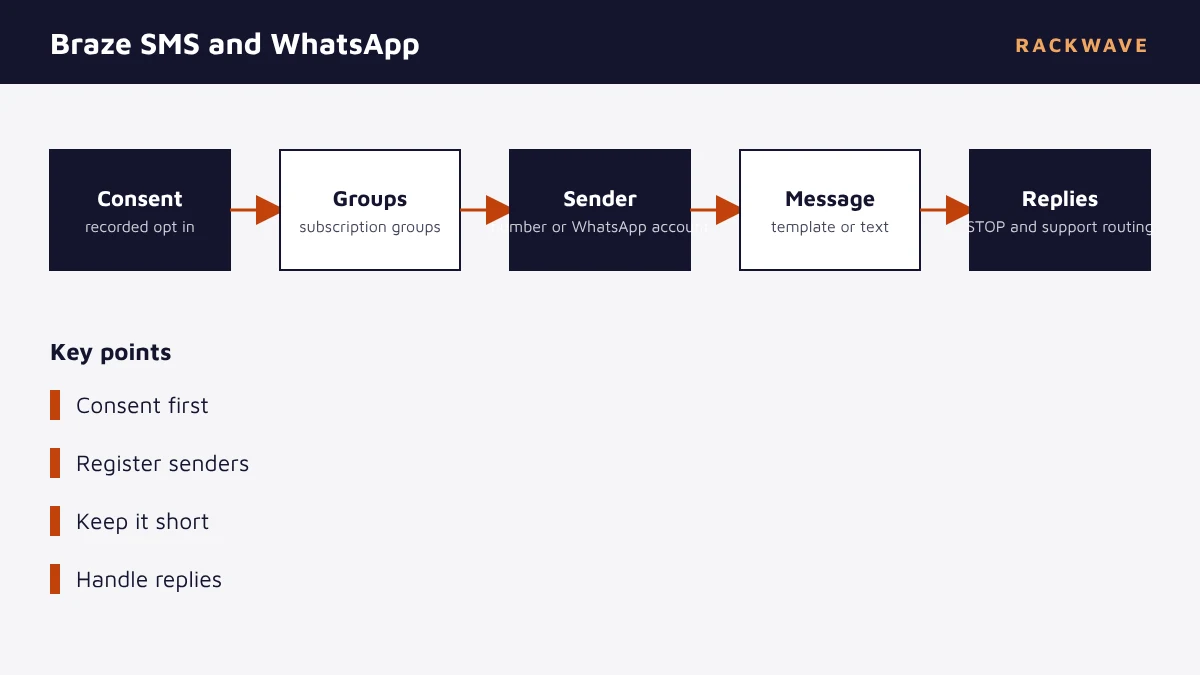
- Capture consent: record clear opt in with the phone number and keep evidence of when and how it was given.
- Set up the sender: configure sending numbers, short codes or alphanumeric senders for SMS, or a WhatsApp Business account and phone number.
- Create subscription groups: separate groups for promotional and transactional messages where needed.
- Build the message: write short, personalised content, using templates approved by WhatsApp where required.
- Send through campaigns or Canvas: target the subscription group and respect frequency limits.
- Handle replies and opt outs: process keywords such as STOP, route replies and update user subscription status.
SMS compared with WhatsApp
| Aspect | SMS | |
|---|---|---|
| Reach | Almost any mobile phone, no app needed | Users with WhatsApp, popular in many regions |
| Content | Text, with MMS support in some regions | Text, images, documents, buttons and rich templates |
| Cost model | Per message, varies by country and carrier | Conversation or message based pricing set by the platform |
| Rules | Carrier and country regulations, sender registration | WhatsApp Business policies, template approval and opt in |
| Two way messaging | Possible with keywords and replies | Strong for conversations within allowed windows |
| Typical uses | Alerts, codes, reminders, promotions | Service updates, support, order tracking, promotions where allowed |
Message types and use cases
| Type | Examples | Notes |
|---|---|---|
| Transactional | Order confirmations, delivery updates, one time codes | Usually the most welcome and least restricted |
| Service | Appointment reminders, account alerts | Keep concise and timely |
| Promotional | Offers, product drops, back in stock | Needs explicit marketing consent |
| Conversational | Support answers, booking changes | Needs routing to people or bots |
| Lifecycle | Welcome, cart reminders, win back | Use sparingly and with clear value |
Compliance essentials
- Obtain explicit, recorded opt in for each channel and purpose, and make opt out easy.
- Identify your brand clearly in the message and respect quiet hours and local rules on timing.
- Register senders, brands and campaigns where required, such as in the United States and other regions.
- Use WhatsApp approved templates for business initiated messages outside the allowed conversation window.
- Never send to purchased lists, and keep suppression lists synchronised across systems.
- Review local laws, such as telecom and privacy regulations, with legal counsel.
How to build an SMS or WhatsApp programme in Braze
- Define use cases and consent. Choose valuable, specific messages and design a compliant opt in flow.
- Set up senders and numbers. Complete registration and verification for each country you serve.
- Create subscription groups. Separate promotional and transactional permission where appropriate.
- Write and approve templates. Keep messages short, clear and personalised, and submit WhatsApp templates for approval.
- Build campaigns and Canvas flows. Use triggers and delays, with frequency caps and quiet hours.
- Test with real devices. Check delivery, links, character counts and rendering across carriers and countries.
- Monitor and optimise. Track delivery, clicks, replies, opt outs and conversions, and refine content and timing.
Measuring performance
Useful measures include delivery rate, failed or filtered messages, click through on short links, reply rate, opt out rate and conversion against a control group. Watch carrier filtering and WhatsApp quality ratings, because poor engagement or complaints can limit sending. Compare channels on cost per conversion, not just price per message, since a higher priced channel may deliver much better returns for specific journeys.
Common mistakes
- Treating SMS and WhatsApp as free extensions of email with the same frequency.
- Weak consent records or unclear opt in wording.
- Long, impersonal messages with unclear sender identity.
- Skipping sender registration or template approval, which causes blocked messages.
- Not handling replies, leaving customers talking to a silent number.
- Ignoring country differences in rules, formats and costs.
Our CRM and lifecycle service designs compliant SMS and WhatsApp journeys in Braze, and our system integration service connects them to commerce, support and consent systems.
A worked example: delivery updates on WhatsApp
An online retailer in several countries wants fewer where is my order contacts. It collects WhatsApp opt in at checkout, creates a transactional subscription group and submits order shipped and out for delivery templates for approval. A Canvas triggered by order events sends the right template with a tracking link, and replies route to the support tool.
SMS acts as a fallback for customers without WhatsApp. Support contacts about delivery fall by a quarter, and click through on tracking links is far higher than email. Promotional messages are kept to a separate, explicitly consented group with strict frequency caps, which keeps opt out rates low.
Designing content for text channels
Text channels reward brevity and clarity. Start with who is writing, say why the message matters, include one clear action and keep links short and trustworthy. Personalise with a first name or order detail only when it helps, and always provide fallbacks. Avoid all capital letters, heavy emoji and aggressive urgency, which harm trust and may trigger filtering. Test variants of copy and call to action, and keep a library of approved templates for consistent tone and compliance.
Governance and reporting
Assign an owner for each channel who tracks regulation, sender status and quality ratings. Keep consent records accessible for audits, document which messages are transactional and which are promotional and review country specific rules before launching in a new market. Build a dashboard that combines delivery, engagement, opt out and cost data, and review it monthly with marketing, customer service and legal, so problems are found early.
Launch checklist
- Consent wording approved and stored with a timestamp and source.
- Sender registration and WhatsApp templates approved in each target country.
- Subscription groups mapped to message types and tested.
- Opt out keywords, replies and support routing tested end to end.
- Frequency caps, quiet hours and time zones configured.
- Reporting dashboard ready before the first send.
Key takeaways
- Braze sends SMS and WhatsApp messages to opted in users through campaigns and Canvas.
- Consent, sender registration and approved templates are essential for compliance and delivery.
- Use transactional and service messages first, and promotional messages sparingly with explicit consent.
- Keep text short, clear and well timed, and handle replies and opt outs.
- Measure cost per conversion, opt outs and quality signals by country.
Quick glossary
| Term | Meaning |
|---|---|
| Subscription group | A Braze group that records channel permission |
| Opt in | Clear consent to receive messages |
| Template | A pre approved WhatsApp message format |
| Sender ID | The number or name from which messages are sent |
| Quality rating | WhatsApp signal reflecting recipient feedback on messages |
Read next: What Is Lead Routing? Methods, Rules and Metrics · What Is a Sales Playbook? Contents and How to Build · What Is Account Planning? Template and Best Practices
Frequently asked questions
Can Braze send SMS and WhatsApp messages?
Yes. Braze supports SMS and WhatsApp as channels in campaigns and Canvas, subject to setup, regional availability and plan.
Do I need consent to send SMS or WhatsApp messages?
Yes. You need explicit, recorded opt in, and you must honour opt outs. Rules differ by country, so involve legal counsel.
What are subscription groups used for?
They record which users are permitted to receive messages on a channel and let you separate promotional and transactional permissions.
What are WhatsApp message templates?
They are pre approved formats for business initiated messages. Outside the conversation window, you generally must use approved templates.
Is SMS or WhatsApp better?
It depends on your audience and country. SMS reaches nearly everyone, while WhatsApp offers richer content and conversations where adoption is high.
How do I handle replies and STOP requests?
Configure keyword handling for opt outs, route replies to support or automated flows and update subscription status immediately.
Why were my messages blocked or filtered?
Common reasons include unregistered senders, missing opt in, spammy content, poor engagement and unapproved templates.
How do I measure SMS and WhatsApp campaigns?
Track delivery, clicks, replies, opt outs and conversions against a control group, and compare cost per conversion across channels.