
What are Braze campaigns? Braze campaigns are single message sends, or small groups of related messages, that you create in the Braze dashboard to reach a defined audience on one or more channels such as email, push notifications, in-app messages, Content Cards, SMS, WhatsApp and webhooks. Each campaign combines an audience, message content, a delivery schedule or trigger and a set of controls such as frequency capping, conversion events and a control group. Campaigns are the simplest building block in Braze, and they sit alongside Canvas, which handles multi step journeys. This guide explains how Braze campaigns work, the delivery types, how to build one step by step, how campaigns differ from Canvas, how to measure results and the mistakes that cause poor performance. Features change often, so confirm details in the current Braze documentation.
Short answer: A Braze campaign sends a message to a segment on a schedule, on a user action or from an API call. Use campaigns for single sends and simple triggered messages, and Canvas for multi step journeys.
What are Braze campaigns?
Campaigns are the core messaging object in Braze. You work with them in the Braze dashboard after completing the account setup and sending data through the Braze SDK. They draw on segmentation and support Liquid personalisation.
How a Braze campaign works
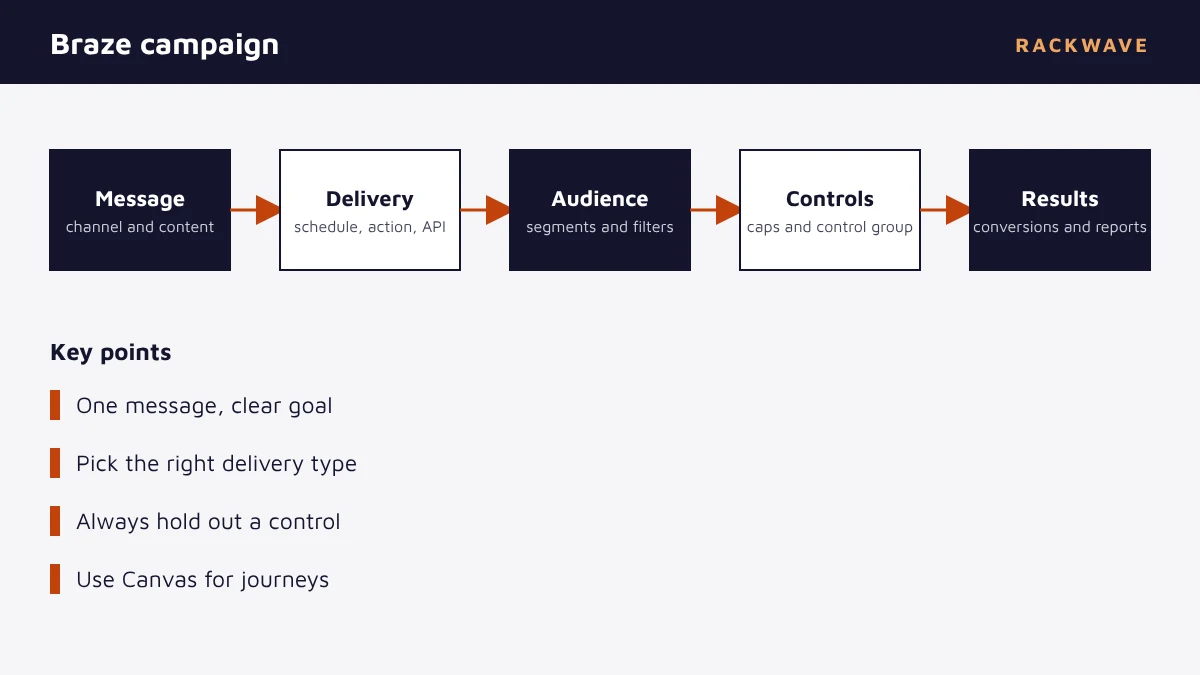
- Compose: choose the channel and build the message, with templates, Liquid personalisation and any Connected Content.
- Choose delivery: scheduled, action based or API triggered.
- Target: select segments and filters, and apply subscription group or channel opt in rules.
- Set controls: frequency capping, rate limits, quiet hours, conversion events and a control group.
- Test and launch: send test messages, review the preview and launch.
- Measure: review sends, deliveries, opens or clicks and conversions in campaign analytics.
Campaign delivery types
| Delivery type | What triggers it | Typical use |
|---|---|---|
| Scheduled | A date and time, once or on a recurring schedule | Newsletters, announcements, promotions |
| Action based | A user action such as opening the app, making a purchase or a custom event | Welcome messages, receipts, replenishment prompts |
| API triggered | A call to the Braze REST API from your systems | Transactional alerts and messages driven by backend events |
Scheduled campaigns can send in each user local time zone, or use intelligent timing to pick the moment a user is most likely to engage. Action based campaigns can include delays, re-eligibility windows and exceptions that stop a message if the user has already completed the goal.
Channels you can use in a campaign
| Channel | Strength | Related guide |
|---|---|---|
| Rich content and detailed content for lifecycle messages | Email design and deliverability | |
| Push notifications | Immediate attention for mobile and web users | See Braze push notifications |
| In-app messages | Contextual messages while the user is active | See Braze in-app messages |
| Content Cards | Persistent, inbox style content inside the app | See Braze Content Cards |
| SMS and WhatsApp | High visibility, consent based messaging | Requires opt in and sender setup |
| Webhooks | Send data to other systems | See Braze webhooks |
How to build a Braze campaign
- Define the goal and audience. Decide what action you want, such as a first purchase, and who should receive the message.
- Create the campaign and name it clearly. Use a naming convention and tags so you can find and report on campaigns later.
- Build the message. Use a reusable template, add Liquid personalisation and test fallback values for missing data.
- Choose delivery and timing. Pick scheduled, action based or API triggered delivery and set re-eligibility rules.
- Select the audience. Combine segments, filters and subscription groups, and check the estimated reach.
- Set conversion events and a control group. Define the outcome you will measure and hold back a small group to prove impact.
- Test, approve and launch. Send tests to real devices and inboxes, check links and rendering, then launch.
Campaigns versus Canvas
| Item | Campaign | Canvas |
|---|---|---|
| Structure | One message or a small set of variants | Multi step journey with branches and waits |
| Best for | Newsletters, one off promotions, single triggered messages | Onboarding, lifecycle flows, multi channel journeys |
| Complexity | Low, quick to build | Higher, needs design and testing |
| Reporting | Per campaign and variant | Per step and per journey. See Braze Canvas |
Measuring campaign performance
- Delivery metrics: sends, deliveries, bounces and unsubscribes.
- Engagement metrics: opens, clicks, push opens and in-app clicks, noting that email open data is less reliable because of privacy features.
- Conversion metrics: primary conversion events and revenue against the control group.
- Audience health: opt out rate, complaint rate and frequency of messages received.
- Data export: stream events to your warehouse through Braze Currents for deeper analysis.
Common mistakes with Braze campaigns
- Launching without a control group, so you cannot prove the campaign caused the result.
- Ignoring frequency capping, which leads to message fatigue.
- Using attributes without fallback text, so some users see blanks.
- Targeting users who have not opted in to the channel.
- Building a long journey as a chain of campaigns instead of a Canvas.
- Poor naming and tagging, which makes reporting and clean up painful.
Our CRM and lifecycle service designs and builds Braze campaigns and journeys, and our system integration service connects Braze to your data and product systems.
A worked example: a replenishment campaign
A beauty retailer wants customers to reorder a product that typically lasts forty days. The team builds an action based campaign that triggers on a purchase event for the product, waits thirty five days and sends a push notification with an email fallback for users who have not opted in to push. An exception stops the message if the user has already bought the item again.
The message uses Liquid to show the product name and a reorder link, with a fallback if the name is missing. Ten percent of eligible users form a control group. After six weeks, the reorder rate in the test group is eight points higher than in the control group, and the team clones the campaign for other consumable products. A short naming convention and tags make the results easy to report.
Governance, naming and testing
As the number of campaigns grows, governance matters. Agree a naming convention that includes channel, audience, goal and date, use tags for business unit and purpose, and keep a library of approved templates. Use workspaces and permissions so only trained people can launch campaigns to large audiences, and introduce a peer review step for high reach sends. A test plan should cover rendering on major devices, link tracking, personalisation fallbacks and unsubscribe handling before every launch.
Using campaigns inside a wider lifecycle strategy
Campaigns work best as part of a lifecycle plan that includes onboarding, engagement, retention and win back. Use one off campaigns for moments in the calendar and product announcements, triggered campaigns for simple reactions to behaviour and Canvas for stories that unfold over days or weeks. Review the combined message load per user, not just per campaign, so the customer experience stays relevant and respectful. A quarterly audit that retires old campaigns and refreshes content keeps the programme healthy.
Key takeaways
- Braze campaigns send messages to a defined audience on a schedule, on a user action or through an API call.
- They support email, push, in-app, Content Cards, SMS, WhatsApp and webhooks.
- Use campaigns for single sends and simple triggers, and Canvas for multi step journeys.
- Set conversion events, frequency caps and a control group before launching.
- Use naming, tags and governance to keep a growing programme manageable.
Quick glossary
| Term | Meaning |
|---|---|
| Campaign | A single message or set of variants sent through Braze |
| Action based delivery | Sending when a user performs a defined action |
| Control group | Users held back to measure impact |
| Re-eligibility | Rules for when a user can receive a campaign again |
| Conversion event | The action that defines campaign success |
Read next: What Is Lead Routing? Methods, Rules and Metrics · What Is a Sales Playbook? Contents and How to Build · What Is Account Planning? Template and Best Practices
Frequently asked questions
What is a Braze campaign?
It is a message or set of message variants sent to a defined audience through channels such as email, push, in-app, SMS or Content Cards, on a schedule or in response to events.
What is the difference between a Braze campaign and a Canvas?
A campaign is a single message or simple trigger. A Canvas is a multi step journey with branching, delays and multiple channels.
What delivery types are available for campaigns?
Scheduled, action based and API triggered delivery, with options such as local time zone sending and intelligent timing.
Which channels can I use in a Braze campaign?
Email, push notifications, in-app messages, Content Cards, SMS, WhatsApp and webhooks, depending on your plan and setup.
How do I measure a Braze campaign?
Review delivery and engagement metrics, define a conversion event and compare against a control group to measure incremental impact.
What is a control group in Braze?
It is a share of the audience that does not receive the message, used to measure whether the campaign changed behaviour.
How do I avoid over messaging users?
Use frequency capping, subscription groups, rate limits and a review of the total message load per user across campaigns and Canvases.
Can I personalise Braze campaigns?
Yes, using Liquid with user attributes, events, catalogs and Connected Content, with fallback values for missing data.