
What is Twilio SendGrid? Twilio SendGrid is a cloud email delivery service that sends transactional and marketing email through an API or an SMTP relay. It handles delivery infrastructure, authentication, bounce and complaint processing, templates and event tracking, so teams can send receipts, password resets, notifications and campaigns without running mail servers. This guide explains how SendGrid works, how to set up domain authentication, the difference between the API and SMTP relay, dynamic templates, event webhooks and suppression lists, IP addresses and warm-up, how to protect deliverability and common mistakes. Features and plans change, so confirm details in current SendGrid documentation.
Short answer: Authenticate your sending domain with SPF and DKIM, send through the Web API or SMTP relay, use dynamic templates, process events by webhook, respect suppression lists and warm up new IPs gradually.
What is SendGrid?
Sending email at scale means managing reputation, authentication, throttling and feedback from mailbox providers. SendGrid provides that as a service and sits within the Twilio family. Applications call it to deliver individual messages triggered by events, such as an order confirmation, and marketers use its campaign tools for newsletters. The underlying mechanics follow standard email protocols, so general ideas in SMTP and email ports still apply.
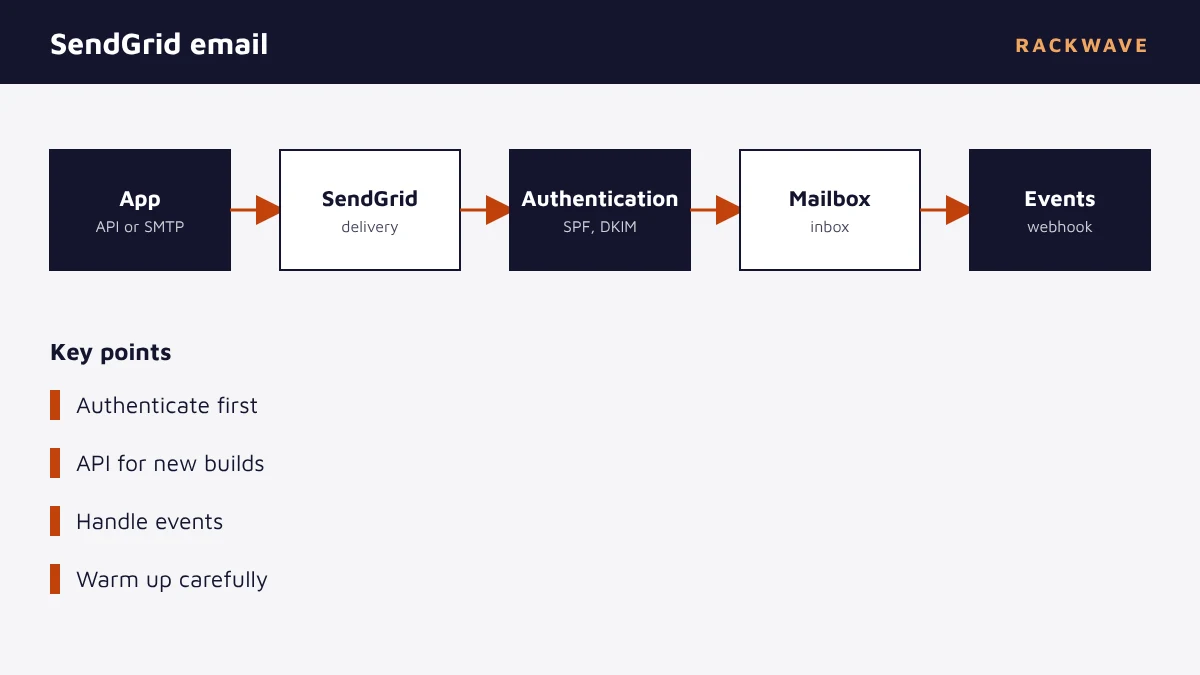
API or SMTP relay
| Option | How it works | Best for |
|---|---|---|
| Web API | Your app sends an HTTPS request with a JSON message | New builds, rich features, templating and metadata |
| SMTP relay | Your app or server sends through SMTP with credentials | Existing systems and tools that already speak SMTP |
Both deliver through the same infrastructure. The API generally offers more control and better error detail, so prefer it for new projects.
Authenticate your domain
- Add the domain. Start domain authentication in the SendGrid settings for the domain you send from.
- Publish DNS records. Add the provided records so mailbox providers can verify messages. These support SPF and DKIM.
- Set up DMARC. Publish a DMARC policy and start with monitoring before moving to enforcement.
- Brand your links. Use link branding so tracked links use your domain.
- Verify. Confirm the records pass and test with a sample message.
- Monitor. Review DMARC reports for unknown senders and failures.
Authentication is the foundation for inbox placement. Without it, messages are more likely to be filtered. See email deliverability for general principles.
Templates and personalisation
- Dynamic templates use handlebars-style variables so one template serves many recipients.
- Pass personalisation data per recipient in the API call, such as name, order number and items.
- Version templates and test them in a sandbox before use, including plain text and dark mode.
- Keep layout simple and responsive, and include a plain text part.
- Use categories or custom arguments to tag messages for reporting.
Events, webhooks and suppression
| Item | Purpose |
|---|---|
| Event webhook | Posts events such as processed, delivered, open, click, bounce, spam report and unsubscribe to your endpoint |
| Bounces | Permanent and temporary delivery failures, which should update your records |
| Spam reports | Complaints from recipients, which should stop further sending |
| Unsubscribes and groups | Preference handling for marketing and subscription groups |
| Suppression lists | Lists SendGrid uses to avoid sending to bad or opted-out addresses |
Verify the webhook signature, process events idempotently and sync suppressions with your own database so other systems stop sending too.
IP addresses and warm-up
Shared IPs are managed by the provider and suit smaller volumes. Dedicated IPs give you control of reputation, but a new IP has no history, so you must warm it up by increasing volume gradually and sending first to your most engaged recipients. Separate transactional and marketing traffic onto different IPs or subusers so a marketing problem does not delay receipts. Warm-up plans and automation options exist, so follow current guidance.
Protecting deliverability
- Send only to people who asked for the email and remove hard bounces immediately.
- Honour unsubscribes quickly and make the link easy to find.
- Keep complaint rates very low and watch engagement by mailbox provider.
- Avoid sudden spikes in volume, and ramp campaigns gradually.
- Clean lists regularly and do not send to old, inactive addresses.
- Use consistent from addresses and subjects that match the content.
Transactional and marketing streams
| Aspect | Transactional | Marketing |
|---|---|---|
| Purpose | Triggered by a user action, such as a receipt or password reset | Promotional or relationship email sent to a segment |
| Consent | Related to the service the person requested | Opt-in or other lawful basis, with unsubscribe |
| Timing | Immediate | Scheduled, often in batches |
| Reputation risk | Low volume, high engagement | Higher complaint and unsubscribe risk |
| Setup | Own subdomain and IP or subuser | Separate subdomain and IP or subuser |
Separating the streams protects critical messages. A marketing mistake should never delay a password reset. Use different subdomains, such as mail for transactional and news for campaigns, with their own authentication records.
Event handling design
- Receive events at a dedicated endpoint that responds quickly and queues work for background processing.
- Verify the signature of each request and reject anything that fails.
- Store the message identifier and event type, and handle duplicate or out-of-order events safely.
- Update your customer record on hard bounces, spam reports and unsubscribes so every system respects them.
- Alert on unusual bounce or complaint rates by campaign. See webhooks for the pattern.
Related email topics
Email programmes combine delivery, content and strategy. For campaign design and lifecycle thinking read lifecycle marketing and lead nurturing, and for platform examples see HubSpot marketing email and Klaviyo deliverability. The same authentication and list hygiene principles apply whichever tool sends the message, and good habits matter more than any single feature, and a monthly review of delivery and complaint data keeps programmes healthy.
Migration checklist
- Inventory current senders, domains, templates and volumes.
- Authenticate the new domain and publish DNS records before any traffic moves.
- Move low-risk transactional streams first and compare delivery.
- Warm up dedicated IPs and ramp volume gradually.
- Switch marketing programmes in stages, with engaged audiences first.
- Retire the old sender only when the new stream has run through a full business cycle.
Common mistakes
- Skipping domain authentication and relying on a default sending domain.
- Mixing transactional and marketing traffic on the same stream.
- Ignoring bounce and spam events, so lists decay.
- Warming a dedicated IP too quickly.
- Using API keys with full permissions in client-side code.
A worked example
An online marketplace sent order emails and promotions through one sender. After a large promotion triggered complaints, order confirmations slowed. The team authenticated a dedicated subdomain for transactional email, moved promotions to a separate subuser and IP, set up the event webhook to update bounces in their database and trimmed the list to recent subscribers.
Transactional delivery times improved and complaint rates fell. The example is illustrative.
Best practices and support
- Use scoped API keys and rotate them regularly.
- Test every new template and sender change with seed addresses at major mailbox providers.
- Report delivery, bounce, complaint and engagement by stream.
- Document your sending domains, DNS records and owners.
Our API development service integrates SendGrid with applications, and our CRM and lifecycle service designs the email programmes built on it.
Key takeaways
- SendGrid delivers email through an API or SMTP relay.
- Authenticate your sending domain with SPF, DKIM and DMARC.
- Use dynamic templates and event webhooks.
- Sync bounces, complaints and unsubscribes.
- Warm up IPs and separate transactional from marketing traffic.
Quick glossary
| Term | Meaning |
|---|---|
| SPF | DNS record listing servers allowed to send for a domain |
| DKIM | Cryptographic signature on email |
| DMARC | Policy that tells receivers how to treat failures |
| Suppression list | List of addresses not to send to |
| IP warm-up | Gradual volume increase on a new IP |
Read next: What Is API Management? Lifecycle, Features, Tools · What Is a Message Queue? Patterns and Best Practices · What Is RabbitMQ? Exchanges, Queues and Use Cases
Frequently asked questions
What is Twilio SendGrid?
It is a cloud email delivery service for transactional and marketing email, available through an API or SMTP relay.
Should I use the API or SMTP relay?
Use the Web API for new builds for richer features and clearer errors, and SMTP relay for systems that already use SMTP.
Why do I need domain authentication?
It lets mailbox providers verify that you are allowed to send for your domain, which improves inbox placement and security.
What is a dynamic template?
A template with variables that are filled with per-recipient data when you send.
What does the event webhook do?
It posts delivery, engagement, bounce and complaint events to your endpoint so your systems can react.
Do I need a dedicated IP?
Not always. It helps at higher volume if you can manage warm-up and reputation, and shared IPs suit smaller programmes.
How do I warm up an IP?
Increase volume gradually, starting with engaged recipients, and follow current provider guidance.
How do I keep complaint rates low?
Send only to opted-in recipients, honour unsubscribes promptly and keep content relevant.