
What are Databricks Workflows? Databricks Workflows is the orchestration service built into the Databricks platform for running jobs made of dependent tasks. A job can run notebooks, Python scripts, SQL, pipelines, dbt projects and more, on a schedule, on a file arrival or continuously, with retries, alerts and repair of failed runs. This guide explains jobs and tasks, triggers, compute choices, parameters and task values, how to handle failures, how to deploy jobs as code and how Workflows compares with external orchestrators such as Apache Airflow. Product names and features evolve, so confirm details in current Databricks documentation.
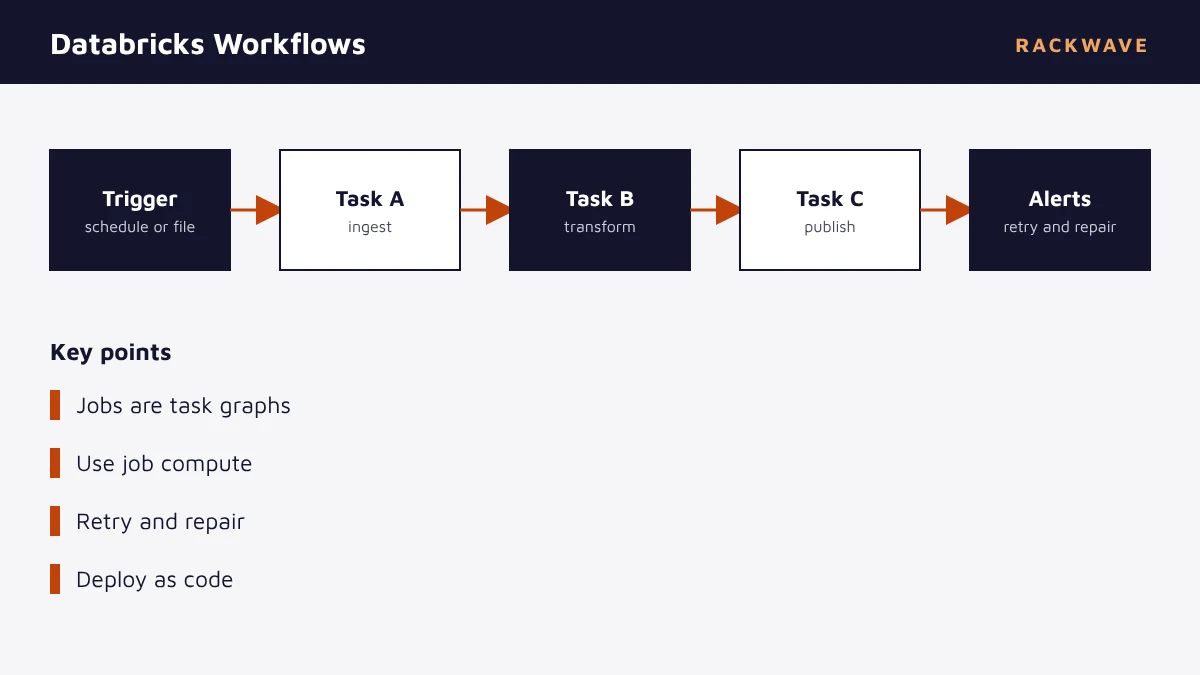
Short answer: A Databricks job is a graph of tasks with a trigger, compute and alerts. Use job compute that ends when work finishes, set retries and notifications, parameterise tasks, deploy as code and use repair runs to recover from failures.
What is a Databricks job?
A job groups one or more tasks and defines how and when they run. Tasks can depend on each other, forming a directed graph, and each task chooses what to run and on which compute. Workflows is therefore the natural scheduler for lakehouse pipelines built on Databricks, and it works alongside declarative pipelines such as Delta Live Tables.
Task types and triggers
| Item | Options |
|---|---|
| Task types | Notebook, Python script, wheel, SQL, pipeline, dbt, JAR and other tasks |
| Scheduled trigger | Cron style schedule with a time zone |
| File arrival trigger | Starts when new files appear in a monitored location |
| Continuous | Keeps a job running and restarts it after completion or failure |
| Manual or API | Started by a person or an external system |
| Control flow | Conditions, for each loops and dependencies between tasks |
Choose the trigger that matches how data arrives. File arrival or table update triggers avoid wasted runs when nothing is new.
Choosing compute
- Job compute is created for the run and ends afterward, which usually costs less than an always-on cluster.
- Serverless job compute removes cluster management where it is available and suitable.
- Shared job clusters can run several tasks in one job to avoid repeated start-up time.
- All-purpose clusters suit development but are rarely the right choice for production schedules.
- Cluster policies keep sizes, runtimes and auto-termination within agreed limits. See cluster configuration.
Parameters and task values
Pass parameters to tasks, such as the processing date or environment, so the same code runs in every environment and for reruns of past dates. Tasks can also publish small values for later tasks, such as the number of rows loaded or the path of an output, which lets you branch with conditions. Keep large data in tables, not in task values.
Failure handling
- Set retries. Use limited retries with a delay for transient errors such as network issues.
- Add timeouts. Stop tasks that run far longer than expected.
- Send notifications. Alert an on-call group by email or a chat webhook on failure and on long runs.
- Use repair runs. Rerun only failed tasks and their dependents instead of the whole job.
- Make tasks idempotent. Ensure a retry does not duplicate data, using MERGE or overwrite by partition.
- Log run outcomes. Write run status and counts to a monitoring table for trends.
Deploying jobs as code
Define jobs in version-controlled configuration and deploy them with a bundle or infrastructure-as-code tool, not by clicking in the user interface. That makes environments consistent, supports code review and allows rollback. Promote the same code from development to production with different parameters and permissions. See CI/CD and infrastructure as code.
Workflows compared with external orchestrators
| Option | Strength | Consider when |
|---|---|---|
| Databricks Workflows | Native, simple, tight with notebooks, pipelines and the catalog | Most workloads live in Databricks |
| Apache Airflow | Broad integrations and complex cross-system dependencies | You orchestrate many systems beyond Databricks. See Apache Airflow |
| Cloud native schedulers | Close to other cloud services | You already standardise on them |
Many teams use Workflows for lakehouse pipelines and trigger it from an enterprise scheduler when a wider process needs coordination.
Cost control for jobs
| Lever | Effect | Note |
|---|---|---|
| Job compute instead of all-purpose | Pays only while jobs run | Largest single saving for many teams |
| Shared job cluster across tasks | Avoids repeated start-up | Group tasks with similar needs |
| Right-sized workers and autoscaling | Matches compute to data volume | Test with real volumes |
| Spot or preemptible workers where safe | Lowers infrastructure price | Use for fault-tolerant work |
| Trigger on arrival, not on a fixed clock | Skips empty runs | Useful for irregular feeds |
Tag every job with team and project so the usage tables can attribute cost, and review the most expensive jobs each month. A single poorly tuned job often accounts for a large share of spend.
Security and permissions
Run production jobs as a service principal, not as a named person, so schedules survive staff changes and audit logs show a clear identity. Give the service principal only the catalog and storage privileges it needs, and restrict who can edit, run or manage each job. Store secrets in a secret manager and read them at run time instead of placing them in code or parameters. Review job permissions quarterly together with data access.
Choosing between a job and a pipeline
Workflows runs imperative steps such as notebooks and scripts. Declarative pipelines describe tables and quality rules and let the platform manage ordering and refresh. A common design uses a declarative pipeline for the core bronze to gold transformation and a job around it to handle triggers, upstream checks, downstream exports and notifications. Pick the simplest tool that meets the requirement, and avoid rewriting working jobs just to use a newer feature.
Common mistakes
- Running production schedules on an always-on interactive cluster.
- Hard-coding dates and paths instead of parameters.
- No alerting, so failures are noticed by users first.
- Long chains of tasks with no idempotency, so a repair run duplicates data.
- Editing production jobs by hand with no record of the change.
A worked example
A logistics company runs a nightly job with five tasks: ingest shipment files, build silver tables, build gold marts, refresh a model score table and send a summary. The job uses a shared job cluster, retries ingestion twice and notifies a data on-call group on failure. When a source file arrived late one night, the team used a repair run to rerun only the failed ingestion and its dependents.
Because tasks used the processing date as a parameter and merged by key, the rerun produced the same results as a normal run. The example is illustrative.
Best practices and monitoring
- Keep tasks small and single purpose so failures are easy to understand.
- Track duration, success rate and cost per job, and review the slowest jobs monthly.
- Use a naming convention that shows owner, domain and purpose.
- Document upstream and downstream dependencies and the on-call route.
- Test jobs in a development workspace with sample data before promotion.
Support
Our data analytics service builds and operates Databricks pipelines, and our DevOps service sets up deployment automation. For governance of the data these jobs touch see Unity Catalog.
Key takeaways
- A job is a graph of tasks with a trigger, compute and alerts.
- Use job compute that ends when work finishes.
- Set retries, timeouts, alerts and use repair runs.
- Parameterise tasks and keep them idempotent.
- Deploy jobs as code and monitor cost and duration.
Quick glossary
| Term | Meaning |
|---|---|
| Job | A scheduled or triggered set of tasks |
| Task | A unit of work in a job |
| Repair run | A rerun of failed tasks and dependents |
| Job compute | Compute created for a run and ended afterward |
| Idempotent | Safe to run again with the same result |
Read next: BigQuery vs Snowflake: Which Cloud Data Platform? · BigQuery Streaming Inserts: Real-Time Ingestion Guide · BigQuery Access Control: IAM, Policy Tags and Row Security
Frequently asked questions
What are Databricks Workflows?
They are the built-in orchestration service for running jobs made of dependent tasks on a schedule, file arrival or continuously.
What can a task run?
Notebooks, Python scripts, SQL, pipelines, dbt projects and other supported task types.
What compute should jobs use?
Job compute or serverless compute where suitable, since they end when work finishes, instead of an always-on cluster.
What is a repair run?
It reruns only failed tasks and the tasks that depend on them, rather than the whole job.
How do I pass parameters?
Define job and task parameters, and read them in your code so the same job works across environments and dates.
How should I deploy jobs?
As code with a bundle or infrastructure tool, reviewed in version control and promoted across environments.
Should I use Workflows or Airflow?
Use Workflows when work is mostly in Databricks, and Airflow when you coordinate many systems.
How do I get alerts?
Configure notifications to email or a webhook on failure, success or long runs.