
How do you configure a Databricks cluster? Databricks cluster configuration is the set of choices that decide how much compute a workload gets, how it scales, how it is secured and what it costs. A cluster has a driver and workers, a runtime version, an access mode, autoscaling and termination settings and optional features such as Photon, spot instances and init scripts. Poor choices cause slow jobs and large bills, while good defaults enforced through policies keep teams productive and costs predictable. This guide explains each setting, how to pick compute for different workloads, how cluster policies help and the mistakes to avoid. Options change, so confirm details in current Databricks documentation.
Short answer: Use job compute for production, serverless or SQL warehouses where they fit, a long-term support runtime, autoscaling with sensible limits, auto-termination on interactive clusters and cluster policies to enforce these defaults.
What is a cluster?
A cluster is a set of virtual machines that run your code. One node is the driver, which coordinates work, and the others are workers, which run tasks in parallel using Apache Spark. In Databricks you can use clusters you manage, job clusters created for a run, SQL warehouses for queries and serverless compute where Databricks manages the infrastructure.
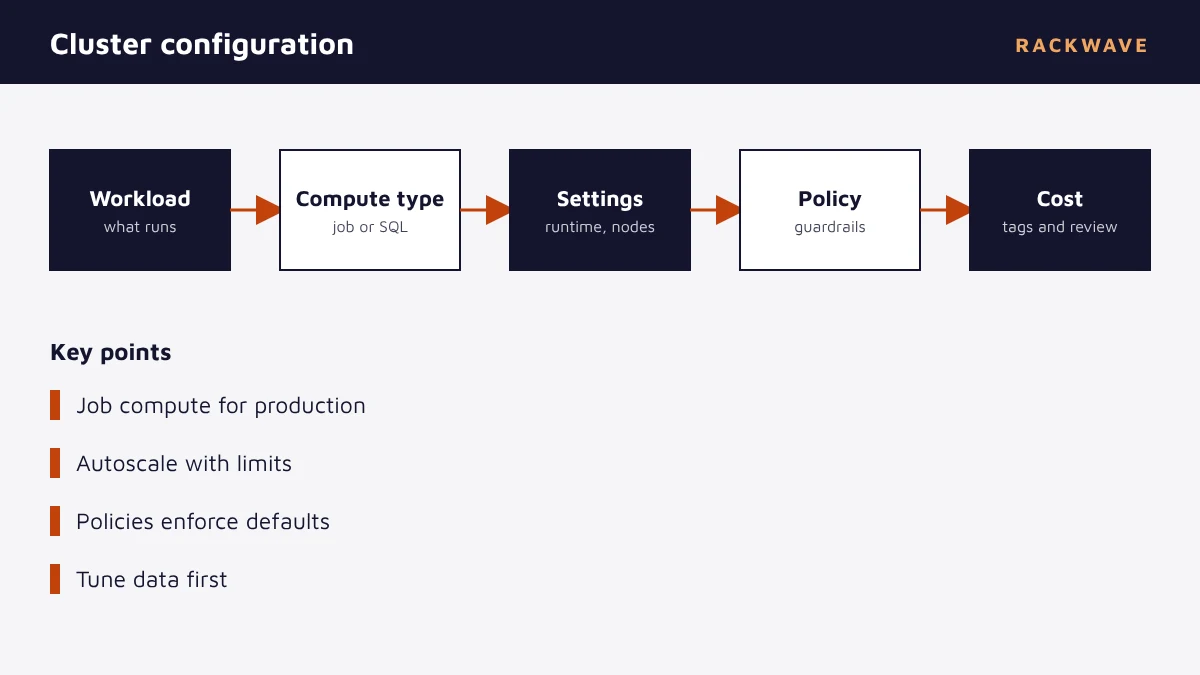
Compute types and when to use them
| Type | Best for | Notes |
|---|---|---|
| All-purpose cluster | Interactive development and exploration | Stays up until terminated, so set auto-termination |
| Job compute | Scheduled and production jobs | Created per run, usually cheaper |
| SQL warehouse | BI and SQL analytics | See SQL warehouses |
| Serverless compute | Notebooks, jobs and pipelines with minimal management | Where available and suitable |
| Instance pools | Faster cluster start from pre-warmed instances | Idle instances can cost, so size pools carefully |
Production work should rarely run on an all-purpose cluster.
Key settings explained
| Setting | What it does | Guidance |
|---|---|---|
| Runtime version | The Spark, Python and library bundle | Use a long-term support version for production and upgrade on a schedule |
| Node type | CPU, memory and local storage per node | Choose memory optimised for joins and caching, compute optimised for CPU heavy work, GPU for deep learning |
| Autoscaling | Adds and removes workers between a minimum and maximum | Set a sensible minimum and cap the maximum |
| Auto-termination | Stops an idle cluster | Set a short idle time on interactive clusters |
| Photon | Vectorised query engine | Often speeds SQL and DataFrame work, check cost benefit |
| Spot or preemptible workers | Cheaper instances that can be reclaimed | Use for fault-tolerant jobs and keep the driver on demand |
| Access mode | How users and data access are isolated | Use modes compatible with Unity Catalog governance |
Change one setting at a time and measure, because interactions are not always obvious.
Access modes and governance
- Choose an access mode that supports governance through Unity Catalog, so data permissions are enforced on the cluster.
- Use single-user access for workloads that need broad library or language support under one identity.
- Use shared access for multi-user interactive work with isolation between users.
- Run production jobs as service principals, not personal accounts.
- Restrict who can create unrestricted clusters, since they bypass cost and security defaults.
How to choose a configuration
- Identify the workload. Batch ETL, streaming, SQL, ML training, or interactive exploration.
- Pick the compute type. Use job compute or serverless for production and SQL warehouses for BI.
- Pick the node type. Match memory, CPU or GPU to the work and test a small and a larger size.
- Set scaling. Use autoscaling with a minimum that avoids slow start and a maximum that controls cost.
- Set termination and tags. Terminate interactive clusters after short idle time and tag for cost attribution.
- Apply a policy. Wrap the choices in a cluster policy.
- Measure and tune. Compare duration, cost and failures and adjust.
Cluster policies
A cluster policy limits the settings users can choose and sets defaults. For example, a policy can require auto-termination within an hour, restrict node types, cap the maximum workers, force tags and pin the runtime version. Provide a few clear policies, such as small interactive, standard job and large ML training, and give each team access to the ones that fit. Policies cut costs and reduce support questions, because users start from safe, tested settings.
Performance and cost tuning
- Fix data layout problems first, including small files, skew and missing clustering. See Delta Lake.
- Use autoscaling to avoid paying for idle workers, but note scale-up delay for spiky workloads.
- Prefer fewer larger nodes for shuffle-heavy work and more smaller nodes for highly parallel work, and test both.
- Cache only data that is reused, and unpersist when done.
- Review the Spark UI for skew, spill and long stages before adding workers.
Tag clusters with team and project and review usage monthly. See FinOps.
Choosing node types by workload
| Workload | Node emphasis | Why |
|---|---|---|
| Large joins and aggregations | Memory optimised | Holds more data in memory and reduces spill |
| CPU heavy transformations | Compute optimised | More cores per cost for parsing and calculations |
| Deep learning training | GPU instances | Accelerates matrix operations |
| Shuffle heavy ETL | Storage optimised or local disk instances | Fast local disks speed shuffle and caching |
| Light exploration | General purpose small nodes | Low cost and quick start |
Test two sizes for a representative job before standardising, and record the result so the decision can be revisited. A larger node type that finishes in half the time can cost the same or less than a smaller one that runs twice as long.
Security settings to review
- Restrict cluster creation rights and require policies for all non-admin users.
- Use private networking and secure cluster connectivity where your security policy requires it.
- Keep secrets in a secret store and avoid placing them in notebook code or cluster environment variables.
- Review init scripts and third-party libraries, since they run with the cluster permissions and can open a path for unreviewed code.
- Enable audit logging so cluster creation and access are traceable.
Common mistakes
- Leaving all-purpose clusters running overnight.
- Using the largest node type by default.
- Running production on interactive clusters shared by many users.
- No tags, so cost cannot be attributed.
- Pinning an old runtime and never upgrading, which blocks security fixes and features.
A worked example
A data team ran every job on one eight-node all-purpose cluster. Interactive users slowed the nightly jobs and the cluster ran day and night. The team moved scheduled work to job compute with autoscaling between two and eight workers, created a small interactive policy with a one hour auto-termination and moved BI users to a SQL warehouse. They tagged everything by team.
Nightly jobs finished sooner, interactive users stopped competing and the monthly bill fell noticeably. The example is illustrative.
Best practices and support
- Document the standard cluster policies and review them each quarter.
- Upgrade runtimes on a regular schedule and test jobs on the new version first.
- Keep init scripts and libraries in version control and prefer managed libraries.
- Monitor failures caused by spot reclaim and adjust fallback settings.
Our data analytics service designs Databricks compute standards, and our DevOps service automates cluster policy deployment as code.
Key takeaways
- Use job compute or serverless for production work.
- Choose runtime, node type and autoscaling deliberately.
- Terminate interactive clusters after short idle time.
- Enforce defaults with cluster policies and tags.
- Fix data layout before adding compute.
Quick glossary
| Term | Meaning |
|---|---|
| Cluster | A set of nodes that runs Spark workloads |
| Driver | Node that coordinates the work |
| Autoscaling | Adding and removing workers with load |
| Cluster policy | Rules that limit and default cluster settings |
| Photon | Vectorised query engine in Databricks |
Read next: BigQuery vs Snowflake: Which Cloud Data Platform? · BigQuery Streaming Inserts: Real-Time Ingestion Guide · BigQuery Access Control: IAM, Policy Tags and Row Security
Frequently asked questions
What is a Databricks cluster?
A set of virtual machines, with a driver and workers, that runs your Spark workloads.
What is the difference between all-purpose and job compute?
All-purpose clusters are for interactive work and stay up until stopped, while job compute is created for a run and ends afterward.
How should I set autoscaling?
Use a minimum that avoids slow starts and a maximum that caps cost, then tune with measurements.
What is auto-termination?
A setting that stops a cluster after a period of inactivity to avoid idle cost.
Should I use spot instances?
They suit fault-tolerant jobs and lower cost, but keep the driver on demand and plan for reclaim.
What is a cluster policy?
A set of rules that restricts and defaults cluster settings such as size, runtime, termination and tags.
Which runtime version should I use?
A long-term support runtime for production, upgraded on a regular schedule after testing.
What does Photon do?
It is a faster query engine for SQL and DataFrame workloads that often improves performance on supported operations.